
You know that post? The one you spent three weeks writing, or paid a freelancer a grand for? It’s sitting there, getting maybe 40 visits a month, ranking on page three for a keyword you actually care about. And converting nobody.
Your gut says to write something new.
Don't.
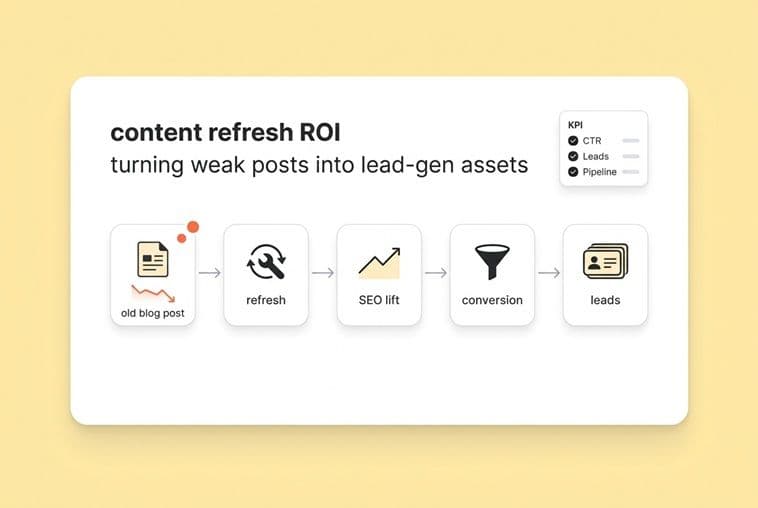
For a lean SaaS team, the fastest ROI isn't publishing more. It's reclaiming what you've already built. A content refresh, when you do it right, is a revenue workflow, not an SEO housekeeping task. It turns your dormant content library into a lead-gen engine. The common "let's just update the publish date" approach gives you marginal traffic gains at best, with no real movement in your pipeline.
This article is about the first way. Here’s the system I use.
Why "just write more" is a trap for early-stage SaaS teams
The hidden cost of net-new content when you're the bottleneck
As a founder who was also the accidental head of marketing, I know this pain personally. Every new article cost me 5 to 10 hours I didn't have. That’s time I could have spent on the product, talking to investors, or closing a deal. It's a massive opportunity cost. Worse, most new content takes months to rank, making it a delayed bet with your most limited resource: your time.
A refresh is not a facelift. It's reclaiming sunk cost and upgrading an asset
I had to learn this the hard way. An old post, even a dud, has something new content doesn't have: history. It has some backlinks (even just a few), it's indexed, and it might even have impressions for good keywords. That's a working asset with an upgrade path. You're not starting from a blank slate.
The mindset shift that matters here is treating a refresh like a product sprint, not just editorial cleanup. You're not just polishing something. You’re re-deploying capital you've already spent to finally generate the return it was supposed to.
What "ROI of a content refresh" actually means (beyond traffic)
The three layers of refresh ROI: efficiency, visibility, conversion
When I talk about the ROI of a refresh, I'm talking about three things. Most people only see the second one.
Efficiency ROI is the time and money you save by not writing something new from scratch. A refresh often takes half the effort of a net-new post but competes for the same keywords. If you're spending six hours on a new article, a three-hour refresh that revives a piece with existing authority is a smarter bet before you even look at the results.
Visibility ROI is the one everyone tracks: better rankings, more impressions, higher click-through rates. This is still worth tracking, of course, but it’s just table stakes. If visibility goes up but leads don't follow, you've only done half the job.
Conversion ROI is where the money is. This means your refreshed post now captures leads. It has the right CTA for where the reader is in their journey, maybe a content upgrade that gets you their email, and internal links that pull them deeper into your site. Traffic that doesn't convert is just a vanity number for your board meeting.
KPIs to track beyond rankings (lead and revenue proxies)
If you stop at traffic, you'll lose the argument with any investor who asks if your content is actually working. Here’s what I track instead:
- Leads sourced from post: Form fills, demo requests, trial signups from that URL.
- Assisted conversions: Sessions that included the post on the path to conversion.
- Time on page / scroll depth: A good proxy for whether the content quality and intent match are right.
- CTA click-through rate: Are people even seeing and clicking the thing you want them to click?
- Return visit rate: Are people coming back? This often signals they're in evaluation mode.
- Pipeline influenced: Customers who touched this post at any point before they closed.
You don't need a perfect attribution setup for this. GA4 can show you conversion paths. Your CRM can tag lead sources. Even a simple UTM parameter on your in-post CTA tells you if that page is turning visitors into contacts.
A simple attribution approach for refreshed posts (without perfect analytics)
Look, I know your analytics setup probably isn't perfect. Mine wasn't either for a long time. Here’s a practical approach. Before you refresh a post, screenshot its baseline traffic, average position, and any conversion data you have. Then set a 60 to 90 day window to measure after the refresh. You're tracking the change, not some absolute number.
Tag your in-post CTAs with UTM parameters (like source=blog, medium=content-refresh, campaign=[post-slug]). If someone fills out a form through that CTA, you know the refresh had a hand in it. It’s not flawless attribution, but it’s defensible.
One more trick: look at first-touch and last-touch attribution separately. A refreshed awareness post might be the first time someone hears about you, with the conversion happening later. That assist still counts. Make sure you're counting it.
When ROI expectations should be lower (and why that's still okay)
Not every refresh is going to be a home run in 90 days. Posts with very few backlinks, in super competitive spaces, or with a fundamental intent mismatch might only recover slowly. You have to set that expectation upfront. A partial win, like moving from position 14 to 8 or getting 30% more CTA clicks, is still compounding value on an asset you already paid for. The bar isn't perfection. It's: "Did this do better than writing something new?"
Usually, it does.
How to choose which underperforming posts to refresh first (lead-gen prioritization)
Run a lean content audit: the minimum data you need
You don't need a 47-column spreadsheet for this. For every post you're considering, just pull this data:
- Organic impressions (Google Search Console, last 6 months)
- Average position (GSC)
- Organic traffic (GA4)
- Conversions or assisted conversions (GA4 or CRM)
- Backlink count (any basic SEO tool)
- Publish date
Your best candidates are the posts with decent impressions but few clicks (strong signal, weak CTR), the ones ranking on page two for a good keyword, or the ones getting traffic but zero conversions. High impressions with low clicks often means the title or meta description is off. Page-two rankings mean you're close, and a little more depth could push you over the edge.
The "refresh priority score" (opportunity × intent × effort)
This is the simple system I built to stop guessing. Rank your candidates on three factors, each from 1 to 3:
- Opportunity: Does it have existing authority (backlinks, impressions, crawl history)? A higher score means more to build on.
- Intent match: Does the keyword match what a real buyer needs at some stage? A higher score means it's more likely to bring in qualified traffic.
- Effort to fix: How much work is it? Minor updates are low effort. A complete structural and tonal rewrite is high effort.
Multiply opportunity by intent, then divide by effort. The posts with the highest scores go first. This little formula keeps you honest. It stops you from refreshing the posts you're emotionally attached to and forces you to focus on what will actually generate leads.
Fast triage: refresh vs rewrite vs retire vs consolidate
Not every weak post deserves a refresh. Here’s the quick decision tree:
- Refresh: The post has good bones and existing authority. It just needs updated info, a better structure, or a stronger CTA.
- Rewrite: The angle is totally wrong or the intent has shifted, but the keyword is one you need to own. You'll start mostly from scratch but keep the same URL.
- Retire: It has low traffic, no backlinks, and is off-topic. Redirect it to a more relevant page and let it go.
- Consolidate: You have two posts cannibalizing each other on the same topic. Merge them into one monster post and redirect the weaker URL to the new, stronger one.
The temptation is to refresh everything. You have to resist that. Retiring and consolidating are often much higher ROI moves than trying to save a post that was a bad idea from the start.
Refresh-specific competitive gap check (what to add, not what to create)
Before you write a single word, spend 20 minutes with the top three ranking posts for your target keyword. You’re not looking for inspiration. You’re doing a coverage audit. What subtopics do they cover that you skip? What questions do they answer in the first 500 words that you bury on page three?
Make a list of what's missing, then add only the gaps that are relevant to your buyer. You're not trying to match your competitors feature for feature. You're closing the specific gaps that explain why their post is outranking yours.
Tools like DeepSmith's Topic Explorer can help here. They can surface these keyword clusters and coverage gaps for you, then push those insights into a draft so you're not juggling five different tabs to figure out what to fix.
The buyer-stage refresh playbook for SaaS (Awareness → lead capture)
Awareness-stage refresh: earn trust, clarify category, capture the right lead
Awareness posts do one job: they help someone who just discovered they have a problem understand what kind of solution exists. Refreshing them means making sure they actually do that job and don't read like a sales pitch.
Specific edits I always make:
- Open with the problem, not the definition. So many posts start with "X is the process of..." That’s a Wikipedia opening, not a founder-to-founder opening.
- Add a clear definition block early in the post. This is good for skimmers and for AI answer engines.
- Replace generic stats with patterns your specific reader will recognize from their own work.
- Use a soft CTA. Offer a checklist download, a related guide, or a diagnostic tool. Do not ask them to "Book a Demo." Someone just figuring out their problem is not ready to buy, and forcing it just loses their trust.
Consideration-stage upgrades you can add without changing the topic
Consideration posts are for buyers who know the solution category they need and are now trying to choose one. You can add a ton of conversion value here without changing the topic.
Add a "how to evaluate" section or a criteria table. Add a comparison angle. This doesn't have to be a direct "us vs. them" attack; it can be a "what to look for in [category] tools" guide that just happens to map to your strengths. You can also add a section addressing common buyer objections. These additions don’t change the post’s core topic, they just make it way more useful for someone in active evaluation.
Decision-support blocks that don't feel salesy (but improve pipeline)
Decision-stage readers are close to buying. They need reassurance and clarity, not another blog post. The most effective additions here are things that help them make their case internally.
- A "questions to ask any vendor before you sign" checklist (this positions you as a trusted guide).
- A simple ROI calculator or sizing framework (this helps them get budget approval).
- A "what this looks like in the first 30 days" section (this reduces the anxiety around switching).
None of these feel like a hard sell. All of them help move pipeline forward.
CTAs and conversion paths for refreshed posts
Getting the CTA right for the funnel stage is one of the biggest wins you can get from a refresh. The wrong CTA, like a "Book a Demo" button on an Awareness post, doesn't just fail to convert. It signals to the reader that you don't get where they're at, and you lose them.
- Awareness: Offer a content upgrade, a related guide, or a newsletter opt-in.
- Consideration: Offer a comparison guide, a live demo, or a "how we approach X" page.
- Decision: Offer a free trial, a consultation call, or a "talk to a human" option.
And please, don't gate everything. Gated content adds friction. Sometimes that friction can even hurt your rankings if people bounce. Try using in-line CTAs with clear value statements instead of generic "Download Now" buttons.
How to refresh without breaking SEO (and how to know you didn't)
URL and redirect rules (when to keep, when to move, when to consolidate)
My default rule is simple: keep the URL. Just keep it. Changing a URL, even with a proper 301 redirect, risks a dip in performance. The only time I'd change it is if the slug is actively misleading, and even then, I'd expect a temporary hit. When you consolidate posts, 301 redirect the weaker URL to the stronger one, and make sure the surviving post actually covers the redirected topic.
Metadata, headers, and internal links: what to update vs preserve
Update: Your title tag (get the primary keyword near the front), meta description (write it like an ad to get the click, not just a summary), and your H1 and subheadings (make sure they reflect the post's new, improved content).
Preserve: The URL structure. Also preserve any exact-match anchor text from external links if you can. And don't drift away from your primary keyword focus just because a new one looks shiny.
Add: Internal links, both to and from the refreshed post. Every time I refresh a post, I make sure at least two other relevant pages link to it, and that the refreshed post links out to other useful content on our site. This spreads authority and helps prevent orphaned content.
Systems like DeepSmith's Content Studio can handle this automatically during drafting by scanning your site and suggesting contextually relevant links, so you're not trying to track this in a spreadsheet.
Quality control: accuracy, consistency, and "AI help without AI mush"
If you use AI to help with a refresh (and you should, it's faster), your QA process matters more, not less. Here’s my checklist:
- Factual accuracy: Did the AI hallucinate or generalize any facts? Double-check everything.
- Brand voice consistency: Does this sound like you, or does it sound like a generic robot?
- Outdated examples: Are the tools, companies, and stats you're referencing still current?
- Hedging language: AI loves to soften claims with phrases like "it's important to note" or "it's worth mentioning." Cut all of it. Be direct.
Refresh for AI-first search (AEO): make your content easier to cite and summarize
What answer engines reward in refreshed content (structure and clarity)
This new wave of AI search (like Perplexity and Google's AI Overviews) can feel overwhelming, but what they reward is actually simple: content that is scannable and easy to quote. They pull short, confident, clearly-labeled answers, not long paragraphs of prose. The good news is that content structured well for an AI is almost always better for your human readers, too.
Citation-ready formatting moves (definitions, tables, step lists, clear claims)
Here are specific formatting changes I make during a refresh to optimize for AI engines:
- Add a bolded definition near the top of the post (perfect for "What is X?" questions).
- Use numbered step lists for any process.
- Add comparison tables for any "X vs Y" content, because AI engines love to pull data from tables.
- Make claims explicit and self-contained. A sentence that can stand alone as an answer is far more likely to be cited than one that needs the surrounding paragraph for context.
Prompt-driven gaps: adding sections people (and AI) are actually asking for
Run your target keyword through an AI chat tool and see what "related questions" it spits out. Those are often gaps in your content. If someone asks an AI "what's the difference between a content refresh and a content rewrite?" and your post doesn't answer that directly, you're invisible for that prompt, even if you rank well in traditional search.
DeepSmith's built-in SEO + AEO layer can help with this by tracking these prompt opportunities and building citation-ready formatting into your workflow from the start.
Operationalize refreshes: governance, cadence, and keeping it from becoming "random acts of updating"
The minimum viable refresh system (owners, workflow, checklist)
I've seen so many refresh programs die after one big sprint. It's almost always because no one owns the decision of what to refresh next. It becomes reactive. You only update something when traffic tanks, not before.
For a lean team, the minimum viable system is:
- One decision-maker (the founder or growth lead) who reviews your prioritized list of content every month.
- A consistent checklist that defines what "refreshed" actually means (e.g., info updated, new CTA, AEO formatting applied, internal links checked).
- A handoff protocol for when you delegate the work. What does the writer get? What do they deliver back?
Document this once. Review it quarterly. That's a system.
Handling reuse at scale: verbatim vs derivative updates
When you refresh one post, you often have related content (an ebook, a landing page, a sales deck) that needs to be updated too. The question is how much you copy over verbatim.
Verbatim reuse (what I call locked reuse) is for things that must be identical everywhere: your official product definitions, pricing language, or compliance statements. Copy it once, paste it everywhere, and never change it in just one place.
Derivative reuse (editable reuse) is for everything else. The core argument from a blog post can be adapted into a webinar script or a sales one-pager. The key is to define what's locked and what's flexible so you maintain brand consistency without sounding like a robot.
Refresh cadence that matches reality (and prevents content decay)
Most refresh programs fail because they try a one-size-fits-all rule, like "update every post every six months." A better approach matches the cadence to the value of the content.
- Pillar Posts & High-Value Converters: Review these quarterly. They're your lead-gen engines.
- Standard Ranking Posts: Review these every 6-9 months. They're your workhorses.
- Evergreen/Foundational Content: Review these annually. A yearly check for broken links and outdated examples is usually enough.
Consistency is hard when you're the bottleneck. Scheduling is your friend. This is where systems like DeepSmith's Autowrite can be set to run refresh jobs on a specific cadence, making sure the work gets done even when you're pulled in a million other directions.
Multiply ROI: turn one refresh into an omnichannel campaign
The ROI of a refresh isn’t just about SEO. A newly updated, higher-performing post is the perfect fuel for a distribution push across all your channels. Ignoring this step is just leaving money on the table.
What to republish vs what to repackage (blog, LinkedIn, newsletter, sales enablement)
Don't just blast the same link everywhere. Distribute with intent.
- Republish: This is a simple announcement. Post on social media that you've updated a popular article with new data. This works best for posts that already have an audience.
- Repackage: This is about creating new, native assets from the refreshed post. Pull out that "how to evaluate" table and turn it into a LinkedIn carousel. Turn the "KPIs to track" list into a short video. Summarize the AEO tactics for your newsletter.
The goal of repackaging is to meet people on their preferred channel with content formatted for that experience, then drive them back to the full post for more depth.
Lightweight paid and social amplification for refreshed winners
Once a refreshed post shows a clear performance lift, like a higher conversion rate or better engagement, it's a perfect candidate for a small amplification budget. You're not guessing anymore. You're pouring fuel on a fire that's already burning.
Targeting can be simple. Boost the post to a lookalike audience of your recent customers or to people who have visited your site but haven't converted. Even $50 or $100 can extend the reach of a proven asset significantly.
Repurposing workflow that doesn’t die after publishing
Distribution fails when it’s an afterthought. You have to build it into your refresh checklist.
- After you publish the refresh, identify 3-5 core takeaways or frameworks from it.
- Immediately draft the derivative assets: a LinkedIn thread, a summary for the newsletter, a key visual.
- Schedule them to go out over the following week.
This is another place where a connected system can save you. For example, some teams use tools like the DeepSmith Agent Library to automatically generate LinkedIn posts and newsletter sections from the final article. This turns repurposing into a standard step, not a whole separate project.