Your brand can show up in an AI answer and still be recommended to the wrong buyer, with an old price or a claim about what the product can do that isn't quite true. This guide is for ecommerce marketing teams who want a steady way to do AI shopping recommendations monitoring. You'll watch category-level recommendations, check the price and fit claims attached to them, and turn the problems that keep coming back into a short correction list.
You'll need a fixed set of buyer questions, access to the engines you want to watch, a place to keep the answers, and an approved reference for your current prices and product claims. If you're still choosing among the AI brand monitoring tools on the market, you can come back to that after step 4.
A note on scope. This guide covers the recommendations that appear in the text of an answer, and what those answers say about price and fit. It doesn't cover product cards, shopping carousels or checkout, and it doesn't ask you to check ChatGPT about every product one at a time.
Step 1: Define the recommendations and claims you will monitor
Start with the buyer decisions your products should help answer, then decide what evidence you'll need to judge the recommendations that come back.
Choose one category, one market and one buyer problem for the pilot. A brand that sells bags might start with commuter backpacks for shoppers in the United States, not the whole catalog in every country.
Write a one-page charter that says which product families are in scope, the market, language and currency, the buyer groups you care about, the brand and family names that count as a match, a fixed list of competitors, and who owns pricing, product facts and content fixes. Include a few situations where your product is a poor fit, so you can spot a recommendation made for the wrong reason.
Then build a dated reference sheet for judging answers. It should come from your own team, usually ecommerce or merchandising, and not from the answer you're checking.
For each family, record the approved name and aliases, the current price or an approved range or starting price with its currency, market and date, any purchase conditions such as membership or minimum quantity, the approved dimensions, materials and compatibility, and the person who can resolve a mismatch.
A price range for a family needs to stay a range. Don't compare an answer's starting price with the price of one premium variant and call it wrong.
You're done when a second person can read the charter and the sheet, tell which families are in scope, and find approved support for the claims you plan to check.
Common mistake: using today's price to judge an answer from three weeks ago. Without a reference from that date, the honest label is "can't check."
Step 2: Map buyer prompts before you look for your brand
Use a steady set of category, budget and suitability questions that a buyer could ask without already knowing who you are.
Build your prompts from real inputs, such as customer service questions, searches on your own site, reviews and what the sales team hears. Sort the core set into four groups: category discovery, budget and value, functional limits, and audience and use case.
People often ask how to track product recommendations ChatGPT gives for their range, and the answer is to ask the category questions a buyer would ask and see who comes back. Keep the wording natural, and don't add your brand name to force a result. Here are examples for a commuter backpack. They show the method and aren't search-volume data, so swap in your own category.
| Group | Example buyer question |
|---|---|
| Discovery | Which backpacks suit cyclists carrying a laptop to work? |
| Budget | Which commuter backpacks cost under US$100 before tax? |
| Functional limits | Which commuter backpacks have a dedicated laptop compartment and weigh under 1 kg? |
| Audience and use case | Which backpack brands suit small adults seeking a compact commuter bag? |
Keep a separate set for questions that name your brand, such as asking about its strengths or comparing it with a named competitor. A prompt that names you has already put you in the answer, so don't blend those results with open discovery questions. This piece on branded and unbranded prompts explains how to read each kind.
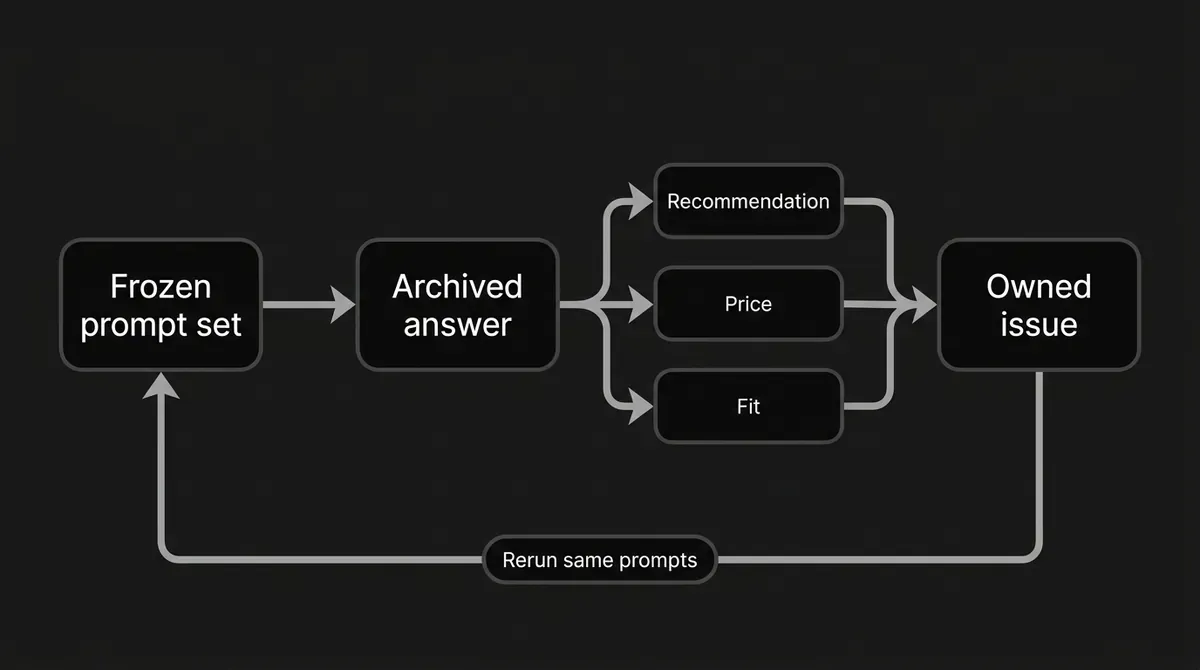
Give each core prompt a stable ID, its exact wording and version, its group, the buyer segment, the market and currency, and any budget rule or hard limits. Hard limits can rule a product out, like a maximum budget. Soft preferences are nice to have. Our guide to a fixed, versioned prompt set goes deeper on freezing it.
DeepSmith's Discover Prompts generates candidate questions from your product, persona and buyer-stage context, and you choose which ones to track or write your own. Check the suggestions against what your customers really ask before you lock the set. They don't tell you which questions are popular.
You're done when the core set covers the buyer situations you picked, the wording is versioned, and most prompts don't name your brand.
Pro tip: freeze the core set before you collect your baseline. If you change the wording whenever your brand goes missing, you won't know whether the answers or the question changed.
Step 3: Standardize how each answer is collected
Record the engine, mode, market and personalization settings for every answer, so a change in your setup doesn't get mistaken for a change in the recommendations.
For each answer, note the engine and model, whether you used the app, the API or a monitoring tool, whether search was on, the language, market and currency, any memory or custom instructions, whether it was a fresh conversation, and a UTC timestamp. Start a fresh conversation for each separate observation. If you tell an assistant about your brand first, what it recommends afterward isn't a fair discovery result.
This matters because answers depend on more than the question. OpenAI's documentation says ChatGPT search can rewrite a request into targeted searches, can use saved memories when it forms them, can infer an approximate location from an IP address, and can return results that are incomplete, outdated or wrong. A screenshot from your own long-running chat is not a baseline.
If you collect by hand, check ChatGPT's memory and location controls under Settings, and note that a Temporary Chat has an Unpersonalized option that leaves out memories and custom instructions. Labels differ between accounts, so write down which option you picked.
If you use one of the AI visibility tools, record what it tells you about how it collected each answer. When it doesn't show a model version or region, write "not exposed" instead of guessing. Don't mix answers from an API and from a chat window without labels. This explainer on API and chat interface answers covers why they differ.
You're done when each result can be traced to a prompt version, an engine, a collection route, a timestamp and the conditions you know about.
Common mistake: comparing screenshots from a personal account with scheduled tool results as if the settings were the same.
Step 4: Schedule collection and keep the full answer
Keep the whole answer and its context, not just a mention count or one flattering screenshot.
For a first pilot, three observations for each prompt and engine pair is a practical place to start. Keep every one, since they show whether an answer was a one-off. The reason to repeat is real. A preprint called Don't Measure Once repeated prompts on ChatGPT, Perplexity, Gemini and Google AI Mode within a 24-hour window. Across the campaigns it analyzed, the average overlap between two runs' brand sets ranged from roughly 33% for sporting goods to 48% for consumer electronics. That measures how much two answers share, not how often an engine is wrong, so treat it as support for repeating your checks.
Twenty prompts across three engines with three observations each is 180 planned answers, which is a workload estimate and not a benchmark. For ongoing monitoring, daily collection with a weekly human review is a sensible starting default, not an industry standard. Compare matching windows, and note any outages or prompt changes.
For every answer, save the exact prompt and version, the full text, the timestamp and engine details, the source links shown, the brands and families mentioned, any competitors named, and whether collection worked. Searchable text is what you'll analyze, so a screenshot is only a backup. Not every empty result means the same thing.
A full answer that recommends competitors but not you is a valid result, so count your brand as absent. A timeout, a block or a missing response is a collection failure, so leave it out of your rates and report it separately. If the answer arrived but the sources weren't captured well, keep the answer and mark source capture as incomplete.
DeepSmith runs your tracked prompts on a schedule, keeps the full answers, and tracks mentions and citations separately. Each prompt has its own mention rate and citation rate next to its answer history, and you set how often collection runs in Settings. When a recommendation changes, you can open the answers and see what was actually said. There's no setting for three repeat runs per prompt, so plan your repetition around the schedule it supports. This roundup of monitoring tools built for ecommerce compares how other platforms handle product recommendations.

You're done when your log has every expected prompt and engine pair, shows which ones are missing, and keeps enough answer text to check what was really recommended.
Common mistake: keeping only a yes or no flag for your brand, or only the runs that look good.
Step 5: Score the recommendation, price and fit separately
A recommendation only helps when you've identified it correctly and judged its factual claims on a comparable basis.
Keep two records. The answer record has one row for each prompt, engine and run. The recommendation record has one row for each brand or family recommended inside that answer, because one answer can recommend several options for different reasons. For each recommendation, note the entity, the status (recommended, conditional, discouraged or mentioned only), the exact sentence, the reason given, the price wording, your price, budget and fit assessments, and who reviewed it.
Count an answer as a recommendation when it proposes your brand or an unmistakable family as an option for what the buyer asked. "A strong option for this use case" counts. "Worth considering if you can go over budget" is a conditional recommendation, so keep the condition. "Avoid this for heavy rain" is a warning, and "Unlike Brand X, these options..." names Brand X without recommending it.
Before you call a price right or wrong, ask whether it's a number or just a word like "affordable." Check the currency, the market, whether it's a regular price, sale price, range or starting price, and whether quantity and conditions line up. Google's product data specification is a good model, since it expects price and currency to agree with the landing page, structured data and checkout. That's Google's rule for product data, not proof that an AI engine follows it.
Price accuracy and budget fit are two questions. A correctly quoted price can still be over budget, and a price that's too low can make a product look like it fits when it doesn't. Use four price labels: consistent, confirmed mismatch, unverifiable (identity, timing, currency or conditions stop a fair comparison) and no numerical price.
For fit, facts like weight, material, dimensions and compatibility can be checked against approved evidence. Words like "stylish" are opinions, so don't mark them true or false. Use four fit labels: supported fit, confirmed violation, unverifiable, and no applicable hard limit, and don't let a hard failure hide inside a positive overall score.
Then open the cited source. A link next to an answer doesn't prove it supports the claim. It also helps to keep a citation and a brand mention as separate outcomes, since an answer can cite your page without recommending you, or recommend you without citing a page.
Here's a made-up example to show the rubric. A buyer asks for a commuter backpack under US$100 with a water-resistant exterior. The answer recommends Example Brand's commuter family, says it costs "around US$80," and calls it "waterproof." Your reference says the offer is US$95 and water-resistant. The recommendation is a yes and the price is a mismatch, but the budget still fits at the real price. "Waterproof" isn't supported, yet your reference backs water resistance, so that error doesn't count as a failed requirement. That's three different problems and three different notes.
What an AEO tool ecommerce mentions report gives you is the captured answers and citations. It won't judge price and fit unless you add that step.
You're done when a second reviewer can reproduce your labels from the saved answer and the dated reference without guessing what the first reviewer meant.
Common mistake: treating a missing price as a correct price.
Step 6: Calculate rates with visible denominators
Report how often you're recommended and how good the claims are as separate things, and show the count behind every percentage.
Start with these measures. The mention rate is valid answers that name the brand, divided by valid answers. The recommendation rate is valid answers that recommend the brand or an approved family, divided by valid answers. The confirmed price-mismatch rate is your records with a confirmed mismatch, divided by your records with a comparable price. The confirmed fit-violation rate is your records with a confirmed hard-limit violation, divided by records marked supported fit or confirmed violation. Keep answer-level and recommendation-level counts apart, since one answer that lists three of your families is one answer with three records.
Here's a worked example with made-up numbers, so none of it is a benchmark or a customer result. Say you made 32 collection attempts, and 30 gave valid answers while two failed. Eighteen valid answers name your brand and 12 recommend it, each with one record of yours. Eight records have a comparable price, and two of those don't match. All 12 can be judged on hard limits, and two break at least one.
- Mention rate: 18 of 30, or 60%.
- Recommendation rate: 12 of 30, or 40%.
- Confirmed price-mismatch rate: 2 of 8, or 25%.
- Confirmed fit-violation rate: 2 of 12, or 16.7%.
- Failed collections: two, reported on their own and not scored as absent.
Show "two of eight comparable prices were wrong" instead of only "25% error rate," so the reader sees how little evidence is behind it.
Look at the results by engine, prompt group, product family and market before you combine them, and don't call a recommendation rate your market share.
A study of five industries in the Journal of Marketing Analytics covered 50 brands and 250 queries, repeated on three systems. It didn't measure consumer effects or returns, so being named more often is something you can watch but not proof you'll sell more.
You're done when every percentage has a count, a denominator, a time window and a scope, and failed collections, missing prices and unverifiable claims are still visible.
Common mistake: dividing price errors by all answers, including the ones with no price.
Step 7: Trace recurring problems to their sources
Look at the evidence behind a problem recommendation before you decide what to change.
For each issue that matters, save the exact sentence and the answer around it, confirm the right reference and its date, open the cited sources that look relevant, and work out whether the issue shows up in your own information, in third-party information, or only in the generated answer. Then give it an owner and a specific task. Don't say a source caused an answer just because it was cited nearby.
Route each one to whoever can fix it, such as ecommerce or merchandising for a stale price on your own page, product for a wrong spec, PR for a stale third-party source, and content strategy when answers are accurate but you're often absent. Being absent isn't automatically an error, since the buyer's limits may favor another option. Decide the order by how much harm the issue does, then by how often it comes back. A confirmed serious incompatibility or clearly misleading claim should go up quickly. Repeated wrong prices deserve an investigation. One reasonable rule is to act when the same issue appears in two separate runs, which keeps you from reacting to one odd answer. It's a triage rule, not a significance test, and a confirmed material error shouldn't wait for a second sighting. It helps to know what product pages need to be considered for AI recommendations, and these alert thresholds separate real shifts from noise.
DeepSmith's citation views show which of your pages get cited, each page's share of your citations, and the prompts behind them. Its competitor views show which exact competitor pages earn citations and how each does by engine. They help you find pages worth opening first, but they don't prove why an engine chose a recommendation or check prices for you.
You're done when each priority issue has an evidence bundle, an owner, a specific action and a date to look again.
Common mistake: blaming the engine when your own pages disagree with each other.
Step 8: Repeat the same measurement and report what changed
After you fix something, run the same core set again under comparable conditions, and report what you saw without claiming a cause you haven't tested.
Keep a change log with the issue, the original evidence, the corrected fact, the page you changed, the owner, the date and time of the change, the first collection after it, and whether the issue came back. Compare matching windows that use the same prompt version, and keep the old baseline. If you change a prompt or the collection method, mark that the results can't be compared directly.
A weekly report can cover coverage, recommendation presence by engine and prompt group, price and fit quality, the competitors that keep being recommended, and the actions finished.
Write results in language you can defend, such as "The incorrect amount did not recur in the next collection window." Avoid saying a correction trained the model, that a new page caused an increase, or that a change increased sales without separate evidence. There's no set waiting period after a correction.
You're done when you can show the original issue, the action you took and a comparable follow-up, including the cases still open.
Common mistake: declaring success after one good rerun.
What to do next
Pick one category and a fixed set of buyer questions, build a baseline, and look into the price and fit errors that matter most. Then use the next collection window to see whether they come back. Good AI shopping recommendations monitoring is mostly the same questions asked the same way each week. If you want a head start, you can set up monitoring in one afternoon and spend the rest of your time on the review work above.
Use DeepSmith to schedule your buyer prompts and keep the answer history and citation evidence in one place. Start a 7-day free trial.
Related guides
- How to Report AI Visibility to Leadership: Build a one-page leadership update that frames AI visibility in business terms, with the few metrics, trend lines and asks an executive will read.
- How to Tell Whether an AI Citation Is Actually Helping You: Judge a citation by position in the answer, framing, link visibility and the prompt it answers, instead of counting every one equally.
- 7 Mistakes Teams Make When They Start Tracking AI Visibility: Avoid seven common early errors, such as tracking too few prompts, reading single runs as truth, or reporting without a baseline.
- A Monthly AI Citation Review Checklist: Use a checklist for a monthly pass over citation share, new and lost sources and follow-up tasks.
- Multi-Tenant AEO for Agencies: Client Workspaces, Permissions and Billing: Set up separate client workspaces, role-based permissions and billing arrangements in an agency AEO tool, so staff see only the right accounts and invoices map cleanly to clients.