A product description can be accurate on the day you publish it and wrong a month later, because a supplier changed a material, a dimension, or a care instruction and nobody told the copy. This guide is for marketing teams who want to produce ai product descriptions for a whole catalog and then keep them true as the data underneath them changes. By the end you'll have a workflow that generates descriptions from approved product records, sends them through review, publishes them safely, and refreshes only the ones a data change has actually affected.
Generating the copy once and running a description lifecycle are two different jobs, and the second needs someone who owns the facts, stable identifiers, approval states, and change detection. You'll need an exportable catalog, an AI generation tool, a short approved brand brief, access to your commerce platform, and one person who owns factual review. Refreshing automatically also needs a connector that can notice changes and write approved copy back. I use Shopify, OpenAI, and Google Merchant Center documentation as examples, but the steps work with other tools too.
Choose your source of truth and define what one description is
Before you generate anything, decide which system owns the product facts, and decide which combination of product, variant, language, and channel gets its own description.
Name the owner for each important field. Supplier specifications might own material and dimensions, and your commerce platform might own availability. Then pick one category to begin with, not the whole catalog. A sensible first unit is one parent-product description in US English for the storefront, plus a plain-text version for a shopping feed.
Record the stable identifiers the destination uses: the platform product ID, the variant ID, the SKU, and the handle. Product names make poor join keys, because names get edited and repeated. Save the current descriptions too, so you have something to go back to. A simple content registry holds all of this, with columns for identity, scope, source version, template version, approval status, published version, and the prior approved description. No platform exports that for you, so it's yours to build.
Shared parent copy should only claim what is true for every variant, so a family with cotton and polyester versions shouldn't carry an unqualified cotton claim.
You're done when every in-scope description has one identity, one authoritative source, one destination, and one approver. People usually go wrong by starting from a spreadsheet of product names and matching results back by row order.
Clean the product data and block records that can't support accurate copy
The model should only receive approved facts in a consistent record, with anything missing or conflicting marked as such. Shopify's documentation warns that generated text can add benefits and facts you never supplied.
Decide which fields matter for each category, such as materials, dimensions, variant-defining attributes, care instructions, approved evidence for sensitive claims, and a list of claims the copy must not make. A clothing template and an electronics template shouldn't ask for the same fields.
Then clean the source. Normalize units, keep item and packaging measurements apart, and separate facts from promotional supplier text, which you should treat as data and never as instructions for the model. Look for conflicts between the supplier record, the commerce record, and the existing description. Treat a blank as unknown, not as permission to guess. Here is an invented product, made up to show the shape of a record.
{
  "record_id": "bottle-750-blue-en-us-storefront",
  "product_name": "Trail Bottle",
  "capacity_ml": 750,
  "material": "18/8 stainless steel",
  "construction": "double wall",
  "closure": "screw cap",
  "color": "blue",
  "care": "hand wash",
  "unsupported_claims": ["retention duration", "dishwasher safe", "leakproof"]
}
Double-wall construction doesn't tell you how long a drink stays cold, so a claim like "keeps drinks cold for 24 hours" isn't supported.
Set blocking rules so incomplete records stop early. Missing identity or conflicting values block the record until someone resolves them, and missing material data goes to the data owner. Give these their own needs_data status so they don't vanish into a general error bucket.
You're done when every eligible record passes the category's required-field checks and every ineligible one has an owner and a reason. The usual mistake is asking the model to make a sparse record sound complete.
Set brand rules and a reusable output template
Keep your stable brand instructions separate from the SKU facts that change. Write down the audience, the tone, preferred and banned terms, the structure, and which attributes must appear. Add off-limit claims and channel length limits, and tell the model to omit optional unknowns but flag critical ones. There's no single ideal word count, so pick a length that suits the category and test it.
A brief along these lines works as a starting point.
Write a product description using only the approved product record and approved brand rules. Preserve quantities, units, materials, care instructions, and variant details exactly. Do not infer certifications, compatibility, performance durations, environmental benefits, or guarantees. If a required fact is missing or contradictory, return a needs-data status and identify the missing field. Omit optional unknowns. Do not include price, inventory, or promotional offers.
Define the output shape too, so code can check it, with fields like record_id, status, short_description, feature_bullets, and missing_fields.
If you use OpenAI, know the difference between JSON mode and Structured Outputs. JSON mode returns valid JSON but doesn't promise it matches your schema. Structured Outputs constrains the response to the schema you supply. Neither makes the facts correct.
Deep IQ stores your products, personas, brand voice, and content types as structured context that DeepSmith uses for everything it produces, so the content around your catalog stays in one voice. If a separate system generates your SKU descriptions, give it an approved copy of the same rules on purpose, because Deep IQ doesn't push them into an outside generator and doesn't hold live SKU specifications. See grounding AI content in your brand voice and product facts for more.
You're done when the template gives the structure you asked for, sounds like your brand, and handles unknowns without inventing anything. People often confuse brand context with product evidence, or treat valid JSON as proof the facts are right.
Pilot the workflow on a small, varied set of products
Prove the whole path on a small set before you raise the volume. I'd suggest 20 to 50 products, adjusted for how complex your catalog is and how much review your team can handle.
Include an easy product, one with sparse data, a parent with real variant differences, and one a person already edited by hand. Write down what generation costs, how long review takes, and how many corrections and publishing failures you see.
Shopify offers native generation. Open a product, select the Generate text icon in the description toolbar, enter your instructions, edit the result, and save. Shopify recommends giving it at least a product title and two product features or keywords. It works on one product at a time, and the documentation doesn't describe a native bulk tool or a refresh loop.
Common mistake: Using a live product as a drafting space. Saving a new description on a published product can show the new copy on your live store right away.
Set release criteria before you start. No unsupported claims remain, missing critical data is blocked, a test publication changes only the fields you intended, a known source change produces the refresh decision you expect, and a rollback restores the old description without touching other data. If one category keeps failing, fix its source rules or template before you widen the rollout.
You're done when the team can show a product going from source record to approved live description and back through a rollback. The usual mistake is piloting only your cleanest products.
Generate in controlled batches and reconcile every result
Submit one traceable job per description you need, and match results back by a stable identifier, never by the order they come out. That's what lets automatic product descriptions scale without losing track of which text belongs to which product.
A batch procedure that holds up looks like this:
- Freeze the approved source snapshot and template version for the run.
- Leave out blocked, locked, and unchanged records.
- Create one job for each product, locale, and channel that needs output, each with a unique ID stored outside the generated text.
- Submit batches small enough for your reviewers to keep up with, not just within platform limits.
- Collect successes, failures, refusals, and incomplete jobs separately, and check each result against its input.
- Retry only the jobs that need it, and keep a link to the first attempt.
The OpenAI Batch API is one way to run the asynchronous part. You prepare a JSONL file with one request per line and a unique custom_id on each, upload it through the Files API with the purpose set to batch, create the batch with a 24-hour completion window, and check its status. When it finishes, you read successes and failures from separate files and join them to your requests using custom_id. Output lines may not come back in order, which is why that ID matters.
Batch processing costs 50 percent less than synchronous API calls, which is about API processing and not your whole content operation. The 24-hour window means it isn't a path for an urgent correction, and a batch can hold up to 50,000 requests.
Keep two kinds of bulk work separate. Bulk AI generation produces proposed descriptions, and bulk commerce updates write approved ones into the store. A finished AI batch tells you nothing about whether your storefront changed.
Pro tip: Store the source version in your job record. A description can come back from a long batch already out of date if the product data changed while it ran.
You're done when every job is accounted for as successful, blocked, failed, refused, incomplete, or superseded. People go wrong by pasting results back in spreadsheet order or generating more than their reviewers can get through.
Validate the facts and approve each description
Use automated checks for the predictable problems, and use a person to approve the customer-facing facts. Google's guidance says it's critical to manually fact-check and review AI-generated content before you publish it. For a method, see how to fact-check an AI draft.
Run automated checks on every record: the job and destination match the original product and variant, the output parses, every number and unit matches the source, no variant details conflict, and no unapproved certification, performance, health, or guarantee claim has slipped in. Block or retry anything that fails.
For human approval, put the generated description next to the source attributes and any change diff. The reviewer confirms it describes this product accurately and the benefits don't go beyond the evidence. For sensitive claims, bring in the right subject expert or compliance owner. Random sampling on its own isn't the same as approving each description. What scales is clearer source records, category templates, and fewer needless rewrites.
Using the invented bottle, a supported description reads: "Trail Bottle is a 750 ml reusable drinks bottle made from 18/8 stainless steel. This blue version has double-wall construction and a screw cap. Hand wash after use." An unsupported one reads: "Our leakproof, dishwasher-safe bottle keeps drinks cold for 24 hours and is the most sustainable choice." The second adds claims the input never made. For the editing side, see editing AI-generated product descriptions at scale.
You're done when each record has an explicit factual approval and anything unresolved can't move on to publishing. The usual mistake is reviewing only style and assuming polished writing must be accurate.
Publish approved copy without overwriting unrelated catalog data
Use your platform's import or API process for automatic product descriptions, update only the fields you mean to, and read the result back before you mark anything as published. Before any write, save the previous approved description and check for manual edit locks, and publish a small canary group before the full batch.
Shopify's documented route for existing products is to export them, edit the CSV, and import it back. The required columns for an update are URL handle and Title, and the main description column is called Description. Start from a fresh export of your own store. The file can't be bigger than 15 MB, and it should be saved as UTF-8. In the import, go to Products, then Import, then Add file, choose "Overwrite products with matching handles", and review the details before you import.
With overwrite on, values in the columns you include replace the values on products with matching handles. A column you include but leave blank can erase an existing value, while a column you leave out generally keeps what's there.
Common mistake: Leaving extra columns in the file and blanking them out. A blank column is not the same as a missing one, and it can wipe real data.
Variants need extra care. If you include SKU or weight columns without the related option columns, you can lose variant options, and changing option values can delete variant IDs, so test with real multi-variant products from your own export.
For repeated or larger updates, Shopify documents the productUpdate mutation and a bulk mutation process. Both return per-line errors, so a successful response alone doesn't prove the change worked, and a bulk run isn't all-or-nothing.
Keep separate versions for separate channels. For Google Merchant Center, descriptions made with generative AI go in the structured_description attribute, with plain text in content (1 to 5,000 characters) and digital_source_type set to trained_algorithmic_media. If you send both description and structured_description, Google says it uses only description, so check how your connector handles that.
If your team also writes the supporting content around these products, such as buying guides and care guides, that's where DeepSmith's Content Studio does the work. It takes ideas through planning, writing, review, and publishing, and Autowrite can schedule articles. That covers your editorial queue, not SKU updates. See producing ecommerce category and buying-guide pages at scale for that side.
You're done when the description is confirmed at the destination, your variants and other fields are unchanged, the feed status has been checked, and the publication is recorded against the approved source version. People go wrong by marking an import as finished before checking it, overwriting human edits, or putting storefront HTML into a plain-text feed field.
Refresh descriptions when the data changes and reconcile what you missed
To keep ai product descriptions current, compare the inputs that matter, regenerate only the affected copy, and check on a schedule that nothing slipped through. This is the part of ecommerce ai content automation that turns a one-time project into something you can run.
Start with a map from changes to actions. These are recommended rules, not native features of any platform.
| Change | Default action |
|---|---|
| Material, dimension, capacity, fit, care, or compatibility changes | Regenerate, then review |
| New product or locale | Generate the missing output |
| Brand rules or template changes | Queue a controlled refresh |
| Price, stock, or sale flag changes | Update those fields, usually skip description generation |
| A claim is withdrawn or a safety issue appears | Correct or remove it right away |
| Copy edited by hand and locked | Keep the edit and open a review task |
For discontinued items, see content pruning for ecommerce.
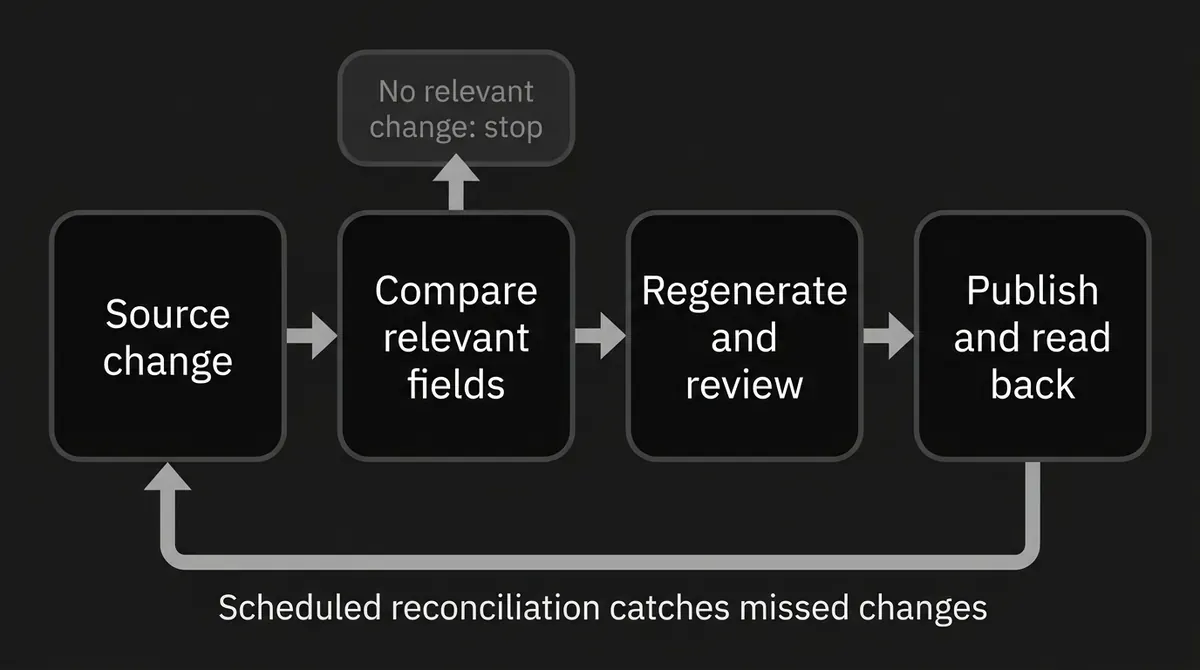
The easiest way to decide whether something changed is a fingerprint, a repeatable summary built from the normalized fields that affect the description, plus the template version. Leave out the generated description itself, and usually inventory and price, because otherwise your own write or every stock movement can set off needless regeneration.
Shopify's product update webhook can fire for product changes, orders, and variant changes, so treat it as a signal to look at current source data, not an order to regenerate. A reliable receiver verifies the HMAC signature, queues the work and answers quickly, and uses X-Shopify-Webhook-Id to catch duplicate deliveries. It fetches the current record instead of applying an old payload, and handles one product's jobs one at a time so an older job can't overwrite a newer approved version.
Writing a description can itself trigger another product update, and comparing only the relevant fields lets you see that the facts didn't change and stop. Before you write, check that the input version still matches.
Add a scheduled reconciliation job, because Shopify says webhook delivery isn't guaranteed and recommends reconciliation. Look for changed source records, stale descriptions, approved records that failed to publish, and feed records the channel rejected. A daily pass is a reasonable place to start, though that's my suggestion and not a platform rule, and urgent fixes shouldn't wait for it.
Don't mistake Google's automatic updates for description maintenance. Merchant Center's automations can correct price, availability, and condition, but they aren't a documented service that regenerates descriptions. If you manage Merchant Center in code, use the Merchant API, because Google states that the Content API for Shopping sunset on August 18, 2026.
DeepSmith fits at the measurement end of this step. AI Visibility runs the buyer questions you track on a schedule and keeps the answer history, and its Pages view shows which of your pages get cited and the prompts behind them. A brand mention isn't a product mention, and DeepSmith doesn't map cited pages to products or send SKU-level alerts on its own, so keep that mapping in your content registry. Monitoring can show you inaccurate answers, but it can't prove that a description edit caused a later change. For more detail, see the guide on monitoring product-level mentions in ChatGPT.
You're done when a test material change refreshes the right description, a stock-only change causes no generation, a repeated event doesn't cause a second write, a manual edit is protected, and a missed event is recovered by reconciliation. People go wrong by rewriting the whole catalog every night, or assuming a successful storefront update means every feed and AI answer is current right away.
Measure approved output and freshness, not word count
Generated word count tells you very little, so measure what reaches customers. Three internal metrics I'd suggest are first-pass approval (descriptions approved without revision, divided by descriptions reviewed), review minutes per approved description, and description freshness (in-scope descriptions matching current inputs, divided by all in-scope). These are suggestions, not benchmarks. Give each role a clear owner too: product data, brand rules, factual review, publishing, and change monitoring. One person can hold several.
What to do next
Pick one category, write down its required attributes, and run a pilot of 20 to 50 products through generation and review. Then change one real source value, such as a material, and watch whether the right description gets flagged and refreshed.
If you'd like help with the content around the catalog, you can start a free DeepSmith trial to keep your brand context consistent in Deep IQ, produce the buying guides that support your products, and track which of your pages AI engines cite.
Related guides
- AI Writing Assistant or Human Writer: Where Each One Wins: Compare where AI writing assistants and human writers each tend to do better, across speed, consistency, original insight, subject expertise and editing, so you can assign the right.
- Can Programmatic SEO With AI Work Without Thin Content Problems?: Judge whether programmatic SEO with AI can avoid thin content by checking data uniqueness, page usefulness, template variation and review sampling, and see which setups tend to fail.
- How to Repurpose Existing Content With an AI Content Platform: Choose which existing posts are worth repurposing, set up the platform with the source and target format, review the generated version for accuracy and voice, and publish it.
- Single AI Writer or Multiple Writing Agents: What Changes in the Output?: See how output from one general model differs from output produced by several specialized agents handling research, drafting and editing, including consistency, depth and error catching, and when.
- Averi AI Alternatives: 7 Best AI Marketing Content Tools for 2026: Seven Averi AI alternatives (DeepSmith, Jasper, Copy.ai, Writesonic, Scalenut, Surfer, Anyword) sorted into camps, weighing Averi's AI-plus-human-expert-network model and $99 to $199 pricing against pure software platforms that.