Your team probably has a good number of posts that did their job once and now just sit on the blog, while the work of turning them into anything else keeps slipping behind new production. People often ask how to repurpose blog content AI platforms can handle, and this guide walks marketing leads through AI content repurposing in eight steps: choosing which post to start with, setting up the platform, reviewing what it generates, and publishing the result without creating a second copy of the original. It also helps to know which AI content tools can publish to a CMS, because that changes how the last step works for you.
Before you start, have one approved post, current product facts, a short voice guide, access to where you'll publish, and one person who can approve the result.
Score your existing posts for reuse
The short answer is to start with a post that is accurate, useful, and has a clear second use, and not just the one with the most traffic. Traffic tells you people found it, but it doesn't tell you whether the post still matches what you sell or who you're trying to reach.
Build a small candidate list instead of sending your whole archive into a tool. Ten posts is a comfortable number, though that's only a starting point and not a rule. If you've never done a content audit on your blog, this is a good moment to do a light one. For each candidate, write down:
- Which current buyer problem it speaks to.
- What evidence you have of demand, such as search queries, qualified visits, or questions your sales team keeps hearing.
- What would need to be corrected or re-approved before anyone reuses it.
- What is actually worth adapting, like a finding, an explanation, an example, or a framework.
For demand, the Performance report in Search Console is a good place to look. Open the Pages tab, select Clicks, and sort by clicks to see which pages get search traffic. Then use the Queries tab to see which questions bring people in. If you want to check one query, select it and open Pages to see which URLs show up for it. Google suggests watching trends in clicks and impressions over time instead of leaning only on average position.
In Google Analytics 4, the Landing page report shows where sessions started, and adding Session source / medium splits that by where visitors came from. It only covers the page a session began on, so it isn't a full list of everything people read.
If you track AI visibility in DeepSmith, the AI Visibility section shows which of your pages AI engines already cite and for which prompts. That's one more signal for choosing a source, though it doesn't mean a repurposed version will earn citations.
If you'd like a simple way to rank the list, score each post from 0 to 2 on five things: audience relevance, demonstrated demand, factual readiness, reusable substance, and how clearly you can say what the new version is for. The top score is 10. Posts that score 8 to 10 are good for a pilot, 5 to 7 need one problem fixed first, and 0 to 4 can wait. These bands are only a team rubric, and a high score never outweighs an open question about accuracy, permissions, or privacy.
You're done with this step when one post has a named audience, a plausible second use, evidence behind it, and a reason you can say out loud for choosing it.
Common mistake: picking the highest-traffic post even though its readers aren't your buyer or its facts are out of date.
Refresh and lock the approved source
Fix the source before you ask any platform to multiply it. If an old claim is wrong in the post, it will be wrong in every version that comes from it, and you'll find that out one version at a time.
Read the whole post, not only the intro, and then:
- Check every time-sensitive statement against a current source.
- Fix old product details, prices, dates, and links. If the post is badly out of date, a full pass to refresh old articles may be the better first job, and the repurposing can wait for it.
- Decide which version is the real one if your CMS, a shared document, and an export all differ.
- Save the approved text with a version name and a review date.
- Pick out the few claims and examples that have to survive the adaptation.
A simple claim ledger helps here. Use a spreadsheet with a row for each claim and columns for the exact claim, its evidence, its scope, a reuse rule (keep word for word, paraphrase, leave out, or re-check), and who approved it and when.
Keep your factual rules separate from your voice rules, so a preference for confident writing never turns a qualified finding into a guarantee. For example:
If you can't back a claim up, take it out or mark it as unresolved. Asking the same AI model whether its own output is accurate isn't the same as checking the evidence.
You're done when a reviewer can point to one approved version of the source, the claims you're allowed to reuse, and the things you've decided to leave out.
Common mistake: repurposing first and then finding out that every version copied the same outdated claim.
Define the job of the new version
Decide what the reader should get from the new version before you pick the format. A format name on its own is not a brief.
Try writing one sentence in this shape: for [audience] in [context], adapt [source idea] into [target format] so they can [do a specific thing], and then take [a next action].
Then settle these before you generate anything:
- The audience and how much they already know, and the one idea the new version should lead with.
- The destination and format, and how long it should be there.
- The facts and examples that must stay, and anything that should be left out.
If you're still deciding on a format, the list of content repurposing ideas by format is a good place to browse. This guide stays at the level of the process, since each format needs its own steps.
For your first run, choose one source and one target. That's not a limit of any product. It's a way to check that your source, brief, and review all work before you do more of them.
You're done when your team can explain why this reader needs this version and not just another copy of the post.
Common mistake: asking for every available format with no audience, no owner for distribution, and no reason for any of them.
Load the approved source and brand context
Give the platform two things: the material it is allowed to reuse, and the rules for how to adapt it. Leaving out either one is how a version ends up with the wrong facts or the wrong tone.
Start with the source. Use whichever input your platform really supports. If it takes a page address, look at the text it extracted. If it takes pasted text or a file, make sure the whole approved version arrived. Check for:
- Sections, tables, or important qualifications that went missing.
- Navigation text, sidebars, or unrelated promo copy that got pulled in.
- A cut-off ending, an older version, or the wrong language.
What you're checking is what the platform can actually see, and not just that it accepted the input. Content repurposing tools handle this step differently, so do it by hand with your first post.
Next, the brand setup. Give the platform the approved company and product descriptions, the persona, voice rules, a few examples of writing you like, and the claims to keep and to avoid.
Voice instructions work best when they describe things you can see in the writing: direct language, concrete verbs, restrained claims, contractions where they sound natural, no invented stories. A request like "make it engaging" doesn't give anyone a standard to check against. If you haven't written yours down yet, it's worth taking an hour to document your brand voice first.
This is a step where DeepSmith does real work for you. Deep IQ keeps your company, product, persona, brand voice, and content type context as structured information that every part of production uses, so you review it once before you generate, which makes AI content repurposing steadier, and don't rebuild a mini-brief for every asset. For the source, DeepSmith's repurposing works from a finished article in its content workflow. This guide doesn't describe a way to bring in an outside post, because that isn't something to assume. If your post lives elsewhere, check which input your own setup supports before you plan around it.
Stored brand context helps ground the output, but it doesn't take away the need for review.
You're done when the source text and the audience, voice, and claim rules are all available to the generation step.
Common mistake: giving the platform only a topic or a title and assuming it will rebuild the approved source correctly.
Generate one bounded adaptation
Ask for a purposeful change, not a free rewrite. The goal is a version that does a new job for a new reader, and a rewrite of the same paragraphs in a shorter form usually doesn't do that.
Pick the target format wherever the platform lets you choose one, and use any instructions field for your brief. Here's a brief you can adapt:
Adapt the approved source for the audience, purpose, destination, and format in this brief. Keep the meaning of the approved claims, their qualifiers, and who said what. Use the product and brand context provided. Do not add statistics, customer results, quotations, product capabilities, or other facts that the approved material doesn't support. Make the new version serve the target reader's task instead of paraphrasing the original section by section. Flag missing information instead of filling it in. Return the adaptation along with a separate list of open questions and claims that a person needs to verify.
That brief is a workflow aid. It isn't a claim that DeepSmith, or any tool, has fields with those names. If you genuinely need new research for the piece, treat it as its own task, and don't let the adaptation step make up what's missing.
This is another step where DeepSmith does the work. Every finished article arrives with social posts already written and ready to copy, and the Apps Library can make more versions in the context of that article for places like LinkedIn, X, Medium, Substack, newsletter email, and Reddit, adapted to each channel's tone and length. What you get is channel-adapted generation. It's not a promise that anything is posted to those services for you.
When the output isn't right, change the brief to match the failure. A distorted claim needs a clearer rule about evidence or a correction. It doesn't need a request for a more enthusiastic tone.
You're done when one adaptation does the job you gave it, traces back to the approved source, and comes with a list of open items.
Common mistake: generating a big batch before anyone has checked that the source, the audience, and the claim rules are doing their job.
Review facts, voice, and added value
Check the adaptation against the evidence first, and only then ask whether it sounds right. Use two separate passes so smooth writing doesn't hide a change in the facts.
Pass A is accuracy and permissions. Go through the adaptation with this table in mind:
| Check | What to look at | It fails when |
|---|---|---|
| Factual claims | Each important statement against the source or its original evidence | A claim is unsupported or contradicted |
| Numbers | The value, unit, base, time period, sample, and place | A number looks right but its context changed |
| Product statements | Current approved capabilities and their conditions | A feature, integration, price, or guarantee was invented |
| Quotations | Wording, speaker, context, and permission | A quote is made up or misleading |
| Scope and cause | Qualifiers and how strong the evidence is | "May" turned into "will," or a link turned into a cause |
| References | The actual supporting material | A source is broken, off-topic, or invented |
| Rights and privacy | Permission to reuse, credit, and sensitive details | A permission or exposure question is still open |
Any open question about accuracy, privacy, or rights blocks approval. The guide on how to fact-check an AI draft goes through this pass in detail, and the one on how to keep editorial control when a platform drafts your content covers approvals and style rules.
Pass B is voice and purpose. Ask yourself:
- Does it speak to the intended reader without assuming context they lack?
- Does it sound like your approved examples?
- Can the reader learn or do something without going back to the original?
Look at the packaging too. Google's guidance on generative AI content includes titles, meta descriptions, and image alt text in what to check for accuracy.
Don't use an AI-detector score, a similarity percentage, or a readability score as the approval decision. What decides release is whether the content is accurate, useful, properly credited, and right for its audience.
Pro tip: keep a correction log. If the same problem shows up again and again, fix the brief or the shared voice rule, and don't keep editing the same defect in every output.
You're done when a named person has approved the asset, every important claim is supported, and no open review note remains.
Common mistake: editing only for tone because the generated text sounds believable.
Publish without creating a redundant copy
Publish according to what the asset really is, because an adaptation, an update, and a republication are three different decisions. Here is how they play out:
| Situation | What to do | What not to assume |
|---|---|---|
| The original is outdated and the new version answers the same question | Update the original before you spread new versions of it | That a new address is needed just because AI rewrote the text |
| The new version does a different job in a different context | Publish it in the right place, and link to the source where that helps the reader | That different wording alone proves it adds value |
| A second article on your site has nearly the same main content and purpose | Ask whether you need both, and have the site owner handle consolidation or canonical signals | That two near-identical pages will each bring search value |
| A partner republishes the same or a very similar article | Agree with the partner on how it will be indexed | That a link back or a cross-domain canonical always stops the two from competing |
| The destination is a social or email channel | Publish through that channel or your approved distribution tool | That publishing the article to your CMS also covers this destination |
Google can group pages that have the same or very similar main content and choose one as the representative version. Canonical annotations are about duplicate or very similar pages, and they aren't a rule that every adaptation has to point back to the original. For duplicates on your own site, Google's canonical and duplicate URL guidance covers redirects, canonical annotations, and sitemap signals, and it says clearly that these are preferences, not guarantees. Keep your signals consistent with each other.
Syndication is a separate case. Google says the canonical link element isn't the recommended fix for syndication partners, and the most effective fix it names is for the partners to block indexing of the syndicated copy. That's a decision for the partner's pages, not advice to noindex your own adaptations. The guide on syndicating content without hurting SEO goes deeper. A normal attribution link helps readers see where something came from, but it isn't a canonical tag and it doesn't control indexing.
There's no supported rule to rewrite a set percentage or change every sentence. The standard is added value and a different purpose for the reader.
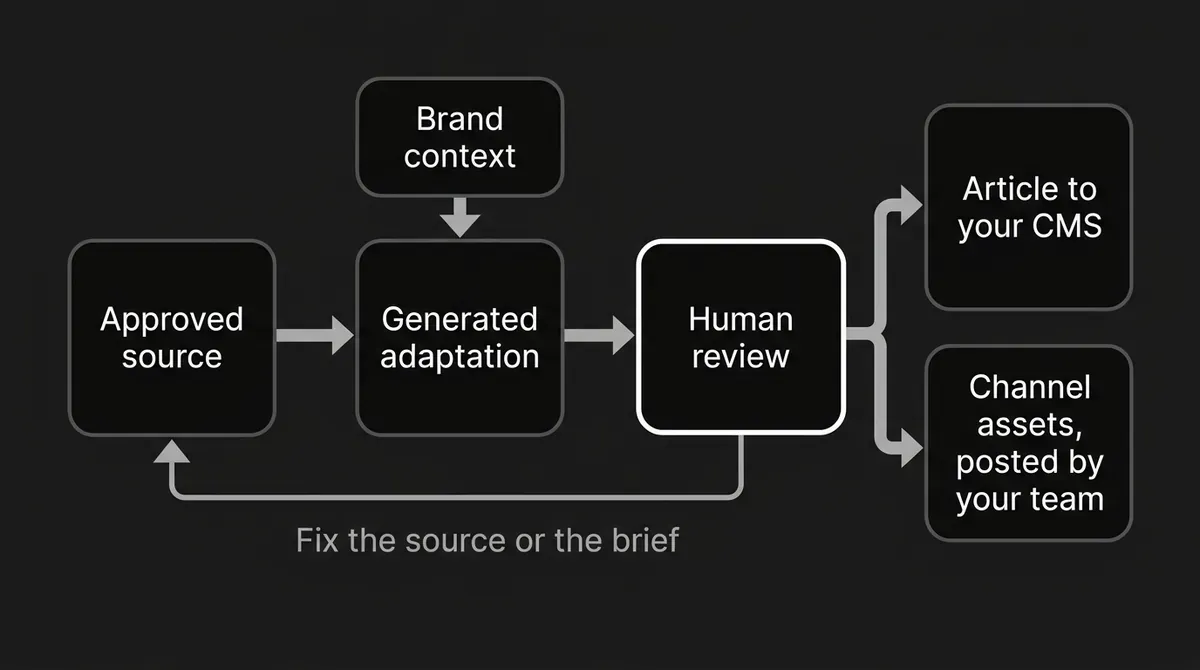
On delivery, DeepSmith's article workflow lets you review and edit before you publish straight to a CMS such as WordPress, Strapi, or Webflow, and Markdown and HTML export are there too. That's separate from Repurpose and the Apps Library, which create channel assets ready to copy while posting and scheduling stay with your team. So plan on a person, or your own distribution tool, to post the LinkedIn version or send the newsletter.
Before anything goes out:
- Preview it in its real destination and click the main link and call to action.
- Check formatting, attribution, and image rights.
- Confirm you're publishing the approved version.
- Write down where it was published and when.
You're done when the right asset is live or intentionally scheduled, its links work, and its relationship to the original is written down.
Common mistake: treating a generated asset as published, or thinking a canonical tag will fix a weak content plan.
Measure the result and save the playbook
Check whether the new version did the job you gave it, and then reuse the process that worked, instead of simply making more of them. Volume alone isn't a result.
A light asset manifest keeps this manageable. A spreadsheet is enough, with one row per asset and columns for the source and version, the audience and purpose, the destination, the approved copy, the reviewer and date, the published location and date, the campaign tags, what counts as success, and the next review.
For traffic that comes from outside distribution, Google recommends using utm_source, utm_medium, and utm_campaign together. Pick a naming convention, write it down, and use it the same way every time. The campaign URL builder in Google Analytics shows how the parameters work, and their values show up in the Traffic acquisition report when people follow the tagged link. If you want a fuller routine, the guide on how to measure content distribution walks through it.
Decide on the outcome before you launch, such as qualified visits, a configured key event, useful responses, or editing time saved if you're improving the process.
A sensible pilot is one source, one destination, and a review date on the calendar. Two weeks for early results and a month for the process are only suggested intervals, and small audiences need longer.
Be careful about crediting every change in the original page's performance to the repurposing, since Google notes that seasonality, news, and other sites also change search performance. Compare similar periods and keep observation separate from cause.
Save what worked as a playbook: the source requirements, the brief, the voice rules, the approval checklist, and who is responsible for delivery. When a source post changes, the manifest tells you which versions may need a second look. Old assets don't update themselves, so that check is yours to make.
You're done when your team can trace the published version to its source, judge it against its intended outcome, and run the next round without rebuilding the process.
Common mistake: reporting the number of generated assets as the only result.
What to do next
Choose one approved post, make one adaptation, and write down the source, the approval, and the result before you widen the batch. That is small enough to finish this week, and it will show you where your process needs work.
If your article workflow already runs in DeepSmith, you can use its shared brand context and ready-to-copy distribution assets to test the process on one finished article. You can start a 7-day free trial if you'd like to try it.
Related guides
- Rankability Alternatives: 8 Best AI Visibility and SEO Content Tools for 2026: Ranks eight Rankability substitutes (DeepSmith, Frase, Semrush, Surfer, SE Ranking, Profound, Scrunch and more) for buyers who want AI visibility tracking and SEO content optimization inside one workflow.
- WordHero Alternatives: 8 Best AI Copywriting Tools for 2026: For lifetime-deal users who now need long-form output, this ranks eight AI copywriting tools (DeepSmith, Writesonic, Jasper, Scalenut, Anyword, Copy.ai, Rytr, Hypotenuse AI) on template breadth, real article.
- Yarnit Alternatives: 7 Best AI Content Platforms for 2026: Ranks seven Yarnit alternatives, DeepSmith, Jasper, Writesonic, Simplified, Typeface, Copy.ai, and Canva, against workflow coverage, agentic automation, SEO and AI-search depth, visual output, and pricing, recommending each for.
- Averi AI Alternatives: 7 Best AI Marketing Content Tools for 2026: Seven Averi AI alternatives (DeepSmith, Jasper, Copy.ai, Writesonic, Scalenut, Surfer, Anyword) sorted into camps, weighing Averi's AI-plus-human-expert-network model and $99 to $199 pricing against pure software platforms that.
- Copy.ai Review: Features, Pricing, and Whether It Is Worth It: Reviews Copy.ai's shift from AI copywriter to a go-to-market automation platform of workflows, agents, and data tables, its short-form strengths, weaker long-form output, and four-figure pricing tiers, concluding.