
A client asks whether a rival is pulling ahead, and you do not have a clean answer. One tool says their traffic is up, another says your rankings held steady, and nobody can say for sure what changed. This guide is a competitive benchmarking guide you can actually run every month: which competitors to include, which metrics to track, how often to check them, and how to read a trend instead of reacting to one snapshot. By the end you will have a repeatable way to benchmark against competitors for any account on your roster, not a one-time report you have to rebuild from scratch next quarter.
What you need before you start: access to the client's Google Search Console and GA4 properties, a rank tracker or SEO research tool you trust, a dated inventory of the client's and competitors' relevant pages, and one benchmark sheet per client that you keep updating rather than replacing.
Step 1: Define the market and lock your competitor set
Start by writing down the client's property, target country, device mix, and the section of the site you are comparing (the blog, the full domain, or a specific content section). Then find out who they actually compete with in search. A tool like Semrush's Organic Rankings Competitors report will show you domains that share organic keywords with the client's site, ranked by an overlap score. That overlap is a discovery signal, not proof. A high score just means two sites rank for similar terms, not that they chase the same customers.
Keep the list short, somewhere around three to five domains that genuinely compete for the client's important topics. Add a separate informational publisher only if it truly competes for the reader's attention on those topics. Label each one as a direct business rival, a search-result rival, or both, and write down why it made the list. If you run content gap analysis for this client already, you likely have this list half built.
If your goal is to benchmark against competitors consistently across the roster, this step happens once per client, not once for the whole book of business. A competitor in one client's space is often irrelevant in another's, and a shared spreadsheet across accounts is how benchmarks quietly turn to noise.
Done when: every competitor on the list serves a relevant audience or competes for a named priority topic, and the comparison boundaries (domain-wide, subdomain, or a specific section) are written down.
Common mistake: treating every keyword-overlap domain as a real competitor, or comparing a client's blog against an entire publisher's domain that happens to outrank them on a handful of terms.
Step 2: Build a fixed measurement spec and a baseline
Before you record a single number for SEO competitive benchmarking, decide exactly what you are measuring and where it comes from. Use one row per client, competitor, market, metric, and period, and write down the precise source and definition for each measure. Pick either completed calendar months or matched four-week windows, and stick with that choice. Mixing the two makes every later comparison unreliable.
A workable set of columns looks like this: client, competitor, market, device, content section, metric, source, period, current value, previous comparable period, same period last year, absolute change, percentage change, and a note for anything unusual. Store the raw values, not just the change, because you will need them later to explain a swing. Calculate percentage change as current minus comparison, divided by comparison, times 100. If the comparison value is zero, mark the percentage as unavailable rather than showing an infinite number.
This is also the point to note anything that could break the comparison later: a site migration, a change in who counts as a competitor, or a shift in which tool you use for estimated traffic. A future you, or a colleague who inherits the account, needs to be able to reproduce your filters without guessing what you meant.
Done when: a second strategist could rebuild the same period, filters, and denominators from your notes alone, without asking you anything.
Common mistake: mixing countries, devices, branded and nonbranded queries, or blog-only and all-site URLs inside one trend line.
Step 3: Pull the client's own traffic, not a competitor guess
You can only measure what you have access to, and that means your own client's numbers come from Search Console and GA4, not from any third-party estimate. In Search Console's Search results performance report, set the search type, a completed date range, and the country, device, and page filters that match your spec. Pull clicks and impressions for the agreed site or section, and keep CTR and average position as secondary, diagnostic measures rather than the headline figures.
In GA4's Traffic acquisition report, record sessions attributed to Organic Search. If you plan to compare this against Search Console clicks, narrow the GA4 source to Google specifically, since Search Console measures visibility and clicks before someone lands on the page, and GA4 measures what happens once they arrive. Google is upfront that these should move in similar patterns rather than match exactly, because the two systems calculate, attribute, and tag traffic differently. A gap between them is not automatically a tracking bug. Check dates, devices, geography, and canonical URL handling before you assume something broke, and remember that Search Console data can arrive a couple of days late, so close a period only once its data is complete.
Done when: the client's Search Console clicks and GA4 organic sessions each have a separately named, repeatable series using the same market and date filters.
Pro tip: if you are reconciling numbers across two systems and they will not line up, resist the urge to average them or pick whichever looks better. Name the gap in your notes and move on. Chasing an exact match between two tools that measure different things wastes an afternoon for no real benefit.
Step 4: Track a fixed keyword cohort and compare rankings
Pick a set of queries that actually matter to this client, mixing buyer-intent and informational terms, and group them by topic and funnel stage. Keep branded and nonbranded terms separate, because a competitor with strong brand recognition can look like it is winning on a topic when it is really just winning on its own name.
Load the same query list into a rank tracker for the client and each competitor, at the same market and device settings, and keep dated snapshots going forward. A tool such as Semrush Position Tracking checks specified keywords daily, which is useful for catching a sudden swing, but your recurring benchmark should always run off that same fixed cohort, not whatever terms a domain-wide report happens to surface that week.
Watch rank by query, count how many cohort terms sit in a defined position band such as one to three or four to ten, and track which pages carry the strategically important terms. Look at individual queries rather than an averaged position, since one big move can hide underneath a flat-looking average. Search Console's average position and a rank tracker's position are measuring two different things (your actual search appearances versus a fixed set you configured), so do not treat them as interchangeable.
Done when: the same frozen cohort can be compared by entity, date, market, and device, and any new query gets added as a labeled addition rather than silently changing the denominator.
Common mistake: claiming a ranking win because you added easier keywords to the cohort, or comparing a mobile local rank against a desktop national one.
Step 5: Measure publishing velocity for relevant pages
Build an inventory of each site's comparable content, and record when each page was first published, what type it is, its topic, and whether it is a genuinely new page or an update to an existing one. Count relevant new pages per completed period for each domain, plus new pages by priority topic, and keep new pages, meaningful updates, and removed pages as separate tallies. Strip out product, legal, navigation, and tag pages from the count so a blog comparison stays a blog comparison.
A sitemap helps you discover and monitor URLs, but its <lastmod> date marks the last significant update, not necessarily when the page first went live. Before you count a page as new, confirm it against the page itself, structured publication data, or an earlier inventory snapshot, and flag anything you cannot confirm.
This is where a content map that tracks competitor sitemaps genuinely earns its place in the process. DeepSmith checks competitors' sitemaps daily for newly discovered pages, which keeps your inventory current without you re-crawling a competitor's blog by hand every month. Read that as a discovery signal, not a guarantee that a new page ranks, gets indexed, or drives traffic. What each strategist does with a newly discovered page, and whether it becomes a benchmark data point worth acting on, is still a judgment call.
Done when: every period's count has a reproducible inclusion rule and a list of the underlying URLs behind it, so an update cannot get counted as a new article.
Common mistake: more pages does not mean better SEO. Publishing volume is an output measure. Check whether the new pages cover topics buyers actually need, and whether rankings, impressions, or clicks moved afterward, before you credit volume with anything.
Step 6: Compare topic coverage on one shared taxonomy
Agree on a set of topics relevant to the client's business, then classify every eligible page on the client's site and each competitor's site against that same list. Record how many eligible pages each domain has per topic, and where useful, split those by buyer stage: awareness, consideration, and decision. Separate an untapped topic, where a competitor covers ground the client has nothing on, from a depth gap, where both sides publish but one has meaningfully more.
Look past the raw page count. A cluster of near-duplicate URLs is not deeper coverage, it is the same page written five times. Keep each period's inventory so you can measure whether a gap closed or widened over time, not just where things stand today.
This is the other place where a shared topic cluster map does real work in a benchmark. Content Map places your site and your competitors' sites on one taxonomy, so a topic comparison is apples to apples instead of you eyeballing two different site structures and guessing where they overlap. Use it for coverage and publishing counts, not as a stand-in for a competitor's actual traffic or rankings, which it does not measure.
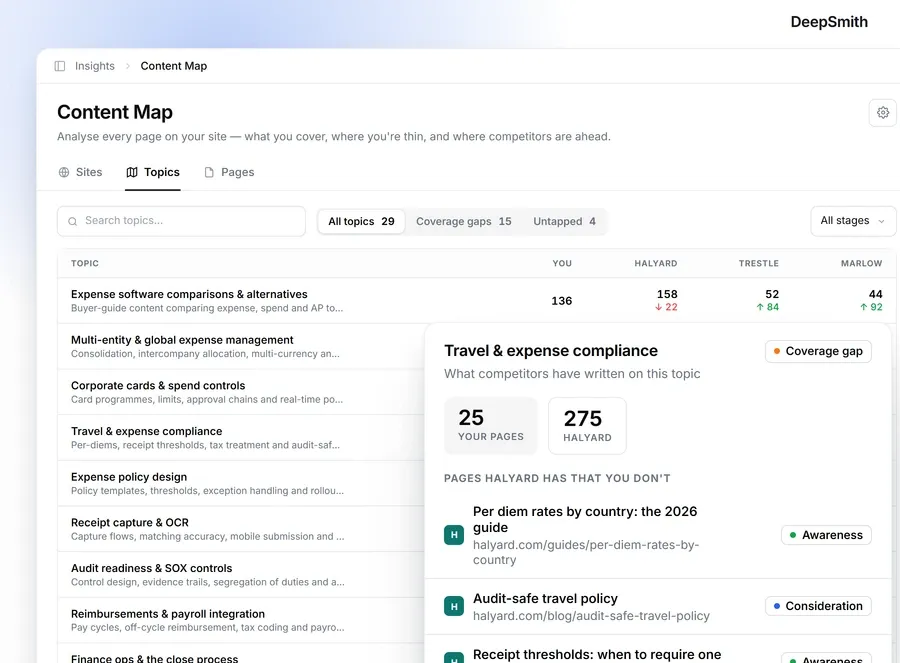
Done when: you can point to the specific pages behind every count, see where coverage is missing or thin, and say whether that changed since your baseline.
Common mistake: assuming a bigger page count means more authority, or chasing a gap just because it exists rather than checking whether it matters to the client's buyers.
Step 7: Set a review cadence and read a trend, not a snapshot
Check the rank series and newly discovered pages weekly, mostly to catch collection problems or a genuinely large move. Close and interpret the full traffic, publishing, and coverage benchmark monthly, once the data for that period is complete. Revisit the competitor list, topic definitions, and market settings quarterly, since accounts and markets shift and a benchmark built on a stale roster stops meaning much.
At each monthly close, compare against the prior comparable period first, then against the same period last year if you have it. Break an aggregate move down by topic, branded versus nonbranded query, landing page, and device before you explain it. Seasonal demand shifts organic traffic in predictable ways for a lot of categories, so check whether interest in the topic itself moved before you credit or blame a competitor for a change in the numbers.
A few patterns worth knowing before you see them:
| What you see | What to check next |
|---|---|
| Clicks fall while impressions hold | Query and page CTR, rank changes, device mix, how the result looks in the SERP |
| Impressions and clicks fall together | Whether search demand dropped, tracked positions shifted, or pages lost coverage |
| A competitor's rank rises on your fixed cohort while the client's falls | The specific queries and URLs involved, then coverage and recent publishing on both sides |
| A competitor publishes more, but the rank and traffic gap does not move | Treat the extra output as an observation, not proof that it is working for them |
| Client traffic rises while priority-topic coverage stays thin | Which queries or pages actually drove the gain, before assuming the gap closed |
Done when: every claimed gain or loss names the metric, the matched periods, the market, and the query or page group behind it, plus any plausible alternative explanation.
Common mistake: comparing an incomplete recent month against a complete earlier one, or treating a third-party traffic estimate as if it were the competitor's actual analytics.

Step 8: Turn persistent gaps into next period's work
Pick a small number of actions the data actually supports: refresh a page that lost relevant queries, build a page for a topic the client genuinely has nothing on, consolidate pages that cover the same ground twice, or hold steady when a competitor's apparent surge in output has not moved rankings or traffic at all. For each action, write down the topic and URL, the metric and baseline that justified it, an owner, and the period you will check it again.
At the next monthly close, look at the same cohort and topic measures and be honest about what changed. If a new page has not earned measurable search exposure yet, say that plainly instead of calling it a win or a loss before there is enough data to know.
Done when: next month's review can separate completed actions from metric movement, and can say whether the gap you targeted narrowed, widened, or is still unproven.
Common mistake: treating a competitor's new articles and its ranking movement as cause and effect just because they happened around the same time.
What to do next
Lock your definitions this week: the competitor set, the measurement spec, and the periods you will use. Pull the first complete baseline for every metric in this competitive benchmarking guide, then put the next monthly close on your calendar before you move on to the next client. A benchmark you rebuild from memory every quarter is not a benchmark, it is a report you dread writing.
If keeping a current competitor page inventory and a shared topic taxonomy across several client accounts sounds like the part that eats your week, DeepSmith's Content Map does that groundwork for you: it checks competitor sitemaps daily and maps every site, yours and theirs, onto one topic taxonomy so the coverage comparison in Step 6 is already built when you sit down to write it. Start a 7-day free trial and run it against your next client review.