
We’ve all been there. You take a post that's pulling in 3,000 clicks a month, decide to "refresh" it, clean it up, add new sections, and make it better. Two weeks later, your rankings fall off a cliff. Or maybe you've just heard the horror stories and you're terrified of touching anything that’s already working.
Here’s what most refresh guides don't tell you: the refresh itself isn't the risk. The lack of a process is.
I’ve watched teams lose rankings during an update, and it’s almost always the same story. They make a bunch of undocumented changes at once, with no plan for monitoring or recovery. That isn't a content refresh. That's a gamble with your organic traffic.
This guide is my repeatable, risk-managed workflow for refreshing old SEO articles. This isn't just "update the date and add a paragraph." This is a real process. You audit first, scope the change correctly, protect the equity you've already built, QA before you publish, and measure the impact in a way you can actually use. If your rankings do dip, you'll know exactly why, and what to do about it.
What's the safest way to refresh old SEO articles without losing rankings?
Safe refreshes are controlled. The people running them know exactly what changed, why they changed it, and what they're watching to see if it worked.
The core rule: preserve what's already working, change what's provably outdated
Before you touch a single word, you have to ask: what is this page already doing well? Maybe it holds a strong position for your main keyword, owns a featured snippet, or pulls in a steady stream of converting traffic from one specific long-tail query.
Those are your anchor points. You don't touch them without a very deliberate reason.
Everything else is fair game. Outdated stats, broken links, a tool recommendation from 2021, terrible mobile formatting, sections that just don't match what searchers want anymore. The goal isn't to avoid change. It's to make targeted changes while protecting what your page has already earned.
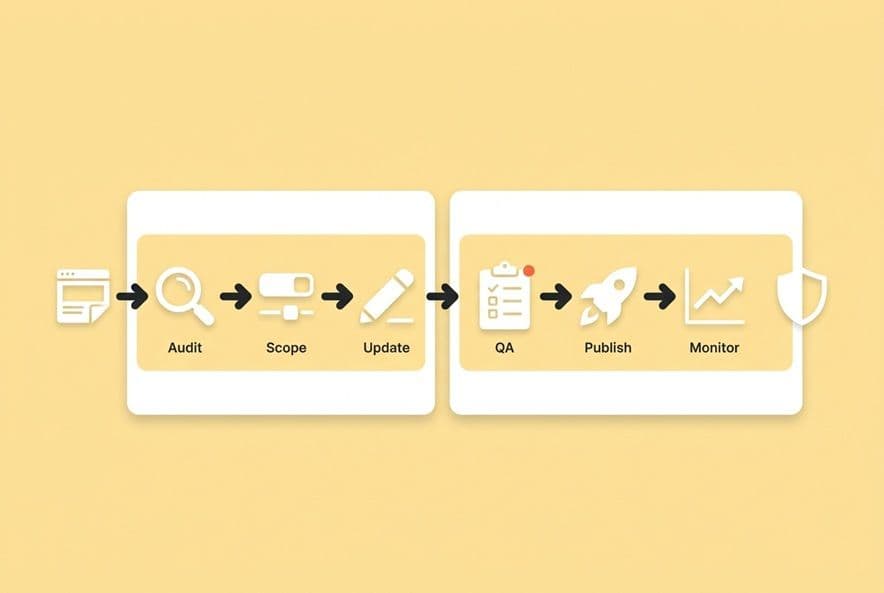
The 6-step "safe refresh" workflow
- Audit: Pull the current rankings, clicks, and engagement data. Identify what's working and what's started to slide.
- Scope: Decide what you’re doing. Is this a minor update, a moderate rewrite, or a full reconstruction? (We’ll get to this.)
- Update: Make only the changes you can justify and document every single one. AI assistants can help speed up research for new stats or rephrase a clunky section, but you have to verify their output. Never let a tool make unscoped structural changes for you.
- QA: Run through a pre-publish checklist. Cover intent, technical stuff, mobile, and links.
- Publish: Push it live with annotations in your analytics tools so you can trace changes back later.
- Monitor: Watch rankings, clicks, and engagement for at least 6–8 weeks. Don't jump to conclusions before then.
That’s the whole process. The simplicity is the point. If your process has more steps than you can remember, your team won't follow it.
What "meaningful updates" look like (and what doesn't count)
Just changing the publish date without changing the content? Google is not fooled. Adding one new paragraph to a stale article? That’s probably not enough to signal new relevance.
Meaningful updates are things like replacing old data with current sources, restructuring sections to better match what searchers are looking for today, adding a new section to cover an angle the SERP now rewards, improving internal linking, or fixing readability issues that are causing people to bounce.
The bar is simple. Would a reader who found this today get something they couldn't get from the 2022 version? If the answer is yes, your update is meaningful.
Which articles should you refresh first (and which should you avoid touching)?
That backlog of 50+ posts isn't going to refresh itself. I know the feeling. You can't do it all at once, so the ones you pick first matter for both getting results and managing risk.
The three buckets: quick wins, high-risk/high-reward, and "do not touch yet"
Quick wins are your posts ranking in positions 5–15 for keywords you care about. Traffic is stable and the intent match is still good. A targeted update with fresher examples, better formatting, or updated links can often push these to page one with very little risk.
High-risk/high-reward posts are your top performers. These are your page-one rankings, the articles bringing in significant traffic and conversions. The urge to "improve" them is strong, but it's often a bad idea. Before you touch these, you need a specific, data-backed reason, not just a vague feeling that "it could be better."
Do not touch yet is the most important and underused bucket. Leave brand new posts (under six months), posts that are actively climbing in the rankings, and posts you just updated alone. Give them time to stabilize.
My mental model is simple: if the page isn't broken, don't fix it. "Could be better" is not a good enough reason to risk the rankings of a page that's already doing its job.
Signals to prioritize: slipping rankings, second-page terms, outdated SERP intent, conversion relevance
The clearest signal for a refresh is a keyword that used to rank well but has slipped. Pull up your position history in Search Console or your SEO platform. Look for keywords that peaked 12–18 months ago and have been trending down ever since.
Second-page terms (positions 11–20) are often your highest-leverage opportunity. These pages are already indexed and have some authority. They just need a push, and that push is often about better intent alignment, not a full rewrite.
The third signal is when the SERP has changed around you. If the top results for your keyword are now all listicles and your post is a long-form narrative, your format might be the problem.
Once you’ve found your candidates, you need a good tool to move from research to production without losing steam. This is where a spreadsheet in a shared drive just doesn't cut it. Platforms like DeepSmith Topics can track your keyword clusters, show you coverage gaps compared to your competitors, and push refresh candidates right into your production queue. It turns your audit into action.
When pruning or consolidating is safer than refreshing
Sometimes, an old post just doesn't deserve to live on. If an article gets fewer than 50 clicks a month, has no meaningful rankings, and covers a topic you've already written about better elsewhere, refreshing it is a waste of time.
Content pruning, either by deleting the post (and redirecting the URL if it has links) or consolidating two weak posts into one stronger one, can actually improve your site's overall quality signals. Google looks at the whole domain, not just one page. A leaner, stronger site often outperforms a bloated one.
Just be sure to check for backlinks before you prune anything. Even a low-traffic post might have valuable links you can preserve with a redirect to a related, stronger page.
How do you decide between a minor update and a full rewrite (without tanking the page)?
This is where most teams get it wrong. They see a post that's slipped, assume it needs a full rewrite, and rebuild it from scratch. Then they watch the rankings fall even further. Over-editing is a huge, unforced error.
The "intent stability" test: did the SERP change or did your content decay?
Before you decide how much to change, you have to figure out why the page is underperforming.
Open an incognito window and search for your target keyword. What does page one look like right now? If the format, depth, and type of content are all similar to what you already have, the SERP intent is probably stable. Your content has just gotten old. That calls for a minor update.
If the SERP looks fundamentally different now, with different formats or different questions being answered, you have an intent drift problem. That might require a bigger structural change. But even then, "bigger change" doesn't automatically mean "start from scratch."
A decision table: tweak vs rewrite vs split vs consolidate
This is the kind of table I live by. It helps take the emotion out of the decision.
| Situation | Recommended Action | Risk Level |
|---|---|---|
| Rankings slipping, intent stable, content outdated | Minor update (data, links, examples) | Low |
| Format doesn't match SERP, content still strong | Structural rewrite, preserve core sections | Medium |
| Two posts covering the same angle | Consolidate into one stronger page | Medium |
| Topic has grown into multiple distinct subtopics | Split into a cluster with a new hub page | Medium-High |
| Content is fundamentally wrong intent match | Full rewrite or reclassify | High |
| High-traffic, stable rankings | Do not touch without specific reason | High |
Your threshold for a full rewrite should be high. Most underperforming posts just need a targeted update, not a complete teardown.
What to preserve in a rewrite to keep equity
Even if you do a major rewrite, some things are non-negotiable.
- URL: Never change it. Redirects are not perfect, and you will lose some link equity.
- Primary keyword in the title and H1: You can reframe it, but the core query focus has to stay.
- Headings (H2s, H3s): You can update them, but be very careful about deleting them. They might be ranking for long-tail queries you don't even know about.
- Internal links pointing to this page: These are your equity. They stay.
- Core sections that match long-tail queries: Before you delete or restructure anything, understand what individual sections are ranking for.
Run the existing page through a keyword gap analysis to see what queries it's currently getting credit for. That’s your list of things to preserve. Everything else can be revised.
How to handle keyword shifts without creating cannibalization
If you're refreshing a post and realize its target keyword has shifted closer to another post's territory, you're walking into a cannibalization trap. When two of your pages compete for the same query, search engines get confused, and usually neither one ranks well.
Before you publish the refresh, do a quick canary check. Search your target keyword in Search Console and see which of your pages are sharing impressions. If two posts are showing up for the same terms, you need to fix that first. Either differentiate their angles clearly or consolidate the weaker post into the stronger one.
Managing this gets really messy at scale. When refreshes involve big changes, relying on manual checks is risky. A platform like DeepSmith Content Studio can generate a full research brief and draft with the SEO structure and internal links handled for you, which seriously cuts down on the human error that leads to ranking loss.
What changes are most likely to cause ranking drops during a refresh?
Knowing what not to do is half the battle. These are the common ranking-killers that turn a simple refresh into a gamble.
Intent drift: how "helpful improvements" accidentally target a different query
This is the most common reason a refresh fails, and it’s painful because it feels like you're doing the right thing.
Let's say you have a post ranking for "how to create a content calendar," a very practical, how-to query. You decide to add a new section on "why content calendars matter for marketing strategy." It seems helpful. But you've just shifted the page's intent from tactical to strategic. If the SERP rewards tactical content, you've just moved your post in the wrong direction.
Before you touch anything, read the top three results for your target keyword. What specific question are they answering? Then ask yourself: does every single change I make move my post closer to that, or further away?
Structural overhauls: when changing H2s, TOC, or intro can backfire
Changing your heading structure is one of the riskiest edits you can make. Individual H2s can be responsible for ranking on very specific long-tail queries. If you delete or totally reframe an H2, you can lose those rankings overnight.
Before you reorganize headers, go to Search Console, filter by the page, and look at the queries driving clicks. See which ones correspond to your existing section headers. Those sections are protected. You can update the content inside them, but be careful about deleting or radically renaming them. The intro is also high-risk, as it sets the topical signal for the whole page.
URL, canonicals, and internal link breakage: the invisible technical mistakes
This one seems obvious, but it happens all the time. If you change the URL, you need a redirect. But most teams forget to update all the internal links that pointed to the old URL.
A 301 redirect from the old URL works, but an internal link that goes through a redirect is weaker than one pointing directly to the final destination. You have to go back and update them.
Also, check your canonical tag. If the post had one set, make sure it still points to the correct URL after the update.
Content pruning inside the article: removing sections that were ranking for long-tail queries
"Cutting the fluff" sounds like a good idea. But what if that "fluff" was a 200-word section that answered a specific question, and it was the only page on your site ranking for that query? You just cut your own traffic.
Before you delete any section, check if it's pulling impressions in Search Console. If it is, either keep it, or replace it with something even better that answers the same user intent.
What should your on-page refresh checklist include before you publish?
This is your pre-flight check. You’re not looking for perfection. You're looking for mistakes that will cause immediate problems.
On-page SEO updates without over-optimization
If the title tag and meta description haven't been touched in over a year, update them. Focus on making them accurate and compelling, not on stuffing the keyword in twice. Check your H1 and main H2s against the current SERP language. Add two or three links to relevant, newer posts on your site.
E-E-A-T upgrades: experience signals and trust caveats
Refreshes are a perfect time to add little details that signal real experience. A direct observation from your team’s work, a specific example, or a warning that shows you understand the topic’s nuances can make a big difference. This is also the time to remove any vague, blanket claims. Replace "Studies show" with a link, or use more careful, specific language.
Freshness signals beyond copy
Don't forget schema markup. If your post is a how-to or FAQ, make sure the right schema is in place and up to date. Using structured formatting like numbered lists and clear headers makes content easier for both search engines and AI platforms to parse. And make sure the dateModified value in your article schema is updated to today's date. That’s a real freshness signal.
Pre-publish QA: what to verify in preview mode
Before you hit publish, check these things: Does the page render correctly on mobile? Do all the internal links work? Do the images load and have alt text? Does your table of contents still match the headings? Is the canonical tag pointing to the right URL? This takes ten minutes and can save you ten hours of diagnosing problems later.
How do you improve mobile UX during a content refresh (in ways that affect SEO)?
"Mobile optimization" isn't just about responsive design and fast load times. The user experience choices you make for mobile readers have a direct impact on SEO.
Mobile-first readability: paragraph length, spacing, TOC behavior, jump links
On a phone, any paragraph over three sentences feels like a wall of text. Break up your writing. Use subheadings more often than you would for desktop, and add plenty of whitespace. A floating or sticky table of contents on mobile is a lifesaver. If a reader lands on your page and has to scroll endlessly to find their answer, they're going back to Google. A TOC with jump links gets them where they need to go in one tap.
Media and layout choices that help (and hurt) mobile performance
Wide tables are terrible on mobile. They force horizontal scrolling, which is an engagement killer. Make sure your tables collapse gracefully or are restructured as bulleted lists on mobile devices. Your images and videos should never slow down the page. Use lazy loading, compress your images (under 100KB is a good target), and avoid embeds that load slow third-party scripts.
"Information speed": making answers findable in the first scroll
AI-powered search and featured snippets both reward content that gets to the point fast. So do impatient mobile readers. A great mobile UX target is to have the key answer for each section appear within the first two sentences. Give the answer first, then provide the context. This habit will also help your content earn more featured snippets and AI citations.
What should you do after publishing to measure impact and prevent (or recover from) drops?
Most guides skip this part, but it's where you find out if any of your work actually mattered.
What to track and when
Week 1–2: Just check for technical problems. Crawl errors, indexing issues, broken links. Don't even look at your rankings yet.
Weeks 3–6: Now you can start watching the average position for your target keywords and your total impressions. Rankings will often fluctuate in this window. Don't panic, but don't celebrate either.
Weeks 6–10: This is when you can start drawing real conclusions. Compare your rankings, clicks, and conversions for this page against the 8-week period before the refresh. Look at engagement metrics like scroll depth and bounce rate, too.
Ongoing: Monitor for any new long-tail queries you start ranking for. Sometimes a refresh will bring in traffic from queries you didn't even target, which is a great sign.
How to attribute gains/losses to the refresh
The day you publish the refresh, add a dated annotation in Google Analytics and Search Console. Note what you changed. This seems so obvious, but most teams skip it. If you’re refreshing multiple articles, stagger your updates by at least two weeks so you can isolate the impact of each one.
For AI visibility, tracking which of your pages earn citations is getting more important. Tools like DeepSmith AI Visibility — Pages can show you which of your pages are being cited, how that's trending, and how it shifts after an update. Pairing that with your Search Console data gives you the full picture.
If rankings drop: a step-by-step triage and recovery playbook
First, if your rankings dip right after a refresh, wait five days. Some volatility is normal. If the drop lasts longer than two weeks, here's what to do:
- Check for crawl/index issues. Is the page even indexed? Any errors in Search Console? Fix technical problems before you assume it's a content issue.
- Compare the current page to the old version. What did you change? Can you guess which change is the most likely culprit?
- Check the SERP intent again. Did the whole SERP change around the same time? You might be blaming your edits for a broader algorithm update.
- Revert the biggest structural change first. If you rewrote the intro or completely changed the H2s, try rolling that one change back. See if rankings recover in a couple of weeks.
- If nothing works after four weeks, you have to consider that the original page had strengths you didn't properly identify and preserve.
The key discipline here is making one change at a time during recovery. If you stack multiple edits, you’ll never know what worked.
Off-page + promotion actions that make refreshes "stick"
Distribution helps your content get rediscovered by readers, other creators, and search engine crawlers. Push every refreshed article through your newsletter and your LinkedIn feed. Try to align your refresh schedule with upcoming launches or campaigns so your supporting content is fresh when you need it.
Once you build this "refresh and distribute" loop, the gains start to compound. An AI tool like DeepSmith Agent Library can take your refreshed article and generate LinkedIn posts, newsletter sections, and social media updates in minutes, all in your brand voice. It helps make sure distribution doesn't get skipped.
How to run seasonal refresh cycles without resetting performance each year
For seasonal posts like "best tools in [year]," you need a slightly different approach. If you create a new URL every year, you're starting from scratch every time. The better way is to update the same post in place to compound its authority.
Create a single, permanent URL for the topic (like /best-content-tools) instead of a year-stamped one. Update it in place each year, and just change the H1 to something like "Best [X] Tools (Updated [Year])". Schedule these updates before the seasonal traffic starts so the page has time to re-index.
Build a refresh system you can run every month (without becoming the bottleneck)
Doing this once is easy. Doing it consistently is hard. With a backlog of 40+ posts, a small team, and a boss who wants to know about AI visibility, your process will either hold up or fall apart.
The teams that win at this treat content refreshes like a production system. They have a defined audit cadence, clear triage rules, scoped briefs, a QA checklist, and distribution baked in from the start. It’s not a heroic sprint every six months that leaves everyone burned out.
If you want to build that system without being the bottleneck, you need a few key pieces: keyword tracking that feeds directly into a refresh queue, a workflow that builds SEO into your drafts from the start, and consistent distribution.
DeepSmith handles all of that in one connected workflow. It uses Topics to track refresh candidates, Content Studio to generate SEO-ready drafts with internal links built in, and Agent Library to turn every published article into social and newsletter content.
If you're ready to run a refresh program that actually compounds your results, explore what DeepSmith can do for your content operation.