Your catalog has thousands of URLs, and only some of them deserve to be found. That gap is what internal linking for ecommerce is really about: making sure a crawler can walk from your menu to every product you want indexed, without falling into a filter maze that generates a new URL every time someone picks a color. This guide is for ecommerce marketing leads who own the content and SEO side of a storefront and need a link architecture that answer engines can follow. By the end you will have a URL inventory, a spine that connects categories to products, an approved facet list, and a way to check whether any of it is showing up in AI answers.
If your site already feels like a tangle, that is normal. Big catalogs get messy because they grow. Let's untangle it one step at a time.
Step 1: Inventory every URL family before you change anything
Start by listing what exists, grouped by how each page behaves, not by what folder it sits in.
Crawl or export your URLs and sort them into families: home, category, subcategory, product, variant, pagination, filters, sorts, search results, tracking and session parameters, empty results, and retired products. For each family, record the template that generates its links, whether other URLs return the same content, and whether the pages get any organic visits or conversions.
Then make one decision per family. There are only three options:
- Index and support. A durable category, subcategory, product, or selected facet with real demand and useful content.
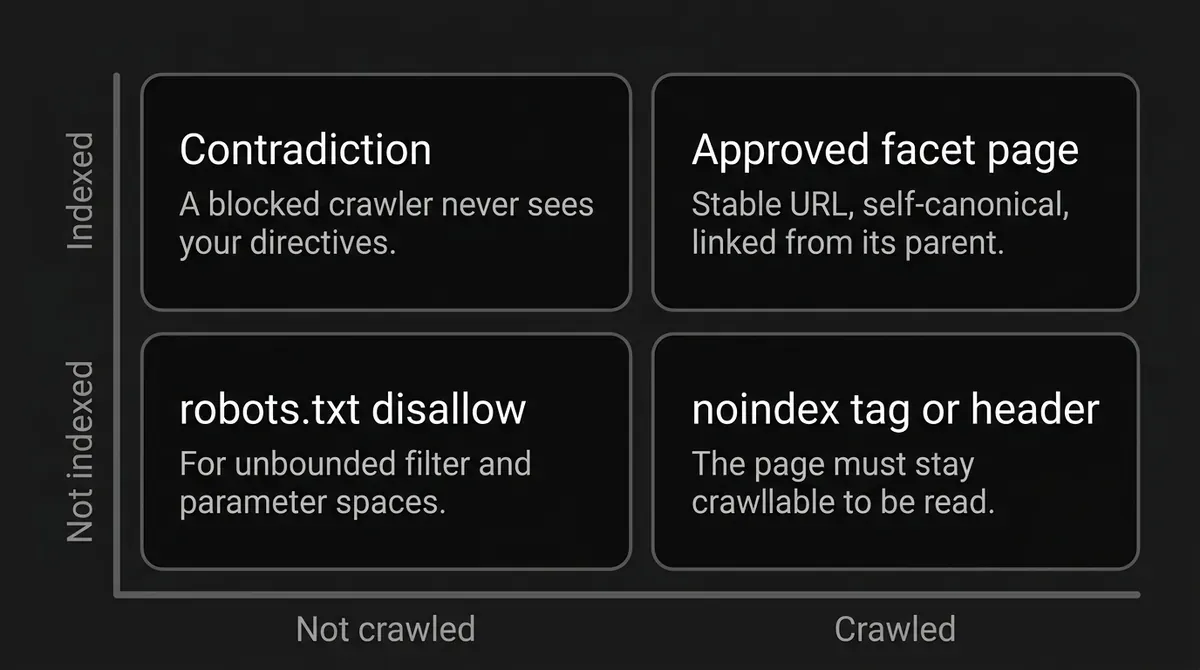
- Crawl but do not index. A page people or crawlers need to pass through, but that is not a worthwhile search result on its own. Use noindex only if the page stays crawlable, because a blocked crawler never sees the directive.
- Do not crawl. An unbounded or clearly unwanted URL space, like most generated filter combinations.
Resist the urge to apply one rule to everything. "All facets index" and "all facets noindex" are both wrong. The right call depends on demand, inventory, uniqueness, and the maintenance your team can carry.
While you are here, lock your canonical URL policy. Pick one representation per page. Keep parameter order deterministic, normalize casing, and strip session IDs and tracking codes out of internal links. The same preferred URL should appear in your links, your canonical tags, your sitemaps, and your product feed.
How you know it is done: a fresh crawl of the same catalog state returns one preferred URL per page, not four near-identical ones with different parameter order or casing.
Where people go wrong: treating /category, /category?page=1, and a filter URL that returns the same products as harmless variations. Google may have to fetch several versions before it works out they are equivalent, which wastes requests and muddies your signals.
This is also the point where a coverage view helps. DeepSmith's Content Map crawls and classifies your pages onto a shared topic and buyer-stage taxonomy, and rechecks sitemaps every 24 hours, so you can see which category and supporting pages actually exist before you plan anything new. It will not decide which filter URLs your server should block or return as 404. That part stays with your engineering team.
Step 2: Build the crawlable spine from menu to category to product
Your catalog needs one obvious path down. Menu to category, category to subcategory, subcategory to product.
Every product you intend to index needs at least one crawlable route through category browsing. Not a route through the search box. Crawlers generally do not fill in search forms, so a product that only appears after someone types its name may simply never be found.
Use real HTML anchor elements with an href for catalog navigation. A clickable card that depends on a JavaScript event attached to a non-anchor element is not a link a crawler can rely on. Put meaningful product or category text inside the anchor where you can.
Good ecommerce site architecture SEO also means prioritizing without orphaning. Give your important categories and best sellers shorter, more prominent paths. Link a hero product from the home page if it earns it. That is prioritization, and it is fine. It does not give you permission to leave the rest of the indexable catalog with no route in at all.
Sitemaps and a Merchant Center feed are useful fallbacks. They can expose product URLs a crawler would otherwise miss. They are not a replacement for the spine, and leaning on them instead of fixing navigation buys a delay, not a solution.
How you know it is done: ignore the site search box, then verify that a crawler can travel from a known page through HTML links to every product marked indexable. Compare that crawl inventory against your sitemap and your feed.
Where people go wrong: a product sits in the database, shows up in site search, and appears in the feed, but no category or subcategory links to it. It exists in your auxiliary systems and is missing from your catalog graph, which weakens both discovery and the context around it.
One more thing, plainly. A descriptive URL path helps a little, but Google says it generally works out site structure from linkages, not folder names. Your /mens/boots/waterproof/ URL is not doing the job you think it is. The links are.
Step 3: Pick the few facets that deserve a real landing page
Here is the decision most teams avoid, and it is the one that decides whether faceted navigation internal links help you or bury you.
A facet combination earns an indexable page when three things are true at once: there is durable user intent behind it, there are enough products to fill it, and it offers something genuinely different from its parent and its neighbors. Category-plus-attribute destinations are often decent candidates. Price ranges, sizes, temporary availability, sort orders, and very narrow combinations usually are not. Validate against your own demand and product data rather than copying someone else's list.
For every facet page you approve, treat it like a real landing page:
- a stable URL
- a unique title and heading
- useful page copy or merchandising information
- a self-referencing canonical
- links to the products it represents
- a link back to its parent category
- a link to it from that parent category, so it does not depend on a crawler stumbling across it
Then make the URL generator behave. Fixed parameter order regardless of click order. No duplicate filters, no contradictory combinations, no alternate encodings of the same state. If your filters live in the path, keep the order constant. If they live in query parameters, use standard key-value syntax with ampersand separators.
How you know it is done: build the same filter state by clicking facets in different orders and confirm the server returns one URL every time. Then check that an invalid, duplicated, contradictory, or empty state returns a true 404 at that URL, rather than redirecting to a generic error page or serving a soft 404.
Pro tip: treat your approved facet list as a product catalog of its own. Version the rules, review performance and inventory on a schedule, and make your internal-link components read from the approved list rather than exposing every filter the frontend happens to support. The moment link generation is driven by a list a human maintains, the combinatorial explosion stops being your problem.
Step 4: Control every facet URL you did not approve
The facets you did not promote still need a decision. Shoppers should keep using them. Crawlers mostly should not, and your faceted navigation internal links should reflect that.
Use robots.txt for URL spaces that should not be crawled at all. Google's faceted-navigation guidance offers robots.txt for filter URLs that do not need to appear in Search, and its example disallows patterns for product, color, and size parameters while allowing an unfiltered all-products listing. Adapt the patterns to your real parameter names, and test them carefully before shipping.
Robots.txt is a crawl control. It is not canonicalization and it is not a guaranteed removal tool. A blocked URL can still be known and listed without content if other signals point at it. And here is the trap: if you block a page in robots.txt, the crawler cannot read the noindex tag you put on it. Those two controls cancel each other out.
Use noindex when the crawler may access the page but the page should not appear. A robots meta tag in the head, or an X-Robots-Tag response header. The page must not be blocked by robots.txt. Google drops the page from Search once it crawls the directive. A noindex page still consumes crawl requests, so for a genuinely huge unwanted URL space, robots.txt is often the better resource decision.
Use canonical and nofollow as support, never as the main control. Canonical tags consolidate similar pages and express a preference. They may reduce crawling of the non-canonical versions over time. Google says explicitly not to use robots.txt for canonicalization, and not to pick a canonical through conflicting methods. Nofollow on links to filtered results may help only when every single anchor pointing to that URL carries it, which is hard to guarantee across templates, and Google describes it as less effective long term than the primary controls.
How you know it is done: for every non-indexable facet family, the intended control is not contradicted anywhere else. Navigation does not promote it, canonicals do not point at it, robots rules do not fight the meta tag, and it is nowhere in a sitemap or feed.
Where people go wrong: stacking controls. A URL blocked in robots.txt, carrying a noindex tag, canonicalized elsewhere, and still linked from the main menu is four instructions that contradict each other. Pick one control per family and apply it consistently across the template and the link generator.
Step 5: Make pagination crawlable without making duplicates
Long categories need pagination, and pagination is where a lot of catalogs quietly lose products.
Google generally crawls href URLs. It does not click buttons, and it does not reliably trigger the JavaScript that loads more products. So whatever experience you choose, expose equivalent crawlable URLs underneath it.
- Numbered pagination: give each page a unique URL, such as a page query parameter, and link each page to the next with an anchor href. Each page gets its own canonical.
- Load more: keep the button, and provide a crawlable URL for the next result set alongside it. The product set must not exist only after a click.
- Infinite scroll: pair the scroll with paginated URLs and real links. Never use a fragment for the page number, because Google ignores URL fragments for crawling and indexing.
- Back to the start: linking each page to page one can emphasize where the collection begins. It does not replace sequential links.
- rel next and prev: Google no longer uses these for indexing. Do not rely on them to discover or group the sequence.
- Sort views: keep sort parameters out of canonical internal links and out of feeds, and apply your chosen control consistently.
There is a real disagreement worth knowing about. Some ecommerce guidance still recommends noindex, follow on deeper pagination, or canonicalizing every paginated page back to page one. Current Google pagination guidance says the opposite: each paginated page is a separate page with a unique URL and its own canonical, and page one should not be the canonical for all of them. Follow the official rule for Google, and treat the other advice as a vendor recommendation rather than settled practice.
How you know it is done: fetch page one with interaction scripts disabled, pull the href values out of the HTML, and confirm the next-page URL is there. Walk the whole sequence that way. Then confirm no page canonicalizes to page one just for being paginated, and that a nonexistent page number returns a genuine 404 instead of a populated or soft-error page.
Step 6: Reinforce product pages with breadcrumbs, variants, and structured data
Now work upward from the product. Product page internal linking has two jobs: get the shopper somewhere useful, and tell a machine where this page sits in your catalog.
Link to the canonical product URL from category pages and approved facet pages, always the same form. Keep the product's real detail in textual HTML where you can: name, description, materials and attributes, availability, price, and whatever else the page claims. Structured data has to match what is visible. Product structured data can help Google understand the item and qualify it for product experiences, and it does not replace a crawlable link.
Variants need an intentional model. A variant is a combination of attributes like size or color. Decide whether variants get unique URLs, and if they do, make each one identifiable by its own URL, whether through a path segment or a query parameter. When an optional query parameter identifies the variant, the URL without that parameter can serve as the canonical product URL. Apply that policy consistently, and use product-variant structured data, ProductGroup with variesBy, hasVariant, and productGroupID alongside your Product data, only where it accurately describes what a shopper can actually see and select.
Breadcrumbs carry context. Show a visible breadcrumb trail that matches the real path, and mark it up with BreadcrumbList where you implement structured data. Breadcrumbs reinforce hierarchy. They do not replace category-to-product links, and they are not a reason to invent several competing paths to the same product without deciding which one is canonical.
Link outward with restraint. Complementary items, alternatives, and same-use-case products are all fair game when the link genuinely helps a shopper. What ruins product page internal linking is turning the template into an indiscriminate link dump where every item points at forty others. Keep the destination set controlled and every destination canonical.
Step 7: Give empty and retired pages an explicit answer
Every catalog accumulates dead ends. Deciding what they return is part of the architecture, not a cleanup task for later.
Do not promote empty categories or empty facet combinations anywhere in navigation. Google's URL guidance recommends noindex for a category with no items, and if you detect that a category has gone empty and pull it out of search and browsing entirely, returning 404 is an option.
For facet combinations with no results, duplicate filters, nonsensical combinations, and pagination URLs that do not exist, the faceted-navigation guidance is specific: return HTTP 404 at the URL that was requested, rather than redirecting everyone to a shared not-found page.
Discontinued products need a lifecycle policy, not a reflex. Is there a genuine replacement worth redirecting to? Is there historical value in keeping the page? Or is the honest answer a permanent removal response? Write the policy down, apply it by category, and stop deciding case by case on a Friday afternoon.
How you know it is done: a sample of empty states, retired products, and invalid pagination URLs each return the status code your policy says they should, at the URL that was requested.
Step 8: Verify at catalog scale, then watch what AI actually cites
You have made a lot of changes. Now build the check that tells you whether they held.
Crawl-budget work matters most on very large or fast-changing sites. Google gives rough classifications: a million or more unique pages with moderate change, ten thousand or more unique pages that change daily, or a large share of URLs sitting in Discovered but currently not indexed. Those are estimates, not thresholds. If your catalog is smaller and slower, keep your sitemaps clean and monitor indexing, and skip the panic.
Reduce waste at the source:
- eliminate duplicate URL forms and unbounded facet combinations
- avoid long redirect chains and soft 404s
- return 404 or 410 for permanently removed URLs, as your policy dictates
- keep sitemaps current, with honest
lastmodvalues when you report updates - support 304 Not Modified when content has not changed
- keep server latency stable, and treat 5xx and 429 responses as urgent
Google's crawl rate responds to server health. Stable response times can let the capacity limit rise, while errors and rate limiting pull it down. Adding servers helps only when capacity is genuinely the constraint. And do not block a section in robots.txt hoping the freed budget moves elsewhere. Google says it will not reallocate unless you were already hitting the capacity limit.
Then track these by template and URL family, on a schedule:
- indexable URL count against intended count
- discovered, crawled, indexed, and excluded counts
- internal inlinks and orphan URLs
- canonical selected against canonical declared
- robots and noindex conflicts
- facet combinations generated, crawled, indexed, and returning zero products
- pagination depth and broken next links
- 404, 410, soft-404, redirect chain, 5xx, and 429 rates
- sitemap and feed URL parity
- server response time and crawl activity
Now the part most teams skip. Indexation is not citation. A page can be perfectly indexed and never appear as a source in an AI answer. Ecommerce internal linking AI search work only pays off when you compare the pages answer engines actually cite against the pages that are merely indexed, then improve the clarity, uniqueness, and product facts on the page types that are losing.
That comparison is what DeepSmith's AI Visibility reporting is for. It tracks mention rate, citation rate, and share of voice with a per-engine breakdown, attributes citations to the specific pages on your site, and shows which prompts drive them, so you can watch whether catalog and bridge pages start appearing as sources after a release. Engine coverage follows your plan: Pro tracks ChatGPT, Grow adds Perplexity, Scale adds Gemini, and Enterprise or Custom covers all ten named engines. Tracking does not cause citations. It tells you whether the architecture work landed.

Worth knowing while you audit access: OpenAI documents separate robots controls, and they are independent of each other. OAI-SearchBot surfaces sites in ChatGPT search, and opting out means you will not be shown in those answers, though you may still appear as a navigational link. GPTBot covers content that may be used to train foundation models. ChatGPT-User is user-triggered fetching and does not decide whether your content can appear in Search. You can allow one and disallow another. Robots.txt changes can take around 24 hours to take effect for Search. Do not assume every other engine uses the same names or the same rules. Check each one you care about.
The bridge from your blog to your catalog
One thing worth adding once the catalog is sound. Non-catalog content, buying guides, comparisons, care instructions, is where you can link into categories and approved facet pages with real editorial context that a template can never produce. A guide to choosing waterproof boots can point at the category and at the two facet pages you approved, in a sentence that explains why.
That is where a production workflow earns its keep. DeepSmith's Writer produces researched, brand-grounded articles with SEO and AEO formatting, metadata, and internal links inserted during creation, scanning your enriched sitemap and placing up to five internal links per article. It is a way to build bridge content at a steady pace. It does not rewire your storefront's faceted navigation, and no tool can promise you a citation.
What to do next
Pick one thing this week. If you have never inventoried your URL families, do that, because every other decision depends on it. If you already have the inventory, go find the products with zero crawlable category paths, because those are the fastest wins you have.
You do not need to fix the whole catalog this quarter. Ecommerce site architecture SEO rewards steady work, not a heroic sprint. You need the spine right, an approved facet list you can defend, and a check that tells you whether it is working.
When you want to see which of your pages AI engines are actually citing, and produce the bridge content that points at your catalog, start a free DeepSmith trial and get real data before you pay.