
I see you. You spend 30 to 60 minutes wrestling with internal links for every single article you publish. That's on a good week, when you don't just skip it because you're already behind on the next piece. Your freelancers? Let's be honest, they're not doing it. Your writers might try, bless their hearts, but they end up manually searching the site, missing half the good stuff, and calling it a day.
I've been there. And I can tell you this isn't a workflow problem. It's a framing problem.
Most teams treat automated internal linking like a cheap browser extension. You install it, tweak a few settings, and hope for the best. You assume it's running in the background, adding links, and making Google happy. The hard truth is that automation without a strategy just helps you fail faster and at a much bigger scale. You get orphaned pages that stay lost, posts so stuffed with links they look like a content farm, and anchor text that makes your brand sound like a robot wrote it.
My argument here is simple. Automated internal linking only works when you treat it like a real system you own. A system with rules, thresholds, and a place in your actual workflow. The goal isn't just "more links." It's to build a smart, durable link architecture that helps readers and search engines discover your best content, without creating a cluttered, risky mess.
Here's how to build that system.
What is automated internal linking? (and why just "turning it on" is a waste of time)
At its core, an automated internal linking tool scans all your content, figures out which pages are related, and then suggests or inserts links. These can be plugins or part of a bigger AI platform, but they almost all operate on a dangerous default assumption: that more links are always a good thing.
They're not.
What automation does well (and what it can't possibly know)
Automation is a beast when it comes to scale. It can crawl your entire site in minutes, find every page with zero inbound links, and spot topical connections a human would miss. That alone is incredibly valuable.
What it can't know is your strategic context. It doesn't know which page is a business priority, or if a suggested link completely disrupts the flow of a paragraph. It has no idea if an anchor phrase sounds clunky, or if the page it wants to link to is five years old and totally outdated. These are judgment calls. They require human-set rules based on your business goals, not just what a machine thinks is similar.
The two ways this goes wrong: orphan pages and link chaos
Without a strategy, I see teams fall into two traps. First is under-linking, where your supporting articles never get any love from your high-traffic pages, so they just sit there, weakly connected and invisible to search engines. The second is over-linking, where you remove all the guardrails and your articles become a minefield of blue links, making readers want to bounce immediately. Both are failures of your system. A good system prevents both.
The 5-Part Internal Linking System That Actually Scales
This is usually where internal linking advice gets vague. People tell you to build topic clusters and use descriptive anchor text. That's all correct, but it's not a system. It doesn't explain how to manage this as your site grows from 50 articles to 500 or more.
This is the model that does.
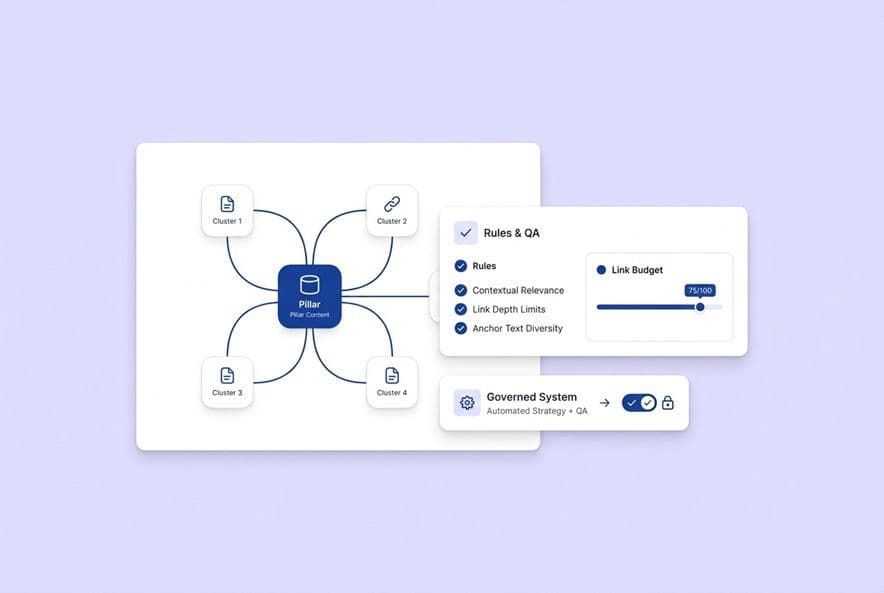
1. Link architecture (pillars, clusters, and "money pages")
Before you automate anything, you have to map out your site. For linking, you really have three types of pages that matter:
- Pillar pages are your big guides on a broad topic. They should receive a lot of links from the articles in their cluster.
- Cluster articles dive deep on one specific part of your pillar topic. They should link up to the pillar and sideways to other, closely related cluster articles.
- Money pages are your conversion pages (think pricing, demo, or trial pages). They need to get links from your most relevant, bottom-of-funnel content, but you have to be careful. Too many links can feel pushy.
If your tool doesn't know your pricing page is a "money page," it'll treat it just like any other blog post. You have to tell it what's what.
2. Link intent tiers (navigation vs. education vs. conversion)
Not all links are created equal. You have to know the job you want a link to do.
- Navigation links help orient readers. They belong in introductions or at transition points, guiding someone to a logical next step.
- Education links offer more detail on a specific concept. They're great for mid-section context, like linking out from a term a reader might not know.
- Conversion links are there to move a reader toward a decision. These belong near the end of an article, at natural conclusion points.
Your automation rules have to reflect these different jobs. If your tool can't tell the difference, then your editors have to.
3. Link rules (anchor text, placement, and "no-link" zones)
These are the guardrails that protect the reading experience.
- Anchor text: Use natural, descriptive phrases, not just stiff keywords. "How we approach customer segmentation" is much better than just "customer segmentation software."
- Density: A good rule of thumb is no more than one internal link per paragraph.
- Placement: Don't put links in the first couple of sentences or the very last sentence of an article. Let the reader get settled in and finish their thought.
- No-link zones: Keep your headings, pull quotes, and simple bullet points clean. They're for structure, not for linking.
These are smart defaults. You can always break them for a good reason, but have a good reason.
4. Link governance (who approves what, and when)
Automation without a clear owner is just chaos waiting to happen. Define these roles:
- Content lead: Owns the overall link architecture (the pillar maps and page roles). They should review it quarterly.
- Writers/AI tools: Their job is to suggest links, not finalize them.
- QA step: Someone needs to review all suggested links before publishing, checking for intent, anchor text, and density.
- Monthly audit: A quick check-in to catch any drift, flag new pages that need links, and fix anything that's broken.
How to Decide Which Pages Get the Links
A simple way to prioritize (revenue, strategy, conversion, freshness)
Not every page deserves equal link love. Use this simple rubric to score your pages and decide where to send your link equity:
- Revenue intent: Does this page directly lead to a conversion? (High score)
- Strategic topic: Is this a core topic you absolutely want to own? (High score)
- Conversion path: Does this page show up a lot in the journeys of users who end up converting? (Medium score)
- Freshness: Is the content up-to-date and accurate? (Pass/Fail)
Use these signals to group pages into tiers. Tier 1 pages are ones you actively link to. Tier 2 pages get links when it's relevant. Tier 3 pages are on hold for now.
When to say "no" to linking
I've seen this happen a hundred times. An automation tool will happily suggest a link to your 400-word blog post from 2021 with an outdated take on the market. You need to actively maintain an exclusion list of pages that are thin, outdated, or just plain wrong for your current strategy. Mark them as "do not link" in your tool until you can update or remove them.
How this changes for AI Overviews and other AI answers
To get cited in AI-generated answers (like Google's AI Overviews or ChatGPT), your internal linking has to send a strong signal about which pages are your citation-worthy hubs. These are your most complete, well-structured, authoritative guides and pillar pages.
AI engines crawl your site by following internal links. When your best pages have a strong network of inbound links from supporting content, they gain authority. Random blog posts with weak connections get ignored.
What are Safe Thresholds for Automated Links?
"How many internal links is too many?" is the right question to ask. The answer depends on what kind of page it is, how long it is, and what the reader is there to do. Here are the starting points my teams use to keep automation from going wild.
Set a "link budget" for each page type
| Page Type | Recommended Internal Links | Notes |
|---|---|---|
| Blog post (1000–2000 words) | 3–5 | Focus on educational and navigational links. |
| Blog post (2000–4000 words) | 5–8 | You can add conversion links near the end. |
| Pillar page | 8–15 | Its main job is to link out to cluster articles. |
| Product/landing page | 1–3 | Keep it minimal. The focus is on the main CTA. |
| Documentation | As needed | Readers are here to complete a task. Link away if it helps! |
Is a link technically correct but strategically wrong?
Your tool will suggest links that are technically accurate but make no sense in context. Before you approve any automated link, ask yourself three questions:
- Would a reader actually want to click this right now? If not, it's just a distraction.
- Does this link serve the reader's goal, or just my SEO goal? If it's only for SEO, kill it.
- Does the linked page deliver on the promise of the anchor text? Make sure the destination matches the expectation.
Anchor text rules to avoid looking spammy
Keep your anchors natural and varied. If you link to the same page with the exact same anchor text over and over, it can look robotic to readers and might even trigger spam signals. Use slight variations. And please, never link weird structural phrases like "as a result" or "in addition to."
How to Fit This Into an AI Content Workflow
Brief stage: plan your links before you write
Before a single word is written, your content brief should spell out which pages must get a link, which would be nice to link to, and which are off-limits. This makes linking intentional from the start.
Draft stage: automate with constraints
If you're using an AI content platform, set it up to add links during generation, not after. Apply your rules for density, no-link zones, and intent before you run the draft. If you let the AI run wild, you'll spend more time cleaning up the mess than you saved in the first place.
QA stage: the 10-minute link review checklist
Before you hit publish, run this quick check. It's what my team does.
- Is this the right number of links for this page type?
- Are the linked pages current and on our priority list?
- Did we avoid linking to anything on the exclusion list?
- Is the anchor text descriptive and varied?
- Is there only one link per paragraph (or so)?
- Are the intro and conclusion free of links?
- Do the links feel natural when I read the sentences out loud?
Natural product mention (teach-first)
Honestly, the hardest part of scaling this is consistency. That's where a platform can really help. Tools like DeepSmith Content Studio build this right into the writing pipeline. It scans your sitemap and inserts a few strategic links as it generates the draft. Linking becomes part of the process, not a manual chore that gets skipped.
How to Keep Link Quality High Over Time
The maintenance rhythm: monthly audits, quarterly reviews
A system needs maintenance. Monthly audits are for catching operational stuff: broken links, new pages that are orphaned, and links pointing to pages that should now be excluded. Quarterly reviews are for strategy: Is our link architecture still right? Do we need to update our page priorities based on performance?
How to handle redirects and pruning without wrecking your site
Redirects are a classic point of failure. Before you redirect a page, you need to update all the internal links pointing to it. When you delete old content, audit its inbound links first and reassign them to the most relevant page that's left. Don't just delete and redirect blindly.
What about multi-site and multi-language linking?
If you run multiple sites or have content in different languages, governance gets tricky. Cross-linking between your English site and your French site, for example, can confuse search engines and fragment your authority. My default rule is simple: link within a single language or region unless you have a very specific, strategic reason not to.
How to Measure If It's Actually Working
Rankings are a lagging indicator. You need to look at earlier signals to know if your system is doing its job.
UX metrics: what are people clicking?
Your internal link click-through rate tells you if your links are actually useful. A link nobody clicks is just noise. Also, look at content pathways. Are people moving from your cluster articles up to your pillars? Are they navigating from informational posts to pages that are closer to conversion? This tells you if your architecture is working.
SEO hygiene: are pages getting discovered?
Run regular site crawls and filter for pages that have fewer than 2-3 inbound internal links. These are your "weakly connected" pages. If a top-priority page shows up on this list, you have a gap in your strategy.
Conversion impact: what paths lead to demos and trials?
Look at your analytics. Which pages do people visit right before they request a demo or sign up for a trial? These pages are proven conversion-assists and deserve more internal link equity.
AI visibility: which pages are getting cited?
If you track your performance in AI answers, pay attention to which of your pages get cited. This tells you what the AI considers authoritative. A page that starts gaining citation momentum is a page you should reinforce with even stronger internal linking. Platforms like DeepSmith AI Visibility can track this for you, which is a huge help.
How to Evaluate Automated Linking Tools
Vendor checklist: controls, exclusions, and workflows
Before you even think about buying a tool, ask these questions:
- How do you determine relevance? Is it just semantics, or can I give you business intent?
- Can we set link budgets per page type?
- Can we have a manual exclusion list?
- Do you support anchor text variation?
- Can we set up "no-link" zones?
- Do you suggest links for review, or just jam them in there?
- How do you handle redirects and URL changes?
Governance questions: who owns what?
Ask the vendor how their customers typically assign ownership for the rules. What does the audit workflow look like? Can an editor override the automation for one article without breaking everything? You need both guardrails and escape hatches.
Pilot plan: prove it on one cluster first
Please, do not roll out a new tool across your entire site at once. Pick one topic cluster, maybe a pillar and 5-10 articles. Run the tool there for 30 days and measure what happens. Prove the model in a controlled environment before you scale.
Natural product mention (teach-first)
One risk with automation is that it can break your brand voice. Look for tools that understand linking isn't just a mechanical task. For example, DeepSmith's Deep IQ layer maintains a source of truth for your brand voice and product positioning. That context shapes every output, so you're less likely to get link placements that just feel... off.
Build an Internal Linking System Your Team Can Actually Run
If internal linking feels like a constant, manual chore, the problem isn't that you're not trying hard enough. The problem is you don't have a system.
A good system doesn't require a bigger team. It requires clear rules, defined owners, and tools that can execute on those rules consistently.
Start by auditing what you have. Map your page roles, find your weakly connected pages, and build that QA checklist. When you're ready to automate that workflow, check out a platform like DeepSmith. Content Studio can insert strategic links during generation, AI Visibility can track what gets cited, and Deep IQ can keep it all on-brand.
The goal isn't just more links. It's a system you can trust.