You published the page. It was good. Then the product changed, the source you cited moved, and nobody noticed for eight months. That's the gap this guide closes, because the way to keep content evergreen is not a label or a date stamp, it's an evergreen maintenance workflow that catches drift before a reader does. By the end you'll have a maintained inventory, named owners, trigger rules, an approval route, and a measurement loop that keeps your best pages useful as the business and the search landscape move.
This is preventive work, not rescue work. If your pages already dropped and you need to fix them one at a time, that's a different job. What we're building here is the ongoing content system that means you have to do that job far less often.
Feeling like this is a lot? It's normal. You'll set it up once, then it mostly runs on triggers instead of on your memory.
Step 1: Write down what "evergreen" means for each page
Evergreen doesn't mean "never needs changing." That definition is why so many pages rot quietly. A better one: the page still answers the reader's question, the facts are still true, and it's still findable and still aligned with the business you have today.
Before you build any queue, write a short page policy for each page in scope. Capture:
- The audience and the job the page has to do.
- The main question or search intent it serves.
- The funnel stage.
- The claims that have to stay accurate.
- The kinds of sources those claims need behind them.
- The canonical URL and the related pages.
- The people: business owner, subject-matter expert, editor, publisher, technical owner.
- The outcomes you'll allow when the evidence changes: keep, update, consolidate, redirect, archive, or remove.
- The signals that should open a review task.
That last one is the hinge. Everything later in this workflow depends on you deciding, now and in writing, what would make this page unsafe or unhelpful.
Governance sounds heavy, and it isn't. It's just a set of policies, roles, and routes that carry a page through creation, review, publication, upkeep, and retirement. Every page gets a named owner. Different content types can run different routes. That's all.
Done when: a brand new teammate can look at a page and answer who owns it, why it exists, what would make it wrong, and what happens next, without asking the person who wrote it.
Where people go wrong: treating a published date or an "evergreen" tag as a maintenance plan. A date is metadata. It doesn't hand anyone ownership, evidence, or a decision rule.
Step 2: Build one canonical content inventory
You need one shared list of what you actually own. Not three tabs and a memory.
Too big a site to do at once? Start with your highest-value section or one buyer journey. One good inventory of forty pages beats a half-finished one of four hundred.
Keep two ideas separate while you build it. An inventory says what exists. An audit judges whether what exists is any good. They can live in the same sheet, but they answer different questions.
Minimum fields worth carrying:
| Field group | What to capture |
|---|---|
| Identity | Title, canonical URL, content type, status, language, CMS location |
| Ownership | Business owner, subject-matter expert, editor, approver, publisher, technical owner |
| Purpose | Audience, reader task, search intent, funnel stage, primary topic, related pages |
| Provenance | Author, research sources, evidence date, claims register, permissions where relevant |
| Lifecycle | Created date, last meaningful change, last approval, current trigger state, disposition |
| Performance | Clicks, impressions, CTR, position, conversions, AI mention and citation signals where tracked |
| Technical state | Indexing status, canonical, sitemap membership, crawlability, redirects, broken links, structured data |
| Decision log | Trigger, decision, work requested, approver, publish date, validation result, follow-up owner |
Update it whenever content is created, changed, consolidated, or retired. A spreadsheet is genuinely fine for a small team as long as it's the single source of truth, edit access is controlled, and one person owns it. The system matters more than the tool.
Done when: every in-scope page has one row, one owner, a purpose, a status, and somewhere to record the next action. No orphans sitting outside the workflow.
Done wrong: recording only URLs and traffic. That gives you a list, not an ongoing content system. Without purpose, owner, source, and disposition, nobody can tell what a signal means or who has to act on it.
Step 3: Classify risk and protect your evidence
Not every page carries the same danger when it goes stale. A pricing explainer going wrong costs you trust. A three-year-old opinion post going stale costs you very little. Sort them, because you can't prevent content decay everywhere at once and you shouldn't try.
Give each page a risk profile. This is a routing aid, not a score to obsess over. Useful dimensions:
- Change exposure: claims tied to your product, pricing, laws, policies, standards, integrations, or market conditions.
- Reader consequence: what it costs someone to act on a wrong answer, financially, operationally, legally, or reputationally.
- Search dependence: whether this is a major acquisition page, a conversion path, or a page whose visibility props up others.
- Evidence fragility: whether the sources are temporary, undated, externally hosted, or likely to move.
- Structural dependence: whether other pages link to it, whether it's a hub, whether a cluster leans on it.
- AI visibility importance: whether AI engines cite it, whether it answers a buyer prompt you track, whether a competitor is winning that same answer.
Then protect the facts. Build a claims and sources register for the statements that actually matter. For each claim, store the source, who owns that source, the evidence date, the claim's scope, and the person responsible for confirming it's still true. When a source changes, you'll know in minutes which pages are affected instead of guessing.
Give yourself real dispositions too: keep, update, consolidate, archive, redirect, remove. Low traffic on its own is not proof a page is useless. Check audience need, business purpose, search demand, inbound links, conversions, and duplication first. Publication on its own is not a reason to keep a page forever either.
Pro tip: separate "this page is declining" from "this page is wrong." A traffic signal opens an investigation. It does not prove that content quality caused the drop. Google's own guidance is to check demand, search-result changes, algorithmic causes, technical problems, security, and spam before making radical changes.
Done when: a reviewer can see which pages need the strongest evidence controls, which claims can change on their own, and who has decision authority for each risk class.
Step 4: Install trigger-based monitoring
Here's the shift that makes this an evergreen maintenance workflow instead of a calendar reminder you keep snoozing. Reviews get created by events, not by dates. Something changes, a task appears, a named person picks it up.
Connect each risk class to observable triggers.
Content and business triggers
- A product, feature, price, policy, integration, or process changes.
- A source is revised, withdrawn, contradicted, or goes dead.
- A subject-matter expert flags a claim as inaccurate.
- Support tickets show readers are confused by the page.
- Search intent shifts, or the page no longer answers the question people are actually asking.
- A new page overlaps and starts cannibalizing.
- A competitor publishes a stronger answer or starts earning citations for a prompt you care about.
- The page no longer fits your current product, persona, or editorial strategy.
Search and performance triggers
Search Console's Performance report gives you clicks, impressions, CTR, and average position, grouped by query, page, country, device, search appearance, and date. The default view covers the past three months, and Google recommends the Last 16 months view when you want to see seasonality or compare year over year.
A diagnostic pattern worth memorizing:
- Impressions and clicks both fall: look at demand, ranking, indexing, technical issues, search-result changes, and algorithm updates.
- Impressions hold but clicks fall: look at your title and snippet, and confirm the result still matches the query.
- One query declines: isolate it in Performance, then check whether demand or intent moved.
- A page drops after a URL change: expect wobble while Google recrawls, and confirm redirects, canonicals, links, and indexing.
- The change shows on mobile only, or in images only: route it to the right owner instead of rewriting the page blindly.
Treat the data with the care it deserves. Results vary by time, location, device, and user history, the newest data is preliminary, and chart and table totals can differ because they're aggregated differently.
Technical triggers
- A URL becomes not indexed, or its indexing reason changes.
- A canonical changes when you didn't ask it to.
- Robots, noindex, server, not-found, redirect, or crawl issues show up.
- Important pages fall out of the sitemap.
- A page loses its crawlable internal links.
- Core Web Vitals move into Poor or Needs improvement for a URL group. Good means LCP at or below 2.5 seconds, INP at or below 200 milliseconds, and CLS at or below 0.1.
- Security issues, manual actions, or spam-policy warnings appear.
The Page indexing report tells you which URLs are indexed, which aren't, and why. URL Inspection covers one URL in detail: its indexed version, discovery, crawl state, chosen canonical, structured data, and a live test.
AI-search triggers
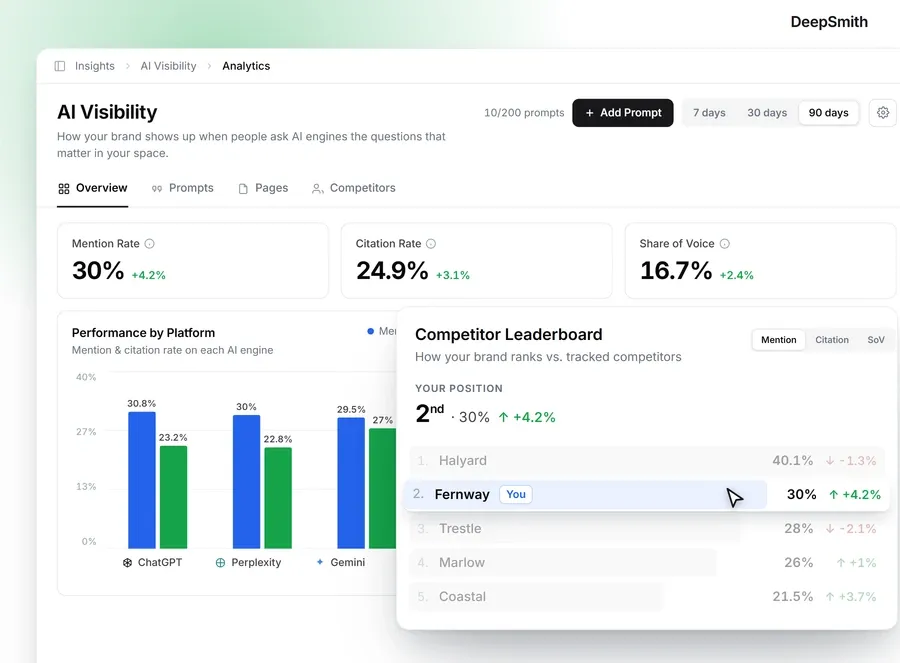
Track whether the buyer prompts you care about mention your brand, cite your pages, or show a competitor instead. Watch which pages get cited, which prompts drive those citations, and how your share of voice moves. Google's guidance for generative AI features is refreshingly plain: the page has to be indexed, eligible for a snippet, crawlable, and genuinely helpful. There's no special AI schema to add.
This is the trigger class most teams have no wiring for at all, and it's the one where a competitor can quietly take your answer. If you'd rather not build prompt tracking by hand, DeepSmith's AI Visibility tracks mention rate, citation rate, and share of voice per prompt, shows which of your pages earn the citations, and shows which competitor pages are winning the ones you don't. Those signals drop straight into your trigger catalog.
Done when: every trigger has an owner, a source system, a severity route, a task destination, and a definition of what evidence the reviewer must collect. An alert with no decision path attached is noise.
Where people go wrong: using one traffic threshold as the whole maintenance system. Rankings move for seasonality, demand, layout changes, personalization, technical faults, competitors, and updates. A single number can't tell those apart.
Step 5: Route every trigger through review and approval
A trigger is not work yet. It becomes work when it turns into a ticket somebody owns. This is the step where evergreen content upkeep either happens or quietly doesn't.
Give each one these fields:
- Page and canonical URL.
- Trigger type and detection date.
- The evidence: the report, the source change, the query, the crawl status, the competitor observation.
- Risk level and affected audience.
- Proposed disposition: keep, update, consolidate, redirect, archive, or remove.
- Required reviewers.
- Acceptance criteria.
- Publisher and verification owner.
- Decision, change log, and post-publication validation.
Use role names, not team names. The owner is accountable for the page staying fit for purpose. The subject-matter expert verifies the facts. The editor verifies clarity, structure, voice, and usefulness. The approver handles material risk. The publisher controls release. The technical owner checks canonical, redirects, indexing, rendering, and links.
On a team of two, one person holds several of those hats. That's fine. Write down which hats, because the handoffs are the part that breaks.
Sensitive pages may need a legal or accessibility reviewer. A policy change may mean pulling outdated guidance and publishing its replacement together, not a week apart.
Done when: no trigger can be closed without a decision, a named approver, recorded evidence, and a next state. "Needs review" is not a final status.
Where people go wrong: making the writer the permanent owner of accuracy. Writers move on, change roles, or simply don't have authority over product and policy facts. Accuracy belongs to the function accountable for the page's purpose.
Step 6: Publish with content, technical, and AI QA
The change is written. Before it goes live, check it against the acceptance criteria you set, not against whether the prose reads a bit nicer than it did.
Editorial and evidence checks
- The page answers its question near the top and matches current intent.
- Every claim traces to the approved source register.
- Product, policy, pricing, and competitor references are current and permitted.
- Headings, paragraphs, lists, and link text make it easy to scan.
- It's written for people, not padded to hit a number. There's no magic word count and no ideal number of headings.
- Images are relevant and carry descriptive alt text.
- The change log says what changed and why.
Technical checks
- The intended canonical is present and resolves.
- The page is crawlable and indexable when it should be.
- Redirects, internal links, sitemap membership, structured data, rendering, and metadata are correct.
- Internal links use real anchor elements with href values, descriptive anchor text, and natural surrounding context. Every important page should be reachable from another page.
- Run the URL Inspection live test when implementation changed or the indexed snapshot may be stale.
AI-search checks
- The page gives a direct, self-contained answer that survives being quoted out of context.
- Headings and sections make the entities, definitions, steps, and caveats obvious.
- The page is still useful even if no AI engine ever cites it.
- Nothing manipulative has been added. Content built mainly to game rankings or generative-AI responses can trip scaled content abuse policy.
Where this loop tends to jam is production capacity. The triggers fire, the tickets pile up, and nobody has the hours to write the replacement. This is where connecting maintenance to production helps. DeepSmith's Content Studio turns an approved idea into a researched, publish-ready article with internal links, external links, metadata, and a cover image already in place, grounded in the product facts, persona, and brand voice you stored once in Deep IQ. You still read it, edit it if it needs it, approve it, and publish it. The system moves the work; it does not take the decision.
Done when: the approver signs off on substance, the publisher checks the live page, and the technical owner records the URL, canonical, indexing state, and any validation request.
Step 7: Close the loop with logs, measurement, and retirement
A workflow that never writes anything down repeats its own mistakes. After every change or decision, put the result back into the inventory and the ticket:
- What changed, what didn't, and why.
- Which claims or sources were affected.
- Who approved it and who published it.
- The live URL, canonical, redirect, and sitemap state.
- The validation result and date.
- Before-and-after numbers from Search Console and from the business metrics you have.
- Any movement in mentions, citations, page attribution, or share of voice.
- Any follow-up trigger or open question.
Be patient with the measurement. Google says changes can take anywhere from a few days to several months to show up in Search, and that there's no guarantee of a noticeable result at all. Treat the outcome as evidence for your next decision, not as proof of cause.
Then do the part almost everyone skips: retire things. A page should go when its purpose is gone, when it's inaccurate, when a better canonical page already covers it, or when it no longer serves anyone. Before you remove it, check inbound links, conversions, search demand, related pages, and whether a redirect or replacement is needed. Record the decision and tell the owners it affected.
This is also where the loop actually closes. Results and decisions update the inventory. The updated inventory changes your risk profiles. The risk profiles change your triggers. That circle is what makes evergreen content upkeep a system instead of a chore you keep rediscovering.

Done when: the inventory reflects reality, every decision is auditable, open issues have owners, and nothing you retired left a broken journey or an orphaned link behind.
What to do next
Don't try to cover the whole site this week. Pick one high-value section. Build the inventory rows for it, name an owner per page, write five triggers you can genuinely observe, and decide who approves a change. That's your first pass, and it's enough to prevent content decay in the part of your site that earns the most.
Next month, add a section. The month after, add the AI-visibility triggers. Momentum matters more than completeness here, and you don't need a perfect map of the whole site to keep content evergreen where it counts.
If you'd like the monitoring and the production side of that loop in one place, start a DeepSmith free trial and see what your pages look like with real data behind them.