


You have forty location pages, and you can't say for sure which ones still tell the truth. One branch changed its hours in March. Another added a service in June. A third moved two blocks east. The pages still say what they said last year, and now people are asking AI assistants where to go near them. This guide gives you a repeatable system for location page freshness across dozens of branches, so every page stays accurate, indexable, and in play.
If that feels like a lot, take a breath. You don't need to rewrite forty pages this week. You need one record per branch, one list of triggers, and one loop that checks the result.
What you need: access to your CMS, your business listings, Search Console, and one person per location who actually knows what changed.
Step 1: Build one source of truth for every location
Start with a record, not a page. Create one row per real branch, and give it a stable code that never changes when the copy does. That code is what lets you update one branch without accidentally overwriting another.
Each record should hold the facts a customer would ask for:
- A stable business or store code, plus the official business name.
- The canonical location page path and full URL.
- Street address, locality, region, postal code, country, and coordinates where you have them.
- Primary phone and any additional phones.
- Primary and additional categories.
- Regular opening hours, a special-hours calendar, and temporary-closure status.
- Website URL, social links, attributes, services, products, and the business description.
- Opening date.
- Local photos and video, with capture dates and usage rights.
- Local team, branch-specific services, accessibility, parking, transit, and directions.
- Branch-specific reviews or testimonials, only where permission and policy allow.
- Last verified date, change owner, affected channels, and next action.
That last line is the one people skip, and it's the one that makes location page maintenance survive a busy quarter. A fact with no owner and no verified date is a guess wearing a suit.
Treat this record as the controlled input for both the page and the business profiles. Not the other way around. When the page, the listing, and the spreadsheet each become their own source of truth, you get three versions of Tuesday's opening time and no way to tell which one is right.
Done when: every location has one owner, one stable identifier, one live page, a claimed listing where it's eligible, and a dated record of its latest verified facts.
Common mistake: storing only a city name and a general phone number. That's a label, not a record. It describes your brand, not the branch, and it can't drive an update.
Here's the good news: you probably have most of this already, scattered across an operations sheet, a booking system, and someone's inbox. Pulling it into one place is a morning of work, not a project.
Step 2: Give every real branch one crawlable page
Give a location its own page when you genuinely serve that location and can say something useful about it. That second half is the test most multi-location SEO programs fail.
Every location page should answer the practical questions fast:
- Where exactly is this branch?
- When is it open, including special hours?
- How does someone call, book, buy, or request service?
- Which services or products are available here?
- How do you get there, park, get inside, or arrive by transit?
- Who works there, and what local expertise do they have?
- What proves this page describes a real branch?
- What should the visitor do next?
Then wire it in. Link every location page from a browseable directory or store locator. Link that directory into your main site hierarchy. Point the business listing at the matching page, not at your homepage or a generic contact form.
Use one consistent URL pattern and one information architecture. Consistency means the same shape and the same data model across branches. It does not mean the same words. That distinction is the whole game, and Step 3 is where you make it real.
Done when: every active branch has one canonical page, the directory links resolve, the listing points to the right URL, the page is reachable through internal links, and it doesn't bounce visitors to a generic contact page.
Where people go wrong: spinning up a page for every suburb, neighborhood, and five-mile radius with no real operation behind it. A page that exists only to catch a place name is a quality risk, and it dilutes the pages that deserve attention.
Step 3: Add real local proof, not city-name swaps
Take the city name off a location page. Is there still evidence that this branch exists and helps a local visitor? If not, you don't have a page yet. You have a template.
Build a repeatable local-proof block instead. The template stays shared. The evidence inside it varies by branch:
- Real storefront, interior, equipment, entrance, and local-team photos.
- Branch-specific services, stock, appointment types, facilities, and accessibility details.
- Directions, parking, transit, landmarks, entrance instructions, and service boundaries.
- Local staff bios or expertise, when current and approved.
- Branch-specific customer feedback where it's appropriate.
- Local case studies, projects, events, partnerships, or community work, when genuine.
- Area-specific FAQs, and regional advice or pricing where it truly differs.
- A clear call to action tied to that branch.
Practitioners in local search consistently recommend the same three moves: avoid a template that changes only the city name, use actual branch photos instead of stock, and show feedback from customers who visited that specific branch. Those are field recommendations, not published Google requirements, and it's worth keeping the difference straight when you present the plan upstairs.
Common mistake: using AI to spin dozens of superficially different pages. Google treats scaled content abuse as producing many pages primarily to manipulate rankings rather than help people, and that includes unoriginal pages generated at volume. The fix isn't more synonyms. The fix is real location-level substance, or fewer pages.
That mistake? Almost everyone makes it once. It usually starts with a well-meaning request to "get all sixty live by the end of the month."
This is also where a content platform helps in an honest way. DeepSmith's Content Map crawls your site and your competitors' sites, classifies every page onto one shared topic and funnel-stage taxonomy, and surfaces coverage gaps and untapped topics, with sitemaps rechecked every 24 hours. Opportunity Agents read that data and return ideas with the supporting data point attached. Use them to find the local service or decision-stage coverage you're missing. Then check it against a real branch capability before anyone writes a word.
Step 4: Trigger updates by event, not by the calendar
"Refresh location pages monthly" sounds like a system. It isn't. A branch doesn't change on a schedule, so your updates shouldn't either.
Use event triggers. When a branch does any of these, open a small update job:
- Changes its regular hours.
- Has holiday, event, or other short-term schedule changes.
- Closes temporarily, closes permanently, or reopens.
- Moves, renames, changes phone, or changes service area.
- Adds or removes a service, product, attribute, or facility.
- Changes booking, ordering, or contact instructions.
- Gains new approved photos, staff, projects, or local proof.
- Gets a meaningful branch-specific question worth a public answer.
- Receives a review that needs a timely, policy-compliant response.
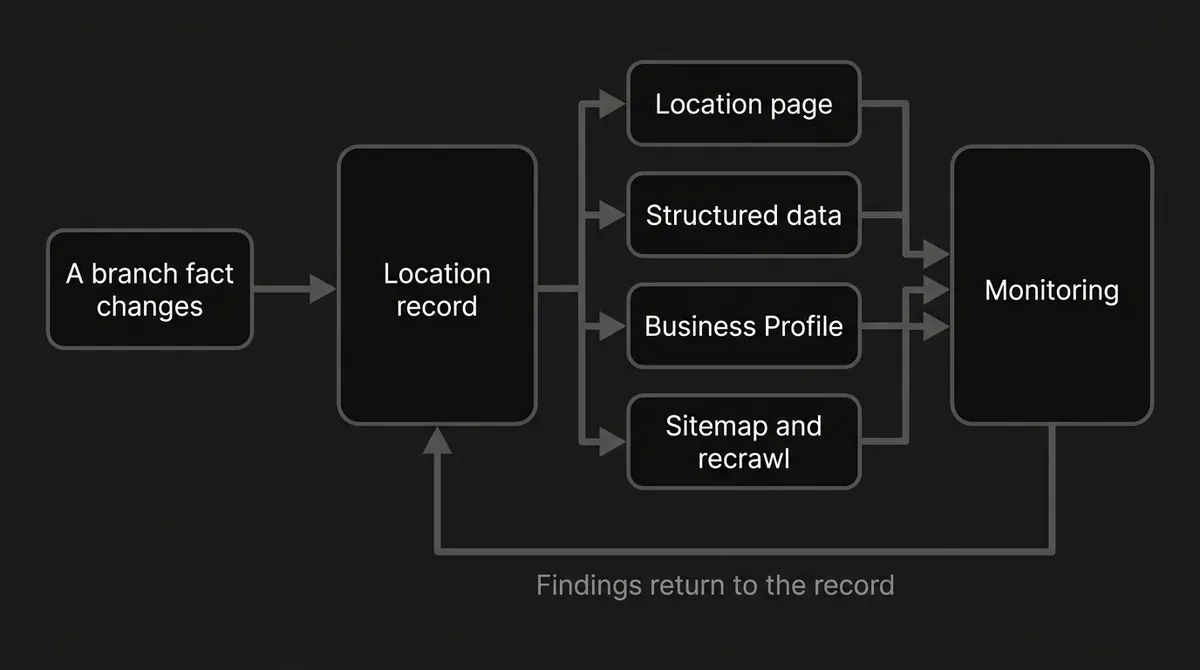
The order matters. Update the source record first. Then the location page, the structured data, the Google Business Profile, and any other important listing. Log the old value, the new value, the effective date, the owner, and the verification result.
On a verified Business Profile you can edit the name, category, address and pin, service area, hours, phone, chat, website, social links, attributes, photos and videos, description, opening date, menu or services, products, and Q&A. Google reviews changes before they go live, and what's available can differ between Search and Maps and by device. Plan for a lag rather than assuming an edit is live the moment you save it.
Hours have their own rules, and they're easy to get wrong:
- Regular hours: edit the profile's main hours and set each open day and time.
- Special hours: use these for a temporary adjustment or a closure of six consecutive days or fewer.
- More hours: use these when a specific service, like delivery, takeout, or senior hours, runs on a different schedule.
- Temporarily closed: use this for a closure longer than seven days, an off-season closure, or an indefinite one.
- Permanently closed: mark the profile closed. It can still appear for branded searches with a clear closed status.
One trap worth naming. If a location was marked permanently closed because it moved or changed names, don't just reopen it. Create and verify the new business instead, and ask Google for help if you need reviews transferred.
Here's a compact version of the pattern you're building:
| Change event | On the location page | In listings | Validation | Priority |
|---|---|---|---|---|
| Holiday or event hours | Hours block, visit instructions, FAQ | Special hours | Check effective dates on the live profile | Before the event |
| Closure up to six days | Notice and visitor CTA | Special hours | Confirm the reopening date | Immediate |
| Closure over seven days | Prominent status, alternatives | Temporarily closed | Check the customer-facing status | Immediate |
| Permanent closure | Closure notice, redirect logic | Permanently closed | Remove stale booking paths, inspect redirects | Immediate |
| Address or move | Address, map, directions, parking | Address, pin, phone, site link | Check schema, NAP, redirects | Immediate |
| Service or attribute change | Services, availability, FAQs, proof | Services, attributes, products | Compare page against profile | Promptly |
| New local proof | Photos, team, project, event, FAQ | Photos and compliant content | Check dates, permissions, accuracy | On approval |
Done when: the page, the schema, the profile, and the directory agree on every customer-facing fact, and the ticket carries a verification result.
Teams that keep location pages updated at scale aren't working harder than you. They just stopped relying on memory.
Step 5: Run bulk updates without wiping good data
At a dozen locations you can edit by hand. At sixty you can't, and this is the point where multi-location SEO either scales or quietly breaks. Bulk operations are the answer, as long as you respect one behavior that catches people out.
Business Profile Manager can handle multiple profiles at once. For bulk verification, Google's stated threshold is 10 or more locations of the same business, or an individual Business Profile. Duplicate, suspended, and disabled profiles don't count toward that minimum. The account has to include all the profiles being managed, can't be a service-area business for this workflow, can't already be verified in the relevant way, and can't have account errors. Only owners or authorized representatives can verify, and Google may ask for evidence that your chain size matches the profiles you supplied.
A safe sequence looks like this:
- Export the latest location information.
- Preserve the existing store codes and identity fields.
- Change only the columns that need changing. For a selected-field update, include the store code and those fields only.
- Check for duplicate or missing store codes before you upload. Store codes can't be updated through the spreadsheet.
- Use an accepted format: XLS, XLSX, ODS, or CSV.
- Keep country-specific address formats correct.
- Upload through Business Profile Manager.
- Read the warnings, the affected-location counts, and the downloadable detail.
- Preview the changes.
- Apply only after a human has read that preview, then review the result.
- Recheck a sample of locations, plus every high-risk change: hours, addresses, closures, phone numbers.
Pro tip: never upload a "complete" sheet rebuilt from an old export unless every blank in it is deliberate. In Google's bulk workflow, a headed column with nothing beneath it can delete the existing information for that column. A partial update touching only the fields you meant to change is the safer move almost every time.
Uploading the sheet doesn't send the verification request by itself. Run the verification workflow afterward. Once it succeeds, eligible profiles in the account that nobody else has claimed can be verified, and you'll get an email confirmation. If the bulk verification tab isn't there at all, Google's answer is that the account may not have enough eligible profiles, so verify those locations individually.
Step 6: Validate markup, indexing, and change discovery
An accurate page nobody can crawl is a private document. This step is where location page freshness turns into something a search engine can actually see.
Give every location page its own location-level structured data. Google's guidance is to define each location as LocalBusiness, using the most specific subtype that fits, like Restaurant, DaySpa, or HealthClub.
The supported rich-result requirements are short: name and address as a physical PostalAddress. Beyond that, the useful supported properties include geo coordinates, telephone with country and area code, the working url for that specific location, opening-hours specifications, department where a location holds a distinct one, priceRange, and image. Add aggregateRating and review only if your site itself collects reviews about other local businesses and you follow the applicable review guidelines.
One rule holds all of it together: don't put a fact in structured data that the visible page doesn't support. Structured data helps engines understand a page and can support eligibility for rich results, but it doesn't guarantee a feature will appear. It's also not a special requirement for Google's AI Overviews or AI Mode.
Then validate, in this order:
- Run representative location pages through Google's Rich Results Test.
- Fix critical errors first, then look at non-critical warnings.
- Use URL Inspection to confirm Google can reach and understand the page.
- Check the page isn't blocked by robots.txt, noindex, a login wall, broken canonicalization, or a failed render.
- Confirm the sitemap holds the canonical URL.
- Set sitemap
lastmodto the date and time of the last significant, verifiable update. Google gives main content, structured data, and links as examples of significant. A copyright-date change is not. - For a small number of important changed URLs, request indexing through URL Inspection. You need to manage the property, quotas apply, and repeated requests don't speed anything up.
- For many changed URLs, submit or update the sitemap instead. A sitemap is a discovery hint, not a promise that Google will fetch it or crawl every URL.
- Watch indexing afterward. Google says crawling can take anywhere from a few days to a few weeks, and asking for a recrawl guarantees neither speed nor inclusion.
Done when: representative pages clear critical markup checks, are indexable, carry accurate last-modified data, sit in the sitemap, and your change log records both the recrawl request and the later inspection result.
Where people go wrong: stamping lastmod on every page at every deployment. It tells engines nothing true, and it costs you the one signal you had for saying "this page genuinely changed."
Step 7: Monitor local AI search visibility branch by branch
One brand-level visibility number can't tell you which of your forty branches went dark. Local AI search visibility has to be measured per location, or it isn't measurement at all.
Track at least this, per location page:
- Indexed or not indexed.
- Canonical URL and sitemap inclusion.
- Organic impressions, clicks, queries, and conversions where you can get them.
- Local pack or map visibility checks, run from consistent locations with a consistent query set.
- Business Profile status, hours, reviews, photos, and customer actions.
- AI mention rate, citation rate, cited page, prompt, platform, competitor, and date.
- Whether the cited page is the location page you intended, or an older generic one.
- How fresh the specific fact that got cited actually is.
Google says local results rest mainly on relevance, distance, and prominence. Complete, accurate profile information supports relevance. Distance depends on where the searcher is. Prominence reflects how well known a business is, including links and reviews. None of that is a published freshness score, so don't sell it as one internally.
For Google's AI features, a page has to be indexed and eligible to appear with a snippet. Google says there are no extra technical requirements and no special AI schema. Ordinary technical SEO, crawlability, useful people-first content, policy compliance, clear text, and good page experience still carry the weight. Google also notes that query fan-out can trigger several related searches, and that AI Overviews and AI Mode may use different models, so links and answers vary.
Crawler access is its own checklist, and it's quick:
- OpenAI identifies OAI-SearchBot as the crawler behind ChatGPT search. Sites opted out aren't shown in ChatGPT search answers, though they may still appear as navigational links. OAI-SearchBot and GPTBot are separate settings, and GPTBot is about possible training use, not search eligibility.
- Perplexity says PerplexityBot exists to surface and link sites in its results, not to crawl for model training, and recommends allowing it. Your web application firewall may need an explicit allow rule.
- Both say robots.txt or crawler-setting changes can take about 24 hours to take effect, so change them and check back tomorrow, not in ten minutes.
Bing Webmaster Tools gives you a first-party directional layer through its AI Performance report: total citations, cited pages, page-level citation activity by URL, grouped grounding queries, a timeline, intent classifications including local, topic clusters, and citation share per grounding query. It refreshes daily with a short delay. Read it as representative and aggregated, not as a complete log, and remember it isn't measuring rankings, authority, traffic, or engagement.
For the cross-platform view, this is the layer DeepSmith is built for. You define the buyer questions worth tracking, and AI Visibility checks them on a schedule and reports mention rate, citation rate, share of voice, sentiment, and visibility trend. The Pages view attributes citations to your specific pages and shows the prompts driving them, which is exactly the per-location cut this step needs. Build a prompt set from location-intent questions and branch-and-service combinations, then read Pages and competitor citations by location. Ten engines are covered, from ChatGPT and Perplexity through Gemini, Claude, Google AI Overviews and AI Mode, Grok, Meta AI, Copilot, and DeepSeek, with coverage rising by plan. It won't update your listings or guarantee a citation, and it doesn't replace Search Console or your profile checks. What it does is tell you which branch pages engines actually cite.

Then close the loop. Each reporting cycle, sort by location and by recently changed facts. Inspect any page whose citations vanished or moved to a generic URL. Compare that page against the source record from Step 1. Fix the biggest factual or usefulness gap you find, validate the change, and write down the result. That cadence is your operating choice, not an official threshold.
Where to go next
Pick five locations. Not forty. Build their records properly, run them through Steps 2 through 6, and set up the monitoring in Step 7 for just those five. That is your whole location page maintenance system, running small. You'll learn where the real bottleneck sits, and you'll have a pattern that works before you scale it.
Momentum matters more than completeness here. One accurate branch beats forty stale ones.
When you're ready to see which location pages AI engines actually cite, and to produce the on-brand updates that close the gaps, start a 7-day DeepSmith trial and track your first set of location-intent prompts.


