If you already have a keyword list and someone asks you to start tracking prompts, it's natural to wonder how much of your work carries over. A lot of it does. The part that changes is how you build the list, and that's what this piece is about. Prompt tracking vs keyword tracking is mostly a question of what you choose to write down for each entry, how you group those entries, and how you keep them steady enough to compare from one month to the next.
Here is the short version. AI prompt tracking means checking, on a schedule, how AI systems answer a chosen set of buyer questions, and saving the answers. Keyword tracking organizes monitoring around selected search words and phrases. Prompts are often longer, but length isn't the real difference. A prompt can carry the buyer's situation, their constraints, and what they want back, and that changes how you select, group, and maintain the list.
This article stays on that one point, how the list gets built. It doesn't compare AI visibility measurement with rank tracking as a whole, because that's a separate decision.
Prompts vs Keywords at a Glance
The table below compares the two across the things that matter when you're building a list. A keyword can be a complete question, and a prompt can be two words, so read each row as a tendency and not a rule.
| List-building criterion | Keyword list | Prompt list | What to do differently |
|---|---|---|---|
| Length | Short or long | Often longer in conversational search, but not always | Don't add words just to make a keyword look like a prompt |
| Intent | Usually inferred from wording and surrounding evidence | Can be stated outright, though short prompts still exist | Write down what the buyer is trying to decide or do |
| Context | A phrase may leave out audience, budget, or circumstances | The text can include those, or lean on earlier turns and personalization | Separate situations that really differ, and note what you left out |
| Variations | Similar phrases may be one topic or several intents | Paraphrases may be one decision, while a small constraint can make a new one | Cluster by meaning first, then keep the differences that matter |
| Demand evidence | Search volume tools and your own query data help, but are incomplete | Prompt demand estimates depend on the provider's data and method | Use keyword demand as an input, not a count of AI conversations |
| Stability | Wording, demand, and meaning shift with markets and seasons | Buyer language shifts, and answers can vary even when the input doesn't | Keep list changes and answer changes apart |
Prompt Length and Keyword Length
Length is the first thing people notice, so it's worth getting right. Google's U.S. AI Mode insights say the average AI Mode search is triple the length of a traditional Search query, measured on Google internal data from April 2025 to May 2026. That's a reasonable sign that conversational search lets people say more of what they mean.
It doesn't tell you the same ratio holds for ChatGPT, Perplexity, or Gemini, or in every market, and the page doesn't say whether it counts words or characters. Use it as a general direction, not a word count for your own list.
The exceptions are easy to find. A keyword can already be a detailed question, like "how to create a content calendar for a small marketing team." A prompt can be as short as "content calendar tools," and a follow-up like "Which one supports approvals?" carries a lot of meaning from the conversation before it.
Long-Tail Is Not the Same as Long
It's tempting to say prompts are just long-tail keywords. Ahrefs defines long-tail keywords by how little search demand they get, not by how many words they have. One and two word phrases can be long-tail, and a long query can be about a very popular topic.
A prompt may overlap with a long-tail search, but a prompt can also add a task, a constraint, or a dependency on earlier turns that the parent keyword never captured.
What This Means for Your List
When you turn a keyword into a prompt, add only the details that would change what a good answer contains. A role, an industry, an integration need, a budget, or a workflow constraint can earn a place in the wording. Decorative detail can't. Putting "What is the best" in front of every keyword doesn't give you a representative list either, it just gives you the same list with the same blind spots, now phrased as questions.
Buyer Intent and Question Design
Both keywords and prompts carry intent, so it's a mistake to say keywords show topics and prompts show intent. Keywords can be strongly commercial, can be full questions, and can be very specific. Prompts can be vague. The useful difference is that a conversational input gives the buyer room to state more of their intent directly, so there is more for you to keep in the record.
For each prompt you're considering, it helps to answer six small questions.
- What job is the buyer trying to get done?
- Who is asking, and would that change the answer?
- Is the buyer learning, comparing approaches, or choosing a solution?
- Which requirements would change the recommendations or the sources?
- Does the buyer want an explanation, a shortlist, a comparison, a plan, or a check on a claim?
- Does the question name no brand, your brand, or a competitor?
A line each is enough to tell you whether a candidate is a real buyer decision or just a keyword in a longer sentence.
Branded and Unbranded Questions
The sixth question matters more than it looks, so keep three groups separate: unbranded category or problem questions, which test whether you show up before a buyer names a vendor, branded questions, which test how a system describes a company it already knows, and competitor questions, where a rival is named. A brand showing up in an answer to a question that already names it tells you something different from being introduced in an unbranded recommendation. Filling the list with branded prompts makes discovery look better than it is, and leaving them out can hide inaccurate product descriptions.
From Keyword Seed to Buyer Question
These examples are ones I made up to show list design. They aren't observed customer queries and they don't show measured demand.
| Keyword seed | Representative prompt | What it adds | List decision |
|---|---|---|---|
| content calendar software | "Which content calendar tools suit a three-person marketing team that needs an approval step?" | Team size and a workflow need | Keep if small teams with approvals are a buyer situation you serve |
| content calendar software | "What tools help an agency manage separate calendars for multiple clients?" | A different operating model | Treat as its own family, because the buyer situation changed |
One keyword seed can produce several valid prompt families, and several seeds can collapse into one family when they describe the same decision.
Prompt Families and Meaningful Variations
The unit that makes a prompt list manageable is a prompt family, a group of questions that stand for the same underlying buyer decision. You define it for your own research, and it isn't a standard shared by every tool.
A simple test sorts most cases: would a good answer need materially different recommendations, sources, or reasoning? If not, the prompts probably belong in one family.
Take these three:
- "Which content planning tools work for small marketing teams?"
- "What are good content planning tools for a small marketing team?"
- "Can you recommend content planning software for a small marketing team?"
They describe one buying situation, so they likely belong together, though the answers won't always be identical.
Some differences do earn their own coverage when they matter to your business, like a single-brand team versus an agency serving many clients, a general recommendation versus one that has to work with a specific CMS, or a market in a different language where you actually sell. Don't multiply every combination automatically. Include the ones you have buyer evidence for.
Capacity Is Not Coverage
A list with a dozen paraphrases of one problem can tell you less than a shorter list spread across distinct decisions. The number of prompts you track is capacity, not coverage. It works the other way too: one representative question doesn't promise you'll show up across every related conversation, so grouping into families is a sampling choice.
Prompt Stability and Comparable Lists
People say prompts are unstable, and that can mean three different things. It helps to pull them apart.
Input stability means the exact text and test conditions stay the same, which you control by keeping a fixed baseline. Buyer-language stability means customers keep framing the same need the same way, and you can't control that, so you review the list as products and markets change. Answer stability means repeat checks return similar recommendations, mentions, or sources, and fixing the wording doesn't fix that.
A buyer's underlying problem can stay the same while the way they phrase it changes. An exact prompt can stay the same while its answer changes. Keywords have the first kind of drift too, since wording, demand, and meaning move with markets and seasons.
On the third kind, OpenAI describes AI systems as nondeterministic, and its prompt engineering guidance notes that different model snapshots in the same family can give different results. That guidance is about applications built on the API, so it doesn't mean a monitoring service can pin the model behind every consumer platform. What you can take from it is a method: keep the input the same, write down material changes, and look at repeated observations before you call one surprising result a trend. You also don't need to treat every paraphrase as fragile, since a 2025 EMNLP paper on prompt sensitivity found some of the measured wording effects came from evaluation methods that missed correct answers phrased differently.
Conversation Context and Generated Search Queries
The sentence a buyer types isn't the whole input, and it isn't the whole search either. Earlier turns, saved memories, and location can all shape how a system reads a question. OpenAI says ChatGPT search may rewrite a user's input into one or more targeted queries for search providers, and may send more specific ones after looking at the first results.
Google describes something similar as query fan-out. So keep three things apart: the question the buyer asked, the context the system had, and the retrieval queries the system produced. Fan-out queries can suggest subtopics, but they aren't verified customer prompts, so don't put them in your list as if they were.
Follow-Ups Need a Protocol
"Which one is cheaper?" can't be checked on its own, because nobody knows which options came before it. For a plain baseline, prefer questions that make sense standing alone. If you study a multi-turn journey, keep the whole sequence in order and keep those findings separate from your standalone ones.
Demand Evidence and Prioritization
Your keyword data is still useful here. An existing list already holds your category language, recurring problems, and likely commercial topics, so it's a good place to start. It just isn't a finished prompt list.
Google Keyword Planner defines average monthly searches as the average for a keyword and its close variants, by default over 12 months, and Google says the statistics are rounded. So write down the market and date range behind any volume you use, and don't add up similar terms as if their demand were separate. Search Console wording is useful too, but it isn't a complete record of demand.
Don't Turn Search Volume Into Prompt Volume
It's tempting to take a keyword's monthly volume and call it the number of times people ask the matching prompt. Nobody has that count for the outside AI platforms, as our look at whether anyone can know AI prompt volume explains.
A concrete example is Ahrefs' explanation of its AI adjusted volume. It's built from a prompt's parent Google keyword volume and a ratio based on AI platform referral traffic compared with Google organic traffic, and Ahrefs says it isn't drawn from user query data. That makes it a fair input for setting priorities, and not a count of people who asked the exact prompt. When you see a demand number for prompts, ask what it really is: observed searches, panel behavior, a modeled topic, or a proxy from Google.
A Reasonable Priority Order
This is a suggested order, not a validated scoring model. Start with relevance to a product or segment you serve, then evidence that the decision recurs in sales calls, support, interviews, or reviews, then how much it matters if the answer is missing or wrong. A high-value question where your brand has no mentions yet may be an important gap, so don't drop it just because the first result is zero.
Building a Prompt List From a Keyword List
This is the playbook I'd use. It's a working process pulled together from the evidence above, and it isn't an industry standard.
- Write the decision inventory. List the buyer decisions you need to understand. "How small marketing teams evaluate approval workflows" is useful, and "everything related to content marketing" isn't.
- Gather evidence. Pull your keyword clusters together with real customer wording from sales calls, demos, support tickets, interviews, reviews, and site search. Keep track of where each entry came from: observed wording, a paraphrase of a need, a tool suggestion, or your own hypothesis. Suggestions can widen your thinking, but they aren't verified questions at a measured frequency.
- Build a coverage matrix. Sort candidates by topic or job, audience, buying stage, brand status, and market. Look for missing decisions before you add more phrasings.
- Group into families. Pick one clear canonical question for each important family, and keep separate versions only where a real constraint changes the answer. Note why each extra one is there.
- Review the wording. Use natural, neutral language with real context. "Which tools help a small team plan articles and manage approvals?" works, while "What is the best content software?" is too weak and "Why is DeepSmith the best solution for every marketing team?" is a leading question that tests your own framing.
- Split baseline from exploration. Keep a stable core for repeat comparisons and put new language and uncertain ideas in a separate exploratory set. Twelve core questions and four exploratory ones is only an example of the shape, not a target.
- Set the observation protocol. Pick the platforms your audience uses, running the same prompts across engines, keep the exact wording, and write down the conditions you can see. Report failed collections apart from completed answers.
- Read the answers. Open the actual answers behind anything unusual, and read prompt-level win and loss data for the question that mattered. A brand being named is different from a link to one of your pages, and a surprising result is something to verify before it becomes a task.
- Review on a rhythm. A light monthly look and a more careful quarterly look at coverage is a reasonable cadence, though those intervals are suggestions. Retire questions for a documented reason, and record a new version when wording changes materially. Our guide on keeping a tracked prompt list fresh goes deeper on this step.
- Report within limits. Say which questions, markets, platforms, and dates sit behind a summary, and what's excluded. "Results across our tracked question set" is accurate. "Our share of all AI buyer conversations" isn't.
If you run this in a spreadsheet, give each prompt an ID, its exact text, a family label, the source of the idea, the audience, stage, brand status, market, platform, collection date, and whether it's core or exploratory. If a tool doesn't show a condition, write "unknown".
How a Changed List Changes the Headline
Here is a small example with made-up numbers. If your brand is mentioned in six of 20 tracked questions, that's 30%. Add 20 questions with no mentions and it's six of 40, or 15%, though none of the original answers changed.
It's arithmetic, not a customer result. It shows why a changed list can change the headline, and why you want a like-for-like view of the old core next to the expanded one. If one decision has six paraphrases and another has one, a simple average also gives the first six times the weight, so keep the same number per family or report families separately.
Where DeepSmith Fits
Keyword research doesn't go away. It keeps telling you which topics and categories matter, and the prompt list is where you turn those into the questions buyers ask an AI system. DeepSmith is built for that second step and for what comes after it. If you're weighing tools, our roundups of the best prompt tracking tools and the best AI visibility tools cover the field.
You define the buyer questions to track in DeepSmith, and Discover Prompts can suggest a starter set from your product, persona, and buyer-stage context. Tracked prompts run on a schedule you configure, and DeepSmith keeps the full answers and tracks brand mentions and citations separately, so you can tell being named apart from being linked.

The numbers in that image are demo data, there to show the shape of the record: each tracked prompt has its own mention and citation rates, a per-platform breakdown, and the pages from your site that were cited for it.
The second half is what you do with it. Opportunity Agents read your visibility data and return content ideas with the data point that justifies each one attached, and Content Studio carries a chosen idea through New Ideas, Planned Content, and Produced Content.
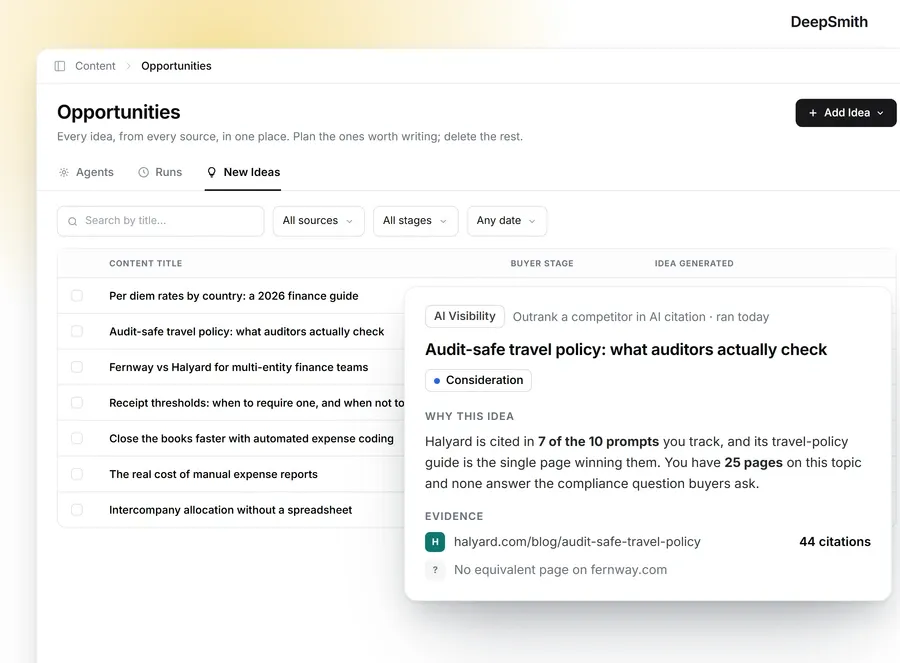
Again, that's demo data. The point is that the idea shows up with its reason, so you can defend why it's in the backlog.
Some limits are worth saying plainly. DeepSmith doesn't tell you the real number of AI conversations about your category, and a tracked question set is a sample, not a census. Prompt discovery doesn't establish exact market demand, and monitoring doesn't guarantee future citations. On capacity, Pro includes 50 tracked prompts on ChatGPT, Grow 100 on ChatGPT and Perplexity, and Scale 200 across ChatGPT, Perplexity, and Gemini, while Enterprise covers all ten supported engines with custom limits. More slots are only worth having when they buy distinct decisions.
Which Approach Fits Your Situation
You don't have to pick one and drop the other. Keep keyword research for topics and demand evidence, and build a deliberate prompt list for the questions you need to understand in AI answers. When you compare prompts vs keywords for your own team, the right first step depends on where you are.
- You have a keyword list and no buyer-question list. Start with your strongest topic clusters and your customer evidence, and translate decisions instead of expanding every phrase. Discover Prompts can give you candidates to edit.
- You have lots of prompt variants and unclear coverage. Merge the near-duplicates, then look for audiences, stages, and constraints you're missing. Spend your tracking capacity on distinct questions.
- Your backlog is growing and has no path to production. Prioritize the families your business serves, then connect the evidence to content planning with Opportunity Agents and Content Studio.
If you want a place to build the list and see the answers behind the metrics, you can start a seven-day DeepSmith trial.
Related guides
- How to Set Persona and Location on Tracked Prompts: Apply persona and location settings to tracked prompts so results reflect the buyer and market you care about.
- How AI Engines Choose Which Sources to Cite: Understand the retrieval and ranking steps that lead an engine to cite one page over another, and which factors you can and cannot influence.
- How to Tell Whether an AI Citation Is Actually Helping You: Judge a citation by position in the answer, framing, link visibility and the prompt it answers, instead of counting every one equally.
- How to Turn Citation Gaps Into Content and Outreach Opportunities: Turn a gap list into two work queues: pages you should create or update, and third-party sites worth pitching.
- The Weekly AI Visibility Review: A Meeting Agenda and Template: Run a short recurring meeting with a ready agenda, a review template and clear owners for follow-up actions.