Checking one question in three browser tabs doesn't give you a baseline you can compare. If one answer used account memory, another searched the web and a third ran a deep research report, the differences you see may have nothing to do with your brand. This guide is for marketing leads who want to track the same prompts across ChatGPT, Gemini and Perplexity in a way that holds up, whether that's a handful of questions or a bigger prompt tracking setup across multiple engines. By the end you'll have one prompt list, a written protocol, a saved answer history and a way to compare mention and citation rates without mistaking collection differences for real changes in visibility.
You'll need a master list of buyer questions, your brand name and variants, your owned sites, a fixed competitor list, and a tracking platform or spreadsheet that keeps the full answers.
Fair doesn't mean identical here. The engines retrieve and write answers in different ways, so keep your inputs steady and write down what you can't control.
1. Define the comparison before you collect answers
Start with a short written protocol, because a fair comparison needs an agreement with yourself about what counts. Write down these items:
- The business question, for example whether your brand is mentioned and your pages are cited for the same buyer questions on all three engines.
- The collection surface: the consumer app, a monitoring platform's collected answers, or an API workflow you configured yourself.
- The interaction type. First-turn answers in fresh conversations are the simplest baseline, and multi-turn journeys are a separate experiment.
- The search policy. Use each product's ordinary behavior or a specified web-search workflow, but say which, and don't force search on one engine only.
- The audience conditions, such as language and intended market, and the comparison period, with the same dates for all three engines.
- Your brand and ownership rules, a fixed competitor list, and your scoring and missing-data rules, all written before you see any results.
For a general buyer-discovery baseline, use first-turn questions with no attached documents, no brand-specific instructions and no connected company files. If personalization is the thing you want to study, keep it as its own labeled group of results and don't blend it into the baseline.
Be clear about the surface you're measuring. Consumer-app monitoring describes that app under the conditions you recorded, API monitoring describes the API workflow you set up, and a monitoring platform's data describes what that provider collected. If you're still choosing a platform, there's a roundup of the best AI visibility tools. Neither OpenAI nor Google says an API answer reproduces the consumer app answer, so keep these series separate. Gemini selected inside Perplexity is a Perplexity observation, because Perplexity says its models can behave differently from the same model in its maker's own product.
You're done with this step when another person could read your protocol and decide which observations belong in the report. People often go wrong by comparing ChatGPT in a personalized session, Gemini through an API and Perplexity in Deep Research, then blaming brand visibility for every difference.
2. Freeze one master prompt set
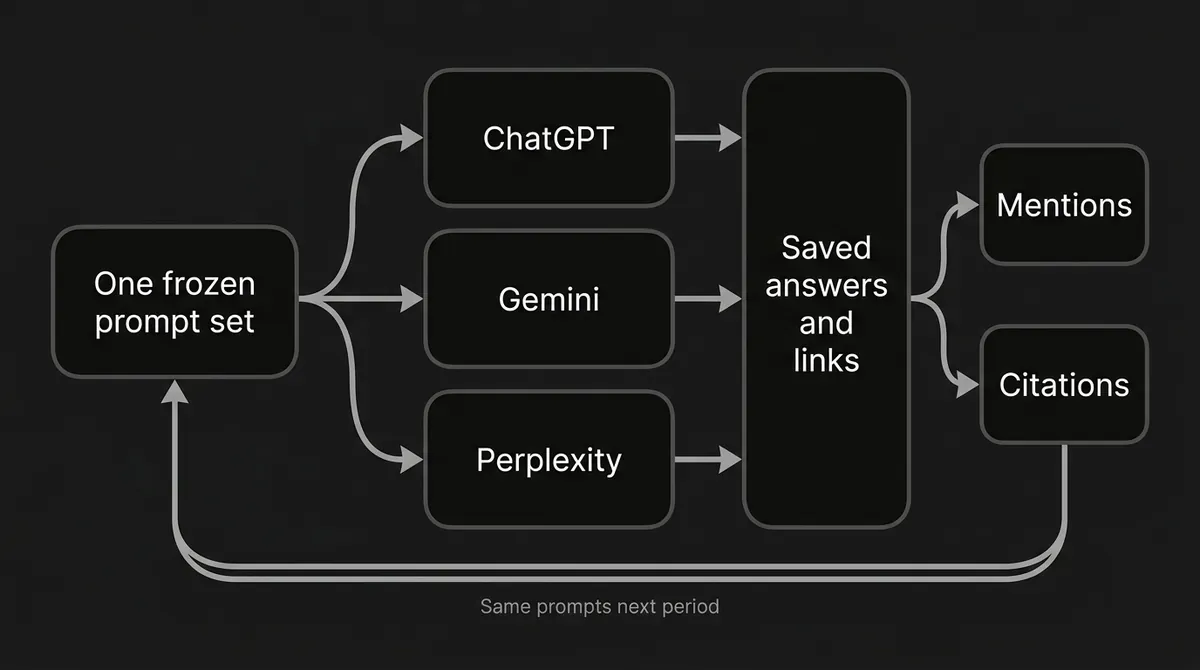
Reuse the exact same prompt text on every engine, because that's the only way to track prompts in ChatGPT, Gemini and Perplexity as a like-for-like set. Three engine-specific paraphrases are three different tests.
Give each prompt a permanent ID and a version, and keep next to it the exact text you submitted, its category or buyer task, language and market, whether it's branded or unbranded, and the dates it's active.
Keep the ID out of the submitted question. Here is a small example registry. These are written examples, not observed customer prompts or a validated benchmark.
| ID | Cohort | Example text |
|---|---|---|
| P001 | Unbranded discovery | Which platforms combine AI search visibility tracking with content production? |
| P002 | Unbranded evaluation | What should a small marketing team look for in an AI citation tracking platform? |
| P005 | Brand-aware evaluation | Does DeepSmith track prompts across ChatGPT, Gemini and Perplexity? |
| P006 | Brand-aware evaluation | What are the limitations of using DeepSmith for AI search monitoring? |
P005 and P006 already contain the brand, so don't pool them with the unbranded questions when you look at whether the brand comes up on its own. If you add a lot of easy branded questions halfway through a baseline, the mention rate will go up, and that isn't improvement. If you want help choosing which branded, unbranded and competitor questions to include, there's a separate guide on branded, unbranded and competitor prompts to track.
When you change wording, language or market, make a new version or a separately identified variant and keep the old history. If you need help building the set, the guide on how to set up a repeatable prompt set walks through it. Even a small change, like adding a location or asking for sources, can change the task.
DeepSmith lets you define the questions you track, and Discover Prompts can suggest questions from your product and persona context. Use those suggestions to build a candidate list, then freeze the actual comparison cohort, since swapping tracked prompts breaks the baseline.
Pro tip: Freeze the prompt set for the whole reporting window. Put newly discovered questions into the next cohort rather than quietly changing the denominator.
You're done when every active prompt has one approved text version and the same list is represented on all three engines. The usual mistake is rephrasing a question for Gemini, adding "use current web sources" only in ChatGPT, or including the brand name on some engines and not others.
3. Standardize the conditions you control and log the rest
Identical wording is necessary, but account context and search mode can still change the answer. For each engine, keep or record the following:
- The collection method, account type and tier, and the selected model or automatic selection label.
- The search mode, any reasoning or research setting, and whether the conversation was fresh.
- Memory, personalization, saved instructions, attached files and connected context.
- Language, market, collection region where you know it, and a timestamp with timezone.
When a collector can't reveal a setting, write unknown or not exposed, and don't record an automatic model selector as a fixed model.
Each engine has its own variables.
ChatGPT. It may search automatically when a question would benefit from current information, and it may rewrite your question into targeted search queries. When memory is on, saved memories can influence that rewriting, and general location can come from the IP address. The help pages say a temporary chat can still use existing memories and custom instructions, and that a separate Unpersonalized choice doesn't, so check and record the personalization choice that was actually active.
Gemini. Gemini apps sometimes show sources and related content, though not on every response. Saved instructions, past-chat context and location can all shape the answer. Temporary Chats are described as not being used to personalize Gemini, which doesn't prove every location or saved-context influence is gone, so record those controls separately.
Perplexity. Search can apply Pro Search automatically when your plan includes it, and the current documentation says it's no longer a separate toggle. The Best setting picks a model for each query, so log it as automatic routing and not a fixed model. Deep Research produces a different kind of report. Memory can carry across conversations and across selected models, so switching models doesn't reset it. Perplexity's own incognito mode turns off memory and search history, unlike a private browser window.
You're done when every observation can be tied to a protocol version, with the unknown conditions visibly marked as unknown. People tend to go wrong by running the whole prompt list in one long conversation, assuming a private browser window erases product-level personalization, or switching research modes halfway through.
4. Run matched collection rounds on a fixed schedule
Prompt tracking across multiple engines only works when you run the same prompt cohort in the same collection window and then repeat on a schedule. One snapshot doesn't tell you much. Run a small pilot first to confirm that answers, source links and metadata are captured correctly, then run the frozen full set on all three engines in the same daily window and timezone. Keep the engine runs close together and keep real timestamps. If you collect by hand, rotate the engine order between rounds so one engine isn't always measured last.
A reasonable start is one full round per day for seven days, then a weekly review. That's a suggestion and not a validated minimum.
Identical inputs don't guarantee identical answers. OpenAI's reproducibility guidance describes its older completion APIs as nondeterministic by default and says seed-based reproducibility is best effort. Search routing, model updates and personalization can also change what you see, so log them where you can.
Now the workload. If you're planning Gemini monitoring 100 prompts deep, and the same 100 on the other two engines, the arithmetic is simple. The general formula is unique prompts times engines times repeats per round times number of rounds.
| Prompt set | Engines | Repeats per prompt per engine each day | Daily observations | Seven-day observations | Thirty-day observations |
|---|---|---|---|---|---|
| 100 prompts | 3 | 1 | 300 | 2,100 | 9,000 |
This assumes one round a day and that every planned run completes. These are answer observations, not billable units, so don't use the table to work out charges or tracked-prompt usage.
DeepSmith collects tracked prompts on a schedule and captures the full answers. Check what your workspace is set to collect and which engines your plan covers, which matters for the 100-prompt case. Grow includes 100 tracked prompts, but it covers ChatGPT and Perplexity. Gemini is included from Scale, which lists 200 tracked prompts, so a 100-prompt set fits inside that limit. The 100 prompts are what you track, and the 300 are the answers collected.
You're done when a collection log shows which prompt and engine slots were planned, completed, retried or missed, with real timestamps. Where people go wrong is comparing ChatGPT collected this morning with Gemini collected last week, or rerunning only the disappointing answers until a nicer one shows up.
5. Save the evidence and separate missing data from negative results
A missing answer isn't evidence that your brand was absent. To keep that straight, keep one record per scheduled prompt and engine observation, and link any retry attempts back to it. For each one keep identity (observation, prompt ID and version, engine), time (scheduled slot, completion time, timezone), protocol (surface, model or routing label, mode, account tier, language, region), evidence (the exact prompt, the full answer text and the original source links), status (complete, partial, timeout, rate-limited), answer flags (refusal, no visible links, search observed or unknown), scoring (mention, citation or unknown, competitor flags) and audit notes (attempt number, retry reason, reviewer).
Then set your missing-data rules ahead of time:
- A fully captured answer with no brand mention, or no qualifying source link, is a real zero under your stated rule.
- A timeout, blocked request or failed capture is missing data and not a zero.
- If the source panel wasn't captured, you can still score the mention while the citation stays unknown.
- A completed refusal is an observed answer. Keep it and score it with the same rules.
- Retries are attempts and not extra successes. Use a declared rule such as the first completed attempt.
Save the original answer and links before any follow-up, because asking "What sources did you use?" creates a new answer.
You're done when a reviewer can open the evidence behind a scored row and reproduce the classification, and when missed runs are visible separately from valid negative answers. The usual slips are keeping only favorable screenshots, losing source panels, or reading an engine outage as a drop in visibility.
6. Score mentions and citations with explicit denominators
Count whether an answer mentions or cites your brand, not how many times the name or link repeats. These are manual rules and not a claim about how any tool calculates its numbers.
Mention flag. Set it to 1 when the generated answer prose names your brand or an approved variant, and 0 when it doesn't. Leave out unrelated namesakes. A negative description still counts as a mention, and sentiment is its own field if it matters to you.
Owned-page citation flag. Set it to 1 when the captured answer clearly attributes a source link to one of your approved owned pages. Count the answer once even if it cites several of your pages. A third-party article about your brand is external coverage and not an owned-page citation. Keep the raw destinations and use a controlled list of owned sites. If you want a fuller explanation of the difference between the two events, see the guide on citations versus mentions across ChatGPT, Perplexity and AI Overviews.
Gemini needs special care, because its links come in different kinds.
Common mistake: Counting Gemini's Double-check links as citations earned by the original answer. Google says a green-highlight verification link is not necessarily a source used to generate that response.
Google describes three Double-check outcomes: green (similar content found, not necessarily used to write the answer), orange (different or no relevant content found, not proof the statement is false) and no highlight (not enough information, not a passing score). Keep these categories apart:
- Answer citations that are explicitly attributed.
- Sources or related links shown next to the answer where it isn't clear how they were generated.
- Links returned by a later Double-check action.
The second group can feed an observed source-link metric but isn't proof of original retrieval, and the third group is verification and not citation performance. ChatGPT is similar, since its Sources view can contain other relevant links besides cited sources.
Here are the formulas I'd use for each engine and a fixed cohort:
Mention rate = 100 × completed answers mentioning the brand ÷ completed answers eligible for mention scoring
Owned-page citation rate = 100 × answers with a qualifying owned-page citation ÷ completed answers eligible for citation scoring
Show the numerator and denominator next to each percentage. When you can't classify citation provenance from the evidence, mark it unknown. A missing source capture is unknown, while an audited answer with no qualifying citation is a zero.
For a manual share of voice, count each tracked brand at most once per answer and divide the target brand's presences by all tracked-brand presences, using a fixed competitor list that includes your brand. This is a proposed manual definition, so don't expect it to match any product's own calculation. There's a walkthrough on how to calculate your brand's share of voice across AI answers if you want to go deeper.
DeepSmith shows mention rate, citation rate and share of voice, with platform-level and prompt-level analytics and retained answers. It lists per-platform snapshots, per-prompt results, competitors mentioned, cited sources and cited pages. Open the answer history behind a number whenever it surprises you.

You're done when a second reviewer reaches the same flags from the saved answer and links, and every percentage has a visible denominator. The usual mistakes are counting repeated name occurrences, treating mentions and citations as the same thing, and hiding that one engine has a much smaller auditable sample.
7. Compare matched prompts before comparing totals
Compare the same prompt versions and collection slots across engines before you look at platform averages. Join observations by prompt ID, version and collection slot, then find the cohort captured on all three engines. Compare mentions on that matched cohort, and compare citations only where the evidence and classification rules are comparable, showing unknowns separately. Break results down by the same buyer-task categories, and look at the answer changes behind the biggest movements.
If Gemini misses a batch, don't compare its remaining prompts with the other engines' full lists. Report each engine's completion coverage and also a matched-cohort comparison. Keep branded and unbranded results apart.
Here is how a matched table can look. The numbers are invented only to show the layout, with 100 matched, completed and citation-auditable answers per engine, and they don't show that one engine does better than another.
| Engine | Matched answers | Brand mentions | Mention rate | Answers citing owned pages | Citation rate |
|---|---|---|---|---|---|
| ChatGPT | 100 | 30 | 30% | 12 | 12% |
| Gemini | 100 | 20 | 20% | 8 | 8% |
| Perplexity | 100 | 40 | 40% | 18 | 18% |
When you report change, a move from 20% to 28% is 8 percentage points. It's also a 40% relative increase, but those two descriptions aren't interchangeable, so lead with the percentage-point change and show the original rates and sample counts beside it. A large count of repeated answers doesn't earn you a claim of statistical significance. If you need one overall score, say how it's weighted and keep the per-engine numbers visible. For help with sizing the list itself, see how many AI prompts you should track.
You're done when every comparison states the cohort, the period, the completed sample, the missing sample, the scoring rule and any protocol change. The usual errors are averaging unlike cohorts, comparing unequal periods, changing competitors without a note, or claiming an engine-wide decline from one unstable prompt.
8. Turn persistent gaps into a focused action list
Use repeated prompt-level gaps to decide what to investigate, and don't treat every fluctuation as a reason for a new article. Start with prompts that show a repeated weakness and not only one surprising answer. Read the actual answers and sources, check whether the change lines up with a model, mode or collection change, name the specific gap, and assign one next action with a date. Keep the original prompt cohort unchanged while you collect the next period. If you're cited in one engine and missing in another, see diagnosing per-engine visibility gaps.
This table pairs common patterns with where to look next. These are paths to investigate and not proven causes.
| Repeated observation | What to investigate | Conclusion to avoid |
|---|---|---|
| Brand mentioned without an owned citation | Which sources support the answer, and whether one of your pages answers the cited subquestion clearly | That repeating the brand name will earn citations |
| Competitor repeatedly cited for the same question | The exact cited page, and how relevant, specific and well supported it is | That the engine has a permanent preference |
| Sudden platform-wide change | Collection conditions, routing and completion coverage before you touch content | That your latest content edit caused it |
A short weekly review card keeps this manageable: the frozen cohort and period, completed versus planned observations, rates by engine, any protocol or model changes, and a few persistent gaps with saved answers, each with one owner and next action. Once that's working, the guide on turning tracked AI prompts into a content plan covers the next hop, and the prompt-level win and loss guide shows how to read per-prompt results against competitors.
DeepSmith can show the competitor pages and the owned pages behind your visibility results, and Opportunity Agents can use visibility and coverage data to return content ideas with the supporting evidence attached. That gives you a backlog you can defend, though it doesn't guarantee citations.
You're done when the team has a short action list tied to specific prompts, answers and pages and not an unexplained platform score. The usual mistake is changing the prompts, the content, the competitor set and the collection mode all at once, then crediting the content work for whatever moves afterward.
What to do next
Keep the prompt cohort unchanged for the next collection period, read the answers behind the largest persistent gaps, and pick one evidence-backed action. Steady inputs and a saved answer history make the next comparison more useful than another round of ad hoc searches. If you'd like to see the collected answers behind your visibility metrics, you can start a seven-day DeepSmith free trial. Use a plan that includes ChatGPT, Gemini and Perplexity if you want the full three-engine workflow.
Related guides
- How to Organize Tracked Prompts by Topic, Funnel Stage and Persona: Structure a prompt list into groups by topic, funnel stage and persona so reports answer real questions.
- Why Prompt Tracking Data Goes Unused and How to Fix It: Find out why prompt data sits in dashboards and fix it with owners, a review cadence and a link to content tasks.
- AI Overviews vs AI Mode: What Each Means for Tracking: Compare AI Overviews and AI Mode on how each is triggered, personalised and cited, and decide what that means for sampling queries, repeat runs and reading results in.
- GEO Templates: A Content Brief, Page Audit and Prompt Set You Can Copy: Copy three ready-to-use templates: a content brief, a page audit and a starter prompt set, with notes on how to fill each in.
- How Google AI Overviews Tracking Works and Why Position Is Hard to Pin Down: Understand how AI Overviews are tracked and why position is hard to pin down.