
Let's be honest. Winning featured snippets feels like a dark art, and most of the advice out there is garbage. "Just be more helpful." "Add more detail." I tried that for years. It doesn't work. Not consistently, anyway.
Here's the secret I wish someone had told me a decade ago: winning Position Zero isn't a writing problem, it's an engineering problem. Google doesn't "read" your article and reward your beautiful prose. It sends a robot to find a clean, liftable answer. Your job is to make that robot's job incredibly easy.
It boils down to five things you actually control:
- Pick queries where a snippet already exists.
- Write question-led headings that mirror the exact query.
- Build "liftable" answer blocks written to proven length limits.
- Support those blocks with clean HTML and relevant schema.
- Run a QA and monitoring cadence to keep what you earn.
That's the framework. That's the system. It's how you stop relying on heroic efforts and start building a repeatable engine.
By the end of this article, you'll have our internal playbook: copy templates for every snippet type with exact word counts, a reusable page skeleton for your writers, a markup checklist for your dev, and the simple monitoring process we use to keep what we win.
What Does Google Usually Pull Into a Featured Snippet (and What Do You Control)?
Google extracts the most "liftable" answer it can find for a query. Think of it as a stressed, overworked intern who needs to find a soundbite for their boss, fast. They're not looking for nuance; they're looking for a block that cleanly matches the format, specificity, and length they expect.
You can't file a ticket to get into Position Zero. But you absolutely control the inputs that make your content the easiest, most obvious choice.
The four snippet formats to plan for:
- Paragraph: A 2–3 sentence definition or direct answer.
- Ordered list: Numbered steps for a process.
- Unordered list: Options, benefits, or best practices.
- Table: Comparisons, specs, or tiers.
What you control:
- Heading phrasing. Your H2s and H3s should be the literal question someone is typing into Google. "What is X?" beats "An Overview of X" every single time.
- Answer block placement. The direct answer must come right after the heading. Don't bury it two paragraphs down.
- Format matching. If Google already shows a list snippet for a query, give it a list. Don't try to be clever and submit a paragraph.
- HTML cleanliness. Use real
<ol>,<ul>, and<table>tags. Google reads the code, not just what looks like a list on the screen.
What you don't fully control:
- Whether Google picks your page over a competitor's. That depends on authority and other signals you can't see.
- Which specific block on your page gets pulled. That's why you should build multiple extractable blocks on every page, not just one.
My rule for the team is simple: write in discrete, attributable claims. Each paragraph or list item should be a complete, standalone idea. This isn't just for featured snippets; it's how AI engines think, too. Structure your content at the claim level, not the section level.
Which Snippet Type Should You Aim For?
This isn't a creative writing exercise. Just match the snippet type to what the user wants to know.
- Definitions ("What is X?") → Paragraph snippet
- Step-by-step processes ("How do I do X?") → Ordered list
- Options or benefits ("What are the best X?") → Unordered list
- Comparisons or pricing ("X vs Y") → Table
- Demonstrations ("Show me how") → Video snippet with timestamps
The fastest way to figure this out? Search the query. See what Google is already showing. If a snippet exists, that's your target format. You're not trying to convince Google to change its mind; you're trying to out-execute the current winner.
How Do You Pick the Best "Steal-the-Snippet" Opportunities First?
The biggest mistake I see teams make is trying to create snippet opportunities from scratch. Don't. The fastest wins are on pages that are already ranking on page one for queries that already show a snippet. You’re not creating new demand. You're just out-formatting and out-clarifying whoever holds Position Zero right now.
Here are the three filters we use before we commit any resources:
- The query already shows a snippet. If there's no snippet, there's no Position Zero to steal. This proves the opportunity is real.
- Your page ranks 1–10 (or close). Google almost always pulls snippets from the first page. If you're ranking 15th, your problem isn't snippet formatting; it's your core ranking. Fix that first.
- You can clearly answer it better. Look at the current snippet. Is it too long? Vague? Badly formatted? Is it missing a key step you can add? Find the weakness.
A 2-hour audit workflow:
I do this with our marketing lead every quarter. It's the highest-leverage two hours we spend.
- Export all your queries from Google Search Console or your rank tracker. Filter for queries where your CTR is low but impressions are decent. That's often the smell of a snippet eating your clicks.
- For each query, look at the SERP. Note if a snippet exists and who has it.
- Analyze the winner's weakness. Is the paragraph 80 words long? Does the list have 12 items? Is the table missing a key feature comparison? That's your opening.
- Map each query to one of your pages (a retrofit) or flag it as a gap (a new page to create).
Build snippet clusters per page. Don't just target one snippet. A single well-built article can often win 3-6 extractions if you structure it around related question headings.
Retrofit vs. new page:
- Retrofit when you already have a page with some authority and relevance. Adding a perfectly formatted answer block to a ranking page is way faster than starting from zero.
- Create a new page when the query is distinct enough that forcing it onto an existing page would feel unnatural and dilute its focus.
When you're trying to organize these clusters and spot gaps, a spreadsheet can turn into a nightmare. We use DeepSmith Topics to surface the keyword groups we're missing and push those priorities straight into our production queue. It keeps the audit from dying in a spreadsheet.
When Should You Avoid Featured Snippets?
Not every snippet is worth winning. Sometimes, "winning" Position Zero can actually kill your traffic. The CTR trade-off is real. If the snippet answers the question so completely that people don't need to click, your traffic will drop even as you rank #1. Simple definitions ("What is MRR?") are the classic trap.
We've learned to avoid snippets in two situations:
- Compliance or nuanced topics. Snippets crave simplicity. If you work in legal, medical, or finance, a stripped-down answer can misrepresent your position and create risk. It's not worth it.
- Pure definition queries with no click intent. If the entire answer fits in 40 words, there's no reason for anyone to click through to your site. You get the vanity of the snippet, but none of the traffic.
Instead, target snippets where the answer is a teaser. A framework overview, a numbered process, a comparison table. These formats imply there's more detail on the page, which naturally drives clicks from people who want the full picture.
What Are the Exact Snippet-Length Copy Targets (Paragraph, List, and Table)?
You have to write to the display limits. If your answer gets cut off with a "...see more," you've probably lost. Google will either pull a partial answer that makes no sense or just skip you for a competitor who wrote to the right length.
We tested this relentlessly. Here are the numbers that work.
| Snippet Type | Length Target | Format Rules |
|---|---|---|
| Paragraph | ~40–55 words / ~320 characters | 2–3 sentences; direct answer first |
| Ordered/Unordered List | 5–8 items | 3–10 words per item; parallel structure |
| Table | ~5 rows × 2–3 columns | Concise cells (≤3 words); clear headers |
Paragraph snippet copy rules:
- Start with the direct answer. No "It's worth noting that..." or "This can be defined as..." Just state the fact.
- Keep your sentences clean and consecutive. Avoid weird formatting like bolding in the middle of a sentence or nested parentheses. These can break the extraction.
- Stick to 2–3 sentences. If you need a fourth, you're writing too much.
List snippet copy rules:
- Right under your heading, include a one-sentence "list intro." Something like, "Follow these five steps to get started:" This little sentence frames the list for Google.
- Use parallel grammar for all your list items. If one starts with a verb, they all should. If one is a noun phrase, they all should be. Don't mix and match.
- For ordered lists, open each item with a clear action verb. "Define your audience," not "Your audience should be defined."
Table snippet copy rules:
- Your column headers need to be specific. "Plan Type" is better than the generic "Options."
- Stick to 3–5 comparison criteria (rows). Big tables get clipped.
- Keep cell content scannable. Aim for 3 words or less per cell if you can.
A quick note on images: Place a relevant, well-labeled image near your list sections. Use descriptive alt text. While images aren't pulled into the text snippet itself, they help Google understand the content around them.
Paragraph Snippet Templates (Copy-Ready)
Just drop your topic into these. We use them all the time.
Template 1 — Definition-first:
"[Term] is [a clear, one-sentence definition]. [One sentence expanding the most important qualifier or use case]."
Template 2 — Direct answer + constraint:
"The best [X] is [Y], but only when [primary condition]. If you're dealing with [alternate condition], use [alternate answer] instead."
Template 3 — Problem → solution:
"[Describe the problem state in one sentence]. The solution is [your solution], which works by [specific mechanism]."
All of these will keep you under 55 words if you're tight. Notice the pattern? No throat-clearing. The answer is always the first thing you say.
List Snippet Templates (Copy-Ready)
Ordered "steps" list (for "how-to" queries):
How to [do X]: Follow these five steps to [achieve outcome]:
- [Verb phrase – keep it under 8 words]
- [Verb phrase]
- [Verb phrase]
- [Verb phrase]
- [Verb phrase]
Try to keep your steps between 5 and 7. If you have 10 steps, you probably have three phases. Group them.
Unordered "best practices" list (for "what are" queries):
[Question heading] List intro sentence.
- [Noun phrase or short verb phrase]
- [Same parallel structure]
- [Same parallel structure] (6–8 bullets total)
Consistency check: Read your list items out loud. Does the rhythm feel consistent? If one sounds clunky, that's the one you need to rewrite. An inconsistent list is an easy reason for Google to pass on your content.
Table Snippet Templates (Copy-Ready)
Here’s a generic 5x3 structure for comparisons:
| Criteria | Option A | Option B |
|---|---|---|
| [Row label] | [Value] | [Value] |
| [Row label] | [Value] | [Value] |
| [Row label] | [Value] | [Value] |
| [Row label] | [Value] | [Value] |
| [Row label] | [Value] | [Value] |
Table vs. list rule of thumb: Use a table when you're comparing multiple things across the same criteria. Use a list when you're just enumerating items that don't need to be compared against each other, like steps or benefits.
What's the Best Page Structure for Position Zero (a Reusable HTML Outline)?
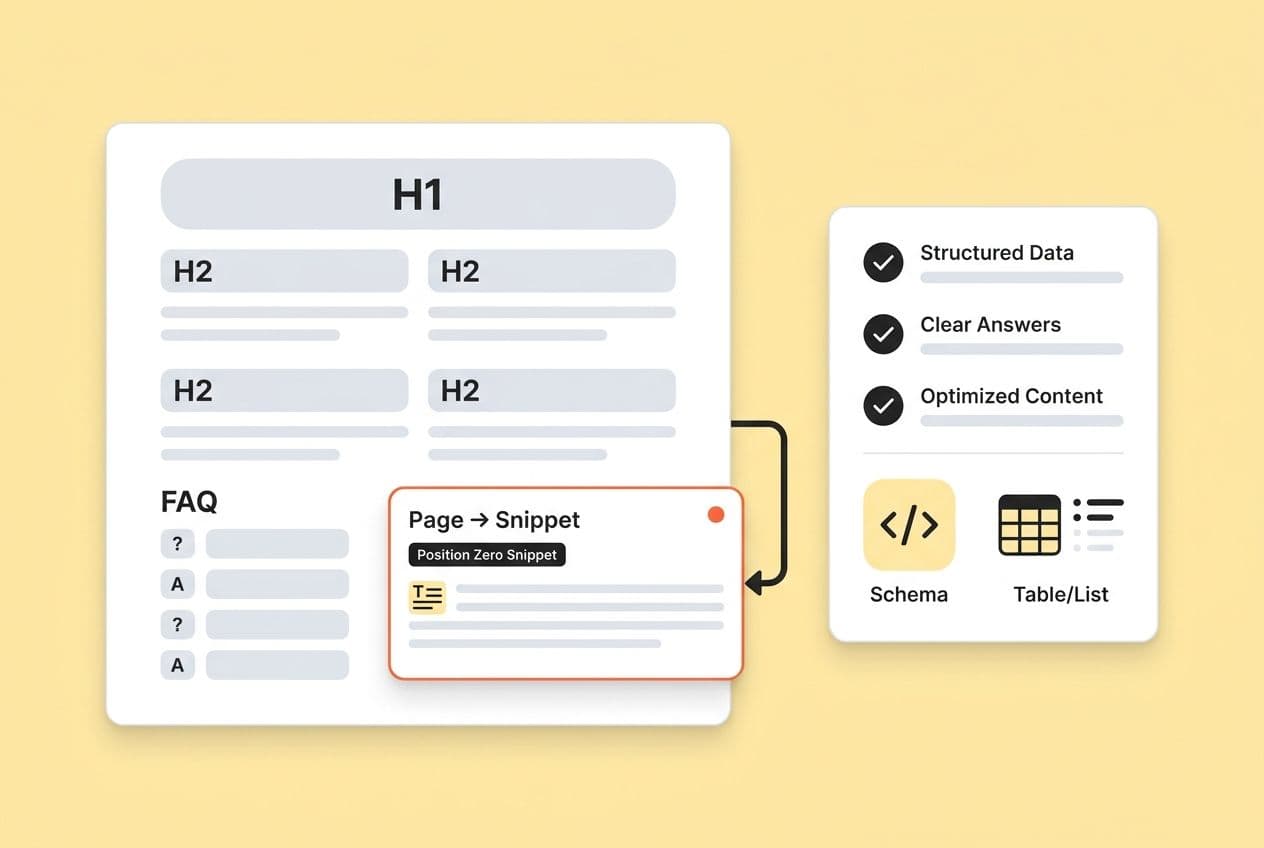
Think of every page as a stack of extractable blocks. Each major heading is a question. Each question is immediately followed by a perfect, snippet-sized answer. The elaboration, examples, and nuance come after that. The liftable bit is always at the top of its section.
The hierarchy we recommend:
- H1: The topic of the page (not a question).
- H2s: Major questions your customers have (these are your primary snippet targets).
- H3s: Related sub-questions (secondary snippet targets).
Put your most important snippet target in the first or second H2 section. Google pays attention to position on the page. An answer buried 3,000 words down is less likely to get picked than one in the first 500 words.
Formatting discipline is non-negotiable:
- Use real
<ol>and<ul>tags. A paragraph with dashes or manual numbering is still just a paragraph in HTML. Google won't extract it for a list snippet. - Use real
<table>markup, including<thead>and<tbody>. - Add a "Last updated" date to pages, especially for things like tool comparisons or pricing guides. Freshness is a signal.
Internal linking matters. From each snippet-target page, link out to 2-5 deeper, supporting pages. This does two things: it signals your topical depth to Google, and it gives readers who land from a snippet a clear next step. The snippet is the teaser; the internal links are the payoff.
Executing this consistently is where most teams fail. Not because the template is wrong, but because life happens. The brief gets written differently each time, and the structure degrades. We use Position Zero Page Skeleton because it builds our snippet-ready heading structures and internal linking plans right into the draft. Deep IQ stores our content templates and applies them automatically, which means less structural drift and less time spent on reviews.
A Copy/Paste "Position Zero Page Skeleton"
Give this to your writers. Use it when you build new pages.
H1: [Page Topic]
(Short intro: 3–5 sentences setting context and explaining what the reader will learn.)
H2: [Primary Snippet Target Question] → 45-word paragraph answer (no filler). → 2–3 paragraphs of examples and nuance.
H2: [Secondary Snippet Target: A "How-To" Question] → 1-sentence list intro. → Ordered list with 5–7 steps. → 1–2 paragraphs of follow-up detail.
H2: [Secondary Snippet Target: A Comparison Question] → A comparison table (5 rows × 2–3 columns). → A brief explanation of the table.
H2: [A Question About Edge Cases or Caveats] → Paragraph answer. → Nuance, exceptions, etc.
Every H2 starts with a direct answer. Every answer block is within the length limits before you start elaborating.
What Markup and Structured Data Should You Use (and What's Optional Now)?
Here’s the deal: Semantic HTML is the requirement. Schema is supporting evidence.
So many teams get this backward. They slap schema on a messy page and expect it to unlock snippets. It doesn't work that way. Schema helps Google understand what your content is about.
What to implement (sometimes):
- HowTo schema: Use this only when the content is a true procedure with a start, steps, and an end. Don't use it for "tips" lists; that's a misuse that can get you a manual action.
- Video schema with timestamps: If you have a video on the page, use
VideoObjectschema and add timestamps for chapters. This helps Google pull answers from your video. A visible transcript helps, too. - FAQPage schema: Google has dialed back the visibility of FAQ rich results, but don't ignore this. The structured Q&A format on the page is still great for users and AI parsers, even if the special SERP treatment is gone.
What to implement (sometimes):
- HowTo schema: Use this only when the content is a true procedure with a start, steps, and an end. Don't use it for "tips" lists; that's a misuse that can get you a manual action.
- Video schema with timestamps: If you have a video on the page, use
VideoObjectschema and add timestamps for chapters. This helps Google pull answers from your video. A visible transcript helps, too. - FAQPage schema: Google has dialed back the visibility of FAQ rich results, but don't ignore this. The structured Q&A format on the page is still great for users and AI parsers, even if the special SERP treatment is gone.
Markup hygiene checklist (the stuff that actually matters):
- Correct heading hierarchy (H1 → H2 → H3). Don't skip levels.
- Make sure your answer blocks aren't hidden in accordions or tabs that are closed by default.
- Fast page load and HTTPS. These are table stakes for quality.
- Clean, descriptive URLs.
/how-to-do-x/is better than/blog/post-1234/. - Validate any schema you do use with Google's Rich Results Test before you push it live.
Markup Implementation Checklist (Hand-Off Ready)
Run this checklist before you publish any snippet-optimized page.
- H2/H3 headings are questions that mirror target queries.
- Direct answer block (≤55 words for paragraphs) is right after each H2/H3.
- Lists use real
<ol>or<ul>tags. - Tables use
<table>with a proper<thead>. - HowTo schema is implemented (if procedural).
- Video schema + timestamps are added (if video is embedded).
- "Last updated" date is visible.
- No duplicate question headings on the page.
- No answer blocks are hidden behind a "click to expand."
- All structured data is validated in the Rich Results Test.
For practical guidance on how to implement schema that increases AI citations without changing your content strategy, see Schema is supporting evidence.
How Do You QA, Measure, and Maintain Position Zero Wins Over Time?
Winning a snippet is an event. Keeping it is a system. Most teams pop the champagne, celebrate the win, and move on. Three months later, they lose the snippet to a competitor who published a slightly cleaner version, and they don't even notice until traffic tanks. Don't be that team.
Measurement:
- Track snippet ownership in your rank tracker. Note the date you win each one.
- Pull CTR data from Google Search Console for the before and after periods. If your CTR drops after winning, your snippet is too good; it's answering the question completely. The fix is to rewrite the answer to be more of a teaser.
- Keep an eye on queries in GSC with high impressions but low CTR. That's your hunting ground for new snippet opportunities.
Maintenance cadence:
- 30-day check: After you optimize for a snippet, check back in a month. Did you win? Did CTR change?
- Quarterly refresh: For your active winners, do a quick refresh. Update any facts, tighten the answer block, and see if Google has changed the SERP format.
- Trigger-based updates: If a competitor targets your query, or Google changes the layout, or your product changes, that's a trigger to go in and update the page immediately.
"Why did I lose the snippet?" diagnostic:
It's usually one of four things:
- A competitor published a better-formatted answer. (Go look at their structure and one-up them.)
- Your answer block got too long during a previous edit. (Trim it back down.)
- The information became outdated. (Refresh it and update the "last updated" date.)
- Your page speed or UX got worse. (Run a Core Web Vitals check.)
To scale this, build a library of snippet templates (paragraph, list, table) that your writers can pull from. The goal is to make "snippet-ready structure" the default, not something you have to fix after publishing.
We use DeepSmith's Autowrite to keep our publishing cadence up, because freshness is a real factor in keeping snippets. The platform's built-in linking also helps reinforce our topical authority across clusters. And for tracking how our content gets used by AI, AI Visibility — Pages shows us which pages are earning citations, giving us another signal for which content is seen as truly extractable.
What Are Copy-and-Format Anti-Patterns That Stop Google From Extracting Your Content?
Most of the time, when we fail to win a snippet, it's not because a competitor beat us. It's a self-inflicted wound. Here are the common mistakes to cut from your process.
-
Long philosophical intros. You write a perfect H2 question, then you spend 100 words giving context before the answer. Google's robot looks at the first sentence or two. If it's just throat-clearing, you've lost. Fix: Answer first. Context second.
-
Paragraphs pretending to be lists. A paragraph with dashes or manual numbering is still just a paragraph in HTML. Google won't extract it for a list snippet. Fix: Use
<ul>or<ol>tags. Every time. -
Tables with 10+ rows. Huge tables get clipped or ignored. Fix: Cap them at 5 or 6 rows. Put the extra detail in the text below the table.
-
Vague headings. "Overview," "Key Tips," "More Information." Nobody searches for these things. Fix: Rewrite them as the exact questions people ask. "What are the key steps to X?"
-
Answer hedging. "It's important to note that..." "There are many factors..." "This is a complex topic..." This filler wastes your precious character count and signals that your answer isn't direct. Fix: Delete it and just state the answer.
One honest caveat: Don't oversimplify complex or regulated topics just to chase a snippet. A 45-word answer about a legal or medical issue can strip out crucial nuance and create real risk for your business and your readers. In those cases, accuracy comes first. It's better to opt out of Position Zero than to publish an answer you can't stand behind.