
You just got the screenshot in Slack from your CEO. A competitor is cited by name in a Perplexity answer about your exact use case. Your brand is nowhere to be found. Then comes the question: "Why aren't we showing up in AI search?"
I've been there. You don't have a great answer, and the last thing you have time for is blowing up your entire content strategy to find one.
The good news is you probably don't have to. You can use schema markup to seriously improve your chances of getting cited by AI, without a single content rewrite. It's all about how you use it to clarify who your brand is and how your content is structured.
But let's be real. Schema is not some magic switch you flip for instant citations. It's an "understanding layer." It's how you help AI systems recognize who you are, what you're talking about, and whether your content is trustworthy enough to use and attribute.
I'm going to give you the playbook I wish I had: a phased, low-disruption plan for getting this done. We'll cover which schema types matter first, how to implement them safely, how to actually measure if it's working, and how to build a maintenance workflow your team can sustain without burning out.
Can schema markup really improve AI citations (and when is it a waste of time)?
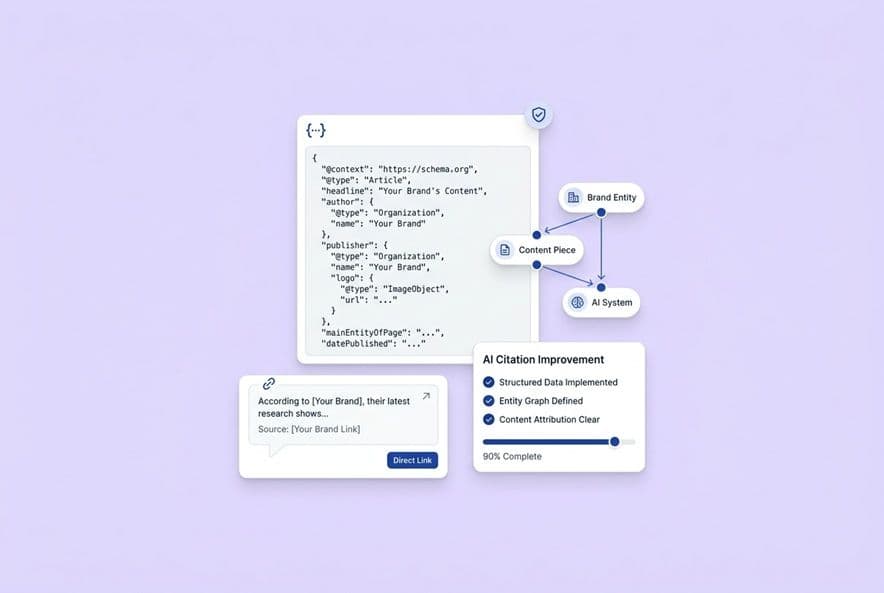
Schema markup is just machine-readable metadata you add to your pages. It's usually a block of code called JSON-LD in the page's HTML. It tells AI crawlers and search engines what your content is, so they don't have to guess. Is this a product page, a how-to guide, or an author's bio? With schema, you're telling it directly.
For the AI systems that generate answers with citations, this is a big deal for three reasons.
First, it clarifies who you are. Good schema helps an AI connect your brand name, your product, and your content to a recognized entity. If your Organization schema has consistent IDs and links out to your LinkedIn, Crunchbase, or Wikidata page, you're sending a strong signal that says, "Hey, we're a real, known company." AI models are much more willing to cite a known entity than to just paraphrase content from a random website without attribution.
Second, it gives them the info they need for a proper citation. Article schema with author, publisher, and datePublished properties is like handing the AI a pre-filled citation card. You're making it easy for them to give you credit.
Third, it makes your content easy to grab. FAQPage and HowTo schema pre-structures your content into neat little packages. The AI doesn't have to parse messy paragraphs to find an answer; you've already labeled it for them.
Where schema is most likely to matter
Schema works best when your content is already solid, but AI systems are passing it over because they can't figure out who you are or what your page is about. If your brand's online presence is a bit of a mess, with different names or URLs across your site and other profiles, schema is where you start. The Organization type with stable IDs, the Person type for your authors, and sameAs properties pointing to verified profiles all help build a coherent picture that AI models can trust.
For your content pages, Article schema with complete metadata and FAQPage schema on posts with Q&A sections are your best bets. They don't guarantee a citation, but they remove a lot of friction.
Where schema probably won't move the needle
If your brand is already getting cited for a topic, adding schema to those pages won't change much. They're already working. And if you're trying to slap schema on pages with thin content or outdated information, don't bother. It won't save them.
AI systems pull from sources they see as credible and relevant. Schema helps a good page get recognized, but it can't make a weak page competitive. You still need content that actually helps your buyers. Schema just makes that great content easier for machines to understand and attribute. That's its job.
Which AI platforms actually use this stuff?
Google AI Overviews and Bing Copilot are your highest-confidence bets. Both have confirmed they use structured data. Google uses it for rich results and likely for AI Overviews, and Bing processes it as part of its normal indexing. If you're looking for a measurable impact, start here.
What about ChatGPT, Perplexity, Claude, and Gemini? They haven't said publicly if or how they use schema in their citation logic. But that doesn't mean it's irrelevant. It almost certainly helps with the basic crawling, entity recognition, and content classification that feeds their models. You just can't draw a straight line from "I added FAQ schema" to "Perplexity cited us."
How to plan when you're not sure
Here's the practical approach: treat Google AI Overviews as your main target for measuring schema's impact. Use it as a proxy. If you see improvements there, assume it's a good sign for other platforms too. Consider any new citations in ChatGPT or Perplexity a correlated benefit, not something you can directly attribute. Don't wait for Perplexity to send you a confirmation letter; just get started.
What to optimize for no matter what
Here's what works on every platform: create pages with clean, readable HTML that state the answer clearly and early. Make sure your brand's entity signals are consistent everywhere on the web. And organize your content with clear sections that are easy to extract. Pages like that just perform better everywhere. Schema's job is to amplify these signals, not replace them.
Okay, what schema should we actually implement first?
If you're like every other SaaS team I know, you're short on resources. So here's the prioritized order.
The "core four" to start with
-
Organization: This is your first move. Add it sitewide. Include a stable ID (your homepage URL is perfect), your brand name, logo, URL, and
sameAslinks to your main company profiles on LinkedIn, Crunchbase, GitHub, or G2. This is your entity anchor. Everything else builds on this. -
Person: Use this on your author pages and bylined articles. It builds the credibility layer. When an AI sees content written by a named author with a consistent bio, social profiles, and a clear link to your organization, it signals that real experts are behind your content.
-
Article: Put this on every blog post. It should include the
headline,author,publisher,datePublished,dateModified, and adescription. Keep the description accurate, don't just stuff it with keywords. This gives AI systems the metadata they need to cite you properly. -
FAQPage: Use this only on posts where you already have a real Q&A section. The rule is simple: if the questions and answers are visible on the page, you can mark them up. If they're not, don't invent a fake FAQ just to use the schema.
When to bother with Product or Service schema
Once the core four are live, you can layer in product-focused schema. SoftwareApplication belongs on your product and pricing pages. Service schema is great for solution or use-case pages where you describe what your product does for a specific customer.
Just don't force these onto your blog posts. Using the wrong schema for the page type is a fast way to look untrustworthy to crawlers.
The simple stuff that matters more than anything
Honestly, this is the most important part: consistency. Use the same URL format for your Organization ID everywhere. Make sure your sameAs links point to your actual, active profiles. If your author's name is "Sarah Chen" in the schema, it better be "Sarah Chen" in her bio and byline, not "S. Chen." Inconsistencies like that fragment your entity graph and make you harder to understand.
How to do this without blowing up your content strategy
The one rule that will keep you safe is this: if it's not on the page, it doesn't go in the schema.
This isn't just a best practice. It's survival. Google has been very clear that schema misrepresenting what's on the page can earn you a manual penalty. AI crawlers that find a mismatch between your schema and your visible content will stop trusting your markup. You'd be better off with no schema at all.
This means you don't rewrite your blog posts to add a fake FAQ section. You don't manufacture author credentials. You just mark up what's already there. Your content strategy can stay exactly as it is.
Adding lightweight FAQ blocks without the headache
That said, there is a middle path. If a post naturally answers 3-4 common questions in the text, you can add a short FAQ summary at the bottom that pulls those Q&As together. This is just a formatting change, not a whole new content strategy. Mark up that block with FAQPage schema. It's helpful, it's accurate, and it creates an easy-to-grab section for AI.
Just don't let this become a mandate that every post needs a 10-question FAQ. Focus on your highest-traffic pages first.
Templates are your friend
Organization schema should be on every page, injected at the template level in your CMS. Article schema should be in your blog post template, auto-populating from the page's metadata. This is the only way to do this at scale without turning your content team into developers. Get this set up once, and you're done.
What's the safest way to get this code on the site?
Put your schema code (as JSON-LD) in the <head> section of your HTML. This is the standard. It's separate from your visible content and easy for a developer to manage.
Every time you add or update schema, you have to validate it. Run the page through Google's Rich Results Test and the Schema.org Validator. After you launch, check Google Search Console's Enhancements Report every week for the first month. If you see warnings, fix them. The loop is: add -> validate -> monitor -> expand. Not: add everywhere -> hope for the best.
Can you just inject it with JavaScript?
Google says it can process JavaScript-rendered schema, but I'm telling you as a friend, "can process" and "reliably processes" are two different things. If a crawler hits your page before the JavaScript runs, the schema simply isn't there. It's a risk.
The safer path is always server-side rendering. If you're on WordPress, use a plugin that handles it server-side. If you have to use Google Tag Manager, fine, but know that it's less reliable for this specific task and plan to move to a better solution later.
How do you measure if this is even working?
I've seen so many teams add schema to everything and then wonder six months later if it did anything. They have no idea, because they never set a baseline. Don't be that team.
Before you do anything, create a baseline
Spend one week on this before you touch a single line of code. Write down 10-20 prompts that your buyers would actually ask an AI. Search each one manually in ChatGPT, Perplexity, Gemini, and Google AI Overviews. For each one, record: does our brand get mentioned? Are we cited as a source? Which competitors show up? You can use our guide on how to measure AI search citations to structure this process.
This is your baseline. Without it, you're just guessing.
Run a controlled rollout
In weeks 1-2, add the Organization and Person schema sitewide and Article schema to your blog template. These are low-risk changes.
At 30 days, re-run your baseline prompts. See what's changed.
At 60 days, add FAQPage schema to your top 10 targeted posts. Re-check your prompts.
At 90 days, you'll have a pretty good signal about whether this is working. Success isn't just "we got more citations." It's "our brand now appears in answers for our target prompts, and the pages we added schema to are appearing more often than the ones we didn't."
A simple scorecard to keep you sane
Track three things monthly:
- Prompt Coverage: What % of your tracked prompts does your brand appear in?
- Page Citation Rate: Which of your pages are earning citations?
- Competitive Share: Are you gaining ground on the competitors you saw at baseline?
Doing this manually is a pain. That's honestly why we built the AI Visibility — Prompts and Pages tools at DeepSmith. It lets you define your prompts once and tracks everything for you across all the major AI platforms. It gives you the clear, attributable data you need.
How do you keep this from breaking in six months?
This can't be a one-time project. You need a process.
Who owns what?
Schema should have one owner, probably the person who manages your website or SEO. Your content writers shouldn't have to think about it. The workflow should be: templates handle Organization and Article schema automatically. An SEO or content lead adds FAQPage schema during final QA when it makes sense. And someone does a quarterly audit to make sure nothing has drifted.
When to update your schema
If you rewrite content and change the FAQ, update the schema. If you change an author, update the schema. If you migrate your domain, you have to redo everything. A good rule of thumb is: if you'd think to update the page's meta description, check the schema too.
For companies publishing a lot, DeepSmith's Deep IQ and Content Studio can help keep your claims and product context aligned with your schema over time, but that's a bigger conversation.
What about llms.txt?
This is a new thing, kind of like robots.txt, that tells AI crawlers what they can and can't use. It's an emerging standard. Think of it as a helpful signal, but not a replacement for schema. It doesn't solve your entity clarity problem. If you can add it easily, put it on the backlog. Don't scramble.
Your first step: build a baseline
The teams that will actually win with schema are the ones who did the boring work first. They defined their prompts, recorded their baseline, and ran a rollout they could learn from.
So start there. This week, pick your top 15 buyer prompts. Run them manually across the AI platforms you care about. Write down what you see. That's the starting line.
Then, have your team layer in the entity schema (Organization, Article, Person) at the template level. Validate everything.
If you want to track this without living in a spreadsheet, DeepSmith's AI search readiness framework can help you operationalize prompts, governance, and measurement across teams.
Schema won't fix a broken content strategy. But if you're already putting out good stuff? It's the lowest-disruption, highest-impact lever you probably haven't pulled yet.