

You had a page that Perplexity used to cite. Now it is gone, and a competitor sits in the source list instead. That stings, and it is also fixable more often than people think.
This guide walks you through seven steps to win back Perplexity citations on a page where Perplexity stopped citing you. It is written for a marketing lead who owns the page, can edit it, and wants a process they can repeat rather than a one-off rescue.
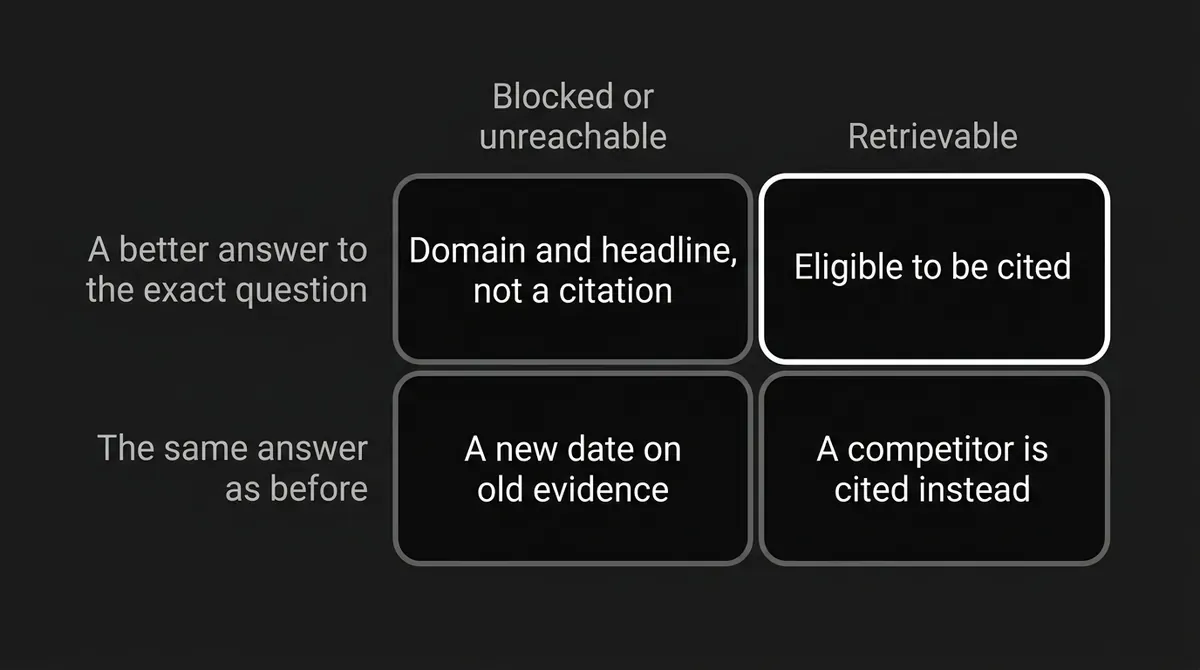
Here is the short answer. Perplexity searches the web in real time and cites the sources it pulls from. So recovery has two halves. Make sure the page can be retrieved at all. Then make it the better answer to the exact question that lost you the slot. A new date on old evidence does neither.
Take a breath. You only need to work one page and one prompt at a time.
Step 1: Check that Perplexity can actually reach your page
Before you rewrite a single sentence, confirm the page is reachable. Access problems are cheap to fix and they make every other step pointless if you skip them.
Open the canonical URL as a logged-out visitor. Then check the boring technical layer:
- The page returns a successful response and is not quietly redirecting somewhere else.
- The answer text is in the page's own HTML, not locked behind a click, a login, or a consent wall.
- There is no stray noindex, no wrong canonical tag, and no security layer blocking automated visitors.
- The URL is in your XML sitemap and your internal links point at that same canonical version.
- There are no leftover mobile, locale, or parameter variants competing with it.
Then look at robots.txt. Perplexity's own crawler documentation names PerplexityBot as the crawler that surfaces and links websites in Perplexity results. It says that crawler is not used to gather content for AI foundation models. A separate agent, Perplexity-User, handles a visit a person specifically asked for. Perplexity's help material says it respects robots.txt, and that PerplexityBot will not index full or partial text from a site that disallows it. A blocked page can still show up as a domain and a headline, but that is not the same as having your evidence available to cite.
If you have server or CDN logs, check whether those agents ever reach the page. Treat that as a clue, not a promise.
How you know this step is done: the page loads publicly, resolves to one canonical URL, is indexable, shows its key passage in the response, and is not disallowed for PerplexityBot.
Where people go wrong: they see the page render fine in their own browser and assume a crawler sees the same thing. They also block the crawler on purpose, then wonder why full-text citations never come back. Access is the entry ticket, not the prize. Allowing the crawler does not guarantee anything on its own.
Step 2: Rebuild the exact prompt you lost
You cannot fix a citation you cannot describe. Which question did you actually lose? Pin down the exact one where Perplexity stopped citing you.
Write down the prompt word for word, including the small qualifiers that change everything: "for small teams," "pricing," "alternatives," a year, an industry, a city. Then record what you see:
- The date you ran it and the mode or account context you used.
- Which competitor or third-party page is cited now.
- The exact claims that competing page seems to be supplying.
- What happened to you. Are you missing entirely, named without a link, cited for a different question, or cited but not used for the claim that matters?
That last distinction does more work than anything else in this guide. Being mentioned is not the same as being cited, and being cited on the wrong claim is not a recovery.
Use the same wording every time you test. Perplexity interprets the context of a question rather than matching isolated keywords, so a paraphrase is a different question and will give you different sources. Comparing a broad research question with a narrow buying question tells you nothing.
If you are tracking more than a handful of prompts, memory will not hold this. A visibility dashboard keeps the answer history, the cited sources, and the page attribution so you are comparing records instead of recollections. That is what DeepSmith's AI Visibility area is for: you define the buyer prompts you care about, it checks them on a schedule, and it reports per-prompt mention and citation rates with the full answer history behind them. Perplexity tracking is included from the Grow plan up.
How you know this step is done: you can state one sentence out loud. "For this exact prompt, this competing page is being chosen because it gives newer, clearer, or more directly relevant evidence than mine." And you can point at the section of your page that has to change.
Where people go wrong: they retype the prompt slightly differently each time, they track the brand name instead of the URL, and they treat one volatile answer as a trend.
Step 3: Compare your page with the source Perplexity cites now
Now put the two pages side by side and go claim by claim. You are not looking for a verdict on which page is better overall. You want one thing: the specific reason theirs is more useful for this question today.
Work through these eight checks:
| Check | The question to ask |
|---|---|
| Intent | Do both pages answer the same question, for the same reader, at the same stage? |
| Recency | Which facts, prices, screenshots, rules, or benchmarks have moved since you published? |
| Evidence | Does each important claim have a source a reader could verify? |
| Completeness | Does the competitor answer sub-questions your page skips? |
| Specificity | Do you give real conditions, steps, numbers, and tradeoffs, or generalities? |
| Structure | Can someone find a self-contained answer under a descriptive heading? |
| Entity clarity | Is it obvious what each claim refers to, with its dates, versions, and units? |
| Links | Are your internal and external links live, relevant, and pointed at the best pages? |
Do not copy the other page. Copying gets you a slightly worse version of a source that already exists. Use the comparison to find what is missing, then add your own examples, data, and framework on top.
Competitor citation data helps here too. Seeing which competitor pages win which prompts, and how often, turns this from a hunch into a short list. DeepSmith reports that alongside your own page-level citations, so the comparison starts from evidence rather than a guess about domain authority.
How you know this step is done: you have a short gap list, ranked by impact, and every planned edit maps to one gap. Stale evidence. Missing answer. Unclear scope. Dead source. Thin section. Structural obstacle.
Where people go wrong: they lift the competitor's headings without improving a single answer, they pad the page to match a word count, and they rewrite all ten sections when only one claim went stale.
Step 4: Refresh the evidence, not just the date
This is the heart of a real refresh page for Perplexity workflow, and it is the step people rush.
Go after the information that would make your page a better source today:
- Replace outdated statistics, screenshots, product references, examples, and tool instructions.
- Re-check every time-sensitive claim and label the period or version right next to it.
- Swap out broken or superseded external sources for current ones.
- Add the newer evidence, original examples, or framework the prompt now needs.
- Delete claims that are no longer true, and trim sections that do not help answer the question.
- Cover the sub-questions your audit surfaced.
- Update the title tag, H1, and meta description if the page's scope genuinely changed.
- Add internal links to your newer, stronger pages, with descriptive anchor text.
- Fix heading hierarchy and image alt text where it helps comprehension.
- Keep the URL and the page's central promise stable unless you have a real reason to change them.
Common mistake: updating only the visible date. Changing "Published" to "Updated" while the body still carries last year's evidence does not help you get cited in Perplexity, and it costs you trust with the humans who do read the page. A date is a label for a real revision. Earn it first, then change it.
General content-refresh practice says the pages worth this effort are the ones with real equity that mainly need newer information, fresher data, or better structure. Common triggers to investigate include a meaningful traffic decline, lost rankings, a falling click-through rate, a dropping AI citation rate, or a long stretch with no new referring domains. Those are prioritization habits for your content team, not rules Perplexity applies.
How you know this step is done: a reviewer can name what changed and why it makes your page a better answer to that prompt. The page carries current evidence, not a fresh timestamp on old material.
Where people go wrong: they add a paragraph and leave the decisive claim stale, or they replace precise evidence with vague "latest" language, which reads current and proves nothing.
Step 5: Rebuild the page so the answer is easy to lift
A page can be accurate and current and still get skipped because nobody, human or machine, can find the answer inside it. Make the answer easy to lift out cleanly.
- Put a short, direct answer near the top of the section that owns it.
- Write headings that match the questions readers actually ask.
- Keep each answer self-contained. Name the subject instead of leaning on "it" and "this."
- Put the scope, date, and units next to the claim they qualify.
- Back important claims with sources a reader can check.
- Use numbered lists for procedures, bullets for criteria, and a table only when it truly clarifies a comparison.
- Keep facts, recommendations, examples, and caveats separate from each other.
- Put your strongest evidence right beside the claim it supports.
- Add an FAQ only for questions the article has not already answered.
- Use structured data only where it reflects what is visibly on the page.
Want a quick test? Copy one answer out of the page and read it on its own. Does it still make sense, and is it still true? If it only works with the three paragraphs above it, it is not extractable yet.
Pages that get cited in Perplexity tend to be the ones a reader can quote without cleaning up first. Schema, headings, and tables help clarity. None of them is a published lever with a guaranteed outcome, so treat them as good craft rather than a trick.
How you know this step is done: for every question the page targets, a reviewer can find one clear answer, its scope, and its support without reading the whole page.
Where people go wrong: they bury the answer under a long warm-up, they stack three claims into one unattributed paragraph, and they build FAQ markup for content that is not actually on the page.
Step 6: Publish the change cleanly
The refresh only counts once it is live on the URL that lost the citation. This step is short, and it is where careless deployments quietly undo the work.
- Publish the body, title, metadata, links, images, and structured data together.
- Keep the canonical URL and existing redirects unless a migration is genuinely necessary.
- Confirm the page is in your XML sitemap and that the sitemap reflects a real modification.
- Confirm internal links land on the canonical page.
- Fetch the live page again after deployment and read the server response, not just the rendered view.
- Re-check robots.txt, noindex, canonical, firewall, and rate-limit behavior after release, because a deploy can change all of them.
- Log the release date, the sections you changed, the evidence you replaced, and the prompts you are targeting.
Perplexity's crawler documentation notes that its settings operate independently and that changes can take up to 24 hours to be reflected in its systems. Read that as a note about settings, not as a countdown to a citation. There is no published recrawl schedule and no recovery guarantee.
How you know this step is done: the live page, the canonical tag, the sitemap, the internal links, the access rules, and your change log all agree with each other.
Where people go wrong: they edit a staging copy, they publish a shiny new URL and leave the old cited one untouched, or they test five minutes before the deploy actually finishes.
Step 7: Retest the same prompt and watch the trend
Perplexity citation recovery is measured, not felt. Run the same test you ran in Step 2, under the same conditions.
- Use the exact original prompt, word for word.
- Hold language, location, account context, and mode as steady as you can.
- Record the answer date and every source cited.
- Check three things: is your URL cited, is it cited for the claim that matters, and is the competitor still there?
- Run prompt variants as separate tests, never pooled with the original.
- Compare across repeated runs instead of declaring victory from one answer.
Pro tip: keep a fixed-prompt test log. Exact prompt, date, cited URLs, competing source, page revision, result. Without that log, one paraphrased retest can hand you a recovery that never happened.
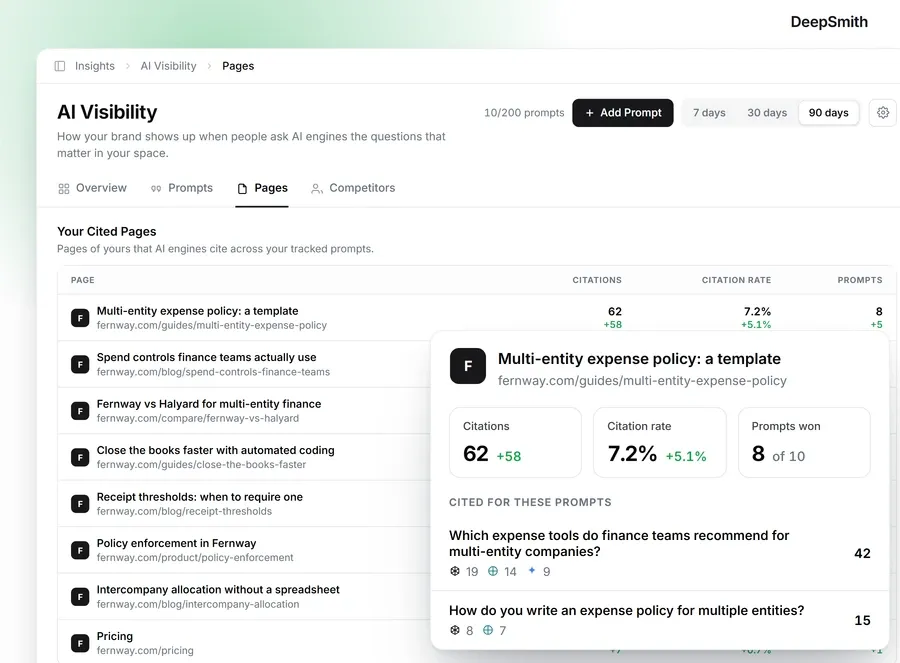
This is the other place a tracking platform saves you real hours. Instead of running prompts by hand and screenshotting answers, DeepSmith collects them on a schedule and shows which of your pages are cited, each page's share of your total citations, and the prompts driving them, with mention rate, citation rate, share of voice, and trend over time. That is how you tell a genuine recovery from a good day.
If you want a tighter experiment, Perplexity's Search API documents date filters you can hold constant: publication-date filters for when something was first published, last-updated filters for when it was modified, and preset recency windows of hour, day, week, month, and year. Running one recency-filtered query against one unfiltered query tells you whether your page is discoverable under a freshness constraint. Those are API semantics, so do not read the result as proof of what the consumer app will cite.
How you know this step is done: you have a dated log showing the prompt, your page's status, the competing sources, the revision you shipped, and the conditions you ran under.
Where people go wrong: they call one answer a stable win, they measure a brand mention instead of a URL citation, and they assume that no change after a week means the refresh failed. Some of this takes repeated cycles.
If the page is still not cited
Go back to the gap audit, in order. Access first, then prompt fit, then evidence freshness, then structure. Change one thing at a time so you can tell what moved.
And keep this in mind: Perplexity stopped citing plenty of pages that never got worse. Perplexity answers are built per question. The prompt may have shifted, a newer source may have appeared, or a different set of pages may have been retrieved that day. Live retrieval also does not mean every page gets fetched on every query. Retrieval is selective, so a perfectly accessible page can still go unpicked.
Nobody outside Perplexity has the ranking formula. Relevance, freshness, evidence, clarity, and structure are the practical signals to work with, and they are the ones you control anyway.
What to do next
Pick one page. Just one. Run these seven steps on it this week, and keep the prompt in a monitoring loop afterwards so you see the next change before your competitor does.
Then set a rhythm. A light quarterly pass on statistics, links, and citation data keeps most pages honest. Save the deep rebuild for when the cited competitor changes or the underlying question shifts.
If you would rather see the whole picture than run prompts by hand, DeepSmith tracks your Perplexity prompts, shows which pages earn citations and which competitor sources are winning, and connects that diagnosis to the content that closes the gap. Start a free trial and check one prompt with real data before you commit to a rewrite.
You are closer than this feels. One page, one prompt, one honest refresh.


