

If you are about to start an AI visibility tool trial, the hard part is not signing up. It's making sure that what you learn in two weeks is something you can trust and compare. This guide is for marketing leads who are testing one or two tools and want a plan they can follow day by day, with a fixed set of prompts, success rules written down in advance, and a short readout at the end.
By Day 14 you'll have a record of what each tool captured, how much of it you could check, and whether it fits the way your team works.
One thing to sort out before Day 1. A 14-day proof of concept is a test design, and it is not the same thing as a 14-day free trial. DeepSmith offers a 7-day free trial, and the public pages don't say whether you can keep collecting in the same workspace afterward. So confirm that your access covers all 14 collection days before you start. If it only covers seven, call it a seven-day test and write that on the readout, or arrange extra access to finish the plan. Either is fine, but it shouldn't be quietly presented as two weeks of data.
Set your success rules before you collect anything
Start with a one-page test brief. Write down the decision this test should help you make, who is going to review the results, the dates and time zone, the language and region, and which AI engines are in scope. Then write down what a pass looks like, and do it before anyone opens a dashboard.
It can show whether a tool captures answers consistently and shows you the evidence behind its numbers. It can't show that the tool caused a lasting change in how AI engines talk about you, or in your traffic or revenue. Aim the test at the first question and you'll get a useful answer. Aim it at the second and you'll mostly get noise.
You're done with this step when the brief names the decision, the scope, the reviewers and the pass or fail rules, and everyone has seen it.
Common mistake: picking the winner after you've seen the dashboards and then deciding which metrics mattered. It's easy to do without noticing, and it's the main reason trial comparisons end up reflecting whichever tool looked nicer on the day. Defining the test before you run it is a general habit in evaluation work, and OpenAI's guide to evaluation best practices is a useful reference for it.
Freeze a 30-prompt test set
Your prompts are the measuring instrument, so they need to be the same for every tool and every day. For this example, use 30 prompts, split evenly into three groups of ten: awareness and category questions, consideration and comparison questions, and decision questions about vendor fit. Thirty is a workable size for a two-week test. It isn't a statistically proven number, and no source we reviewed gives a universal one.
Use real questions your buyers ask, and mix questions that name no brand with ones that might. A few examples, with the brackets filled in for your own market:
- What tools help [persona] with [job to be done]?
- How can a small marketing team track which sources AI answers cite?
- What is the difference between tracking brand mentions and tracking citations?
- Which tools track both brand mentions and citations in AI answers?
- Which tool shows the source pages AI cites for a tracked question?
- Which platform connects AI visibility findings to content-planning workflows?
These are templates, not validated search volume. If you need help finding questions, find AI search prompts to track walks through a discovery process, and the guide on how many prompts to track helps you size the set for the long run.
Treat the set like a document with a version number. Record the exact text of each prompt, the intent group it belongs to, the name of your brand and the shorthand buyers actually use, and a fixed list of competitors. Three to seven competitors is a sensible range to start with, although that's a rule of thumb and not a statistical requirement. Then name the file something like buyer-prompts-v1, add the freeze date, and don't touch it. If you ever have to change a prompt, make a new version and treat it as a new baseline, so results from v1 and v2 never get compared as if they were the same thing. The article on setting up a repeatable prompt set goes deeper on this if you want it.
You're done when you have 30 unique questions, each with one intent label, with scope, competitors, region and language recorded, and the file is frozen.
Common mistake: editing a prompt because a tool gave you an answer you didn't expect. Write the concern in a log and leave the test alone. An odd answer is a result too.
Match the comparison conditions
Two tools are only comparable on the things they both do. So use the same 30 prompts, two engines that both tools support, one region and language, one collection per prompt and engine each day, and the same 14 calendar days. If only one engine is shared, test that one, and say plainly that your scope is narrower. Don't swap in a different engine, region or prompt for one tool.
On DeepSmith, Pro tracks ChatGPT, Grow adds Perplexity, and Scale adds Gemini. That means a two-engine test with ChatGPT and Perplexity needs the Grow plan or above, so check which plan your trial workspace is on. Whatever tool you test against, compare the engines each one actually gives you, and write them down.
It's also worth asking each vendor how it collects answers. Some tools capture what a person sees in the browser, and some use an engine's API, and the two can produce different answers. Neither one is automatically wrong, but you need to know which one you're looking at. We cover the tradeoffs in a separate guide on API answers versus scraped answers. Ask for the collection surface, whether an account or session is involved, how the model is identified, how often data refreshes and how errors are handled. If a vendor can't say, write "not disclosed" in the sheet. Don't guess.
For every tool and every run, your collection manifest should capture:
- The tool and workspace, the prompt-set version, the prompt ID and the exact prompt text
- The intent group, and the engine plus model or version if the tool shows it
- The region, language and the collection method, if disclosed
- The scheduled time and the actual run time, in UTC
- The full answer text and the source URLs shown
- Whether your brand was mentioned, where, and the exact wording
- Whether your domain was cited, and which page
- Competitors mentioned or cited, and which of their pages
- Any failed, delayed, retried or changed run, with a note, kept separate from the original scheduled result
You're done when another person could rebuild which prompt, engine, region and collection event produced any record.
Common mistake: treating an API result, a browser result and a logged-in personal account result as the same thing. Record the difference and compare like with like.
Configure both tools and capture a Day 1 baseline
On Day 1, load the frozen prompts into each tool, switch on only the matched engines and region, and set the same daily schedule if the tool allows it. Before you trust either dashboard, pick a few records and compare them to the real engine output or to the evidence the tool shows. Setup steps and failed jobs shouldn't be counted as answer observations.
This is one of the places where DeepSmith does some of the work for you. You can type in your own tracking prompts, or use Discover Prompts to generate candidates from your product, persona and buyer-stage context, and then edit the list down to your frozen 30. Tracked prompts run on the schedule you set, and the answers are captured and analyzed. The schedule makes collection regular, but it can't make the AI's answers identical from one day to the next. Your AI visibility free trial setup should take most of an hour, and most of that time goes into the prompt list, not the tool.
If you plan to pull data into your own spreadsheet, DeepSmith has a read-only API. The visibility:read scope covers visibility setup, mention and citation rates, competitors, cited pages, answers and exports, with a limit of 120 requests per minute per workspace. Since it's read-only, it can read what the workspace collected, and it can't create or schedule prompt runs. Check which export options your workspace has switched on.
You're done when each tool holds the identical prompt set and conditions, the first run is captured, and a reviewer can open at least one complete answer record for each engine.
Run the same checks every day for 14 days
Each day, each tool collects one answer for each prompt on each engine. With 30 prompts, 2 engines and 14 days, that's 840 scheduled observations per tool, and 1,680 across two tools. With one shared engine it's 420 per tool. These counts describe workload, and they don't show the sample is large enough to prove anything.
Here is a day-by-day plan you can copy, and it's a simple way to test AI tracking tool behavior over time.
| Day | What to do |
|---|---|
| 1 | Freeze the prompt set, configure both tools, capture the first run |
| 2 to 3 | Check that records arrived, and note anything missing |
| 4 | First quality check (see the next step) |
| 5 to 6 | Let collection run unchanged and log exceptions |
| 7 | Midpoint review, and confirm access continues for the second week |
| 8 to 13 | Keep collecting, with no prompt or scope changes |
| 14 | Final export, calculations and the written readout |
Keep failed runs visible as missing collection events. A missing response is not the same as "brand not mentioned," and mixing them up will make a broken pipeline look like a visibility problem. Use only the answers that were really captured as the denominator for your answer-based rates, and report completeness as its own number. If an engine changes its model, a vendor changes how it collects, or an engine goes down, stamp the date and mark the affected records. Please don't quietly retry a run because you didn't like the answer.
It also helps to know why repeated runs matter at all. AI answers can change even when the question doesn't. A SparkToro research project had about 600 volunteers run a set of prompts through three AI tools, and the study found AI recommendation lists almost never came back the same, and almost never in the same order. The authors were open about its limits: it was exploratory, it wasn't peer reviewed, and the volunteers used their own default setups. So read it as a warning against trusting one answer or one rank, and not as a rate that applies to every market. For the same reason, we'd avoid a single "AI rank" as your deciding measure. The piece on why AI citations keep changing explains more of what moves.
If Google's AI surfaces are in scope, track AI Mode and AI Overviews as two separate things. Google says AI features can use different models and techniques, and AI Overviews don't show up for every search. So if no overview appears for a prompt, don't log it as a failed answer or as a citation you lost. The guide on how AI Overviews tracking works explains why. Also, don't use a brand-new page or a recrawl request as your success test. Google says crawling can take anywhere from a few days to a few weeks, and asking doesn't guarantee inclusion. Google also counts AI feature appearances inside the normal Web search report in Search Console, so that report won't give you a clean, separate view of them.
You're done when the schedule has run every day, every exception is logged, and you can line up the same prompt, engine and region across both tools.
Trial-duration warning: the DeepSmith free trial is 7 days. If your access ends there, decide on Day 7 whether you're going to call it a seven-day test or arrange access for the rest.
Audit coverage and answer labels
Check the data on Day 4 and again on Day 7 without changing the test. Look for missing prompts, duplicated runs, the wrong engine or region, cut-off answers, unrecorded source pages and mismatched time zones. Look at a spread of records across both tools and engines, not only the good-looking ones. If you find a configuration mistake, fix it going forward, write down when it started and what it affected, and keep the original records.
Two checks are worth putting numbers on. These are our suggested defaults for this example, not industry benchmarks.
The first is capture completeness. A reasonable target is at least 95%, which is 798 of the 840 scheduled observations for a two-engine tool. When you compare tools, only use the prompt, engine and day combinations that both tools actually captured, and show how many that was so nobody wonders what got left out.
The second is label agreement. Pick 60 answer records per tool, spread across both engines and different days, and read each raw answer yourself. Then compare your reading of mention and citation with the label the tool gave. At least 57 of 60 agreeing, which is 95%, is a sensible bar. If agreement falls below the line you set in advance, write up the disagreements and try to find out why, and don't treat the dashboard totals as the truth. For a deeper method, the guide to auditing the data quality of an AI visibility tool covers it.
You're done when coverage, matching, raw-answer availability and label agreement are reported for both tools, and every exception has an explanation.
Pro tip: keep three separate states in your sheet: "not captured," "answer captured but brand absent," and "answer mentions brand but doesn't cite it." If you merge them, a collection problem can look exactly like a visibility problem.
Compare matched metrics and read the raw answers
Use one shared analysis sheet, calculate the main rates from raw records where you can, and decide your denominators before you start.
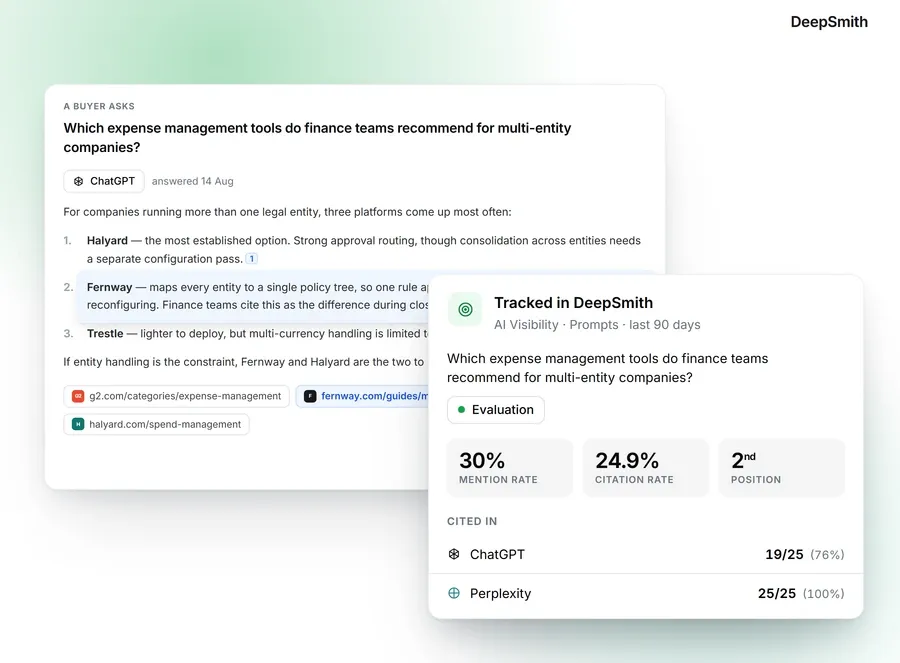
- Mention rate is the number of valid, relevant answers that name your brand, divided by the number of valid, relevant answers collected, times 100. In DeepSmith, a mention means the brand is named, with or without a link.
- Citation rate is the same calculation, but counting answers that cite your brand's domain. Record which page was cited and whether it showed up inline, in a sources panel or in a footnote, and keep the link as evidence along with the count.
- Share of voice is your share of mentions or citations across the prompt set and competitor set you defined. There's no standard formula. Some tools count mentions and some count citations, some weight position, and they treat duplicates and competitor sets differently. If you have the raw records, calculate one transparent version yourself, and our guide to calculating share of voice across AI answers shows one way to do it. If you don't, compare each tool's number only against its own history and don't put unlike numbers side by side.
- Sentiment and position are secondary. A mention, a recommendation and a positive description are three different things, and citation rate says nothing about where in the answer the source appeared, so record source order separately if you need it.
Compare by prompt and by engine, and not only on one blended total. Then read the full answers behind a handful of apparent wins, losses and disagreements. DeepSmith's answer history, competitor citations and cited pages views are there for this part, since they let you look at the evidence behind a summary number. They're for inspecting the data, and they aren't a promise that your visibility will rise during the test.
Score usability only against the criteria you wrote in the brief, and don't invent a performance result you didn't measure.
You're done when both tools are compared on matched conditions and the report shows the formulas, denominators, completeness, sample sizes, per-engine results, and any places where the dashboard label disagreed with the answer you read. When you are working out what counts as a citation, settle it in the brief and apply it the same way everywhere.
Write the Day 14 readout
On the last day, export or save the final records, calculate your scorecard against the gates you set in advance, and write a one-page readout. Here is a scorecard you can adapt.
| Dimension | How to assess | Suggested gate |
|---|---|---|
| Scope fidelity | Compare actual prompts, engines, region, language and dates with the frozen manifest | No unlogged changes, and compare only matched conditions |
| Capture completeness | Captured answers divided by scheduled observations | At least 798 of 840 (95%) per two-engine tool |
| Evidence inspectability | Can an analyst see the answer, timestamp, engine and sources behind a label? | Set the pass rule before Day 1 |
| Label QA | Hand-label 60 records and compare with the tool | At least 57 of 60 agree |
| Comparability | Same prompts, schedule and definitions, with method differences disclosed | Pass only for the matched subset |
| Workflow usefulness | Analysts do the tasks from the brief | Use your own checklist and record blockers |
| Interpretation quality | Report keeps missing data, non-mentions, citations and answer variation separate | No causal or rank claims the data can't support |
None of these gates is a vendor promise or an industry norm, and 30 prompts over 14 days doesn't establish statistical significance. You can change the thresholds if you write them down before anyone looks at results.
Your readout should include the scope, prompt-set version, days collected, engines and region, expected and successful runs, missing and unmatched records, metric definitions, audit agreement, a few real answer examples, the method details that were and weren't disclosed, and a pass, fail or inconclusive mark for each gate.
Inconclusive is a legitimate result. If coverage was patchy, the labels didn't hold up, the method stayed unclear, or the sample can't support a conclusion, say so and name the smallest follow-up test that would settle it. Please don't stretch a two-week observation into a claim that a tool caused your citations to grow.
What to do next
Once the readout is done, share it with the people named in your brief. If both tools passed, you can compare them on how to evaluate an AI visibility tool, and if you're still choosing between tools, the roundup of the best AI visibility tools is a good place to look at the wider field. If DeepSmith is one of the tools you're testing, you can start a free trial and get your first prompts running while your brief is still open. Remember that the DeepSmith AI visibility tool trial is 7 days, so plan your Day 7 access check before you begin.
Related guides
- Trackers, Optimizers and Content Platforms: The Types of AI Search Tools: Sort the market into trackers, optimizers and content platforms, and see which job each type does and where they overlap.
- Which AI Engines Should You Track First? A Prioritization Method: Rank engines for your business using audience, referral evidence and buying behavior, then pick the first two or three to track.
- Goodie AI Alternatives: 8 Best GEO and AI Visibility Platforms for 2026: A buyer roundup of eight generative-engine-optimization platforms you could switch to from Goodie AI (DeepSmith, Profound, Peec AI, OtterlyAI, LLMrefs, Semrush, Foglift, AthenaHQ), comparing published pricing, engine coverage.
- LLMpulse Alternatives: 8 Best AI Search Visibility Platforms for 2026: Explains what LLM Pulse covers and its published euro pricing, then ranks eight replacements (DeepSmith, Profound, AthenaHQ, Scrunch, LLMrefs, Rankscale, Goodie, Otterly) by engine coverage, prompt allowances, cost.
- LLMrefs Alternatives: 8 Best AI Citation Tracking Tools for 2026: Compares eight AI citation trackers as LLMrefs substitutes (DeepSmith, Profound, Peec AI, OtterlyAI, Ahrefs Brand Radar, Scrunch, Semrush, Rankscale) on engines included per tier, evidence depth behind each.


