

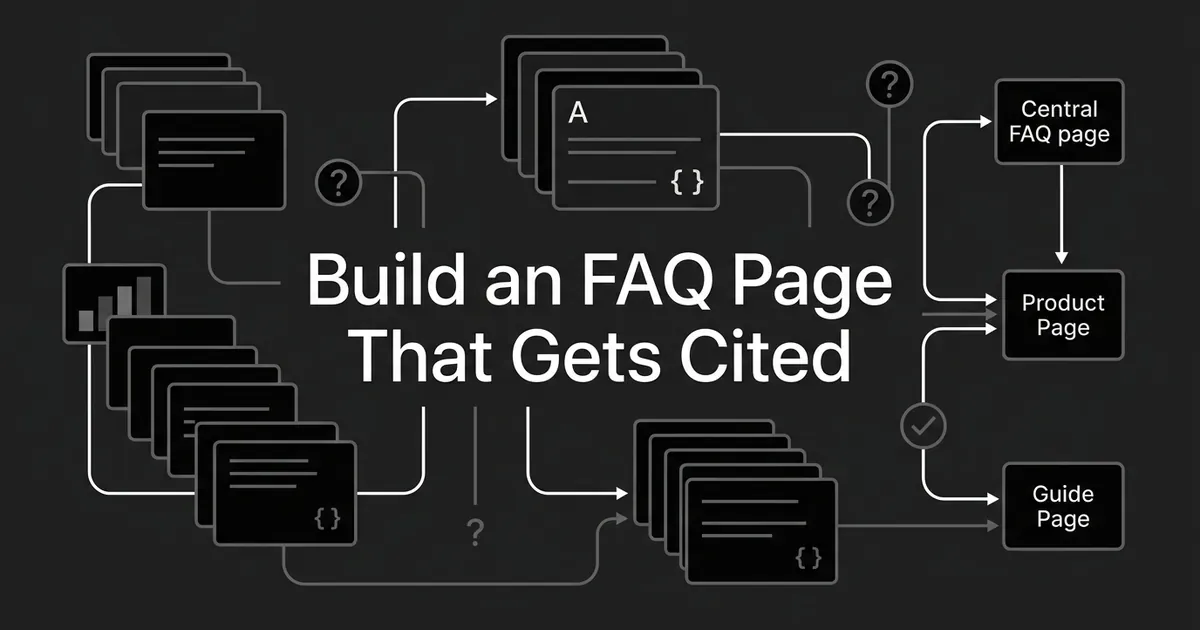
If you're staring at a pile of support tickets, sales objections, and half-finished FAQ blocks scattered across your site, you don't need another opinion about FAQ page SEO. You need a way to decide where each question actually belongs, and a page structure you can reuse every time a new one comes in. That's what this piece gives you: a copyable FAQ page template for sorting questions by where they should live, plus the page structure that puts them there.
Before you build anything, it helps to know what an FAQ page can and can't do for you right now. Google says FAQ rich results stopped appearing in Search on May 7, 2026. The retirement of the FAQ search appearance and its Rich Results Test support followed in June, and Search Console API support for that report is going away in August. If you've been chasing that old FAQ snippet, that goal is gone. For AI Overviews and AI Mode, Google is just as direct: there's no special schema or extra markup that gets you included. A page can be eligible as a supporting link if it's indexed and eligible to show up in Search with a snippet. That's it. So the honest promise of a good FAQ page is this: it makes your site more discoverable and more useful, and it gives you the best shot at being available to cite. It doesn't guarantee a ranking or an AI citation, and nothing in this article claims otherwise.
The FAQ page template
Use this table as your working inventory. Copy it into a spreadsheet and fill in a row for every candidate question before you write a single answer. The fields aren't a checklist for Google to approve, they're the questions you need to answer yourself before a question gets a home.
| Field | What to enter | Decision it enables |
|---|---|---|
| Customer question | The wording a buyer or user actually uses | Keeps the page tied to a real need, not a keyword guess |
| Evidence and frequency | Support ticket theme, sales objection, site search term, Search Console query, or another observed source, with recurrence noted | Separates a question people actually ask from one you assume they ask |
| Intent and scope | Policy, account wide, product specific, category selection, or instructional | Points to the page where the answer does the most good |
| Primary answer location | Central FAQ, a specific product or category page, or a dedicated guide | Gives the question one clear home, not three half answers |
| FAQ treatment elsewhere | A short contextual summary with a link, a plain navigation link, or no repeat | Stops two pages from quietly saying the same thing |
| Answer extent | One sentence, a short explanation, or a summary with a link out | Lets the question set its own length instead of a fixed word count |
| Internal link destination | The relevant policy, product, guide, or central FAQ page | Gives the reader a next step, not a dead end |
| Schema decision | Suitable for optional FAQPage markup, not appropriate, or needs review | Keeps the markup decision separate from the retired rich result |
| Owner and review trigger | The team responsible and what change should trigger a rewrite | Keeps the answer accurate as the business changes under it |
| Measurement | FAQ page queries, impressions, clicks, plus observed AI mentions versus real citations | Stops you from treating a mention as proof of a citation |
Once a row is filled in, the routing decision usually falls out of it on its own. These four rules are what to apply:
- Central FAQ. A short, recurring question about the company, the account, a service, or a policy, with no single product or article that explains it better. Group these by what the person is trying to do, not by every small wording difference.
- Product or category FAQ block. A question that helps someone understand or choose the product or category they're already looking at. Keep the answer right there instead of sending them off to a general page.
- Dedicated article or guide. A question whose real answer is a full explanation, comparison, or set of steps. The FAQ can point to that piece, but it shouldn't try to become a second, shorter version of it.
- No new entry. A duplicate wording of a question you already answer, a claim nobody on your team can verify, a policy that's out of date, or an answer that already lives fine in the regular page copy.
These are editorial calls your team is making, not a published Google algorithm. The point is to avoid two pages saying almost the same thing, and to stop sending a reader on a detour when the answer they need is right where they're standing. A canonical tag can tell search engines which version is the real one, but it's not a substitute for deciding which page should actually carry each question in the first place.
Where the questions come from
Start with what people are already asking, not with a brainstorm. Pull from support tickets, sales call notes, site search terms if you have them, and Search Console. In Search Console's Search results Performance report, look at the Pages and Queries dimensions for the URLs you already have. A query showing impressions can point to a wording gap or a topic you haven't covered, but impressions alone don't mean you need a new FAQ entry for it. Group the different ways people phrase the same question under one clear version, and check what you've already published before adding a new page or block on top of it.
Giving the page an FAQ page structure people can scan
A standalone FAQ page works best with a plain, predictable shape: a descriptive title and a line or two of orientation, jump links to a few task based groups if the page runs long, clear group headings, the questions with their answers, links out to the fuller resources, and a way to reach support when the FAQ doesn't resolve it. A product or category block is the same idea at a smaller scale: one heading, then only the handful of questions that matter on that page. Either way, the question text needs to actually appear in the page you can see and read. Burying it only in structured data doesn't count.
How many questions is a design choice, not an SEO threshold. Towson University's web writing guidance suggests aiming for around ten questions and answers on a page, grouping the rest under headings once you go past that. That's one institution's editorial rule of thumb, not a Google limit and not a number this article is asking you to hit. If you genuinely have thirty different questions, split them into categories or separate destinations. If you only have four honest ones, stop at four instead of padding the page to look fuller than it is.
Answer length should follow the question, not a formula. A simple policy question might only need one clear sentence. A question with a real exception needs that qualification spelled out, or the answer is technically true and practically misleading. When the full answer is a procedure, give a short summary here and send the reader to the guide that maintains it properly. The craft of writing FAQ answers that get cited is its own piece; this one is only about deciding where a question lives. There's no dossier-backed word count that makes an FAQ answer rank or get cited better, so don't invent one and don't chase one.
For presentation, headings and a plain list are the easiest for someone to scan. An accordion can make a long page more manageable, and Google's own FAQ guidance has said an answer is fine behind an expandable section as long as users can reach it. Just don't let every answer default to collapsed: a visitor who lands on the page for one specific question shouldn't have to click through five panels to find it. Whatever presentation you pick, keep the question wording visible and the group labels short.
Linking the page into the rest of the site
An FAQ page that nothing links to is a page nobody finds. Link to the central FAQ from at least one relevant page elsewhere on the site, and link out from FAQ answers to the specific policy, product, or guide that carries the fuller detail. A product page can point to a general billing answer without repeating the whole central FAQ underneath it. Google's own guidance is straightforward here too: pages you care about should have an internal link pointing to them from somewhere else on the site, links should be normal crawlable anchors with an href, and anchor text should describe what's on the other end. The mechanics of writing that anchor text well are their own topic. There's no required number of links and no guaranteed ranking bump for having them, just a page that's easier for people and crawlers to actually reach.
A worked example
Here's how the routing rules play out for a fictional B2B analytics company. Every question, policy, and decision below is invented for illustration. Swap in your own verified facts before you publish anything like it.
| Candidate question | Primary home | On other pages | Reason |
|---|---|---|---|
| Can I change my billing contact? | Central FAQ, under Accounts and billing | Link from the account settings page | Recurring, account wide task, not tied to one product |
| What happens when my trial ends? | Central FAQ if one policy covers every product, otherwise the specific product or pricing page | Short contextual note on the trial signup page | Depends on the actual, verified policy, not an assumption |
| Does the dashboard export reports as CSV? | Dashboard product page, in its own FAQ block | General FAQ can link over to the product page | A feature question that matters at the decision point |
| Which analytics package fits a multi-brand team? | Category or comparison guide | Category page can introduce and link to the guide | This is a real selection decision, not a one line answer |
| How do I set up a scheduled report? | Dedicated instructional guide | Product page block gives a short pointer | Procedural, and shouldn't be duplicated across two FAQs |
Once the questions and policies are verified, a plausible central page groups into something like: a short title and orientation, Getting started, Accounts and billing, Data and access, and Support and next steps. Inside each group, list the real questions your team actually gets, with accurate short answers and links to the deeper guidance. Treat this as a shape to reuse, not an instruction to invent questions to fill every group.
The FAQ schema decision
Schema.org defines FAQPage as a page presenting one or more frequently asked questions, with FAQPage, Question, and Answer describing publisher supplied Q&A content. If your team adds or keeps this markup, the questions and answers in the markup need to match what a visitor can actually see or open on the page. Don't mark up a fabricated answer, hidden content, or promotional copy as if it were a real FAQ. If you're ready to actually write and test that markup, the FAQ schema implementation guide covers the JSON-LD details this piece skips.
Here's the distinction worth holding onto: FAQPage is still a real vocabulary, but the Google FAQ rich result it used to power has ended. Google also says AI Overviews and AI Mode don't require any special schema to include a page. So the honest way to treat FAQ markup is as an optional, accurate description of content that's already visible, not as the reason you built the page and not as a proven lever for ranking or AI citation. Whether any given AI engine actually uses a page's FAQ markup when choosing what to cite isn't something the available guidance settles either way.
How to know whether it's working
Checking whether your FAQ page structure is actually earning its keep takes three separate looks, and they're not the same measurement wearing different hats. This is also where FAQ page SEO stops being theory and starts being something you can actually watch.
First, check search discoverability. In Search Console's Search results Performance report, select your FAQ URL in the Pages dimension, then look at the Queries dimension across a reasonable date range. Read impressions, clicks, CTR, and average position for what they are. Check any product or category pages carrying FAQ blocks separately too. Some queries get anonymized out of the report, and Google attributes a lot of performance to the canonical URL, so a missing row doesn't mean nobody searched for it.
Second, check AI visibility on its own terms. Pick a stable set of real buyer questions and, for each platform you care about, record the prompt, the date, whether the answer mentions your brand, whether it links to your specific FAQ or product URL, and which other pages got cited alongside you. Repeat this under similar conditions over time to see if anything actually shifts. A brand mention with no link attached is not the same thing as a page citation, and it's worth tracking the two separately. Bing Webmaster Tools' AI Performance preview reports citations and cited URLs across Copilot, Bing AI summaries, and some partner integrations, which is a useful window into those specific experiences, not a full cross-engine count.
Third, check whether people can actually finish what they came to do. Use real support and sales feedback to find questions that go unanswered, policy text that's gone stale, or links that don't deliver the next step. Give every entry an owner and a reason to revisit it, tied to the change that should trigger a rewrite.
Worth knowing before you build a dashboard around any of this: Google folds AI feature traffic into Search Console's overall Web search type performance, so a Web impression or click on its own can't prove an AI answer cited that FAQ URL. And an increase after you add schema doesn't prove the schema caused it. Track what you can actually observe, and be honest about what you can't.
A page like this is also something DeepSmith's AI Visibility can help you watch once it's live: it tracks which of your pages AI engines actually cite for the prompts you're tracking, so you can see whether your FAQ page is one of them instead of guessing from brand mentions alone. You can try it free for 7 days and see your own pages against it.


