A page gets harder to keep accurate when the same price, statistic, or software detail shows up in the introduction, the instructions, the examples, and the conclusion. Then one small change in the world means edits in five places, and most teams don't find all five. This guide is for marketing leads who want to prevent that while the piece is still being written. By the end you'll know how to write evergreen content that keeps its useful detail and has fewer places that can go wrong later, and you'll have a checklist to prove it before you publish.
Everything here happens before the first publish: in the brief, the research, the draft, and the final review. The ongoing upkeep afterward is a different job, and there is a separate maintenance workflow for evergreen content that covers it. You'll need a draft or brief, your source material, and access to your publishing template.
One thing to say up front. None of this guarantees a page will never need an update. Products change, laws change, and sometimes the recommendation itself changes. The goal is content that doesn't go stale quickly, with changes that stay small and local, so a new number means editing one block and not rewriting the argument.
Step 1: Pick a task your reader will still have
Start with a problem the reader will still need to solve next year, not a news event or a single release. Before you choose examples or statistics, write one sentence that says who is doing what, under which conditions, and what a good result looks like.
Good tasks for this audience include setting approval criteria for content, choosing a platform against your workflow, structuring a brief, or documenting a publishing handoff. A release announcement or a list of current prices serves a different purpose and leans on facts that change.
Here is a quick way to see the difference. "The newest content automation features to try this year" depends on a release calendar. "How to evaluate a content platform against your production workflow" depends on your criteria, and it can still include a product example.
Ask yourself two questions. Would the main explanation still help if the opening statistic disappeared? Would the article still be worth reading without the named vendor or the current trend? If both answers are yes, you have a task that supports future-proof content.
You're done when the brief names a reader, a task, an outcome, and any real constraints, and the planned headings still describe a useful process with the dates, vendor names, and trend numbers taken out.
Where people go wrong. They mistake a format for a subject. A how-to guide can lean heavily on change if every step follows one interface. They also go too far the other way and make the topic so broad that it stops answering anything. If a reader needs an exact setup procedure, they need exact setup instructions, even when those are tied to a version.
Step 2: Map what can change before you draft
Before you write a paragraph, list the claims you plan to make and decide where each one will live. A short ledger in the brief is enough, and if you don't have a briefing system yet, a repeatable content briefing system is a good place to start. It's a production note for this one article, and you won't need to maintain it afterward.
For each claim, jot down these things:
- The exact statement you plan to make, and its role, such as principle, instruction, evidence, example, or product fact.
- The source, including who published it and when, and the period the measurement covers.
- The scope, such as population, region, platform, plan, or version.
- What would make the statement wrong or incomplete.
- Where it will sit, and whether you plan to repeat it anywhere else.
Then sort each claim with three plain labels. Relatively stable claims are principles, clearly bounded history, and task logic that isn't tied to one interface. Conditional claims depend on an audience, a workflow, or a standard. Change-prone claims are prices, plan limits, rankings, current surveys, menu names, compatibility details, and statements about what a product doesn't support. These labels are a planning aid and not a prediction of shelf life.
Now make a location decision for each one. Principles and reasoning stay in the main text. Dated evidence goes next to the claim it supports, in a bounded block. A price you really need goes in one table. A compatibility requirement goes in a prerequisite note. A fact that only decorates the page can come out.
This is a good place to use stored brand context. If your team keeps its products, personas, voice, and claim boundaries in one place, the writer starts from the approved terminology and the lines you won't cross, and doesn't have to guess. There is more on how to ground AI content in your brand voice and product facts if you want the detail. In DeepSmith, that is what Deep IQ holds, and Content Types let you save a format's requirements, like the ones in this guide, so they travel with every brief. The editorial calls still belong to you. Deciding which claims are change-prone and where each one goes is your job, and stored context only makes the drafting consistent.
You're done when every material change-prone claim has a source, a scope, and a planned location, and no unverified claim is holding the argument up.
Where people go wrong. They label the whole article evergreen and stop looking at individual claims. They also treat every number as equally risky, when a fixed historical date and a live subscription price are very different things.
Step 3: Put time-bound evidence in labeled blocks
Keep the lasting recommendation in the prose, and put the changing evidence in a clearly scoped block beside it. First decide whether you need the statistic at all. If you do, keep its meaning and its source with it so it doesn't read as an undated universal truth.
A simple order works well. State the principle or decision rule, explain why it matters for the task, add the evidence block where it supports that reasoning, and keep the source, period, population, and main limitation together with the number.
Here is a template you can copy. The brackets are placeholders, and none of them are facts.
Evidence snapshot
Finding: [the exact supported finding]
Observation period: [when it was measured]
Population and scope: [who or what was measured, where, and under what conditions]
Source: [organization and report title]
Limitation: [any material qualification]
Relevance: [the narrow conclusion this supports]
When you research a number, record the exact value and unit, how the metric is defined, who or what was counted, the period, and the source. Keep the report's release date separate from the period it measured, because they are often not the same. If a source doesn't say something you need, write that down and don't fill the gap with a guess. If the missing detail makes the number impossible to interpret, find another source or drop the claim.
One phrase deserves a second look. "Recent research shows" stops meaning anything as time passes, so name the organization and the period instead. If you're looking for a source in the first place, a guide on how to find data and statistics for content can help you choose ones worth keeping.
Common mistake: A callout doesn't make a statistic timeless. It only makes it easier to find and replace. If the date and the caveats sit somewhere else on the page, the number is still misleading. Keep them inside the block.
You're done when each number can be understood with its context attached, and swapping one snapshot wouldn't force you to rewrite unrelated explanations.
Where people go wrong. They move the statistic into a box and leave the date and caveats three paragraphs away.
Step 4: Write instructions around function, not wording or layout
Explain the action and its purpose first, and add the exact interface or version detail only when the reader needs it. A lot of writing is tied to the day it was written without anyone meaning it to be. Google's style guide points to words like "now," "new," "currently," "latest," and "soon" as ones that can undermine timeless documentation, and it names reduced maintenance as one benefit of avoiding them.
That isn't a ban on every time word. A release note, a historical comparison, a compatibility note, or a deadline may need an explicit date or version. The point is to cut the ones that add nothing.
| More brittle wording | More durable treatment |
|---|---|
| "The tool now supports exports." | "The tool supports exports," if you've verified it and that's enough for the task. |
| "Use the latest version." | State the supported requirement, or point to the official compatibility information when a version matters. |
| "This feature is new." | Say what the feature lets the reader do. If the release matters, give the date or version. |
| "It's not yet available." | State the verified limitation and its scope, without implying a promised release. |
| "Last year, the team changed its process." | Give the actual year when the timing matters. |
The same idea applies to interface steps. Google's guidance on UI writing recommends describing what the reader should accomplish when that's practical, and it connects this to helping future-proof procedures. So "Click the blue button at the top right" becomes "Open the publishing settings and select the destination." When someone really does need exact navigation, name the control by its visible label, say what it does, and give enough context to find it.
Some detail should stay. Don't strip version numbers from code, API behavior, security steps, or configuration requirements to make the text look timeless, and don't write "should work on any version" in place of what you've actually tested.
You're done when a reader can tell what to do and can do it, and removing a color or a screen position doesn't remove the only clue to finding a control.
Where people go wrong. They swap precise steps for advice like "configure the settings," which can't be acted on. Or they delete the word "currently" and leave an inherently changing claim sitting there unchanged.
Step 5: Build self-contained sections
Give each section one job and enough context to do that job, and keep its changeable details inside clear boundaries. A reader who lands on one section from search should be able to tell the task, the conditions, the action, and what success looks like. Putting the direct answer first helps here, and there is a guide on how to structure an article answer-first for AI extraction.
The idea comes from topic-based documentation. The OASIS DITA standard treats a topic as a unit of authoring and reuse with a single subject, and it notes that extra transitional text makes reuse harder. A marketing how-to isn't a manual, but the same thinking works at the section level, and reusable article templates make the pattern below the default. It also happens to suit how AI systems split a page, which is covered in the explainer on how content chunking works.
A section pattern that holds up looks like this:
- An action heading that names the task.
- A direct answer near the top.
- Only the prerequisites that task needs.
- The instructions.
- A test for what a correct result looks like.
- The pitfall or exception that would make the instruction fail.
- An optional block for evidence, compatibility, or interface detail.
Watch for phrases that only make sense with the previous paragraph, like "apply the same rules here." Say what the rules are, for example "apply the approved source and date requirements to each statistic in the comparison table." Keep genuine sequencing, though, because a process has an order.
Keep each changeable fact in one intentional place. If a plan limit belongs in a reference table, don't also reproduce it in three examples. If several sections share a prerequisite, write one short shared block and point to it by name. If your CMS supports reusable fields, check how it actually behaves before you rely on it, because pasting the same paragraph in several spots won't keep them in sync.
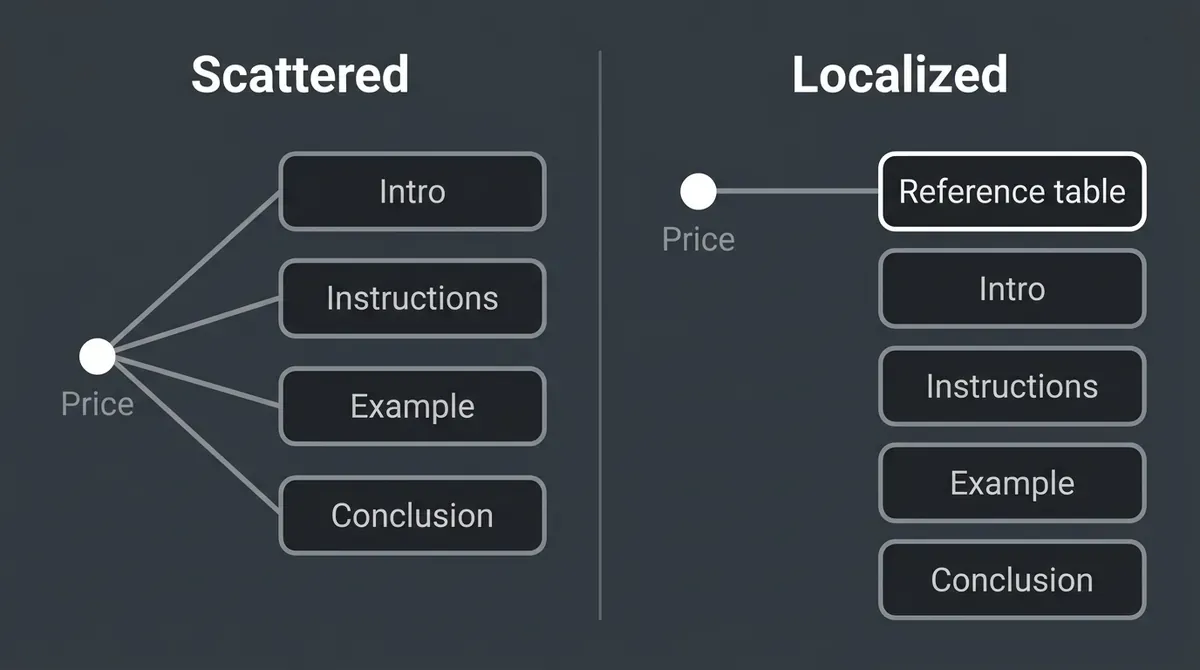
Two tests help before you publish. Read a section without the one before it and see whether you can still name the task and the result. Then delete a dated evidence block and check that the rest still makes sense. If it doesn't, the dependency may be real, and then it should be visible.
You're done when each section has a clear purpose, its dependencies are named, and a changeable fact isn't scattered across unrelated paragraphs.
Where people go wrong. They treat modular as meaning tiny. Dozens of small sections force the reader to rebuild the task, and that is its own kind of failure. Modular writing still keeps useful links and citations.
Step 6: Choose examples and visuals that teach stable relationships
Pick examples because they help the reader understand an action or a decision, and don't pick them because they're a snapshot of something current. Real stories and historical cases still work when you make their timing and scope clear. Johns Hopkins' evergreen teaching guidance allows personal stories and real-world examples, suggests giving explicit dates for past and current events, and warns that infographics full of trends and statistics create updating obligations. It was written for a classroom, so borrow the principles and not the schedule.
Worked decisions with named criteria, before-and-after structures, sample briefs, process diagrams, and bounded historical cases all hold up well. Don't swap all the real detail for abstraction, though. A durable example still needs enough specifics to teach the task.
Treat screenshots as conditional evidence. They help when a control is hard to find or when a visual state matters to the action. When you need one, explain the action in text so the image isn't the only carrier, note the version or environment you captured in your production notes, and don't assume the layout looks the same across plans, devices, or releases. W3C's guidance on informative images stresses meaning over a literal description, so for a structural diagram, describe the relationship it teaches and don't just write "diagram."
If you write an invented example to teach a point, mark it as illustrative. Never imply a customer result you don't have.
You're done when each example or image teaches something the prose couldn't do as well, and the essential instructions are still there as text.
Where people go wrong. They use screenshots as decoration, drop in a market chart where a decision diagram would do, or make up an outcome to make a principle sound proven.
Step 7: Give the page a lasting identity and honest dates
Choose the title, slug, headings, and metadata so they don't create needless dependencies on a moment in time. Use a descriptive title that matches the task. Don't add a year to a guide that isn't about a particular year, and keep prices, plan limits, and release slogans out of a permanent slug. Pick stable heading names where you can, since readers sometimes link straight to a section.
These are design choices, and they aren't a claim that a URL without a year ranks better. W3C's guidance on durable URIs doesn't say dates are always bad in a URL either. A fixed creation date can be a perfectly stable identifier. The trouble starts when the page's identity is built on something expected to change, like an edition that gets renamed every year.
Keep dates accurate too, and if you want more on how to signal content freshness with dates, there is a full guide. Google recommends a visible date with a clear label and structured data that agrees with it, as covered in its publication dates guidance. The date on the byline describes the page, and it doesn't describe an event the page talks about. Don't set a future publication date, and don't change a modified date just to look fresh.
You're done when the title and slug describe the task without time-sensitive details, the dates are truthful, and the metadata matches what's visible on the page.
Where people go wrong. They remove every date to look timeless, mix up a report's date with the page's date, or put a year in a slug they plan to rename again and again.
Step 8: Stress-test the draft before you publish
Run one resilience review before the first publish by simulating the changes you can foresee and checking how far each one spreads. This is a final production check, and it isn't a recurring refresh routine.
| Test | What to simulate | A good result |
|---|---|---|
| Evidence replacement | Swap a dated statistic for a different supported finding. | Its context stays attached and no unrelated instruction needs an edit. |
| Price change | Change one necessary price or plan allowance. | One reference block is the main place to edit. |
| Interface movement | Rename or move a control in an example. | The functional explanation survives and any exact navigation is obvious. |
| Version boundary | Change a compatibility assumption. | The affected prerequisite is easy to find and nothing claims to work everywhere. |
| Section isolation | Read one section without its neighbors. | The subject, conditions, and task are still clear. |
| Evidence removal | Remove a nonessential research callout. | The principle still holds together. |
| Reader completion | Ask someone who hasn't seen the draft to explain the action and the result. | They can say what to do, what they need, and how they'll know it worked. |
Before you publish, resolve or remove every unsupported material claim, and confirm that the article still answers the real task after your resilience edits. There's no proven maximum number of statistics or screenshots, so judge each one by whether it's necessary.
Pro tip: If changing one number forces edits to the introduction, the instructions, the recommendation, and the conclusion, reconsider the structure before you publish. Keep the decision rule in the main text and put the necessary number in a clearly scoped place.
This is also where your production tools come in. In DeepSmith, the Writer in Content Studio handles research, planning, writing, internal and external linking, and generates a cover image and publish-ready metadata, and Produced Content gives you a review editor for the body, title, and slug. That editor is a good place to localize a statistic, adjust a section, or remove a claim you can't support, and human review and QA gates cover the review step in more depth. The resilience checks in this step are still yours to run, since the platform doesn't run them for you.
You're done when a reviewer can point to the edit location for each foreseeable local change, and where a change would overturn the whole recommendation, the draft says so openly and doesn't pass itself off as evergreen.
Where people go wrong. They over-optimize for durability and publish advice so generic nobody can act on it. The aim is local change, and it isn't the removal of all useful detail.
A checklist to attach to your brief
Copy this into the brief for a new article and tick it off before you publish.
- The title and outline serve a lasting reader task.
- The central argument doesn't rest on an unnecessary trend or statistic.
- Every necessary changeable fact has a verified source and a clear scope.
- Statistics keep their period, population, unit, and caveats.
- Relative words like "new," "latest," and "soon" are removed or anchored.
- Each section has one job and can stand on its own.
- The title, slug, and dates are honest and agree with the visible page.
- The draft passes the local-change and reader-completion tests.
- Product claims stay within what is documented.
What to do next
If you're wondering how to write evergreen content that holds up in practice, pick one article that hasn't been published yet and run this list on it. Start by marking its change-prone claims, give each one a clear boundary, and check whether the rest of the piece can stand without them. If you also want the bigger picture of why pages lose ground over time, the guide to content refresh and decay is a good next read.
When you're ready to produce your next brand-grounded article, you can start a DeepSmith free trial and apply this checklist in the review before you publish.