Most teams compare AI visibility tools by the number on the pricing page, and then the first real invoice is higher than they expected. That gap is what people mean by AI visibility software hidden costs, and it is the main thing to plan around when you set a budget. The headline price on most AI visibility tools covers a plan built around a small setup, and the setup you actually need (more engines, more prompts checked on each engine, a few more teammates, an API key) can sit outside it. Sometimes there is a separate fee for the extra. Sometimes there is just a ceiling, and the thing you need lives on a bigger plan.
This guide walks through eight tools and what each one's published material says about charges beyond the plan price, so you can estimate your own monthly bill instead of trusting a plan name.
How we chose and ordered these tools
We included tools where the vendor's own published pages show a concrete charge beyond the plan, a usage allowance that affects the bill, or a feature that is gated to a higher plan. We ordered them by how clearly each tool lets a buyer see its cost mechanics, with DeepSmith first because we publish it and can state its limits plainly.
A few ground rules apply to everything below. Prices are in the currency the vendor publishes, and we have not converted anything. Where a vendor lists a monthly price and an annual-equivalent price, we say which one we mean. A usage cap is not the same as an overage fee, so we keep those separate: some vendors publish a per-unit overage rate, some publish a cap and say nothing about what happens at the cap, and some put the feature on a higher plan. Where the evidence runs out, we say so. Information comes from each vendor's public pricing and help pages as of November 2026, so check current terms before you buy.
The comparison below is not a ranking of who is cheapest. Engines, check frequency, locations and the definition of a "check" differ, so the same monthly price buys different amounts of tracking.
| Tool | Best for | Cost detail that stands out | Starting price |
|---|---|---|---|
| DeepSmith | Teams that want AI visibility tracking and content production in one platform | Monthly page-analysis allowance; engine access rises by plan | Pro: $99/month ($80/month billed annually) |
| Peec AI | Teams that want to add models without changing plans | Each extra model is a separate monthly fee | Starter: $95/month |
| OtterlyAI | Teams that want to pick engines and watch credit use | Every engine checks every prompt; Claude uses three credits per check | Lite: €29/month |
| Scrunch | Teams that need a defined response volume | 5,000 responses a month on Core; API and integrations are Enterprise | Core: $250/month |
| Profound | Teams trialing before a custom Enterprise deal | Agent credits can pause or bill as overage | Free trial; Enterprise custom |
| Semrush AI Visibility Toolkit | Existing Semrush customers | Extra users from $45/month; report add-ons; one domain | $99/month per domain, billed annually |
| Ahrefs Brand Radar | Teams that want published per-check overage rates | One check is prompt times model times location | Custom prompts: $50/month |
| SE Ranking AI Search Add-on | Teams adding GEO tracking to an SEO plan | Add-on sits on top of the SEO subscription | $89/month for 200 checks |
1. DeepSmith
Best for: a marketing team that wants AI visibility tracking and content production in one platform, with usage ceilings stated by plan.
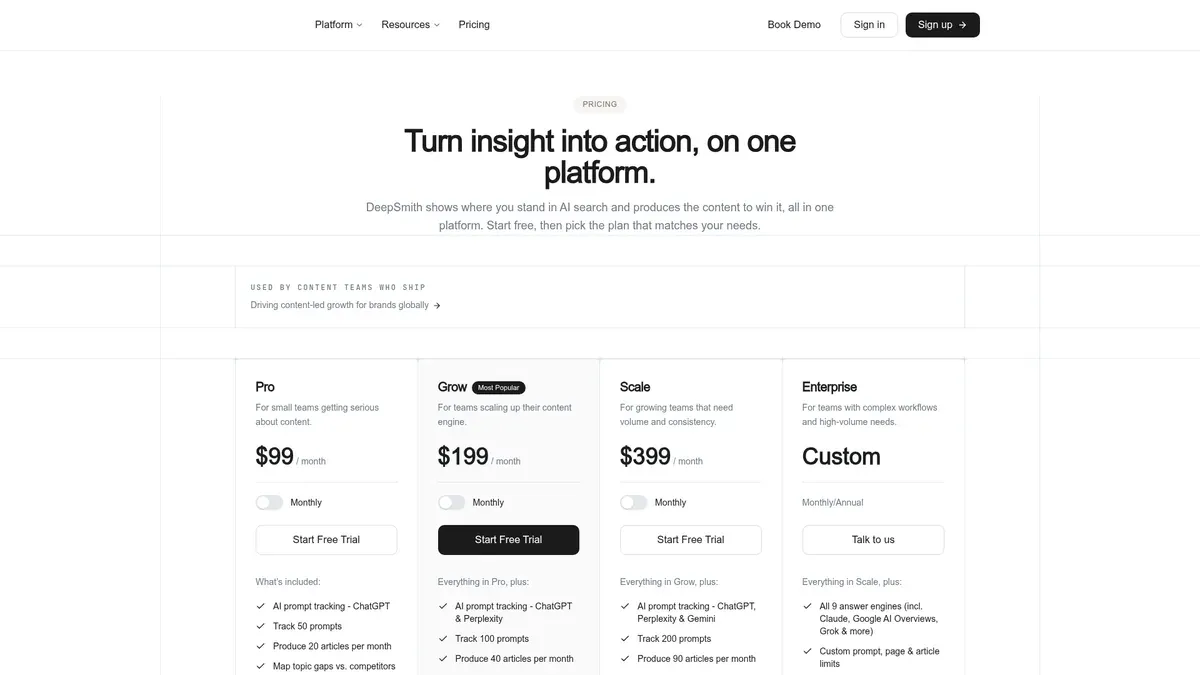
DeepSmith publishes four plans. Pro is $99/month ($80/month billed annually) and covers 50 tracked prompts, 5 team members, ChatGPT, 1,500 pages analyzed a month and 20 articles. Grow is $199/month ($160/month annually) with 100 prompts, 7 team members, ChatGPT and Perplexity, 3,000 pages and 40 articles. Scale is $399/month ($299/month annually) with 200 prompts, 10 team members, ChatGPT, Perplexity and Gemini, 8,000 pages and 90 articles. Enterprise is custom, with custom limits on every metric and the full engine list.
The clearest ceiling to understand is page analysis. Each page DeepSmith reads, classifies into a topic and assigns a funnel stage uses one page credit, and that counts your own site and every competitor site you add to the Content Map. A page is only counted once. The monthly budget resets and does not carry forward. If your sites together hold more pages than the remaining budget, the extra pages wait until the allowance resets or you move up a plan. That is a queue and an upgrade decision, not a cash overage charge, and none is published.
On the other costs you would normally worry about, no extra-seat, extra-engine or export fee is published. Seats are set by plan, and engine coverage rises with the plan, so wanting Gemini means being on Scale or Enterprise. Workspaces are isolated and billed and limited independently, so an agency running several brands should plan on each workspace carrying its own plan. API reads do not spend credits.
Key features:
- Mention rate, citation rate and share of voice tracked per prompt and per engine
- Content Map for your site and unlimited competitor sites, with coverage gaps
- Opportunity Agents, Content Studio and Autowrite for producing the content that closes gaps
- Publishing to WordPress, Webflow, Strapi, Sanity and Contentful, plus webhooks

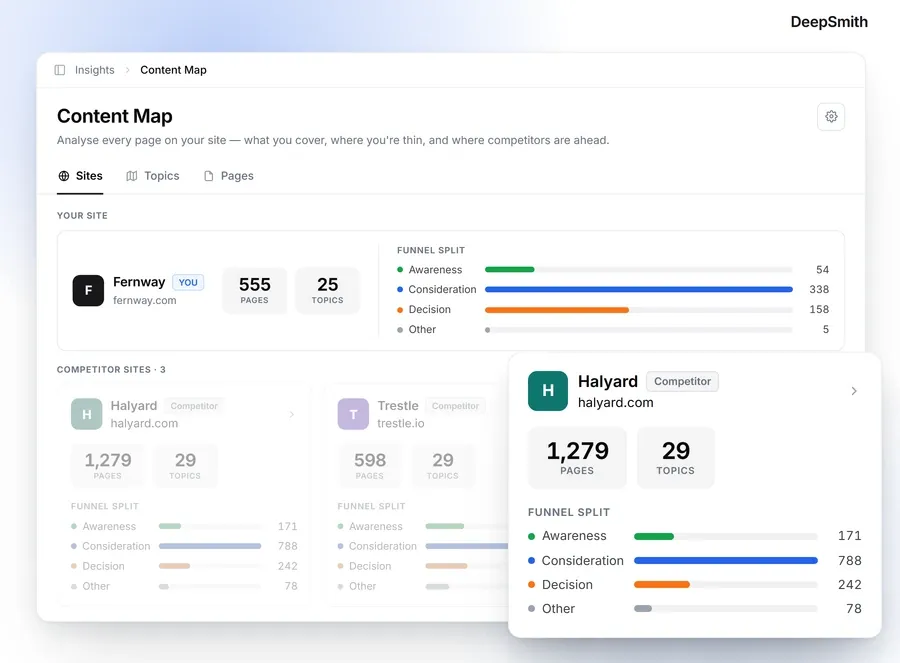
Limitation that matters for cost: engine coverage is tiered, so a team that needs many engines at once will end up on Enterprise and a quote. If you will map several large competitor sites, count their pages before you pick a plan, since those pages draw from the same monthly budget as yours.
2. Peec AI

Best for: a team that wants to add models to an existing plan and share the workspace with many colleagues without a per-seat charge.
Peec's plans are Starter at $95/month, Pro at $245/month, Advanced at $495/month, and a custom Enterprise plan billed annually. They include 50, 150 and 350 prompts and 1, 2 and 5 projects, with unlimited users on every plan. Annual billing carries a 15% discount, so the annual-equivalent rates come out near $80.75, $208.25 and $420.75 a month. Those figures are arithmetic from the stated discount, not separately advertised prices. Standard plans include three active models.
The add-on to watch is the model fee. One additional model costs $30/month on Starter, $70/month on Pro and $140/month on Advanced, and it is described as covering one extra model across the prompts already in the plan. So the prompt count can stay the same while the bill climbs, which is a good example of the add-on engine cost people tend to miss. Tracking more countries or languages carries no separate fee.
There is one conflict worth settling before you buy. The pricing page says API access is not on Starter and is included from Pro up, but the API documentation says the beta API is limited to Enterprise customers. Get the entitlement in writing instead of assuming Pro has it. CSV exports are included on the listed tiers.
Peec tracks daily on Starter, Pro and Advanced, with monthly AI-answer allowances of 4,500, 13,500 and 31,500.
Limitation: the model fee is explicit, but history retention and overage behavior are not described in the pricing material, so ask what happens when you hit your answer allowance.
3. OtterlyAI

Best for: a team that wants to choose its tracked engines per workspace and see how that choice uses up a finite credit allowance.
Otterly's published prices are €29/month for Lite (16 prompts, 2,000 credits), €189/month for Standard (120 prompts, 15,000 credits) and €489/month for Premium (403 prompts, 50,000 credits), with custom Enterprise pricing. The page shows a 15% annual discount, but we could not establish the exact annual amounts, so we are not quoting them.
Here the cost is in how credits are spent. A credit is a tracking slot, and every engine you select checks every prompt in the workspace. Most engines cost one credit per check, but Claude costs three. A help page updated November 10, 2026 says a workspace must select at least three engines, and it shows how daily prompt capacity shrinks as you add engines. On Lite, Standard and Premium, three engines without Claude give 21, 161 and 537 daily prompts. Four engines without Claude give 16, 120 and 403. Four engines including Claude give 10, 80 and 268, and all seven give 7, 53 and 179. Same subscription, much less tracking, which is how engine breadth becomes a cost without a separate engine fee.
When you run short, Standard can add 5,000 credits for €65/month and Premium can add 10,000 credits for €99/month. The pricing page lists no extra credit pack for Lite. API and MCP access is not on Lite, while Standard includes 2,000 requests a month and Premium 5,000, and we found no price for going over those limits. Seats, brands, competitors, countries and languages are unlimited on the listed plans.
Tracking is daily on Lite and Standard, and daily or weekly on Premium.
Limitation: headline prompt counts do not predict coverage. Work out the engine mix and credit arithmetic for your workspace first.
4. Scrunch

Best for: a team that wants to budget against a stated monthly response allowance, or that needs enterprise integrations negotiated as a package.
Core is $250/month and includes 125 unique prompts, 5,000 responses a month, 5 user licenses, 1 brand workspace and 4 LLMs (ChatGPT, Perplexity, Google AI Overviews and Copilot). We did not find an annual price. Enterprise is custom, with custom prompts, responses, workspaces and licenses, nine listed models and API and integrations.
The 5,000 responses are an allowance, and the pricing material does not say what happens past it. It might pause collection, queue it or bill you, and you should ask which. Likewise, no extra-seat or extra-workspace price is published, so do not assume one. If you manage several brands, Core's single workspace is the number to check first.
Several things are gated rather than priced. The Query and Advanced API and Looker Studio access are Enterprise-only, MCP is unavailable on Core and custom on Enterprise, and wider model coverage is an Enterprise feature with no per-engine price. The Responses API FAQ says Scrunch does not charge per API call, and that usage is counted by the AI responses collected, not by how often you retrieve them. That tells you how the API is measured, but it does not say response collection is unlimited.
Core also covers one country, persona and language and five competitors, while Enterprise adds SSO and a dedicated account team.
Limitation: Enterprise pricing is not public, and the Core response ceiling plus a single workspace may be tight for multi-brand teams. Ask how a "response" is defined, how often collection runs and what the full package costs.
5. Profound
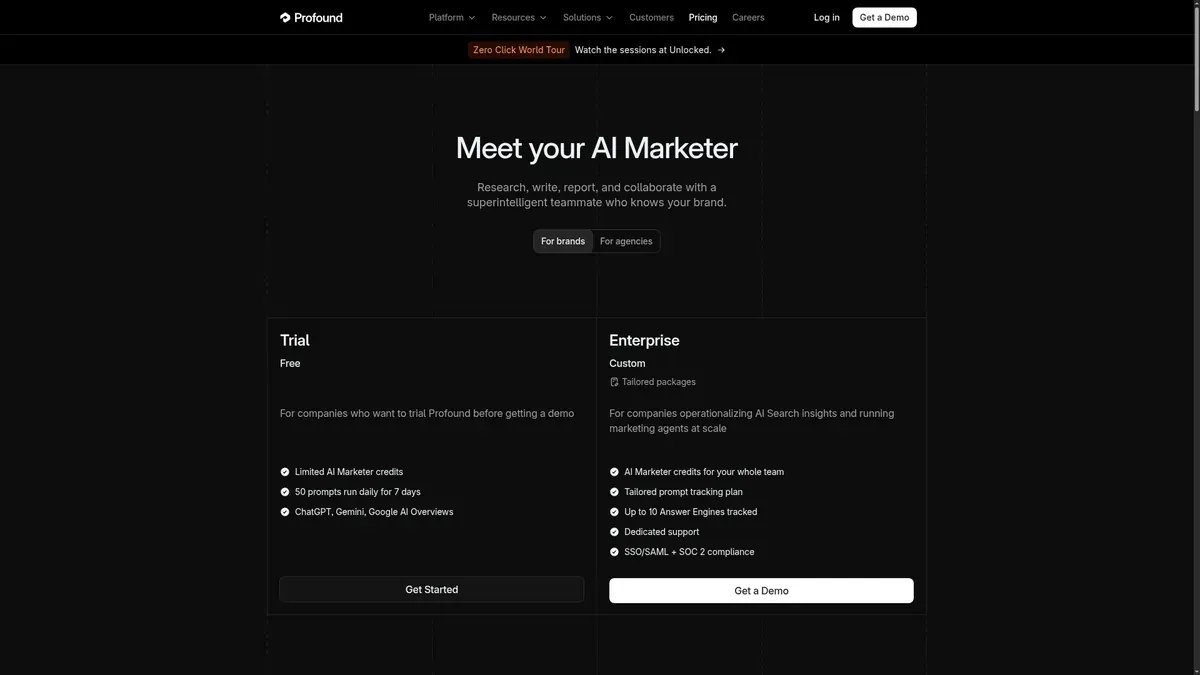
Best for: a team evaluating a limited trial before requesting a custom Enterprise package, especially where AI marketing agents are part of the plan.
Profound publishes a free trial and a custom Enterprise plan, and no other price. The trial runs 50 prompts daily for seven days across three engines (ChatGPT, Gemini and Google AI Overviews), with recommended prompts you cannot customize. It includes unlimited seats, but the comparison shows no history, exports or API. Enterprise lists up to ten answer engines, unlimited seats, all-time history, CSV and JSON exports and API access, with price on request.
The most important line for a budget is about agent credits. The vendor says an AI Marketer agent run uses credits based on its complexity, and an account can be set either to continue with overage billing when the credit allotment is used up or to pause. The rate and credit quantities are not published. Before you turn agents on, ask which setting applies, what the rate is and whether you can set a hard cap or alerts.
Seats are unlimited on both the trial and Enterprise, so no per-seat charge is indicated. We did not find a separate export fee, but the trial-versus-Enterprise gap means the history, export and API you will want after the trial sit behind a quote.
Limitation: price opacity. Enterprise features and usage customization are described, but there is no public amount or agent-credit rate, so the pause-or-overage setting is a must-ask question.
6. Semrush AI Visibility Toolkit
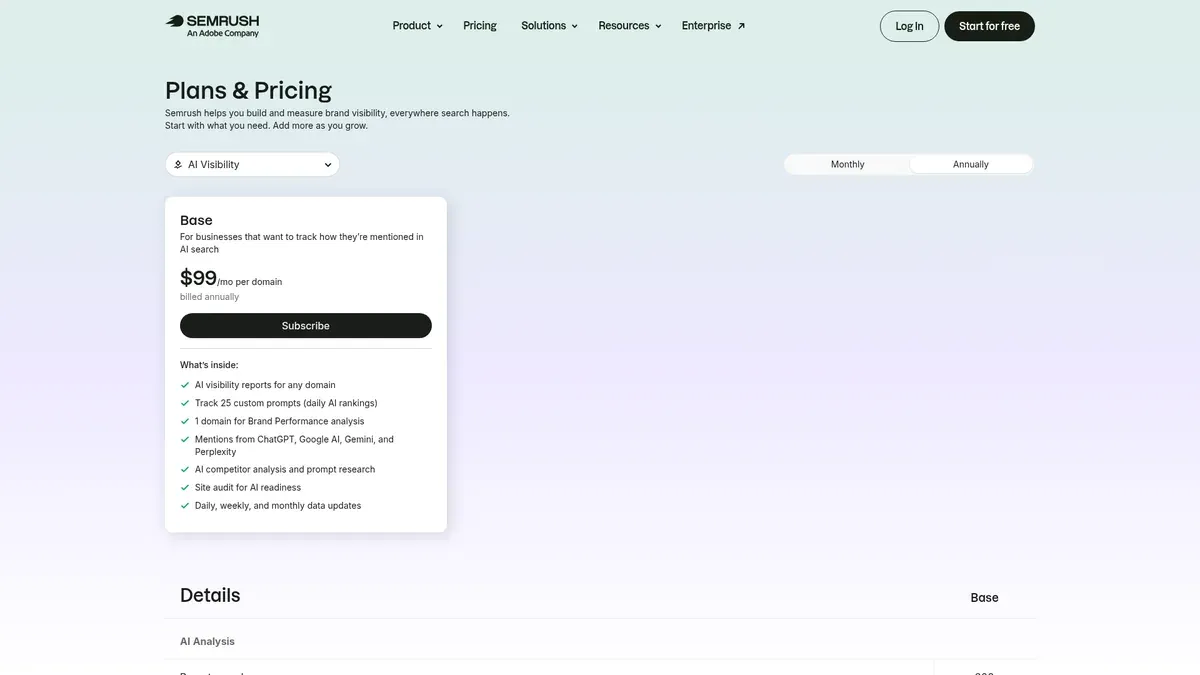
Best for: existing Semrush customers who want AI visibility reporting and are fine with a per-domain price plus separately billed users and reports.
According to Semrush's AI pricing page, the AI Visibility Base is $99/month per domain, billed annually, and covers one domain for Brand Performance analysis with 300 AI-analysis reports a day. Additional users start at $45/month, and the included seat count is not stated. Reporting is sold as add-ons: Base Report at $10/month includes PDF export, and Pro Report at $20/month adds more than 20 integrations, scheduled delivery, white labeling, AI summaries and link sharing.
Per the Semrush knowledge base, there is no free trial for this toolkit, and if you add it partway through an annual subscription term the $99 charge can be prorated to the rest of that term. Ask for the exact current-term charge and the renewal amount. Because the price is per domain, covering several brands means asking how many domains need their own charge.
The Base lists mentions from ChatGPT, Google AI, Gemini and Perplexity. Large-scale prompt tracking, multi-brand features and advanced automation are described without public prices, and API and custom integrations are listed under Enterprise. The PDF export in Base Report is a reporting product, not evidence of a per-export fee.
The toolkit also includes competitor analysis, prompt research and an AI-readiness site audit.
Limitation: one domain in the base price, no free trial, and no published overage behavior for the 300 daily reports or history retention.
7. Ahrefs Brand Radar

Best for: a team that wants a defined custom-prompt allowance and can model a published per-check overage rate.
This is the tool with the most explicit ai tracking overage fees. Ahrefs' help article describes custom-prompt packages: Basic at $50/month with 2,500 checks and $0.020 per extra check, Growth at $100/month with 7,000 checks and $0.015 per extra check, and Scale at $250/month with 25,000 checks and $0.010 per extra check. Overage checks are billed at the end of the billing month. At 1,000 extra checks on Basic, that is $20 before any other charges, which is plain arithmetic from the stated rate and not a quote for your usage. The AI Visibility Index (from $199/month) and the all-platform package ($699/month) are separate products with separate allowances, so do not add them together.
The thing to understand is what counts as a check. Ahrefs defines one check as one prompt execution on one LLM in one location. The product page gives the example that five prompts on one platform daily equals 150 checks a month, and says Claude uses eight checks per update. So a modest prompt list across several models and locations can use an allowance far faster than the raw prompt count suggests.
The Index covers AI Overviews, AI Mode, ChatGPT, Perplexity, Gemini and Copilot, and custom prompts also support Claude.
Limitation: the check arithmetic. Seats, export limits, API access and any export fee were not specified in the material we reviewed, so ask for projected monthly checks based on your actual prompts, models and locations.
8. SE Ranking AI Search Add-on

Best for: a team already looking at SE Ranking that wants to bolt AI visibility checks onto an SEO subscription.
The add-on comes in three sizes: 200 checks for $89/month ($71.20/month on annual billing at 20% off), 450 checks for $179/month ($143.20) and 1,000 checks for $345/month ($276). That is on top of the SEO plan, which is $129/month for Core and $279/month for Growth ($103.20 and $223.20 annually). This stacking is the first thing to catch if you are comparing the add-on to a standalone tool.
A check is one prompt on one AI platform, and the vendor's own example says one prompt across AI Overviews, AI Mode, ChatGPT and Gemini uses four checks. So 200 checks is not 200 prompts. Per the SE Ranking help center, the add-on includes prompt monitoring and AI sources analysis, and you should ask the vendor how a plan consumes its allowance.
Other charges sit around the edges. Core includes one manager seat and Growth includes three, and extra manager seats start at $16. A standalone API plan starts at $179/month and is annual-only, which is separate from the research API and MCP credits included in some SEO tiers. History is six months on Core and all-time on Growth, and export rows are capped at 50,000 and 100,000. We found no export fee, but those ceilings might push you up a plan for long-term reporting.
Limitation: the AI feature is an add-on layered over an SEO subscription, with seats and API priced separately, and no overage price for exceeding AI checks was found.
The charges to look for, and the questions that surface them
Reading across these eight, the same few patterns come up, and most trace back to usage-based pricing. Knowing them is more useful than memorizing any one price.
Prompts are not always the billing unit. Ahrefs bills a prompt times a model times a location. SE Ranking counts a prompt times a platform. Otterly spends credits per prompt-engine check, with Claude weighted at three. Peec charges a recurring fee for each extra model. Compare a real setup, not plan names. Engines are the same story: Peec charges a fixed fee per extra model, Otterly lets engines eat a shared credit pool, and DeepSmith and Scrunch tie wider coverage to the plan.
Seats are inconsistent. Semrush starts extra users at $45/month and SE Ranking starts extra manager seats at $16, while Peec, Otterly and Profound list unlimited seats. Do not assume every tool charges per seat.
A cap is not an overage policy. Many pages list a daily report, response, credit or prompt limit without saying whether service pauses, queues or bills at the limit. Ahrefs publishes rates. Profound describes a pause-or-bill choice with no rate. DeepSmith queues pages until reset or upgrade.
History, exports and API are plan gates more than fees. In the material we reviewed, these were mostly gated by plan (Profound's trial against Enterprise, SE Ranking's six months against all-time) and not charged as separate export fees. Do not budget for a per-file export fee unless a vendor writes one down.
A custom price is a missing number. Profound, Scrunch, Peec Enterprise and DeepSmith Enterprise need a quote, so do not guess at them.
When you talk to a vendor, these questions surface most of it:
- What exactly uses up one prompt, credit, check, response, report or page, and does one question on several engines, locations or daily runs multiply it?
- What is my real monthly allowance at the engine mix and frequency I plan to run?
- At the limit, does collection stop, queue, upgrade or bill, and can I set a hard cap with alerts?
- How many users, domains, brands and workspaces are included, and what does each extra one cost?
- How far back can I see data on this tier, and what happens to it if I cancel or downgrade?
- Are exports and API included, rate-limited or Enterprise-only?
- Is the quoted price monthly, or an annual rate billed up front, and when is the renewal and cancellation deadline?
If you want to go deeper on contracts and negotiation, the guide to buying an AEO platform covers renewal and exit terms.
How to choose
Start from your workload, then match the cost mechanics to it. Your geo software subscription cost depends more on how you measure than on which tool you pick, and the geo software subscription cost you see on a pricing page is only the floor.
- If you want tracking and content production on one bill with plan ceilings you can read, DeepSmith is the place to start, and the trial lets you see real data first.
- If you want to add models one at a time with no seat charge, Peec's model fee is easy to predict.
- If you want to tune engines against a credit pool, Otterly gives you that control, but you need to do the arithmetic.
- If you want a published overage rate you can model, Ahrefs is the clearest.
- If you already pay for Semrush or SE Ranking, compare the add-on price with a standalone tool, including the extra seats and API.
- If you need custom engine coverage or agents, expect a quote from Profound or Scrunch, and ask the cap and overage questions before you sign.
Try DeepSmith
If you want to see your ceilings before you commit, start a DeepSmith free trial and check the usage against your own prompts and sites.
Related guides
- Entry-Level vs Enterprise AI Monitoring: Is the Price Gap Justified?: Weigh what enterprise AI monitoring adds over entry-level plans, such as coverage, integrations, governance and support, and decide whether those extras justify the price gap for your situation.
- Is an AI Citation Tracker Worth Keeping After the Trial? How to Judge the Value: Judge at trial end whether to keep an AI citation tracker by checking data usefulness, actions it triggered, effort to maintain and alternatives, and decide using a simple.
- How to Track AI Visibility on Under $300 a Month: Build an AI visibility tracking setup under $300 a month by choosing a small prompt set, the engines that matter, a suitable plan tier and a light reporting.
- AI Visibility Tool Red Flags: Claims to Question Before You Buy: Spot vendor claims that deserve a follow-up question, from vague engine coverage to unexplained scores and guaranteed outcomes.
- How to Track Your Brand in Google AI Mode: Track your brand in AI Mode: build a prompt list from real conversations, run repeat samples, record mentions and cited URLs, and log results so changes over time.