You typed your own category question into Copilot, and a competitor's page came back with the little numbered citation beside it. That one stings. It also tells you exactly where to look next.
Here is the good news. Copilot is not a black box with a mind of its own. It grounds its web answers in the Bing search index, so how to get cited in Copilot is mostly a question of how well Bing can find, read, and trust your pages. That is solvable, and you can start today.
If you want to get brand into Copilot answers, you start where Copilot starts. By the end of this guide you will have a working path: verify with Bing, open the door for the crawler, push your updates, add the entity signals, write pages Copilot can lift from, then measure what changed. One step at a time.
Step 1: Trace Where Copilot Actually Gets Its Answers
Start here, because every other step follows from it.
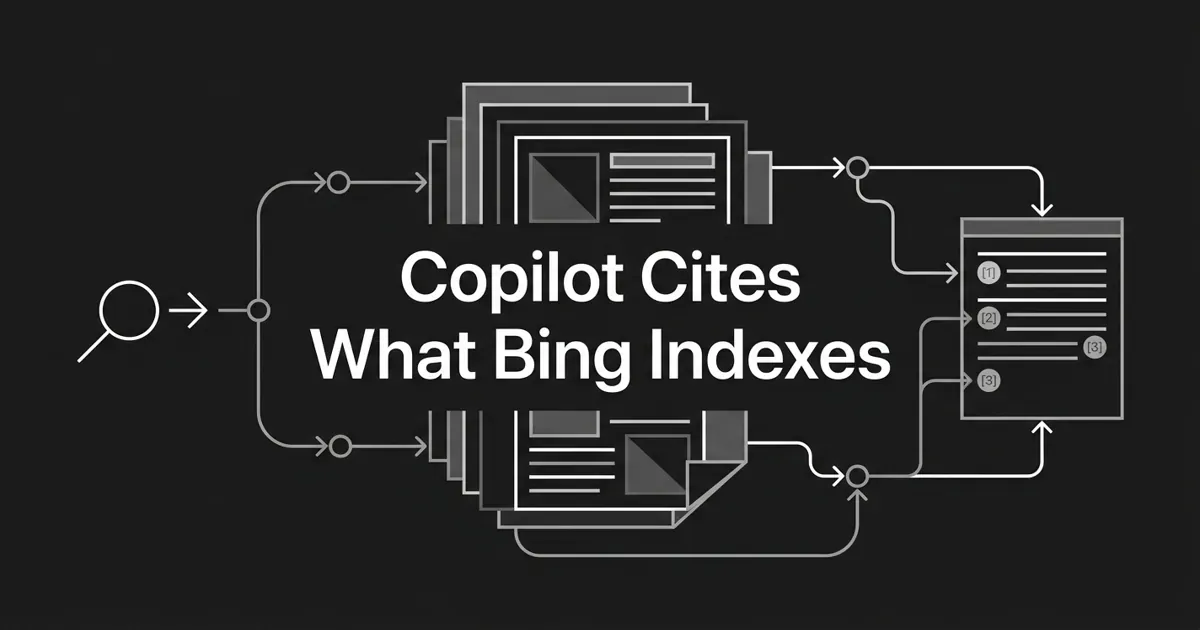
Microsoft's own documentation states that Microsoft 365 Copilot and Microsoft 365 Copilot Chat both use generated search queries sent to the Bing search service to ground responses in web data. Copilot Studio's architecture docs say the same thing in a different shape: queries flow through Bing Custom Search, then safety guardrails, then the generated answer.
The pipeline looks like this:
- Someone submits a prompt to Copilot.
- Copilot reformulates that prompt into one or more search queries.
- Those queries hit Bing's ranking system.
- Bing returns web results.
- Copilot writes an answer from those results and shows citations back to the user.
Read step 3 again. If Bing cannot discover your page, cannot crawl it, or ranks it below the slice of results Copilot pulls from, your page cannot be cited. Content quality does not rescue a page Bing never sees.
You know this step is done when you can say out loud, without hedging, that your Copilot work is Bing work. That reframe saves you months of chasing the wrong signals. Most of how to get cited in Copilot turns out to be Bing hygiene done properly.
Where people go wrong: treating Copilot like a model recalling things it learned in training. Web-grounded Copilot answers are retrieval, not memory. Bing copilot citations come from the live index, so the index is where you go to work.
Step 2: Verify Your Site in Bing Webmaster Tools
Bing Webmaster Tools is your control room. Without verification you cannot submit URLs, manage crawl behavior, or see the AI visibility data waiting in Step 7.
Three ways in, and any one works:
- XML file. Download the BingWebmasterAuth.xml file from Bing Webmaster Tools and upload it to the root of your domain.
- DNS record. Add a CNAME or TXT record to your domain's DNS configuration.
- Meta tag. Drop a
<meta name="msvalidate.01" content="...">tag into the head section of your default page.
Pick whichever one your team can ship this week. The meta tag is fastest if you have CMS access. The DNS record is sturdiest if a future redesign might wipe a file.
Once verified, submit your XML sitemap through the Sitemaps panel. A few details matter: canonical URLs only, chunks of 50,000 URLs each for large sitemaps, and an HTTP 200 response with a Content-Type of application/xml or text/xml.
You know this step is done when Bing Webmaster Tools shows the property verified and your sitemap accepted with a URL count that matches your real site.
Where people go wrong: forgetting to re-verify after a domain migration. The old property keeps showing stale data while the new domain sits outside your view. Migrated in the last year? Go check now. It takes two minutes.
Step 3: Make Sure Bingbot Can Reach Every Page You Care About
This is the step that fixes the most invisible damage, and it is the least glamorous work on the list. Everything you do to optimize for Copilot answers depends on it.
Bingbot is Microsoft's primary web crawler, and it comes in a few flavors: Bingbot Desktop, Bingbot Mobile, AdIdxBot for ads landing pages, MSNBot-Media for images and video, and BingPreview for result previews. All respect standard robots.txt directives.
The simplest permission is an explicit one:
User-agent: Bingbot
Allow: /
Then go look for the quieter blockers. These are the technical errors that keep pages out of Bing, and therefore out of Copilot:
- Blocking Bingbot in robots.txt, on purpose or by inheritance from an old rule.
- Blocking CSS, JavaScript, or image resources the crawler needs to render the page.
- Returning 5xx errors or soft 404s.
- Redirect chains of three or more hops.
- Canonicalizing every page to the homepage.
- Leaving a noindex tag on a key landing page.
- Serving different content to Bingbot than to real visitors.
That last one deserves its own warning. Cloaking violates Bing's webmaster guidelines and can cost you rankings or get you de-indexed. There is no clever version of it.
Pro tip: Bingbot can render JavaScript, but with limits. Keep the content you want cited in the initial HTML response rather than in client-side execution. If your key paragraph only appears after hydration, that is a citation risk, not a detail.
Bing Webmaster Tools also gives you crawl control settings: block specific URLs or patterns, set a maximum crawl rate, define the hours when Bingbot may request pages, and apply geographic targeting. Use these gently. Every restriction is a page Copilot might not see.
To confirm a crawler in your logs is really Bingbot, check it against Bing's published IP ranges (40.77.167.0/24, 199.30.16.0/20, 65.55.210.0/24, plus IPv6 ranges 2620:1ec:c00::/48 and 2620:1ec:4::/48), and run a reverse DNS lookup. Real Bingbot resolves to a name ending in .bing.com or .microsoft.com.
You know this step is done when your robots.txt allows Bingbot, your priority URLs return 200, and nothing important sits behind a noindex or a three-hop redirect.
Step 4: Push Every Publish and Update Through IndexNow
Waiting for a crawler to wander back is the slowest part of Microsoft Copilot AEO. IndexNow removes that wait.
IndexNow is a protocol that pushes URL change signals straight to participating engines. Create, update, or remove a page, and you notify them immediately instead of hoping for organic discovery. Bing, Yandex, Seznam.cz, Naver, Amazon, and Yep.com all receive IndexNow submissions.
Setup is a short job:
- Generate an API key. It can be a UUID, or a hexadecimal string between 8 and 128 characters.
- Host a text file at the root of your site named after the key, for example
abc12345.txt, containing only the key string. - Submit a single URL with a GET request to
https://api.indexnow.org/indexnow?url={url}&key={key}. - Submit batches with a POST request, up to 10,000 URLs per request.
One rule to remember: wait at least five minutes before resubmitting the same URL.
Be honest about what this buys you. IndexNow does not guarantee ranking or instant indexing. It gets your URL into the discovery queue faster than a crawler revisit would. Worth a lot, not magic.
There is a second channel if you need it. The Bing URL Submission API is Bing-only, authenticates with OAuth 2.0, accepts up to 500 URLs per batch, and allows up to 10,000 URLs per day per verified site through the https://ssl.bing.com/webmaster/api.svc/json/SubmitUrlbatch?apikey={key} endpoint.
Which should you use? For most sites, IndexNow: free, no quota, six engines instead of one. Reach for the URL Submission API if you are a high-volume publisher needing Bing-specific control over batch timing. You can also submit high-priority pages by hand in Bing Webmaster Tools, up to 10 per day.
You know this step is done when publishing a page automatically fires an IndexNow ping, with no human remembering to do it.
Step 5: Give Bing the Entity Signals It Reads
Copilot favors sources that look like known, credible entities. Schema markup is how you say who you are in a format machines do not have to guess at.
Bing supports structured data in JSON-LD, Microdata, Microformats, RDFa, and Open Graph. Use JSON-LD. It is the preferred format, easier to maintain, and separate from your HTML.
The types Bing documents support for include BreadcrumbList, businesses and organizations, events, people, products and offers, recipes, reviews, aggregated reviews, and ClaimReview. For citation work, prioritize five:
- Organization: identifies your brand as an entity in the knowledge graph.
- Person: identifies your authors and their credentials.
- Article: carries editorial metadata including author reference, publisher, and dates.
- BreadcrumbList: clarifies where a page sits in your site structure.
- ClaimReview: for fact-check and verification content, and uniquely valuable to Bing.
Then feed the trust layer around it. E-E-A-T (Experience, Expertise, Authoritativeness, Trustworthiness) applies to Bing's quality assessment too, though Bing weights it differently than Google.
On author bio pages, use Person schema with name, jobTitle, affiliation to your Organization, sameAs links to LinkedIn, Wikipedia, or professional profiles, knowsAbout fields for expertise areas, and any credential fields that apply.
On your about page, use Organization schema with name, logo, url, sameAs links to Wikipedia, LinkedIn, and Crunchbase, founder list, foundingDate, and contactPoint.
The unglamorous editorial signals count too: visible bylines linking to real author bio pages, an editorial policy page, contact information and a physical address, HTTPS sitewide, and clear sourcing inside the content.
You know this step is done when Bing's Markup Validator inside Bing Webmaster Tools and the Rich Results Test both parse your markup without errors.
Where people go wrong: shipping schema once and never validating it again. A template change can silently break every Article block on the blog. Put validation in your publishing routine.
Step 6: Write Pages Copilot Can Lift a Passage From
Ranking gets you into the candidate set. Structure is what gets you quoted.
When Copilot cites you, it shows a clickable title, your favicon and domain, a short snippet of the relevant passage, and on some surfaces a publication or crawl date. Citations appear as numbered inline references or expandable footnote-style links, depending on whether the reader is in Bing chat, Windows Copilot, or Microsoft 365 Copilot. Either way, the model pulls a passage. Make good passages easy to find.
Here is the pattern that works:
- Put a direct answer of 40 to 60 words immediately after each H2 heading.
- Phrase headings as questions where it reads naturally, so "How does Bing index pages?" rather than "Indexing process".
- Use bullet lists for enumerable facts and tables for comparisons.
- Use definition patterns ("X is ...") for entity content.
- Add FAQ schema for your question and answer pairs.
- Surface key statistics with inline citations to primary sources.
The formatting hygiene underneath matters too: one H1 per page carrying the primary topic, a clean H2 to H6 hierarchy with no skipped levels, descriptive anchor text on internal links, and alt text on every image.
None of this asks you to write worse. It asks you to answer sooner. When you optimize for Copilot answers, you are writing for a reader who wants the point in the first four sentences, and that reader is already on your site.
This is where a lot of teams stall, because doing it consistently across every page is real work. Heading structure, schema markup, internal linking, and metadata are part of DeepSmith's writing pipeline rather than a cleanup pass afterward, so pages come out already shaped for extraction. The point is the discipline, not the tool. Whatever gets you consistency, keep it.
You know this step is done when you can open any recent post, read the first paragraph under each H2, and get a complete answer without scrolling.
Step 7: Watch the AI Performance Report in Bing Webmaster Tools
Microsoft Copilot AEO without measurement is guesswork, and this is the one place where the data comes straight from the source.
The AI Performance report, launched in public preview in mid-2026, is Bing Webmaster Tools' dedicated dashboard for AI visibility. It reports three metrics:
- Mentions: how often Copilot references your brand or page.
- Citations: how often Copilot links to your page as a source.
- Share of Voice: your visibility relative to competitors in cited queries.
Filter by intent (informational, commercial, transactional), by topic cluster, and by time period. The report also shows which specific URLs Bing's AI systems surfaced, with comparisons revealing which competitor URLs won for the same prompts.
That competitor view is the most useful screen in the product. It turns "why are we invisible" into "this page beat that page for this query", which is a question you can answer.
Keep the two headline metrics straight. A mention is Copilot naming your brand without a link. A citation is a hyperlink back to your page. Both matter, but only one sends a reader to you. When you report Bing copilot citations to leadership, say which one you mean.
Monthly is a sensible cadence, with a deeper quarterly review to catch competitor movement and topic cluster shifts.
One honest limitation: this report covers Copilot and Bing's AI surfaces, not the rest of the field. If your buyers also ask ChatGPT, Perplexity, Gemini, Claude, or Google AI Mode, you need coverage there too. DeepSmith tracks mention rate, citation rate, and share of voice across those engines, with a competitor leaderboard and page-level attribution, so the two views together give you the full picture instead of half.
Step 8: Close the Gaps and Keep Your Best Pages Fresh
You have the plumbing. Now make it a loop.
Start with the competitor URLs winning citations for your priority prompts. Read them the way Bing does. What is the heading structure? Where does the direct answer sit? What schema is on the page? You are not looking for a secret. You are looking for the pattern you are missing.
Then refresh your own outdated sources and re-ping IndexNow so the update gets discovered.
How often should you refresh? Match the cadence to the content:
| Cadence | Best for | Trade-off |
|---|---|---|
| Weekly | News, trending topics, fast-moving information | Maximum freshness, high effort, can signal instability |
| Monthly | Time-sensitive evergreen content | Balanced freshness and stability, needs a consistent workflow |
| Quarterly | Reference and fundamental topics | Low effort, may miss freshness opportunities |
A few Bing signals also behave differently than Google's. Bing has confirmed that shares, likes, and overall social engagement influence rankings, which Google has denied. Bing gives more weight to exact match domains. Multimedia, meaning images, video, and audio, carries more weight in its algorithm. Page speed and Core Web Vitals matter to both. The usual suspects still count: backlinks with keyword-relevant anchor text, domain age, HTTPS, and mobile-friendly design.
Set your expectations properly. Bing holds roughly 4% of global search market share and around 7.6% in the United States, so Copilot is a focused channel, not a volume channel. Citations concentrate, too. An Ahrefs study of Copilot citations in July 2026 found Amazon captured 14.4% of citations across tracked US queries, the single most-cited domain. A Semrush study across three months found Wikipedia, Reddit, and major news outlets consistently among the most-cited domains in AI answers. Big aggregators take a big slice. Your opening is the specific, clearly-sourced page on the question they answer generically.
People want a trick to get brand into Copilot. There is not one. There is this loop: find the gap, produce the page, ping, measure, repeat. That cycle is what DeepSmith runs, with competitor citation tracking on one side and article production on the other, so the gap you spot on Monday is not still sitting in a spreadsheet in March.
You know this step is done when it stops being a project and becomes a monthly rhythm.
Where Copilot and ChatGPT Part Ways
Both systems lean on Bing-derived search signals, which is why people assume one optimization covers both. It mostly does, and the gaps are worth knowing.
Architecture. Copilot uses the Bing index only, tightly integrated with Microsoft services. ChatGPT uses Bing plus its own browsing tool and native search integration.
Grounding behavior. Copilot sends reformulated queries to Bing for every response needing web data. ChatGPT browses selectively, often only when a user invokes it or confidence is low.
Source selection. Copilot favors authoritative, well-structured pages with strong entity signals. ChatGPT pulls from a broader spread, including more user-generated content like Reddit and forums.
What does that mean for your work? To optimize for Copilot answers, your page has to perform in Bing's results for the target query, full stop. ChatGPT asks for that plus more: brand mentions, topical authority, and social proof across the open web. Bing fundamentals are the shared foundation, and ChatGPT needs an off-site layer on top.
If you are short on time, build the Bing layer first. It is the one with a clear, measurable control panel.
What to Do Next
Do not try to run all eight steps this week. How to get cited in Copilot is not one big project, it is a queue. Pick the one step that is blocking you.
Not verified in Bing Webmaster Tools? That is your week. Verified but IndexNow is not wired into publishing? Do that next. Both done? Open the AI Performance report and write down the three prompts where a competitor is beating you. Those three prompts are your content plan.
Momentum matters more than completeness. One fixed blocker beats eight half-finished ones.
When you are ready to run the measure-and-produce loop as a system instead of a to-do list, start a DeepSmith free trial and see your visibility data and your first drafts side by side before you pay.
Related guides
- How Citation Selection Differs Across ChatGPT, Google AI Overviews, and Perplexity: ChatGPT, Google AI Overviews, and Perplexity choose citations differently.
- Platform-Specific AEO: How to Get Cited in ChatGPT, Perplexity, Gemini, Copilot, and Google AI Overviews: ChatGPT, Perplexity, Gemini, Copilot, and AI Overviews each pick sources differently.
- How to Get Cited in Gemini: Optimizing for Google's Assistant Answers: You asked Gemini about your category and it cited someone else.
- How to Get Cited in Perplexity: Winning Source Slots in Perplexity Answers: Perplexity shows only three or four sources per answer.
- Scrunch vs HubSpot AEO: Key Differences for In-House Dashboard Reporting: You can pull AI visibility data into your own dashboards and assistants with either tool.