You refreshed the page. You waited. Now someone wants to know if it worked, and all you have is a chart that went up a bit.
That's a rough place to be, and almost every content lead has been there. The good news is that the fix is a process, not a bigger tool budget. This guide shows you how to measure content refresh impact on two fronts at once: what Google does with the page, and what AI engines do with it.
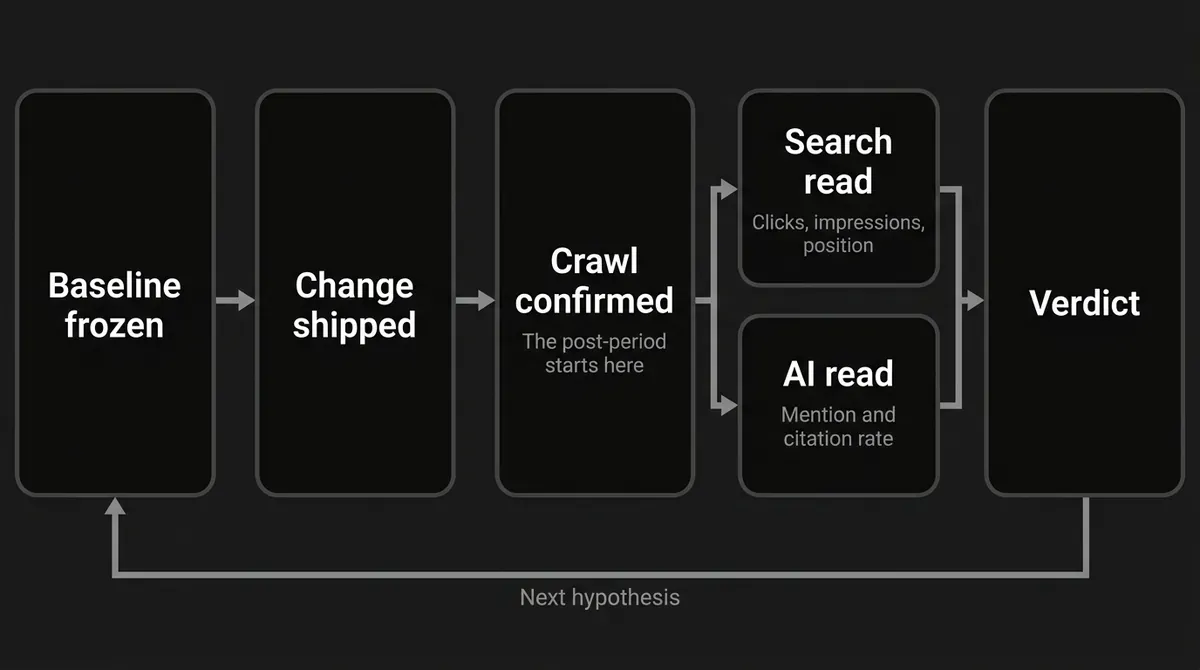
To prove refresh worked, four things have to line up. The page changed for a documented reason. The engines got a chance to recrawl it. Your predefined measures moved. And the movement lasted longer than a good week.
By the end you'll have a dated change log, a frozen baseline, a fixed prompt panel, sensible windows, and a scorecard that ends in a verdict you can defend.
Step 1: Write the hypothesis before you touch the page
Pick one page. Write down what you're changing, why, and what should improve because of it.
A hypothesis in this shape works well: for this page and this query cluster, changing this weakness into this improvement should increase this predefined metric after the page is recrawled, without hurting this guardrail.
Choose one primary ranking outcome. Non-brand clicks to the page, impressions for the target query cluster, or average position for that cluster all work. Choose one primary AI outcome too. Page citation rate for a fixed prompt cluster is usually right, because it asks whether the refreshed URL itself became a source.
Secondary signals can ride along: CTR, total brand mentions, competitor citation share, referral traffic. Keep them secondary.
Set your guardrails before anything ships. No loss in clicks for the page's established non-brand queries. No drop in citation rate for the old prompt cluster. No indexing or canonical error.
Done when: someone else can read your hypothesis and calculate success without asking you what "better" means.
Where people go wrong: they refresh, wait for something to move, then pick the metric that makes the result look good. They also bundle a rewrite, a template change and a technical fix into one update, then wonder which part did the work. If several things must ship together, label the result a bundled change.
Common mistake: treating a new date as the treatment. The treatment is the documented content and technical change, not the timestamp your readers see. Google specifically warns against changing dates to make an unchanged page look fresh.
Your change log should hold the URL and canonical, the old and new title, the real update timestamp, every section added or rewritten or fact-checked, new sources and examples, internal links changed, metadata and schema changes, the hypothesis, the owner, and anything else that shipped in the same window.
Step 2: Freeze the baseline before you publish
Here's the part most teams skip, and it's the one that decides whether you can say anything at all later. You cannot measure content refresh impact against a past you never recorded.
Before the new version goes live, capture the old one. Save the full old copy or a versioned archive. Export the page-level and query-level search data. Run your first AI prompt collection while the old page is still what engines see.
A practical default baseline is the 28 days before the change, so you cover the same days of the week as your post-period. Stretch to 8 to 12 weeks when the page is low-volume, seasonal, or just noisy.
Capture at least this much:
- Search Console clicks, impressions, CTR and average position for the page, with query, country and device breakdowns
- the target query cluster from a rank tracker, with location and device held constant
- the indexed version, last crawl, canonical, and indexability
- the exact AI prompts, engines, countries, languages, modes and collection dates
- the full AI answers, with mention status, citation status, cited URLs and competitor names
- current internal and external links, template, schema, and technical state
- anything else in the window: Google updates, site releases, campaigns, competitor moves
That AI half is where a tool earns its keep. DeepSmith's AI Visibility module stores the tracked questions and keeps full answer history per prompt, so the baseline is a saved record rather than a screenshot in someone's folder. Discover Prompts generates a starter set from your product, persona and buyer-stage context. Prune it, then freeze it. The point is to preserve the same test inputs, not to let a tool pick a flattering sample after the fact.
Done when: the baseline is stored with a timestamp, and you could rerun it tomorrow without changing a single word, engine, country or denominator.
Where people go wrong: they screenshot one AI answer, export sitewide traffic instead of the page, or work from a keyword list that keeps changing. None of those records can tell you what happened to one refreshed URL.
Step 3: Choose your attribution design and your windows
You're picking between two designs, and the choice caps how strong your conclusion can be.
Single-page before and after
Use this when only one page can change, which is most of the time. Compare the frozen baseline with a post-refresh period, and label the conclusion observational. A daily or weekly time-series chart tells you more than two totals, because it shows whether movement starts after the change and whether it sticks. Annotate everything around it: algorithm updates, seasonality, site releases, link changes, competitor moves.
Treatment and control
Use this when you have a group of comparable pages and can refresh only some. Match on template, historic traffic and trend. Assign eligible pages randomly, or with a documented method that balances traffic, topic, age and baseline visibility. Leave the controls alone.
Don't try to manufacture a control by flipping one URL back and forth. Search engines recrawl and reprocess over time, so a page-level SEO test is not a normal user A/B test.
The windows
These are operating defaults that make your test repeatable. They are not promises from Google or any AI engine.
| Phase | Default | Purpose |
|---|---|---|
| Search baseline | 28 days before the change, or 8 to 12 weeks if low-volume or seasonal | Establish the pre-refresh level |
| Indexation gap | From publish until the change is confirmed crawled or indexed | Not a result yet, the old version may still be the one being served |
| Early diagnostic | 7 to 14 days after availability | Catch indexing, canonical or crawl problems |
| Primary read | 28 days after availability | Compare an equal-length period with the baseline |
| Durable read | 8 to 12 weeks | Test whether the movement persists |
| AI baseline | At least 3 runs per prompt over 5 to 7 days | One answer is not a baseline |
| AI post read | Same prompts and settings, 4 weeks as the primary read | Extend to 8 weeks if the direction is unstable |
Notice what the post-period is anchored to. Not the publish button. Google says a changed page can take from a few days to a few weeks to be recrawled, and asking for a recrawl puts the URL in a queue rather than guaranteeing anything.
For AI, hold the prompt, engine and country settings identical on both sides. A starting panel of 20 to 50 prompts across 2 to 3 engines and 2 countries is a reasonable place to begin, with weekly collection after the first burst. That's a starting sample, not a statistical standard.
Done when: your report names the baseline, the crawl gap, the diagnostic period, the primary period, the durable period, and whether a control exists.
Where people go wrong: they start the clock on publication, treat a seven-day spike as the verdict, or quote a big-site testing timeframe as if it applied to one article.
Step 4: Measure the refresh impact on rankings
Two sources do the work here. Search Console tells you what the page actually did in Google. A rank tracker tells you where your exact target queries sit.
In Search Console, open the Search results performance report and stay on Web search. Filter to the page's canonical URL, because Search Console attributes clicks, impressions and position to the canonical Google chose, not the URL a visitor requested. Select your frozen baseline and post-refresh range, then use the comparison view.
Record clicks, impressions, CTR and average position. Break the view down by query, country, device and date, and split brand from non-brand queries if you can. Export both tables and keep them beside your change log.
The maths is simple:
CTR = clicks / impressionsabsolute change = post-period value - baseline valuerelative change = absolute change / baseline value, only when the baseline isn't zerorank improvement = baseline average position - post-period average position, so a positive number means you improved
For rates, give the change in percentage points first, then the relative percentage if it helps. If the baseline is zero, report the new count rather than dividing by zero.
One caution about average position: it's the average of your topmost result across impressions, so it can move because your query mix changed or because the page started showing for new low-volume queries. It's directional, not a rank diagnosis. That's what the rank tracker is for, with location, language, device and wording held constant. Record that query set before the refresh, and never add only the winners afterwards.
GA4's Google organic search report can sit alongside this to reconcile landing-page activity, though linked data lags about 48 hours. Treat it as support, never as a replacement for query data.
Done when: your scorecard shows the refresh impact on rankings in one place: page-level clicks and impressions, query-cluster movement, CTR, average position, and the exact-query distribution, all for identical windows.
Where people go wrong: they judge one page with sitewide clicks, call average position "the ranking", ignore the brand-query mix, or treat more impressions as proof the page got more useful.
Pro tip: keep a page-level table and a query-cluster table side by side. A page can gain impressions while quietly losing the high-value non-brand queries that made you refresh it in the first place.
Step 5: Measure refresh AI mentions with a fixed prompt panel
Refresh AI mentions are a repeated observation problem, not a screenshot problem. One search in ChatGPT is an anecdote.
Start by getting the vocabulary straight, because these four things get mashed together constantly:
- Mention: the answer names your brand or product, link or no link.
- Citation: the answer links to a page on your domain or names it as a source.
- Page citation: the answer links to the exact refreshed URL. For a refresh, this is your most direct measure.
- Referral: someone clicked through from an AI answer. Useful support, but it can't see the answers that produced no click.
Your rates follow from that:
mention rate = valid runs mentioning the brand / valid runsdomain citation rate = valid runs citing any page on your domain / valid runspage citation rate = valid runs citing the refreshed URL / valid runspercentage-point change = post rate - baseline rate
Now build the panel from real buyer language and the task the page is meant to serve. Mix informational questions, comparison and commercial-research questions, non-brand questions where your page could be cited, branded questions where your company could be named, and a few prompts naming competitors. Several phrasings of one intent are fine, as long as each gets its own prompt ID.
For every run, store the prompt ID and exact wording, the engine and mode, the collection date, the country and language, the full answer, whether the brand was mentioned, whether the domain and the refreshed URL were cited, every unique cited URL, competitor mentions, and any error state.
Decide your classification rule before you collect, then leave it alone. If the engine errors out, drop it from the denominator and log why. A clean answer with no mention and no citation is a valid negative, and it counts.
Run every prompt at least three times across five to seven days before you conclude anything. AI answers move with retrieval, wording, location, model updates and reranking. If you change the prompt wording, that's a new prompt ID, not a continuation.
Report by engine, country and prompt cluster before you show any blended number. A pooled rate can hide a gain in one engine and a loss in another, and the engine with the most runs silently decides your conclusion.
Three platform notes worth holding onto. Google's AI features use query fan-out, so several related searches feed one answer, and a page has to be indexed and eligible for a Search snippet to qualify as a supporting link. Bing's AI Performance report covers visible citations, cited pages and grounding queries, and says plainly that it does not measure rankings, authority, traffic or engagement. OpenAI says ChatGPT referrals can be separated in analytics with a utm_source=chatgpt.com parameter, which measures clicks, not citations.
Doing all of that by hand is real work, and it's where DeepSmith's AI Visibility module does the job for you. Prompts holds the tracked questions with per-prompt mention and citation rates and full answer history. Overview reports mention rate, citation rate and share of voice with trends, a per-platform breakdown and a competitor leaderboard. Pages attributes citations to the exact URLs on your site and shows which prompts drove them, which is the view that answers "did the refreshed page become a source". Settings holds your brand definition, competitor list and collection cadence, so the panel stays frozen between periods. Coverage varies by plan: Pro tracks ChatGPT, Grow adds Perplexity, Scale adds Gemini, and Enterprise covers all ten engines.

Done when: every pre and post run can be joined by prompt ID, engine, country and collection rule, and your report keeps brand mention, domain citation, exact-page citation and referral click apart.
Where people go wrong: they search their brand once and call it data, count repeated links instead of unique cited URLs, reword prompts after the refresh, pool countries, or report a referral session as a citation.
Step 6: Verify crawl, index and retrieval before you claim anything
Take a breath before you read the numbers, because this step saves a lot of wrong conclusions. A search result or an AI answer cannot reflect a version nobody has fetched yet.
Use Google's URL Inspection tool and look at the indexed version, not just the live page. Check the last crawl and any indexing obstacles. Run a live test for the current fetch, and keep the two straight in your head. If the page changed recently, request indexing or submit an updated sitemap. Repeating the request doesn't speed anything up.
Before your post-period starts, confirm:
- the changed text is present in the indexed version
- the URL is indexable, serving properly, and not redirecting somewhere you didn't plan
- the canonical points at the URL you're testing
- no accidental noindex, robots block, auth wall or rendering failure
- the title, heading, structured data, internal links and template all still work
- the new facts, sources and examples are accurate
Then do the human review. Does the page offer original analysis? Does it cover the task completely? Could a reader finish and not need to search again? Google says plainly that not every change to a site produces a noticeable change in search results. A flat result is a real outcome, and reporting it honestly beats inventing a win.
Done when: the change is visible in the indexed or retrievable version, technical blockers are cleared, and you can say out loud what value the refresh added.
Where people go wrong: they start measuring on publish day, inspect only the live page, hammer the indexing request, or call an indexation failure a content failure.
Step 7: Calculate the lift and separate evidence from inference
Put your content refresh results in one scorecard. For a plain before and after, show the baseline, the post-period, the absolute change, the relative change where it's valid, and the exact window.
If you have a control group, use difference-in-differences:
adjusted lift = (post-treatment - pre-treatment) - (post-control - pre-control)
For rank, convert first so positive means better (rank improvement = pre-period position - post-period position), then apply the same treatment-minus-control subtraction. For rates like mention rate or page citation rate, compare percentage-point changes, and only bring the control into it when the control pages are genuinely comparable.
Then label what you've got. This ladder is how you prove refresh worked without overclaiming:
- Strong: the changed version is confirmed live in the index, the predefined search outcome improved, page citation or mention rate improved across repeated fixed runs, the movement persisted, and a matched control didn't move the same way.
- Moderate: confirmed change, clean before-and-after improvement, repeated AI observations, but no control. Call it an observed association, not a causal estimate.
- Mixed: rankings improved while AI page citations stayed flat, or the reverse. Report each channel separately, and resist the urge to force one verdict.
- Inconclusive: the window was too short, the page wasn't recrawled, the sample was tiny, a prompt or engine changed, or a major update overlapped.
- Negative: the primary outcome declined through the durable window while comparable controls didn't. Check technical state and query mix before you revert.
Resist any universal threshold. "One position" and "10% more mentions" mean nothing without your page's baseline volume behind them, which is why you set the threshold back in Step 1. When counts are low, report counts and direction, not a decimal implying precision you don't have.
Under the chart, build an annotation strip: core updates, SERP layout changes, deployments, link changes, competitor releases, seasonality, prompt-set changes, engine model changes. The strongest report says what changed, what didn't, what else was happening, and how sure you are.
Done when: a reader can tell the difference between a page result, a control-adjusted lift, a directional AI observation, and a story nothing actually measured.
Pro tip: use three separate labels. "Worked for rankings", "worked for AI citations", and "worked for both". The channels overlap, and they are not interchangeable.
Step 8: Turn the result into your next single test
Finish with a decision, not a dashboard. Pick one:
- Keep and standardize. The outcome improved, guardrails held, the movement persisted. Write down what you did so the next refresh copies it.
- Iterate the same page. Indexed fine, one channel improved, the other stayed flat. Change one variable and start a fresh baseline.
- Investigate access. The content improved but the new version was never indexed or cited. That's a technical problem wearing a content problem's clothes.
- Revert or revise. The outcome dropped, and the drop survived the durable window.
- Inconclusive. Extend the window, widen the panel, or build a matched control. Don't declare either way.
Your final report should carry the URL, owner, hypothesis and change log; every window date; the search numbers; the AI figures by engine; treatment and control values or an explicit "no control" label; the crawl and index checks; the annotations; the verdict; and the one next variable you'll test.
Once the verdict is in, the useful question is what to fix next. DeepSmith's Pages and Competitor citations views show which of your pages and prompts still need work, and which competitor pages are winning the prompts you wanted. Opportunity Agents turn that gap into an evidence-backed next idea, with the data point that justifies it attached, over a 30, 90 or 180 day window.
Done when: you have a saved scorecard, a defensible verdict, and one defined next action.
Where people go wrong: they treat the dashboard as the conclusion, never record the tests that failed, or launch the next refresh before the first one has a stable post-period.
What to do next
Save the scorecard. Repeat the same cycle on your next refresh, using the same windows and the same prompt panel so the two runs are comparable. Then pick one controlled change and run it again.
That's it. You don't need a research team to measure content refresh impact. You need one page, one hypothesis, and the discipline to freeze your inputs first.
If the AI half keeps slipping, DeepSmith runs it on a schedule: fixed prompt collection, per-prompt and page-level citation attribution, competitor context, and an evidence-backed next idea when the gap is clear. You can start a free trial and have real data before you pay.