Your product ships on its own rhythm. Your content calendar was set in a planning meeting a quarter ago. That gap is where most content operations quietly break, and a SaaS content workflow that ignores the release calendar will always run late.
Here is the good news: you do not need a bigger team to close it. You need a SaaS content pipeline that takes product facts as an input instead of a writing queue that guesses at them.
This is for the marketing lead who wants more output without more headcount, and who cannot afford a beautifully written article that describes a feature wrong. By the end you will have an operating model, a release-to-content hand-off, and a measurement loop that watches product behavior as well as page views.
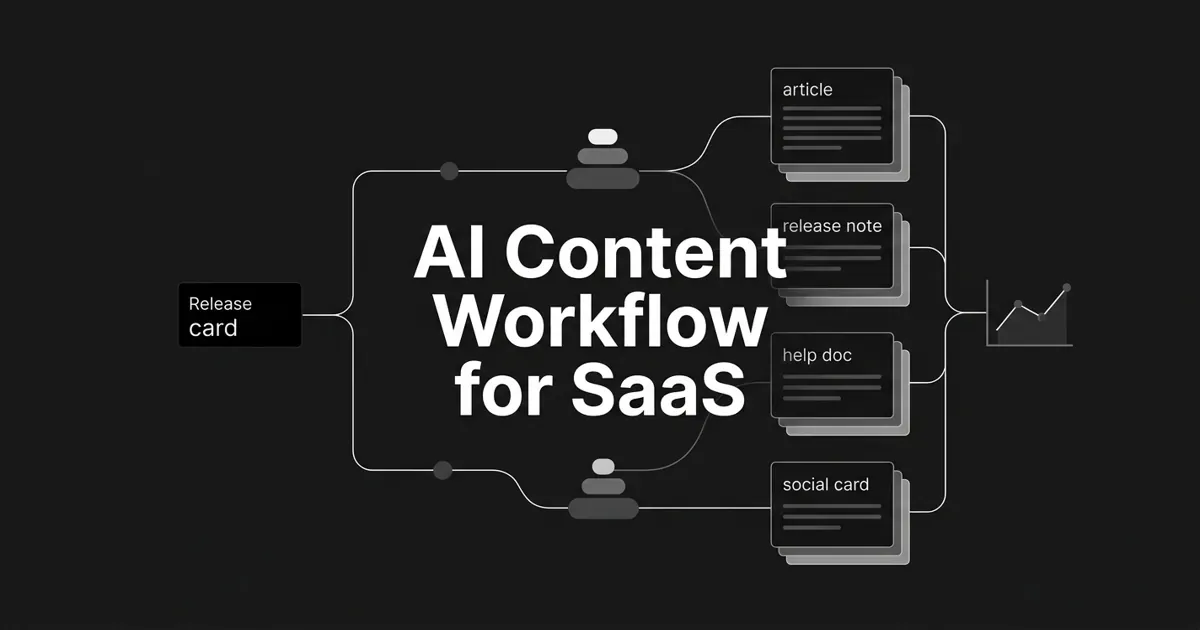
The shape of it, in one line: product signals and release records, then an impact tier, then persona and PLG stage, then a structured brief, then an asset bundle, then SaaS review gates, then release-aware scheduling, then distribution, then measurement that feeds the backlog.
Two queues run through it. The release queue holds anything triggered by a product change: a launch, an integration, a fix, a deprecation. The opportunity queue holds a customer problem, an activation gap, a coverage gap, or a buyer question that AI engines answer without mentioning you. One release can enter both.
Eight steps. Take them one at a time.
Step 1: Pick the product outcome before you pick the topic
Every asset gets one primary product outcome. Acquire self-service users. Get new users to the activation event. Lift adoption of a named feature. Bring back inactive users. Support retention or expansion. Improve visibility for a buyer question. One, not four.
Then write the objective in a single sentence:
For [persona] who needs to [job], this asset teaches [workflow or capability] so the reader can [product outcome], measured by [content event] and [product event].
That product event has to be real in your analytics. Activation is company-specific, so define your own first-value moment before assigning a target to anything. It might be a completed workflow, a connected integration, or an invited teammate finishing a key action.
Done looks like: the brief names a persona, a problem, a capability, a stage, a CTA, a content metric, a product metric, an owner, and a measurement window. A reviewer can say what the reader should do next and what product behavior would show progress.
Where teams go wrong: using "awareness" as the goal for everything, then judging a feature tutorial by pageviews. In a self-service motion, a completed product action tells you more than an MQL count.
Pro tip: put the product action in the brief, but do not claim the content caused it unless your measurement design can defend that.
Step 2: Build one release record both sides trust
Before any AI system writes a derivative asset, one canonical record has to exist. It is the hand-off between product, engineering, docs, product marketing, support, and content. Everything downstream inherits from it.
Minimum fields worth capturing:
| Field | What it holds | Owner |
|---|---|---|
| Release identity | Feature name, status, availability date, product area | Product |
| Change type | New, improved, fixed, integration, deprecation, packaging | Product and engineering |
| Customer problem | The job or workflow the change addresses | Product marketing |
| Customer value | What gets easier, faster, or less error-prone | PMM, verified by product |
| Behavior | What changed, prerequisites, permissions, limits, edge cases | Engineering |
| Audience | Personas, segments, plans, regions, roles affected | PMM and customer teams |
| Availability | Rollout state, eligibility, setup or migration needs | Product |
| Evidence | Beta feedback, support questions, approved proof, screenshots | Product and support |
| Usage signal | The product event showing setup, adoption, or expansion | Product analytics |
| Content obligations | Docs, release note, in-app message, email, article | PMM and content |
| Claims and risk | Technical, legal, or pricing restrictions | The functional owner |
Intercom runs a version of this: product managers and engineers write a What We Built document, and that becomes the starting point for the help content. Feature summary, design workflows with screenshots, demos, and the beta feedback showing where people got confused.
Feeling like that is a lot of process for one feature? It is one form, filled once, reused by six assets.
Alongside the release record sits your stable context: positioning, product profiles, personas, brand voice, claims to make and claims to avoid. In DeepSmith that layer is Deep IQ, and it keeps ai content for saas teams from re-briefing the same product truths every time. Content Map is the site-level view next to it, classifying your pages and your competitors' pages into shared topics and Awareness, Consideration, and Decision stages, so a feature with a release note and no setup guide shows up as a gap instead of a hunch.
Done looks like: a PM, an engineer, a product marketer, a docs or support owner, and the content owner can each point at the same record. It answers what changed, for whom, when, why it matters, what not to claim, and what to measure.
Where teams go wrong: asking AI to infer product truth from a ticket dump or last year's blog post. You get invented availability, stale screenshots, missing limits, and two names for the same thing. The other failure is capturing the feature facts but never the customer problem, so every asset turns into a feature description.
Step 3: Tier each release before you plan a single asset
Not every change deserves a campaign. Score the release against the business goal and give it a tier. Intercom's model runs P1 for the biggest launches down to P4 for small improvements, and the tier reflects impact and resourcing, not engineering effort.
Ask a few blunt questions. Will this create new or expansion revenue? Could it lift engagement or reduce churn? How large is the affected audience? Does it change how a buyer evaluates you?
| Tier | Use it for | Minimum treatment |
|---|---|---|
| P1 | Flagship launch or a change tied to revenue or positioning | Full brief, launch article, docs, enablement, release communication, post-launch review |
| P2 | A meaningful capability for a defined audience | Use-case article when the problem justifies it, release note, docs, targeted customer comms |
| P3 | A capability that fills a gap or completes a workflow | Release note, docs update, grouped comms, standalone article only if it answers a real need |
| P4 | Small improvement or fix for a subset of users | Changelog or digest entry, docs update if behavior changed, targeted support comms |
Cadence follows the same logic. There is no universal publishing rhythm for saas content at scale, and no rule that a release earns a blog post. GitLab publishes monthly release posts with quarterly sales enablement sessions. Stripe keeps a monthly API changelog. Userpilot's guidance is a permanent searchable release history, with email reserved for a monthly or quarterly digest rather than every minor change. Those are teams matching cadence to their own shipping rhythm, not targets for yours.
Build the calendar with a release date, tier, review date, publication date, distribution date, owner, and measurement checkpoint. When product dates move, the record moves the dependent assets with it.
Done looks like: every planned release carries a tier, goal, audience, asset list, owner, and date. You can see which changes are grouped into a digest and which get their own treatment.
Where teams go wrong: announcing everything, which trains customers to ignore you, or announcing nothing, which leaves useful improvements undiscovered. Right behind those sits the arbitrary weekly publishing target that ignores what engineering is actually shipping.
Step 4: Map each feature to a persona, a job, and a PLG stage
Now turn the record into a content map. For each asset: who is trying to do what, what brings them here, which capability resolves it, how much they already know, what they do next, and what product event would show the content helped.
| PLG stage | Reader need | Formats that fit | Product hand-off |
|---|---|---|---|
| Acquisition | Understand a problem, recognize a solution | Problem-led article, use case, integration explainer | A clear route to trial or signup |
| Activation | Reach first meaningful value | Setup guide, implementation how-to, template, FAQ | The first-value action and its prerequisites |
| Adoption | Find and use a new capability | Release note, feature use case, workflow guide, in-product help, targeted email | Feature entry point and audience segment |
| Retention | Keep getting value, recover from confusion | Troubleshooting, best practice, advanced workflow, docs refresh | Repeatable workflow and support path |
| Expansion | See the next use case, team, or plan | Advanced use case, team workflow, integration content, approved proof | The expansion signal or broader adoption |
The distinction that matters most is between a product-led story and a feature-first announcement. Product-led content production starts with a defined challenge, names the features that solve it, picks the ICP who has that challenge, and shows the outcome. A feature-first announcement starts with the feature and hopes someone recognizes themselves in it.
For each important capability, keep a small map: problem, trigger, capability, outcome, proof, next action.
Done looks like: the brief names one audience, one job, one stage, one workflow, one outcome, one next action. A reviewer can explain why this exists separately from the release note.
Common mistake: calling a feature "adopted" because the launch page got traffic. Keep engagement, activation, feature usage, retention, and expansion as separate numbers. They move independently, and pretending otherwise hides the problem you actually have.
Step 5: Turn the record into an asset bundle with named hand-offs
Decide the output bundle before production starts. A P1 bundle might include a permanent release-history entry, updated docs, a problem-led article, a targeted in-product message, sales and success enablement, distribution assets, and a post-launch note recording questions and gaps. A P4 bundle might be a changelog line and a docs change.
Then write down who hands what to whom:
| Hand-off | Output | Completion test |
|---|---|---|
| Product to PMM | Positioning and audience brief | PMM can explain the customer problem and the business goal |
| Product and engineering to docs | Help article or reference update | A user completes the task without guessing |
| PMM to content | Structured brief and asset list | The brief says what to teach and what not to claim |
| Docs and support to content | FAQs, troubleshooting, examples | The draft resolves known confusion instead of repeating it |
| Content to sales and success | Enablement summary and talking points | Everyone uses the same terminology and availability |
| Analytics to marketing | Outcome definition and post-launch report | The team tells exposure apart from product behavior |
| Content to distribution | Channel variants | Each version fits its channel instead of being pasted |
At production time, pass a structured brief, not a prompt. Release identity, behavior, approved claims, persona, user problem, PLG stage, content type, CTA, and prohibited claims. Name what the system must leave blank for a human.
This is where the opportunity queue earns its keep. DeepSmith's Opportunity Agents read your AI visibility and Content Map data and return ideas with the justifying data point attached: a competitor page winning a buyer prompt, a missing decision-stage topic, a product area with thin activation coverage. Those ideas move into Content Studio as New Ideas, then Planned Content, then through the Writer into Produced Content. Attach the release record and the reviewer to each idea. Evidence about a content gap is not permission to invent product behavior.
Done looks like: every asset has a source record, audience, stage, owner, channel, date, CTA, product event, and reviewer. You can trace a paragraph in the blog post, a line in the help article, and a sentence in the email back to one approved record.
Where teams go wrong: generating one long article and calling it a bundle. A release note, a help article, a use-case post, and an enablement page have different jobs. Reuse the facts. Do not reuse the copy.
Step 6: Add SaaS review gates to your production workflow
Let your general production workflow handle research, drafting, optimization, linking, metadata, and imagery. This step adds the gates only a SaaS team needs, because product truth is what breaks in public.
Seven checks, each assigned to whoever owns the answer:
- Product accuracy: current behavior, name, availability, plan, permissions, prerequisites.
- Technical accuracy: API behavior, integrations, limits, migrations, compatibility, edge cases.
- Customer value: a real problem and outcome in plain language, not a restated feature name.
- Documentation usability: the reader can finish the task from what is on the page.
- Support readiness: known confusion is answered, and support has a consistent answer.
- Positioning: the message fits the persona and the launch goal.
- Measurement: the CTA connects to the intended product event.
Intercom's help-content practice is worth copying: start from the What We Built document, split complex features into separate articles when setup and integration are distinct tasks, share near-final drafts with support, and aim to have help content ready at least a week before a major launch.
Match review depth to tier. A P1 or a breaking change needs real scrutiny. A P4 wording fix does not need a committee.
Production tooling helps here, and it helps honestly. DeepSmith's Writer turns a planned idea into a finished, brand-grounded article with research, links, a cover image, and publish-ready metadata, and Produced Content is where you review, edit, and publish. That removes the repetitive work of producing saas content at scale. It does not remove the product review. You check strategic alignment and editorial quality. A product or engineering owner still confirms the feature facts.
Done looks like: the piece passes its product, technical, docs, positioning, and support checks, and uses the same words as the product UI and help center.
Where teams go wrong: shipping a polished, well-optimized article that is technically wrong or describes something the reader cannot access yet. Close behind: asking every stakeholder to edit prose instead of giving each a narrow question.
Step 7: Schedule around availability, then distribute every asset
Publication dates depend on product availability, not on a tidy calendar. Sort assets into five buckets: pre-launch education where permitted, documentation that lands before release, launch-window communication, follow-up content for questions and advanced use cases, and a digest for small changes.
Then check the boring thing that causes the worst outcomes. Is the feature actually available to the people you are publishing to?
GitLab's release pattern is a good reminder that one product change can need several outputs at once: release posts, enablement sessions, presentations, videos, and a findable handbook page. A saas content pipeline needs a distribution checklist, not just a publish button.
In DeepSmith, Planned Content is that scheduling layer, and giving an idea a date is what plans it, individually or in bulk. Autowrite generates a configured article on its scheduled date and drops it into Produced Content, which keeps the pipeline moving through a launch week when nobody has a spare hour. Once an article is approved, Repurpose and the Apps Library turn it into channel-native versions for LinkedIn, X, newsletters, and nurture email, so distribution becomes a hand-off instead of a project nobody schedules.
Done looks like: every asset has a destination, owner, date, and availability rule. Help content is live before people need it. The release note has a permanent home. Approved articles already have their distribution assets.
Where teams go wrong: publishing the blog post and stopping. Or scheduling content for a feature still rolling out. Or pasting identical text into five channels, which buries the one instruction the user needed.
Step 8: Measure content movement and product movement separately
Build the feedback loop before launch, not after the first disappointing report. Measure at four levels and keep them distinct:
| Level | The question | What you look at |
|---|---|---|
| Reach | Did the intended audience see it? | Views, engaged visits, email engagement, doc searches |
| Acquisition | Did relevant people enter the product motion? | Signups, trials, self-service accounts by source |
| Product value | Did readers reach the workflow? | Activation events, feature adoption, repeat use |
| Durable growth | Did it contribute to retention and visibility? | Retention, expansion, mention rate, citation rate, share of voice |
Cohort by release, tier, persona, and source asset. Compare the content metric with the product metric without claiming one caused the other. A launch page can have great engagement and terrible activation. A help article can have almost no traffic and still be the most valuable thing you shipped, because it removed an activation blocker.
Resist borrowed benchmarks. Vendor adoption and activation numbers come from a specific product, population, and event definition. Set your own baseline with your analytics owner.
This is where the visibility loop closes. DeepSmith's AI Visibility tracks mention rate, citation rate, share of voice, sentiment, and visibility trend, plus which pages AI engines cite and which competitors win them. Track prompts around your buyer problems, feature use cases, integrations, and implementation questions. Content Map shows where coverage is thin, Opportunity Agents turn those gaps into evidence-backed ideas, and the loop starts again.
One honest boundary: AI visibility is not product usage. A citation shows a page is being used as a source. It does not show that anyone activated. Keep product analytics for activation, adoption, retention, and expansion.
Done looks like: the post-launch review records goal, audience, tier, assets, content results, product results, caveats, and the next action. The backlog changes because of evidence.
Where teams go wrong: measuring traffic and AI mentions alone, then wondering why product-led content production never shows up in the numbers leadership cares about.
What to do next
You do not have to build all eight steps this quarter. Start with step 2. One canonical release record, filled by product, used by everyone downstream, fixes more content problems than any tool will.
Then add tiering. Then the PLG map. The rest gets easier once the inputs are trustworthy, because a saas content workflow only produces accurate output when accurate facts go in.
If you want the production and measurement layers running together, start a free DeepSmith trial and set up your product context, personas, and voice once. You will see real data and real drafts before you pay.