
So you bought an AI SEO tool. The promise was speed, and you got it. Drafts are flying in. But you’re still here, late at night, doing all the other stuff by hand. You're manually linking posts, trying to figure out which articles to refresh, copying and pasting into the CMS, and cobbling together reports in a spreadsheet.
Your draft count is up, but your actual output, the stuff that goes live and gets results, isn't. Sound familiar?
This is the big lie of most "AI SEO" platforms. They show you a slick writing demo and ignore the 80% of the work that happens before and after the draft. You get a faster first draft that just sits in an even longer bottleneck.
I’ve learned this the hard way: the real value of an AI SEO platform isn’t just writing faster. It’s automating the grunt work. The systems that prioritize your next article, handle your internal links, watch your competitors, and get content published and distributed without you having to manage every single step.
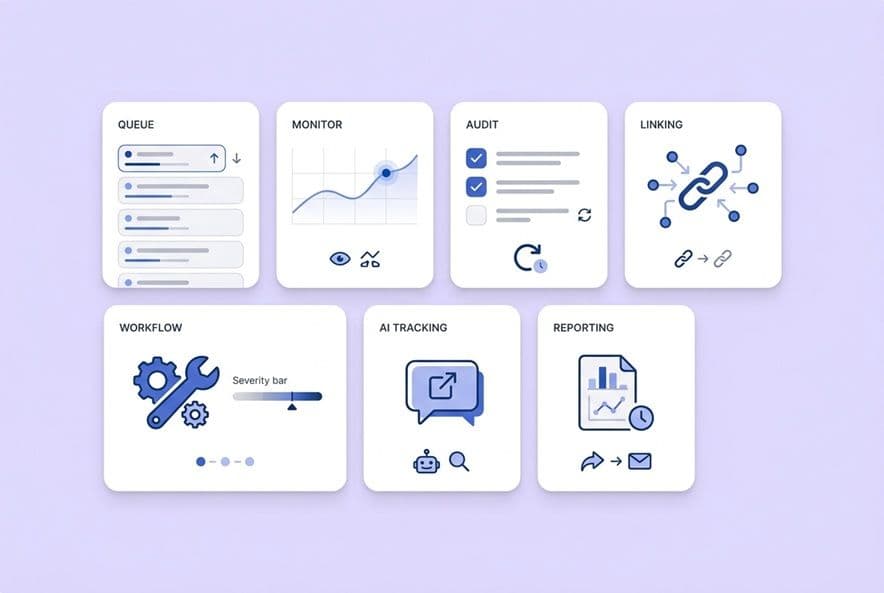
If you're evaluating a platform, don't get distracted by the writing demo. Here are the seven non-writing automations you should demand. I’ll walk you through what to look for and how to tell if it's real.
Why "AI for SEO optimization" ROI usually comes from non-writing automation
The bottleneck pattern: insight → draft → backlog → no deployment
I’ve seen this pattern play out at so many companies. The team spots a great keyword opportunity, a brief gets made, a draft gets written… and then it just stops. It dies in a Google Doc.
Why? Because someone still has to do the internal linking, check the metadata, and actually schedule it in the CMS. That SEO fix from last month’s audit is still sitting in a Trello card because nobody feels like they "own" the deployment part. The problem isn't a lack of ideas. It's the huge, messy gap between having an idea and getting it live. Every manual handoff in that process adds days or weeks to your cycle time, and in SEO, that delay is killing your momentum.
A simple definition of “automation” (vs. suggestions)
Vendors love to play fast and loose with the word "automation." Let’s clear it up.
A suggestion is a tool telling you, "Hey, this page should probably be refreshed," and then waiting for you to do something about it.
Automation is when the system actually does the work. The internal links get added. The refresh brief gets created and assigned. The report lands in your inbox on Monday morning without you lifting a finger.
Here's a simple test for your next demo: when a vendor shows you a feature, just ask, "So what does a human do next?" If the answer is something like "review the insight and decide what to do," you're looking at a suggestion engine. If the answer is "approve the output," that's automation.
Some platforms just help you write faster. Others help you build an entire production system that handles everything from the brief to the internal links to publishing, so your team can focus on strategy and review instead of being digital assembly line workers. We actually built our Content Studio at DeepSmith to solve this exact problem. It's a pipeline that handles the whole mess, so our team can focus on making the content great.
Automation #1 — Topic + keyword cluster prioritization that updates itself (not a static spreadsheet)
What "good" looks like: clusters, gaps, and a ranked queue tied to outcomes
We’ve all done it. You spend a day in Ahrefs, export a giant spreadsheet of keywords, and feel super productive. Two weeks later, that spreadsheet is already out of date. A competitor launched a whole series on a topic you were planning to tackle, and three of your top posts slipped to page two.
Good prioritization isn't a one-time research project. It’s a living system that constantly adjusts based on what's happening in the real world. It should give you:
- Clusters, not just keywords. Instead of a flat list, you need to see topics grouped together. A cluster for "SEO workflow automation" should show you all the related terms, what you've already covered, and where your content gaps are, all in one place.
- Constant competitor watch. The system should tell you immediately when a competitor publishes something in a topic you care about. You shouldn't have to go looking for it.
- Smart ranking. Prioritization shouldn't just be about search volume. It should factor in things like which topics have the most traffic potential based on your current coverage.
The goal is a ranked to-do list that you can act on today, not a research project that gets stale in a week.
| Maturity Level | What it looks like |
|---|---|
| Basic | Static keyword lists you have to refresh by hand. |
| Solid | Topics are automatically clustered and show you where you have content gaps. |
| Best-in-class | A dynamic queue that constantly updates, flags competitor moves, and plugs right into your content workflow. |
Validation checklist: what to ask in a demo
- "What data are you using for prioritization?" You want to hear more than just search volume. Look for your own site's data (from GSC or your sitemap) and competitor publishing signals.
- "How often does this queue refresh itself?" The answer should be "automatically," on a schedule. If you have to manually re-run it, it's not automation.
- "Can I manually override the ranking?" You always need a human override for your own strategic bets.
- "Show me what happens when a competitor publishes on one of my topics." You want to see an automatic alert, not a process where you have to go hunting.
International SEO edge case: prioritization by market, language, and intent
If you're working across multiple countries, this gets even more complicated. A keyword that's a huge opportunity in the US might be a total dud in the UK. Your automation needs to be able to prioritize at the market level, not just apply a one-size-fits-all ranking. Ask your vendor: "How do you handle prioritization for multilingual sites? Can I set different priorities for different markets or languages?"
Automation #2 — SERP + competitor monitoring that turns changes into actions (not alerts you ignore)
What should be monitored: SERP shifts, competitor publishing, and content deltas
The SERP changed. A competitor just dropped a 5,000-word guide on your favorite topic. Your "best practices" post from last year is now painfully out of date. You probably won't notice any of this until you happen to check manually, which might be weeks too late.
Good monitoring automates this vigilance for you, watching three main things:
- SERP shifts: How your content is ranking for your target clusters, but also new things that might be stealing clicks, like AI Overviews.
- Competitor moves: When your rivals publish new content, categorized by topic so you can see where they're investing.
- Content changes: When a competitor makes a major update to a page you're competing against.
Action outputs to demand: refresh briefs, rewrite tickets, and new page recommendations
Here’s where most monitoring tools fall apart. They give you data but don't give you work. You want a system that turns what it sees into a concrete task for your team. For example:
- When your content gets outranked or is clearly outdated, it should automatically generate a refresh brief with notes on what the new top results are covering.
- When it spots a competitor ranking for something you haven't covered, it should create a new content recommendation.
- When it finds you have three thin posts all targeting the same keyword, it should flag them for consolidation.
The output needs to be a ticket your team can start working on, not another chart for a PowerPoint slide.
What to avoid: noisy monitoring that creates thrash
The big risk here is a system that's too sensitive. If it flags every tiny ranking fluctuation, your team will quickly develop "alert blindness" and start ignoring everything. Ask vendors about their filtering logic. You want to be able to set your own thresholds and get clear signals on what's a major change versus what's just normal SERP noise.
Automation #3 — Content audit + refresh workflows that don’t require manual page-by-page triage
If you have more than 50 articles on your blog (and especially if you have hundreds), I guarantee some are slowly dying, some should be merged, and some just need a quick update. Figuring out which is which is a massive project that always gets pushed to "next quarter."
Automated content auditing takes this pain away. It should pull in your performance data (traffic, rankings, engagement), sort your entire library by its health, and give you a clear, prioritized list of what to refresh first.
The refresh decision tree (update, consolidate, redirect, expand, leave alone)
Not every decaying post needs a full rewrite. A smart system helps you make the right call:
- Update: The content is a bit thin or outdated, and traffic is slipping.
- Consolidate: You have several small posts on the same topic. Merge them into one definitive guide.
- Redirect: The page is redundant and has no real traffic or value. Just get rid of it.
- Expand: The page is ranking, but not for the whole cluster of keywords it could be. Time to make it more comprehensive.
- Leave alone: It's working. Don't touch it.
A tool that just flags 100 articles as "needs an update" isn't helpful. It's just adding to your to-do list.
Governance: approvals, changelogs, and rollback thinking
Automating refreshes is a high-stakes game. You're messing with live content. A bad automated update could tank your rankings overnight. Make sure any tool you consider has a clear approval step, a changelog to show you exactly what was changed, and a version history so you can undo anything that goes wrong. Automation without governance is just a faster way to break things.
Automation #4 — Internal linking that is context-aware and measurable (not random link stuffing)
Ah, internal linking. The last, soul-crushing 30-60 minutes you spend on every article when you're already past deadline. It's that final chore we all know is important, but it’s the first thing to get skipped when we're in a rush. This is a perfect job for a machine, but only if the machine is smart.
What “good” automated linking does (and what it shouldn't)
Good automated linking is not about stuffing as many links into a post as possible. It's about being strategic. Here’s what it should do:
- Actually be relevant. The links should make sense to a human reading the article. It needs to be based on the real meaning of the content, not just a keyword match that feels clunky.
- Vary the anchor text. It should use different, natural phrases for links, just like a human would. No more linking the exact same keyword 50 times.
- Understand your site's structure. A good system knows which articles are your big, important "pillar" pages and which are the supporting "spokes." It links in a way that reinforces this structure for search engines.
- Not cannibalize your own content. This is a big one. It has to be smart enough not to link two similar pages together in a way that confuses Google about which one is the real authority.
Basically, it can't create awkward, jarring links or point to random, weak pages. The goal is to build a helpful web of content, not a spammy-looking mess.
How to measure whether internal linking automation worked
After you turn it on, you need to track whether it's actually helping. Over the next 60-90 days, watch for:
- Better crawl depth: Are your older, buried pages now easier for Google to find?
- PageRank flow: Are your pillar pages getting more internal link love?
- Ranking lifts: Are some of your under-linked posts finally starting to move up?
- Click-through rates: Are real users actually clicking on these links?
Teach-first product reference
The best systems build linking right into the writing process. Instead of it being a chore at the end, it's just done. For example, at DeepSmith, we built our platform to scan our sitemap and automatically insert relevant internal links as the draft is being generated. By the time it gets to a human for review, the linking is already handled.
International SEO edge case: linking across markets
For multilingual sites, automation has to be smart enough to respect language boundaries. Linking a page in English to a page in German without the right signals (like hreflang tags) can create a huge mess for search engines. The system needs to either stay within a single language or be fully aware of how your international sites are structured.
Automation #5 — Technical SEO workflows that move from detection to resolution
The biggest failure of most AI tools for technical SEO isn't that they can't find problems. It's that they find problems and then leave them on your doorstep.
The minimum bar: real-time monitoring with severity + impact framing
Any tool in this space should be constantly watching your site for things like Core Web Vitals issues, broken links, crawl problems, and structured data errors. But just finding them isn't enough. Each issue needs to be framed with severity (how bad is this?) and impact (what will fixing it actually do for me?). A dashboard with 200 issues and no sense of priority is just a source of anxiety.
What to demand beyond alerts: ticketing, ownership, and deployment hooks
This is where real automation shows its value. You need to ask every vendor these questions:
- Does it create tickets? Can it automatically push a new issue into Jira, Asana, or whatever you use, with a clear description of the problem and the fix?
- Can it assign ownership? Can it route a site speed issue to the engineering team and a metadata issue to the content team? This is huge for getting things done across departments.
- Does it connect to deployment? For simple fixes like meta tag updates, can the platform push the fix live with the right CMS integration?
Without these connections, you’re just buying a pretty dashboard that creates more manual work for you.
Where humans stay in the loop (and why)
You shouldn't automate everything. Big changes to your site architecture, URL structure, or redirect maps carry real risk. A bad automated deployment can destroy your rankings. The right model is this: automation handles detection, prioritization, and creating the ticket. A human approves and deploys any change that touches the live site infrastructure. The approval should be quick and easy, but it has to be there.
Automation #6 — AI visibility (GEO/AEO) tracking that ties prompts and citations back to pages and competitors
I bet your boss has already asked about your visibility in AI answers. And I bet your current "strategy" is manually typing questions into ChatGPT and seeing if your brand shows up. We've all been there. This is a brand new field, and the gap between what vendors claim they can do and what they can actually deliver is huge.
What to track: prompts, mention rate vs. citation rate, and page attribution
To do generative engine optimization (GEO) right, you need to track specific things:
- Prompts: The actual questions your customers are asking AI assistants, which you define and track.
- Mention rate: How often your brand gets mentioned in the answers.
- Citation rate: How often your actual content is linked or cited as a source. This is the one that really matters.
- Page attribution: Which specific pages on your site are earning those citations.
- Competitor benchmarking: Which of your competitors are getting cited for the same prompts.
If you don't have page-level attribution and competitor data, the information isn't actionable.
How to turn visibility gaps into a publishing plan
The loop should look like this: track prompts → find gaps where your competitors are getting cited and you aren't → surface specific pages you could create or update to win that spot → feed those opportunities directly into your content production queue. Most teams are treating GEO as a reporting task, but it should be a powerful input for your content roadmap.
Teach-first product reference
Platforms are finally starting to operationalize this. For instance, systems like DeepSmith are now able to track both mention and citation rates across major AI engines (like ChatGPT, Gemini, and Perplexity) at the prompt, page, and competitor level. The gaps they find can then be used to create new content briefs, which finally solves the problem your leadership team is asking about.
| Maturity Level | What it looks like |
|---|---|
| Basic | Manually searching AI platforms and hoping for the best. No real tracking. |
| Solid | Tracking brand mentions for a set of prompts across a few AI platforms. |
| Best-in-class | Tracking prompts, pages, and competitors across multiple platforms, with a workflow to turn gaps into new content. |
Automation #7 — Reporting + cross-channel distribution that runs on a schedule
Reporting automation: the metrics that matter for SEO ops decisions
No one on your team should be building the monthly SEO report from a blank spreadsheet ever again. Good reporting automation delivers two different views, both on a schedule:
- The Operator View: This is for the SEO team. It has the nitty-gritty details on ranking changes, traffic trends, page health, and what's in the refresh queue.
- The Executive View: This is for leadership. It's the high-level summary of organic traffic, keyword positions, and maybe a top-line metric on AI visibility.
The automation isn't just that the report gets sent. It's that the right information is framed for the right audience, automatically.
Distribution automation: turning one article into many assets with approvals
This is the step that always gets dropped. You hit "publish" on a great article, and then... nothing. The LinkedIn post doesn't get written. The newsletter blurb is forgotten. Distribution automation fixes this by making it a standard part of the publishing workflow. It should automatically convert a finished article into assets for other channels. For example:
- A few versions of a LinkedIn post.
- A summary for your email newsletter.
- A thread for X/Twitter.
- A Slack announcement for your team.
The approval step is key. You're not writing these from scratch, just reviewing and approving the variants. Publishing and distributing should be part of the same seamless process.
Teach-first product reference
This automation is what finally connects the content team's hard work to the demand gen team's needs. At DeepSmith, we have specialized "agents" in our Agent Library that can take any published article and repurpose it for different channels, all in our brand voice. It makes distribution the default, not an afterthought.
How to evaluate an AI SEO automation platform in a demo (a decision checklist)
The maturity table: basic vs. solid vs. best-in-class automation
| Automation | Basic | Solid | Best-in-class |
|---|---|---|---|
| Topic prioritization | Static keyword lists | Auto-clustered with gap tracking | Dynamic queue, competitor signals, production pipeline integration |
| SERP + competitor monitoring | Rank tracking alerts | Competitor publishing + SERP features | Action outputs (refresh briefs, rewrite tickets) auto-generated |
| Content audit + refresh | Manual triage, health scores | Auto-prioritized refresh queue | Decision-tree output with governance and rollback |
| Internal linking | Post-draft link suggestions | Relevance-matched suggestions | Built-in during generation, cannibalization-aware |
| Technical SEO | Issue detection dashboard | Severity + impact framing | Ticketing integration, ownership assignment, CMS hooks |
| GEO/AEO tracking | Manual AI searches | Prompt-level mention tracking | Prompt + page + competitor tracking with pipeline connection |
| Reporting + distribution | Manual report builds | Scheduled automated reports | Dual-view (operator + exec) + distribution assets in one workflow |
Data privacy + compliance questions to ask before you connect anything
Don't skip this part. Before you give any platform access to your data, get clear answers:
- Where are you storing our data, and for how long?
- Are you using our data to train your models? (The only acceptable answer is "no.")
- Who inside your company can see our content and search data?
- What's your SOC 2 status?
- If we decide to leave, how do we get our data out and make sure it's deleted?
ROI framework: quantify value by automation bucket
When you make your case to leadership, talk in terms they understand. Don't just say "it saves time."
- Time saved: (45 minutes per article for linking) x (20 articles per month) x (your team's hourly cost).
- Traffic recovery: The potential value of fixing your top 10 decaying pages.
- Risk reduction: The value of catching a critical technical issue in hours instead of weeks.
- Competitive intelligence: The value of knowing where your competitors are showing up in AI answers when you aren't.
Build your AI SEO automation requirements list
These seven automations give you a framework for buying an AI SEO platform. It will help you see past the flashy writing demos and find a tool that will actually change how much work your team can get done.
Before your next demo, use the maturity table and the validation questions in this article to build your own scorecard. Run every platform you see through the exact same evaluation. The point isn't to find the tool with the highest score on every feature. The point is to find the one that solves your biggest bottlenecks, the manual, frustrating work you're doing by hand today.
That’s how you find a platform that truly compounds your efforts, not just one that writes a little faster.