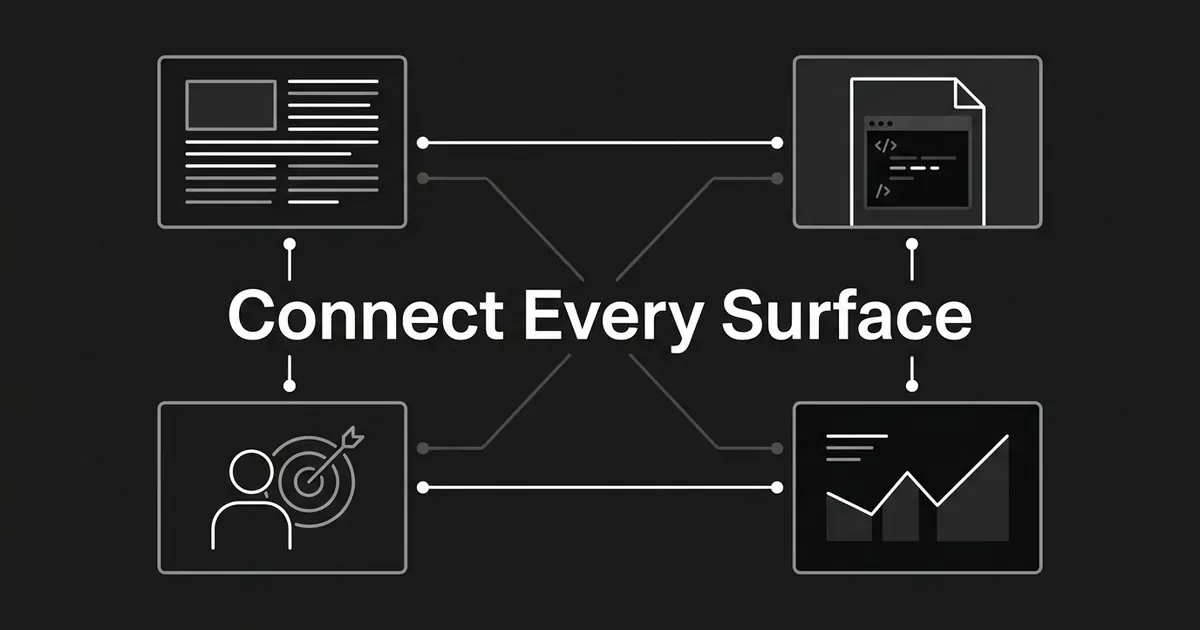
Your site is probably four sites wearing one logo. A blog on /blog, help docs on a subdomain, use-case pages somewhere in the marketing site, and product pages nobody links to. Each was built by a different team in a different quarter, and none of them point at each other. That is the real problem behind internal linking for SaaS, and it is fixable in a few focused sessions.
Here is the honest version up front. Internal links do not force ChatGPT, Perplexity, or Google to cite you. What they do is make every important page reachable, make the relationships between your pages obvious, and give a reader a real route from "what is this problem" to "here is how it works." Nothing gets cited from a page a crawler cannot reach.
Eight steps, one topic at a time. You do not need to fix the whole site this month.
Step 1: Name the buyer question each page answers
Before you touch a single link, decide what each page is for.
Pick one topic your buyers actually ask about. For every page that touches it, write a short brief: the buyer question, the surface (blog, docs, use case, product, pillar, or decision page), the funnel stage, the main capability, what the reader already knows on arrival, the next question they will have, and the page that answers it.
That last field is the one that matters. Most linking work fails because nobody wrote down where a reader should go next.
One habit to build alongside it: use the same words everywhere. If your product team calls something a workflow, your docs and your blog should call it a workflow too.
Done when: a teammate can read your brief and say in one sentence what the page does, who it serves, and where the reader goes after it. Every page has one preferred destination for its main intent.
Where teams go wrong: they group pages by URL folder or publish date instead of by reader question. The other miss is letting a blog post and a use-case page chase the same question without deciding which teaches and which sells.
Step 2: Inventory every surface, including the docs host
You cannot connect pages you have not counted.
Pull a full public inventory: your CMS export, every XML sitemap, and a crawl. Include the marketing site, the blog, the docs subdomain or help center, use-case pages, product and feature pages, and your proof or pricing pages. Docs are the surface teams forget, and they usually carry the best evidence.
For each page, record the title and canonical URL, the surface and host, the topic, the funnel stage, whether it is public or gated or noindexed, its current inbound and outbound links, any redirects or duplicates, and its traffic. Add two more columns: the page that should link to it, and the page it should link to.
That inventory is your map. It is also the boring part, and where most people stall.
If manual inventory is your bottleneck, DeepSmith's Content Map does this work. It crawls and enriches your pages, classifies each onto a topic and a funnel stage, and holds as many sitemaps as you have, blog and docs and product together. It surfaces topic depth, coverage gaps, and topics where a competitor publishes and you have nothing. It re-checks sitemaps every 24 hours, so new pages fold in on their own. Use it to spot disconnected surfaces, then confirm the real destinations in your CMS before you link.
Done when: every important public page appears once in your inventory, each has a role and a stage, and you can see which pages are public and which are deliberately excluded.
Where teams go wrong: they crawl the blog and stop. Or they assume the marketing sitemap covers the docs subdomain. It does not. A page that only shows up in your app's search box is not connected. Search boxes are not links.
Step 3: Choose the hub, the proof page, and the evidence page
For each topic, four pages have to exist and each needs one job.
The awareness page explains the problem to someone new. The use-case page makes it concrete for a role, industry, or workflow. The product or feature page makes the actual claim. The doc proves how it works. Add a pillar above them if the topic is broad, and a decision page (pricing, comparison, demo) at the end.
Do not make one page do all four jobs. That page will be vague and it will compete with itself.
Write the destinations down: topic, awareness, use case, product, implementation, decision, the return route, and exclusions (private, outdated, or duplicate pages you never want recommended).
Then run the next-question test on every planned link. What uncertainty does the destination remove? If the only answer is "it is related," the link is not ready.
Done when: each important page has a real destination for the reader's next question, and every destination has at least one relevant page pointing at it.
Where teams go wrong: they route everything to one pillar or one trial page. That builds a graph that is technically connected and semantically useless. A configuration doc should route to the feature it configures, not to an unrelated awareness post.
Step 4: Draw the cross-surface link matrix
Decide the rules before you edit a word of copy.
This is the heart of SaaS site architecture. Instead of linking page by page and hoping, you set the pattern for each pair of surfaces once, then apply it everywhere. Linking blog to product pages stops being a judgment call you make forty times and becomes a rule you check.
| From | Link to | Use it when | Skip it when |
|---|---|---|---|
| Blog | Pillar page | The post introduces a subject needing a stable overview | The pillar duplicates the post |
| Blog | Use-case page | The post has named a role, industry, or workflow | The use-case page is thin or unrelated |
| Blog | Product or feature page | The post explains a problem that capability solves | It would be an unexplained promotional jump |
| Blog | Help doc | The post mentions setup, an API, or an integration | The doc needs a login |
| Help doc | Product or feature page | The task uses a named capability | It would interrupt a short task |
| Help doc | Use-case page | The use case explains why the workflow matters | It adds nothing to the task |
| Help doc | Another doc | There is a prerequisite or next task | It becomes a list of loosely related docs |
| Use case | Product or feature page | The feature solves the described situation | The product page cannot back the claim |
| Use case | Help doc | The reader wants implementation proof | The doc is private or stale |
| Product or feature | Help doc | The doc verifies how the feature works | It is a generic help index |
| Product or feature | Use case | A role or workflow makes it concrete | The use case targets a different capability |
Read down the matrix and you can see the shape of a healthy property. Every surface can reach the pillar, and the pillar is never a dead-end directory.
The route runs both ways, which is the part most SaaS site architecture work misses. Readers do not enter at the top. Someone lands in a doc from a Google search, or on a product page from a demo email. Your job is to give them the missing next step from wherever they started.
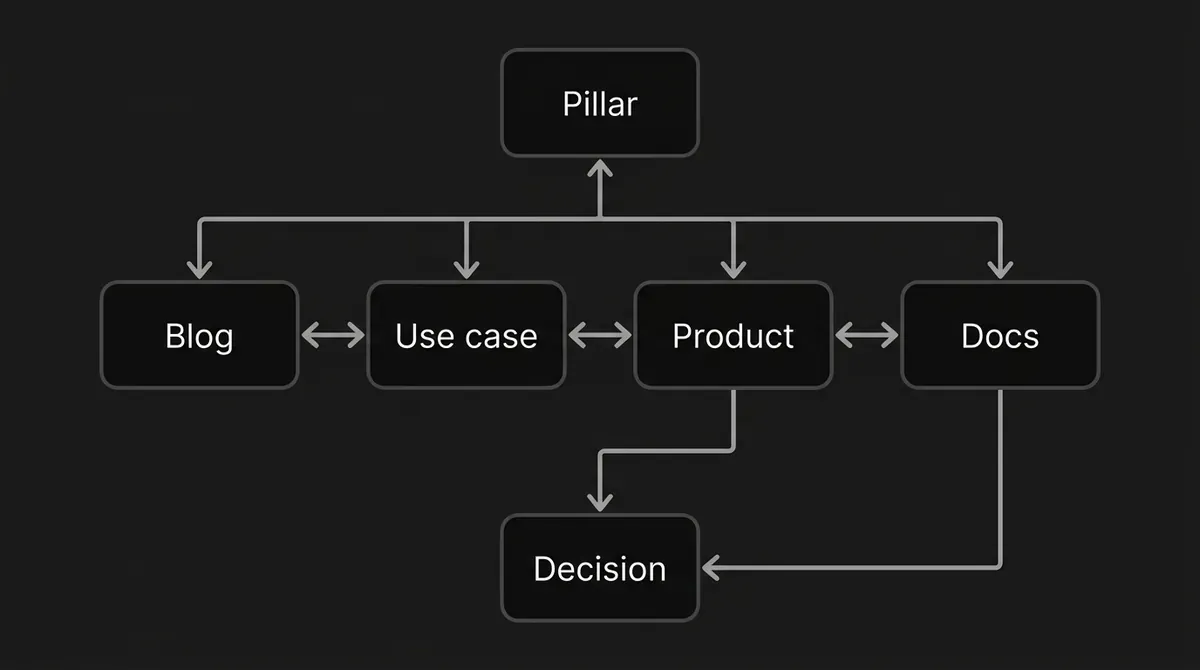
Pro tip: treat a new page as unfinished until an existing relevant page links to it and it links onward to the page explaining its next step. That is an editorial rule you control, not a search-engine formula.
Done when: the matrix produces a path for every priority page, includes a return route, and creates no destination that receives links without giving a reader anywhere useful to go.
Where teams go wrong: they insert links one page at a time and never look at the graph. That produces one-way links from old posts, isolated docs, and product pages with plenty of traffic and no route to evidence.
Step 5: Insert links at the moment the reader needs the next answer
A link belongs where the sentence creates the need for it. Not before.
Put your highest-value cross-surface links in the body copy. Navigation, breadcrumbs, and footers still matter for findability, but they cannot explain why a reader should move. A sentence can.
Use this order inside a piece:
- Link to the pillar near the first clear definition of the subject.
- Link to the use-case page after you have named the role, workflow, or situation.
- Link to the product or feature page once the problem and the needed capability are both on the page.
- Link to the exact doc at the point where the reader would configure, integrate, or verify something.
- Link from the destination back to explanatory context, so a reader who arrived cold can step back.
- Place the decision CTA last, after the page has actually earned it.
Keep labels short, natural, and descriptive of where the reader lands. You do not need an anchor-text seminar. One test covers it: does the reader know what the next page is for, and does the surrounding sentence say why it is being offered?
This is where linking blog to product pages goes wrong most often. A product link in the first paragraph reads as an ad. The same link three sections later, right after you have described the exact problem it solves, reads as help. Timing is most of what separates the two.
DeepSmith's Writer handles this part during article generation. Internal links are inserted from your Content Map site graph while the draft is being written, along with heading structure, keyword coverage, schema, and metadata. That removes the hour of manual cross-referencing per article, the step most teams skip when they are behind. It does not remove your review. Check every suggested destination for surface, stage, product accuracy, and whether it is public and indexable.

Done when: each priority article has its lateral link to the hub, its vertical link to a use case or product page, and its implementation link where the copy calls for one. No destination is private, duplicate, outdated, or a redirect.
Where teams go wrong: they send a docs reader to a generic product homepage instead of the relevant feature. Or they add five links because an automation limit allows five. The right number is the number that improves the route.
Common mistake: a link to a trial or demo is not a substitute for a link to product evidence. Route the reader to the page that explains the capability or proves the use case first. Then offer the action.
Step 6: Make every destination crawlable across hosts
Editorial pass done. Now the technical one, and this is where SaaS docs internal linking usually breaks.
Your marketing site, blog, docs host, and app can all belong to one company and still have completely different robots rules, sitemaps, rendering, and canonical setups. Treat them as one editorial system and four separate technical surfaces.
Work this checklist:
- Every link is a normal HTML
aelement with anhref. JavaScript may add it, but the rendered result has to be a real link. - Every
hrefresolves to the final canonical page, not an error, a redirect, or a duplicate. - Cross-host destinations are public and reachable without a login if you want them discoverable.
- Each host gets its own check for robots access, rendering, sitemaps, canonicals, and indexability.
- Important facts exist as visible text, not only inside an interaction, an image, or a blocked script.
- Client-side routing uses real page URLs, not fragments that swap in different substantive pages.
- No page's only route is a site search box or a click handler on a non-link element.
- One preferred destination per piece of content. Consolidate duplicates rather than linking to all of them.
- Robots.txt is not a deindexing tool. It controls crawling and will not reliably keep a URL out of search. Use noindex or access control.
- Each surface has an XML sitemap with its canonical public URLs. A sitemap supports discovery. It does not excuse missing links.
- If Bing and Copilot matter to you, notify added, updated, and deleted URLs through IndexNow. That is a change notification, not an indexing guarantee.
Then validate a few real pages in Google Search Console. Inspect a priority destination, review its crawl and indexing details, confirm the chosen canonical is the page you meant, run the live test, and view the rendered HTML. You are checking one thing: is your new link actually there in the rendered result, along with the page's key text?
Two limits worth remembering. Google says every page you care about should have a link from at least one other page, and that there is no magical ideal number of links for a page. It also says a page must be indexed and snippet-eligible to appear as a supporting link in AI Overviews or AI Mode, with no special file and no special schema needed. Eligibility guarantees nothing.
The crawler side is worth five minutes too. OpenAI documents OAI-SearchBot as the crawler behind ChatGPT search, separate from GPTBot. Perplexity documents PerplexityBot for search inclusion. If those bots are blocked on your docs host, you have an access problem before you have a content problem. Allowing them removes a barrier. It does not make a page relevant.
Done when: a crawler can follow every planned link to its final page, the link and key content appear in rendered HTML, targets are public and indexable where intended, and each target sits in the right sitemap.
Where teams go wrong: the marketing page visibly links to a doc, but the link only appears after a client-side interaction. Or the docs host blocks its own crawler. Or the sitemap lists a login page.
Step 7: Crawl, score, and repair the graph
You built it. Now check what you actually built.
Run a full-site crawl after the first build, after any migration, and on a schedule. Join it to your analytics, CMS, sitemaps, and whatever AI visibility data you have. Then sort the findings into queues:
- Orphans. Zero internal inlinks. An important public page here needs a source link, or a deliberate decision to merge, retire, or exclude it.
- Weakly connected pages. Very few relevant inlinks, especially on use-case, product, and public docs pages. A review queue, not a threshold.
- Broken destinations. Errors, removed pages, malformed URLs.
- Redirect targets. Links pointing at a redirect instead of the final page. Update the source.
- Indexability conflicts. Links to noindex, gated, disallowed, or noncanonical pages you meant to recommend.
- Surface gaps. Blog posts with no use-case or product route. Product pages with no implementation evidence. Docs with no feature context. Use cases with no proof.
- Overlinked pages. Long link lists and repeated footer links that do not help the source page. Remove, do not add.
- Stale paths. Old feature names, dead integrations, pages whose role changed in a redesign.
To decide what to fix first, score each target zero to two on business importance, buyer-stage value, current traffic, and AI visibility opportunity. Start with the highest totals. That score is your team's workflow, not a ranking metric.
Then repair in this order: fix the final destination and canonical, clear broken and stale links, give important orphans a contextual source link, add the route from awareness content to use-case or product evidence, close the product-to-doc and doc-to-product loop, remove links to private or duplicate pages, then re-crawl and re-inspect rendered HTML on a sample page from every surface.
Practitioner guidance points to a link-health review each month and a broader audit at least quarterly. Small team? Run it at launch, after every major site change, and on a cadence you write down.
Done when: no important public page is an accidental orphan, priority links reach their final destinations, every cross-surface gap has an owner, and each repair has been re-crawled instead of assumed.
Where teams go wrong: they rank by raw traffic alone and skip the low-traffic docs or product page that is central to a buyer's question. Adding links to a weak page does not fix it either. Improve its own explanation first.
Step 8: Measure structure and citations separately
This is the step that keeps you honest.
Take a baseline before you change a group of pages, then compare the same pages and the same prompts afterward. Keep link health and AI visibility as two workstreams. Collapsing them is how a team ends up crediting one new link for a citation it did not cause.
Track four groups:
Structure. Share of important public pages with at least one inlink. Count of orphans. Broken, redirected, blocked, noindex, and noncanonical targets. Inlinks to each priority pillar, use case, product, and docs page. Whether planned links appear in rendered HTML.
Search and indexing. URL Inspection status, chosen canonical, and rendered result on representative pages. Search Console impressions, clicks, and queries for the changed pages. Bing crawl status and IndexNow processing where relevant.
Reader movement. Click-through from blog to pillar, use case, product, and docs. Click-through from use case to product, and from product to evidence. Where readers hit a dead end or an overly promotional turn.
AI visibility. Mention rate, citation rate, page-level citation attribution, prompt and platform history, and share of voice against competitors. The question is not "are we visible," it is "which exact page is being cited, for which prompt, on which platform." That page-level answer is what makes SaaS content cluster AI search measurable instead of anecdotal.
This is what DeepSmith's AEO area is for, once the link graph is in place. The Prompts view tracks each question you care about with its own mention and citation rate. The Pages view shows which of your pages AI actually cites and the prompts driving them. Competitor citations show whose pages are winning the prompts you want. Read those together and you can tell whether your next fix is a missing use-case page, a product page with no proof, or a doc nobody can reach. DeepSmith tracks visibility. It does not control what a model retrieves, and no tool can promise you a citation.
Three rules for reading the numbers:
- If a page is not crawlable or indexed, fix that before you interpret its citation performance at all.
- If a neighboring page gets cited instead of the one you wanted, check whether it simply answers the prompt better. More links will not fix that.
- If a link lifts clicks but not citations, that is still a real navigation win. Call it what it is.
Done when: you can show a before-and-after structural report, an indexability check, reader movement, and prompt-level visibility data without presenting correlation as proof.
Where teams go wrong: they treat one AI answer as a benchmark, compare different prompts before and after, or report a citation change without recording which page and platform produced it.
What to do next
Do not audit the whole site. Pick one topic that matters to your pipeline and walk it across all four surfaces: blog, use case, product, docs. Find the missing link in that path. Fix it. Re-crawl it. Write down what you measured.
That is one afternoon, and it teaches you more about internal linking for SaaS than a full-site crawl you never read.
Then do the next topic. That is how a SaaS content cluster AI search strategy stops being a slide and starts being a site.
If the manual part keeps stalling you, that is the work DeepSmith takes off your plate: your site and your competitors' mapped onto one topic taxonomy, articles produced with internal links and metadata built in, and prompt-level citation tracking so you can see whether any of it landed. Start a free trial and see real data on your own site before you pay.