

You typed your buyer's question into ChatGPT, and there it was: a competitor's page listed as the source, where yours used to sit. That stings. The good news is that a lost AI citation is a solvable problem, and you only have to work one page at a time.
This guide walks you through eight steps to diagnose why a page slipped out of AI answers and refresh it so it can get cited again. We diagnose first, then edit. Changing the copy before you know the cause is how teams burn a week and reclaim AI citations for nobody.
What you need: the page URL, the exact prompt that used to produce the citation, the answer you see today, access to the page and its analytics, and somewhere to keep a change log. Save that list as your refresh page for AI checklist. You will reuse it on the next page.
One promise up front, because it matters: no refresh guarantees a citation. What a good refresh does is make your page the better source. That is the part you control.
Step 1. Prove the citation is really gone
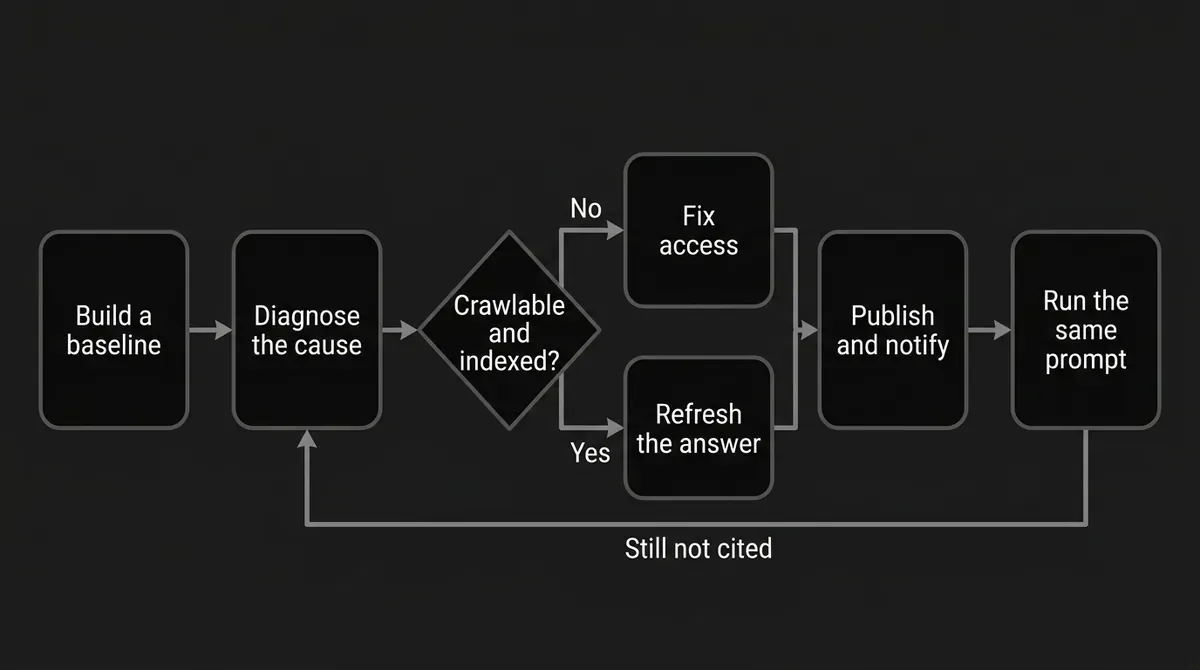
Before you touch a word on the page, build a baseline. Write down the page URL and title, the exact prompt that earned the citation, the engine and interface you used, the country or language setting, and the date. Then record today's answer: is your brand named, and is your URL visibly cited? Save the current cited sources too, especially the page that took your spot.
Run the same prompt, not a loose paraphrase. AI answers move around. The same question can return different sources depending on the engine, the model version, the wording, your location, and the moment you asked. So ask more than once, on more than one day, and record what you see.
How you know this step is done: you can write one testable sentence. "Page X was cited for prompt Y in March, is absent in August, and I checked the same engine both times." You also know whether the brand still gets mentioned even when the page is not cited, and whether a different page of yours is being picked instead.
Where people go wrong: declaring a loss after one volatile answer. Comparing two different prompts and calling it a trend. Treating a brand mention as a page citation, when a mention and a citation are not the same thing. Treating a drop in Google rankings as proof that an AI citation moved.
This is the measurement work DeepSmith is built for. In AI Visibility, Prompts holds the questions you track with their full answer history, and Pages shows which of your URLs actually get cited and which prompts drive them. You can open the real answer behind the number, so mention versus citation stops being guesswork. You still choose the control prompt and read the result. The platform gives you the record to read.

Pro tip: Screenshot the answer and save the current page version before you edit anything. After the refresh, a screenshot cannot tell you whether your page improved or whether the answer simply moved on its own.
Step 2. Find the page that took your place
Now put the old answer and the new answer side by side and read them closely. You are looking for four things.
First, the job of the answer. Is the engine now answering a different intent? A comparison instead of a definition, a current recommendation instead of background.
Second, the passage that got cited. What exact claim does the new source support? A number, a process, a definition, a first-hand observation, a current list?
Third, the coverage. Which subquestions, criteria, examples, and caveats does that page handle that yours does not?
Fourth, the context. Is it clearer, more current, more specific, better sourced, or just easier to scan?
Do not copy the competitor. Extract the information gap and turn it into a brief: one target question, the answer your reader needs, the supporting subquestions, and the evidence each claim requires.
Here is a diagnostic table you can work straight down.
| What you see | What to check | Likely cause | First move |
|---|---|---|---|
| Your URL is absent everywhere, and ordinary search looks broken too | Crawl access, status code, indexability, redirects, noindex, canonical | Technical or discovery failure | Fix eligibility before rewriting copy |
| The page is indexed and shows in search, but a competitor replaces it in the answer | Intent, freshness, evidence, specificity, where the answer sits | Eligible, but no longer the best answer | Refresh the weak sections, not the whole page |
| Still cited for broad prompts, gone for one narrow question | That question's criteria, terms, and supporting facts | Coverage gap | Add or sharpen one focused section |
| A different page of yours is cited | Overlapping intent, internal links, which URL answers most clearly | Page-selection problem on your own site | Clarify each page's purpose |
| Citations dropped right after you edited | The before and after versions, removed sections, changed markup | The refresh caused a regression | Restore the removed value first |
| Several pages moved at once | Prompt demand, model updates, reporting delay | System-level change | Wait for a comparable window |
| The answer changes while your page and prompt do not | Repeat observations, engine, location, trigger | Normal retrieval variation | Report a range, not a verdict |
How you know this step is done: you have one primary diagnosis and a short list of changes that would test it. Something like: "The page is indexed, but the answer wants a comparison and ours buries the criteria, has no dated evidence, and never states the answer outright." One testable hypothesis beats a list of every possible cause.
Where people go wrong: calling the other page "better" without naming the passage that matters. Copying their outline instead of serving your reader. Assuming the newest date wins.
DeepSmith helps here too, and only in one specific way: Competitor citations shows you which competitor pages win the prompts you are losing, and the sources view shows which domains the engines lean on to build those answers. That turns "they beat us" into evidence you can act on.
Step 3. Clear the crawl and index gate
Before you improve the writing, make sure the page can be found and used at all. Google's technical requirements are short: Googlebot is not blocked, the page returns an HTTP 200, and the page has indexable content. There is no extra AI-specific requirement, and no special AI text file or markup is needed.
Run the practical version of that check on your own stack. Is the URL public, with no login wall? Is it blocked by a robots rule or a CDN setting? Is a noindex tag sitting there by accident? Is it stuck in a redirect chain? Is the actual answer present as crawlable text rather than locked inside an image or a hover state?
If Google visibility is part of the problem, inspect the URL in Search Console and check which version is indexed. Request indexing after the update is live, not before. You need owner or full-user access to the property, individual requests have a quota, and asking twice does not make the crawl faster.
Keep the existing URL. A refresh should not become a migration. If the topic genuinely changed and a new URL is truly needed, treat the redirect and canonical setup as its own decision.
How you know this step is done: the live page loads for a logged-out visitor, returns successfully, is not accidentally blocked, and the answer exists as text. Any indexing warning you found is written down, not assumed away.
Where people go wrong: rewriting a page nobody can reach. Assuming a 200 status proves indexability. Moving the page to a new URL to look fresh. Adding a special file or extra schema instead of fixing the real problem.
Step 4. Rebuild the page around the question the AI has to answer
Take a breath, because this is the step that does the heavy lifting. Write a one-page answer brief before you draft anything:
- Target question: the exact prompt the page must support.
- One-sentence answer: the conclusion your reader needs first.
- Decision criteria: what makes that answer true or useful.
- Supporting subquestions: the natural follow-ups.
- Evidence plan: the source, data, example, or first-hand detail behind each important claim.
- Boundary conditions: when the answer does not apply.
Then restructure the page so the answer is easy to lift out and easy for a human to verify:
- State the direct answer near the top, after only the context the reader truly needs.
- Write headings that describe the question or decision in each section.
- Give each section enough context to stand alone, because an engine may only ever read that one chunk.
- Put criteria, comparisons, and processes into lists or tables when that makes the relationship clearer.
- Keep the recommendation, the evidence, and the caveat separate.
- Add an FAQ only for questions real readers ask and this page can answer.
- Link to the supporting pages a reader would genuinely want next.
Google has described how its AI features can fan a query out into several related searches across subtopics. Read that as a reason to answer the real follow-up questions clearly. It is not permission to stuff every related term onto the page.
How you know this step is done: a reader finds the answer without wading through a generic intro, and a reviewer can point from every important conclusion to the evidence behind it.
Where people go wrong: keeping the old warm-up intro and burying the answer under it. Writing long to hit an imagined word count, when Google says it has no preferred length. Repeating the prompt as a heading without answering it. Adding a thin FAQ nobody asked for.
Step 5. Replace stale claims with current, supported information
Audit the claims, not just the sentences. Build a small ledger with a row per claim: is it still true, what evidence does it need, what is the source or first-hand basis, what changed, and does the date treatment stay, change, or go?
Work through these first:
- Expired numbers, product names, policies, prices, examples, and screenshots.
- Claims the competing page supports more precisely than yours.
- Sections that answer your target prompt only by implication.
- Missing caveats that would change the recommendation.
- Unsupported superlatives like "best," "only," or "fastest."
- First-hand detail, original analysis, or examples that show why your page deserves to be consulted.
- Clear sourcing, and an author or reviewer where the topic calls for one.
There is real evidence behind that list. A 2024 research study on generative engine optimization tested content changes across a large benchmark of queries and found that adding relevant source citations, credible quotations, and statistics were among its strongest performing methods, with clarity and readability improvements also helping. The same study found little benefit from keyword stuffing, and no meaningful gain from simply sounding more authoritative. Treat those results as directional evidence from a research setting, not as a lift you should expect. The lesson holds regardless: improve the information, not the packaging.
One more thing, and it is the one most teams get wrong. Google's guidance says not to change a page's date just to look fresh when the content has not substantially changed, and not to add or remove large blocks of content mainly to seem current. So update the visible date when the page genuinely changed, and keep a change log that says what you did.
How you know this step is done: every time-sensitive claim has been rechecked, every important conclusion has a real basis, and you can explain in one sentence what materially changed and why it helps the reader.
Where people go wrong: changing the year in the title and leaving the body stale. Updating the modified date without updating the information. Adding invented statistics or customer results. Deleting a useful caveat to sound more decisive.
Common mistake: A date stamp is not a freshness strategy. If the page did not materially improve, leave the date alone and fix the substance first.
Step 6. Make the answer clear, extractable, and honest
Now do a clarity pass over the refreshed page. Keep the main answer near the top. Use short sections with descriptive headings, one question per section. Reach for a table, a numbered list, or a worked example whenever it removes ambiguity. Make sure important information lives in text, not only in an image, a video, or a hover state. Cut the boilerplate that delays the answer. Check that your title, headings, metadata, and visible update date all describe the same page. Then read it on a phone.
Structured data belongs in this step as a correctness check, not as a citation lever. Google says no special structured data is required for its AI features. If you already use markup, it should truly represent what a visitor can see, include the required properties for the rich result you want, and validate cleanly. Correct markup can make a feature eligible. It does not buy you a citation.
Skip the invented "AI answer" schema, the hidden text, and the big block of machine-facing copy. Put the useful answer in the page a human reads.
How you know this step is done: someone can skim the page, understand it, and quote one passage accurately without reassembling your conclusion from four scattered paragraphs. Your markup, dates, and visible content agree with each other.
Where people go wrong: assuming more schema equals more citations. Marking up content visitors cannot see. Using FAQ markup as a substitute for a useful FAQ. Hiding the answer in a graphic.
Step 7. Publish, then tell the discovery systems
Publish the real page and verify the live version yourself. Check the URL, the status, the visible body, the headings, the links, the markup, the canonical, and the update date. Log the publish timestamp, the sections you changed, the evidence you added or removed, and the discovery request you made.
For Google, use URL Inspection to request indexing for that one updated URL if you manage the property. Use a sitemap when you have a large batch of changed URLs. Do not resubmit the same page over and over. Google's guidance is that crawling can take anywhere from a few days to a few weeks, and that a crawl request does not guarantee inclusion.
For engines that support IndexNow, use your site's existing integration. Setting one up manually means generating an API key tied to your domain, hosting a UTF-8 key file at your site root or another permitted location on the same host, and submitting the changed URLs through the API. Submit only the URLs that were added, updated, or deleted, and confirm receipt in Bing Webmaster Tools. IndexNow tells participating engines that something changed. It does not index anything, and it does not reach every AI engine.
How you know this step is done: the live URL shows the intended update, the discovery request was accepted, the change log is complete, and you have a recheck date in the calendar. A successful API response is not recovery.
Where people go wrong: requesting a crawl before the page is live. Submitting your whole site instead of the changed URL. Calling IndexNow instant indexing. Editing the page again before the first change had a chance to show.
Step 8. Recheck the same prompts and iterate from evidence
Go back to your baseline and run the same controlled checks. Compare seven things:
- Is the target URL cited again?
- Is it cited for the original prompt, related prompts, or both?
- Is the brand mentioned while the page still is not cited?
- Is a different page of yours being selected?
- Is the competitor still the cited source?
- Does the answer now use the section you refreshed?
- Did citation counts and prompt coverage move in the expected direction?
Give it time. Crawling can take days or weeks, and citation reporting is aggregated with its own processing delay. There is no published recovery interval, so treat these as operating constraints and resist the urge to keep editing while you wait.
This before-and-after check is exactly where DeepSmith earns its keep on a page refresh AEO project. Open the answer behind the metric, watch which prompts and pages moved, and compare the periods either side of your publish date. It reports what changed. It does not promise an engine will cite you, and no tool can.
How you know this step is done: the page has a documented outcome. Citation reclaimed, reclaimed for some prompt variants, no measurable change, or an unresolved technical issue. "The page is longer" is not an outcome.
Where people go wrong: checking a different prompt after the refresh. Calling a mention a recovery. Judging success on traffic alone. Changing five things at once and then claiming to know which one worked. And treating a still-lost AI citation as proof the page needs more words.
Your page refresh AEO worksheet
Copy this into your doc and fill it in for one page. Sixteen lines, and most of them take a minute.
- Target URL
- Last known cited prompt and date
- Current prompt, engine, context, and date
- Mentioned, cited, both, or neither
- Current cited source or replacement page
- Primary diagnosis: technical, intent, coverage, freshness, evidence, clarity, competition, or variation
- The one-sentence answer this page must give
- Subquestions the page must answer
- Claims that need rechecking
- Evidence, examples, and caveats to add
- Sections to rewrite, add, merge, or cut
- Technical checks passed
- Date decision: keep, update after substantive change, or remove unsupported freshness language
- Discovery action taken
- Recheck window and exact prompts
- Outcome and next test
What to do next
Pick one page. Just one. Run the worksheet on it this week, make one evidence-backed refresh, notify the discovery systems, and go back to the same prompt in a couple of weeks. That is the whole refresh page for AI loop: diagnose, fix, publish, recheck. If it recovers, you have a process you can repeat. If it does not, return to Step 2 and test a different diagnosis instead of adding paragraphs.
You are closer than this feels. Most pages that lost their spot did not fall apart. They stopped being the clearest, best-supported answer to one specific question, and that is fixable. Teams that reclaim AI citations do it page by page, not in one heroic sprint.
If you want to see which prompts and pages are driving your AI visibility before and after a refresh, start a free DeepSmith trial and check your own numbers.


