

A citation source audit is a way of checking which pages AI answers link to when people ask questions about your brand or your category, and sorting those pages by type. This guide is for marketing leads who have seen a competitor cited in ChatGPT or Perplexity and want a clearer picture of where their own brand is and is not showing up. By the end you'll have a source ledger, a summary table by source type, and a short list of gaps you can back up with evidence.
You'll need a spreadsheet, access to the AI products you want to check, and a few hours. If you already use an AI visibility tool you can pull some of this data from it, but the method works with nothing more than a browser and a sheet.
An AI citation audit shows you a sample, not every source an engine could ever use, so write down exactly what you sampled.
Set the audit boundary and decide what counts
Start by writing a short scope note before you collect anything. It should name the brand or product you're auditing, the AI experiences you'll check (for example ChatGPT Search, Perplexity, Gemini and Google AI Mode), the buyer questions in scope, the dates, and the language and market. It should also say whether you'll look only at links to your own pages or also at third-party pages that mention you.
Then decide what counts as a citation. This sounds small, but it's the decision that causes the most trouble later. Keep these as separate fields in your sheet instead of folding them into one visibility number:
- Mention: the answer names your brand. That alone isn't a citation.
- Citation to an owned page: a visible source link points to a page on your site.
- Citation to a third-party page: the answer links to another publisher's page. Open it and check whether it actually talks about your brand, because a page can be relevant to the answer without ever naming you.
- Recommendation: the answer presents your brand as a fit for a need. An answer can recommend a competitor while linking to your educational page.
Platforms don't show sources the same way, so also write down what you'll treat as a citation in each one, such as a link attached to the answer text or a URL in the sources panel. If you want more background on the difference between a mention and a link, how AI citation tracking works covers it.
You're done with this step when you have a scope note that someone else on your team could apply to the same response and reach the same count.
Common mistake: calling any mention of the brand a citation, or counting a link about the general topic as a page that mentions you. Both inflate your numbers and are hard to untangle afterwards.
DeepSmith's AI Visibility reports mention rate, citation rate and share of voice as separate measures and keeps the answers behind them, so it can be a handy reference for how to keep these apart. It only covers the questions you've set it up to track, though, so your scope note still needs to say what you did and didn't check.
Build a fixed panel of buyer prompts
An AI citation analysis is only as good as the questions behind it. Pick a set of real buyer questions about your brand, your category, your products, your use cases and the comparisons people make, and keep the wording fixed for the whole audit. If you aren't sure where to start, find the prompts to track by mining sales calls, support tickets and the way customers phrase their problems.
Mix the types of question. Include category and problem questions ("how do I do X"), questions that name your brand or product, and comparison or evaluation questions. Branded and unbranded prompts behave differently, so keep both in the panel. Treat your panel as a practical sample, not a statistically representative one.
Set up a prompt register with these columns:
| Field | What to record |
|---|---|
| Prompt ID | A stable identifier you reuse in every later run |
| Exact prompt | The full text you typed in |
| Prompt category | Your own consistent intent label |
| Brand or product | Which entity the prompt is about |
| Market and language | The location and language you tested |
| Collection date | The date of each response, not just the audit start |
| Platform and experience | The specific search or answer experience tested |
If you need to change a question, keep the old version and add the new one as a different prompt. Otherwise you end up comparing answers to different questions. A repeatable prompt set is easier to maintain when each prompt has its own ID from the beginning.
You're done when every prompt has an ID, exact text, category and collection conditions, and anyone could rerun the same panel next month.
Common mistake: typing a slightly different question into each platform, or mixing conversational follow-ups with standalone queries. After that you can't tell whether a difference came from the platform or from your wording.
No number of prompts is enough for every brand, so pick a panel you can realistically re-run. If you're unsure how big to go, how many prompts to track walks through the trade-offs. DeepSmith lets you define tracked buyer questions, and Discover Prompts can suggest a starter set from your product, persona and buyer-stage context. That helps you build a brand-specific set, not discover everything buyers might ask.
Run the panel and save every answer
Now submit each prompt to each AI experience on your list. Save the full answer and every visible source link, ideally with a screenshot, because source lists change and you'll want proof of what you saw. For each response, record the platform, the date and time, the language, the country or market, the device if you know it, whether you were logged in, the model or mode if the interface shows it, and any personalization settings you know about.
ChatGPT Search can rewrite your question into several targeted searches, and memory and location can affect what comes back. Google AI Mode breaks a question into subtopics and searches across more than one data source, and it offers personalization tied to your Search history. Run each prompt as a new question when you want to compare standalone answers, and if follow-up context is part of how your buyers really use the tool, log that as its own test condition.
A single answer is a snapshot, so plan for more than one pass. Ahrefs followed about 37,500 citations across five AI tools daily for 20 days and found that at least half of the citations were gone by the next day, with the share varying by tool. About three quarters of the citations that disappeared came back within the 20 days. In the same study, ChatGPT repeated the exact same searches on consecutive days only 26% of the time. These numbers come from that study's own question panel and method, so don't treat them as a rate for your brand. What they do tell you is why a one-off run shouldn't be read as a stable position.
Choose your run plan before you start, whether that's a fixed number of runs or a schedule, and write it down. There's no universal sample size or stopping rule, so pick a practical plan, disclose it, and call a single collection a snapshot.
You're done when each prompt, platform and condition has a saved answer with its sources, or is clearly marked as having no answer or no visible source. Keep the failed ones in the sheet.
Pro tip: if a result surprises you, check whether the test conditions changed before deciding your brand did. A different account state or a rewritten query can move sources by itself.
DeepSmith checks your tracked prompts on a schedule and keeps each full answer, which saves you from copying answers by hand. It covers ChatGPT, Gemini, Perplexity, Claude and Google AI Mode in the AI Visibility feature, but the engines you actually get depend on your plan, so confirm what's enabled in your workspace before you say anything about coverage.
Capture the citations and keep related links apart
Open each answer and record the sources the interface actually shows, not just what the answer says in its own words. Save the URL as displayed and, when you open it, the final URL after any redirects. Keep real answer citations separate from related links, verification links, ordinary search results and links that came from some other tool action.
Each platform needs a slightly different eye:
- ChatGPT Search: responses may have inline citations. When they don't, the Sources panel may list cited sources together with other relevant links. Note whether a link was an inline citation or only sat in the panel, and apply your stated rule instead of counting everything in the panel.
- Perplexity: answers use numbered citations. Record the citation link and the page it resolves to. Perplexity also shows Government, Academic and Trusted source labels, and these describe the website, not the page or the claim. Most domains carry no label, and having none isn't a negative judgment.
- Gemini Apps: sources can appear behind a Sources button or inline, and related content may be offered separately. The Double-check response feature uses Google Search to find material that is similar to or different from a statement, so a link shown for a highlighted statement isn't necessarily something Gemini used to write the original answer. Don't count it as an original citation unless the interface presents it as one.
- Google AI Mode: record the links shown as AI sources separately from the other search results on the page. Because AI Mode can break a question into subtopics and search several data sources, an answer may draw on more than one path, so follow the interface's own labels and write down what you see.
Also log responses with no visible source links as such, since a missing citation doesn't prove the answer wasn't grounded somewhere.
You're done when every link you count has a platform, prompt, answer, link context, URL and destination status attached to it.
Common mistake: counting a verification link, a related-content suggestion, an ordinary search result or a site label as a citation in the original answer. If you aren't sure, leave it out of the count and put it in the notes.
Normalize each URL and sort sources by type
Create a source ledger with one row per observed citation URL. Keep columns for the raw displayed URL, the normalized URL, the final destination, the domain, the ownership, the source type, whether the page mentions your brand, and which prompt, platform and run produced the observation.
Resolve ordinary redirects while keeping both the displayed and the final URL. Group tracking-parameter variants only when they lead to the same page. Don't merge pages that differ by language or version. It's also worth being clear about URL-level and domain-level results from the start, because they answer different questions: two pages on the same domain can do very different jobs.
Then give each row one primary source type from a small, consistent list. These are working labels for your audit and not categories any AI platform uses:
- Brand-owned: your site, product pages, documentation, blog, research or newsroom.
- Review and comparison: review sites, comparison directories, rankings and buyer guides.
- Editorial and news: journalism, trade publications and independent coverage.
- Community and user-generated: forums, discussion boards, Q&A and user posts.
- Social and creator: social platforms, creator pages and video channels.
- Partner or vendor: partner, integration, supplier and other vendor pages.
- Government, academic or nonprofit: public-sector, scholarly or mission-driven sources.
- Other or unclear: anything that doesn't fit cleanly or can't be verified.
Use one primary type per row so the categories add up without double counting. Ownership is a separate column with four values: brand, competitor, third party or unclear. A competitor's blog and a neutral review site can share a type but mean different things for you.
For third-party pages, check whether the page really mentions your brand and what it says. Note if the page is out of date, can't be opened or is about a different product or entity.
You're done when every URL has a primary type and an ownership label, and the uncertain or inaccessible ones are flagged instead of guessed.
Common mistake: treating a Perplexity domain label as a quality score for the page, or treating a tool's own, competitor or neither tag as if it were a source-type taxonomy.
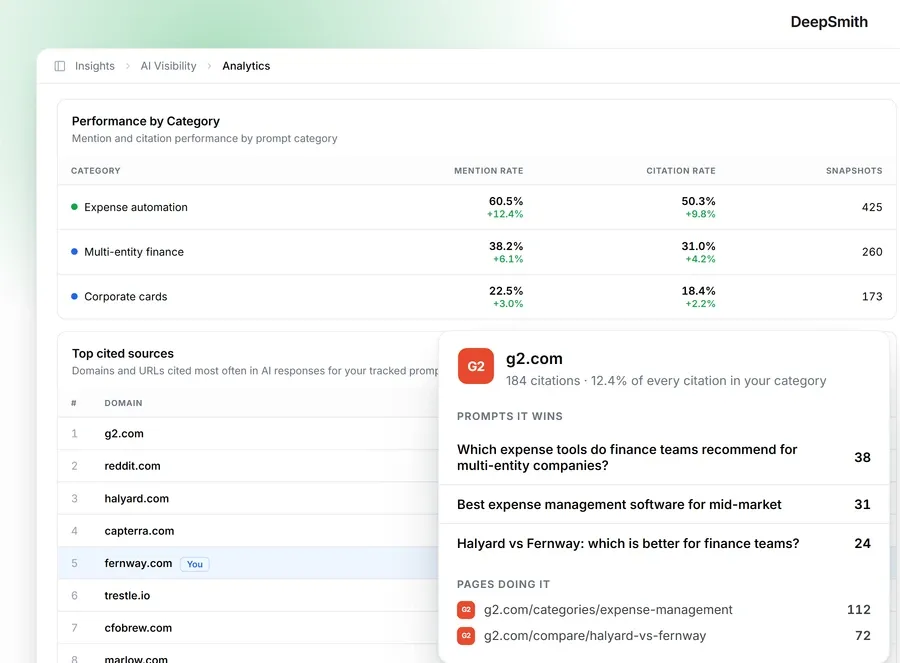
DeepSmith's cited-sources view can show domains or URLs and tag each source as yours, a competitor's or neither. That covers the ownership column. It doesn't apply the editorial source types above for you, so that sorting stays manual.
Check what each linked page supports
A link in an answer tells you the page was shown. It doesn't tell you the page backs up what the answer says, so for the rows that matter, open the page and read the relevant passage. Record whether it names your brand, which product or entity it covers, whether it supports the claim the answer made, and whether the information is current for the time period in question.
A short review vocabulary keeps this consistent:
- Supported: the page backs the claim within the scope stated.
- Partially supported: the page backs part of the claim but leaves out or changes an important condition.
- Unsupported: the page doesn't back the claim as written.
- Unable to assess: the page is gone, paywalled or otherwise can't be checked.
Unable to assess doesn't mean false. Keep a note when two reviewers disagree, and ask a second person to check claims that matter a lot.
A 2025 Tow Center test found incorrect source identification and broken or fabricated URLs in its tasks. It used news publishers and supplied excerpts, so it's a reason to check your links, not a rate to apply to your audit.
You're done when every important source row has a brand-mention result, a support status and a short note about relevance, freshness or access.
Common mistake: counting a domain without ever looking at the cited page, or assuming a link proves the page is accurate or was the reason for the answer.
Calculate results by source type, prompt and platform
With the ledger filled in, the AI citation analysis is mostly counting. Report at both page and domain level, state your denominators plainly, and keep your own calculations apart from any metric a tool reports. A simple manual table is enough:
| Source type | Unique cited URLs | Unique cited domains | Citation observations | Owned URLs observed | Third-party pages mentioning brand | Prompts with at least one observation | Prompts with none |
|---|---|---|---|---|---|---|---|
| Brand-owned | |||||||
| Review and comparison | |||||||
| Editorial and news | |||||||
| Community and user-generated | |||||||
| Social and creator | |||||||
| Partner or vendor | |||||||
| Government, academic or nonprofit | |||||||
| Other or unclear |
If you want a rate, write the formula in plain words. For example: "For this audit, source-type incidence is the percentage of valid prompt responses in the chosen platform and period that contained at least one citation of that type." Then say how many valid responses were in the denominator. Don't give this number the same name as a tool's Citation Rate, since the two formulas aren't interchangeable.
Look at the results by platform and by prompt category before you combine anything. A page that's cited again and again counts as multiple observations, not multiple independent endorsements. Include the runs, the date range and the no-source responses.
A September 2026 preprint that analyzed 4,500 responses to 50 buying questions found that counting every returned source host gives a different set than counting only hosts attached to numbered citation markers. A report has to say which one it counts.
You're done when a reader can trace each total back to the ledger and understand the denominator and conditions.
Common mistake: reporting only a ranked list of domains. That hides the distinct pages, the source types, the prompts, the platforms and the empty results, which are often the most useful part.
DeepSmith shows a visibility overview, platform and category breakdowns, cited sources at domain or URL level, a list of your own cited pages with per-page metrics, per-prompt analytics and answer histories. Its views run over 7, 30 and 90 days, with 30 as the default, and those are product settings, not a recommended audit period. The cited-source list returns at most 50 results, so it shouldn't be described as a complete inventory. If you'd like a reference for where tools differ here, the roundup of AI citation tracking tools compares them. Google's Search Console generative AI performance report counts impressions, which isn't the same as the source links you recorded.
Write a short, evidence-backed gap list
The last step is to name the gaps your audit actually shows, and stop there. Each entry should say which prompt or prompt category it concerns, the platform, the date range and number of runs, the source type or owned-page pattern you didn't see, what showed up in its place, and how confident you are. Mark each one as a one-off or a repeated pattern.
These are the kinds of gaps an audit like this can support:
- No brand-owned citation was observed for a particular prompt, even though third-party sources appeared.
- Your brand was named in an answer, but none of the visible citations were your pages.
- Third-party pages were cited about your brand, but the pages were out of date, described a different product or didn't support the answer's wording.
- A result showed up on one platform or in one run but not in the others, which is platform or run variation and not a universal absence.
To decide which gaps go on the short list, weigh how important the buyer question is, how often the gap repeated across runs, how much a source error matters, and how many platforms it appeared on. Those are editorial judgment calls, not a validated scoring model, so don't put numbers on them or explain causes without evidence.
You're done when the reader of your report can follow each gap back to the ledger and nobody has been told the brand is missing everywhere.
Common mistake: presenting one missed citation as a lasting loss of ranking, or turning the audit into a promise about what will get a page cited.
What to do next
Save the ledger and the prompt register from this AI citation audit, because the same panel run again in a month is what lets you see change. Deciding what to publish or fix is a separate piece of work, and a good place to begin is how you turn tracked prompts into a content plan, and if you're curious about the wider picture of which publishers AI engines lean on for your category, there are tools that show which sources AI engines cite beyond your own brand.
If you'd like the prompt scheduling, answer history and cited-source views in one place while you repeat the audit, you can start a free DeepSmith trial and run your panel against real data.
Related guides
- Maxaeo Alternatives: 8 Best Multi-Engine AEO Trackers for 2026: For buyers who want broad AI engine coverage, this ranks eight Maxaeo substitutes (DeepSmith, Rankscale, Scrunch, OtterlyAI, Peec AI, Goodie, Profound, ZipTie.dev) on engine breadth per self-serve plan.
- Netranks Alternatives: 8 Best AI Share-of-Voice Tools for 2026: Ranks eight AI share-of-voice trackers replacing Netranks (DeepSmith, Profound, Scrunch, OtterlyAI, Rankscale, Goodie, Peec AI, Semrush AI Visibility Toolkit) on engine coverage, prompt volume, citation depth and published.
- Oltre Alternatives: 8 Best AI Visibility and Content Tools for 2026: Compares eight Oltre substitutes (DeepSmith, Frase, Writesonic, Surfer, Profound, Athena, Goodie, Semrush) for buyers who want AI plus Google visibility tracking paired with content production, explaining which tools.
- SE Visible Alternatives: 7 Best AI Visibility Trackers for 2026: Compares seven substitutes for SE Ranking's SE Visible: DeepSmith, AthenaHQ, LLMrefs, RankScale, OtterlyAI, Peec AI and Profound.
- Searchify Alternatives: 8 Best AI Engine Visibility Tools for 2026: Reviews eight Searchify alternatives (DeepSmith, LLMrefs, AthenaHQ, Rankscale, Scrunch, Profound, OtterlyAI, Peec AI) using six filters: engine coverage by tier, prompt depth, page-level citation attribution, competitive view, pricing.


